# Cisco 6500 VSS Configuration Example
**URL:** https://forum.networklessons.com/t/cisco-6500-vss-configuration-example/1054
**Category:** Lessons Discussion
**Created:** [December 26, 2016, 7:02pm UTC](https://forum.networklessons.com/t/cisco-6500-vss-configuration-example/1054 "2016-12-26T19:02:11Z")
**Posts on this page:** 20
**Page:** 3
### Author:  [@adave1103](https://forum.networklessons.com/u/adave1103)
#### Post date: [November 7, 2016, 11:15am UTC](https://forum.networklessons.com/t/cisco-6500-vss-configuration-example/1054/41 "2016-11-07T11:15:18Z")
Hi team
what is the dual-active detection concept ?
To achieve dual active detection - do we need to have separate link between both VSS chassis OR it is part of VSL ?
Thanks
---
### Author:  [@ReneMolenaar](https://forum.networklessons.com/u/ReneMolenaar)
#### Post date: [November 22, 2016, 2:49pm UTC](https://forum.networklessons.com/t/cisco-6500-vss-configuration-example/1054/42 "2016-11-22T14:49:02Z")
Hi Abhishek,
If your VSL fails then the standby switch can’t tell if the active switch is still there or not. If the standby switch goes active while the active switch is still there, both will be active, forwarding packets and you’ll run into issues. This is called “dual active”.
Dual-active detection is configured outside of the VSL link. There’s enhanced PAgp, BFD and Dual-Active Fast Hello Packets to use. You can use one or all three at the same time.
Cisco has a pretty good document for this:
> **[Catalyst 6500 Release 12.2SX Software Configuration Guide - Virtual Switching...](https://www.cisco.com/c/en/us/td/docs/switches/lan/catalyst6500/ios/12-2SX/configuration/guide/book/vss.html#wp1063718)**
Rene
---
### Author:  [@shantel](https://forum.networklessons.com/u/shantel)
#### Post date: [December 26, 2016, 7:02pm UTC](https://forum.networklessons.com/t/cisco-6500-vss-configuration-example/1054/43 "2016-12-26T19:02:41Z")
19 posts were merged into an existing topic: [Cisco 6500 VSS Configuration Example](https://forum.networklessons.com/t/cisco-6500-vss-configuration-example/1054)
---
### Author:  [@rosamariasanchez080](https://forum.networklessons.com/u/rosamariasanchez080)
#### Post date: [February 11, 2017, 3:20pm UTC](https://forum.networklessons.com/t/cisco-6500-vss-configuration-example/1054/44 "2017-02-11T15:20:28Z")
Is it necessary to use a port channel to configure vss?
I currently only have 2 sfps to connect two
4506-E switches
---
### Author:  [@lagapidis](https://forum.networklessons.com/u/lagapidis)
#### Post date: [February 14, 2017, 3:59pm UTC](https://forum.networklessons.com/t/cisco-6500-vss-configuration-example/1054/45 "2017-02-14T15:59:56Z")
Hello Helen
The use of two or more links for the Virtual Switch Link (VSL) is only a recommendation by Cisco. It is not manditory. However, this is not recommended as VSS is designed to be a high availability system and by having only one link, this high availability is sacrificed. It should be implemented fully realising this. Ideally, you should purchase an additional module to implemente multiple links.
I hope this has been helpful!
Laz
---
### Author:  [@jasonaverymms](https://forum.networklessons.com/u/jasonaverymms)
#### Post date: [January 15, 2019, 1:21am UTC](https://forum.networklessons.com/t/cisco-6500-vss-configuration-example/1054/46 "2019-01-15T01:21:32Z")
I’m sure I’m missing something here but if I were to use VSS on 2 layer 3 4500 chassis and wanted to connect a access switch to the VSS pair would I use a regular port channel to connect to the VSS pair from the access switch or is there an actual multi-chassis Ethernet port configuration I would need to configure between the access switch and the VSS pair? I’m just a bit confused as to what configuration I need to connect multiple access layer switches to the VSS pair. I’ve been trying to research it but am pretty confused about the topic as I’m not able to see a straight forward answer. Any clarification would be helpful.
---
### Author:  [@lagapidis](https://forum.networklessons.com/u/lagapidis)
#### Post date: [January 17, 2019, 12:57pm UTC](https://forum.networklessons.com/t/cisco-6500-vss-configuration-example/1054/47 "2019-01-17T12:57:12Z")
Hello Jason
There is no special configuration that you need to apply to the access switch that connects via etherchannel to the VSS pair. From the point of view of the access switch, the etherchannel that is being configured would be exactly the same whether both (or all) links are connected to the same physical switch or if they are connected to both members of the VSS pair. The special configuration would be applied on the VSS pair side.
Take a look at the following Cisco documentation that describes such a configuration:
> **[VSS-dg\_appa-configs.pdf](https://www.cisco.com/c/en/us/td/docs/solutions/Enterprise/Campus/VSS30dg/campusVSS_DG/VSS-dg_appa-configs.pdf)**
>
> 388.53 KB
I hope this has been helpful!
Laz
---
### Author:  [@inonlahiani](https://forum.networklessons.com/u/inonlahiani)
#### Post date: [February 7, 2019, 12:58pm UTC](https://forum.networklessons.com/t/cisco-6500-vss-configuration-example/1054/48 "2019-02-07T12:58:30Z")
Hey, you mentioned that NSF and SSO don’t have to be configured but Cisco documentation says otherwise: [https://www.cisco.com/c/en/us/td/docs/switches/lan/catalyst6500/ios/12-2SX/configuration/guide/book/vss.html#wp1130268](https://www.cisco.com/c/en/us/td/docs/switches/lan/catalyst6500/ios/12-2SX/configuration/guide/book/vss.html#wp1130268) “Configure SSO and NSF on each chassis”
Do I miss something here, or it’s something new that you aren’t familiar with?
---
### Author:  [@lagapidis](https://forum.networklessons.com/u/lagapidis)
#### Post date: [February 11, 2019, 10:41am UTC](https://forum.networklessons.com/t/cisco-6500-vss-configuration-example/1054/49 "2019-02-11T10:41:32Z")
Hello Inon
Yes, you are correct that according to Cisco documentation, both SSO and NSF are necessary in order for VSS to function. Rene doesn’t mention in the lesson that they don’t have to be configured, but mentions them as features and explains what they do. In any case, I will ask Rene to take a look and to make any clarifications necessary to the lesson to avoid confusion.
Thanks for bringing this up!
Laz
---
### Author:  [@jallen314](https://forum.networklessons.com/u/jallen314)
#### Post date: [May 21, 2019, 6:24pm UTC](https://forum.networklessons.com/t/cisco-6500-vss-configuration-example/1054/50 "2019-05-21T18:24:40Z")
In the VSS lesson there was a mention that not all ports are compatible for VSL, is there a reason for this? If anyone has an explanation or an article that I can read I would be very grateful.
---
### Author:  [@lagapidis](https://forum.networklessons.com/u/lagapidis)
#### Post date: [May 22, 2019, 4:33am UTC](https://forum.networklessons.com/t/cisco-6500-vss-configuration-example/1054/51 "2019-05-22T04:33:52Z")
Hello Justin
VSS requires that VSLs are configured on 10Gbps ports only. Not only this, but these ports must either be on the supervisor itself or on one of several switching modules. You can find more info about this at the following Cisco documentation:
> **[vss.pdf](https://www.cisco.com/c/en/us/td/docs/switches/lan/catalyst6500/ios/12-2SX/configuration/guide/book/vss.pdf)**
>
> 842.68 KB
Look at the section titled “VSL Hardware Requirements”.
Now the reason that only specific ports can be used is because the requirements of the VSL are very specific. A VSL link has the following characteristics:
- The VSL gives control traffic higher priority than data traffic so that control messages are never discarded.
- When a VSL is configured, all existing configurations are removed from the interface except for specific allowed commands
- When VSL is configured, the system puts the interface into a restricted mode. This means that only specific configuration commands can be configured on the interface.
All of these restrictions and limitations are there in order to ensure that the link created between the two switches is sufficient to provide the necessary communication for VSS to function.
I hope this has been helpful!
Laz
Ethernet port can be
located on the supervisor engine module or on one of the following switching modules:
• WS-X6708-10G-3C or WS-X6708-10G-3CXL
• WS-X6716-10G-3C or WS-X6716-10G-3CXL
• WS-X6716-10T-3C or WS-X6716-10T-3CXL
---
### Author:  [@Giovanni](https://forum.networklessons.com/u/Giovanni)
#### Post date: [December 3, 2019, 2:27pm UTC](https://forum.networklessons.com/t/cisco-6500-vss-configuration-example/1054/53 "2019-12-03T14:27:20Z")
Hi,
In the case that I have to replace a switch on a production stack, should I care to erase the startup-config on the “new switch”( that maybe has been used for lab enviroment ) .
Does a switch configuration is a better criteria then uptime of the master? and does the same criteria used for other brands?
Thank you
---
### Author:  [@lagapidis](https://forum.networklessons.com/u/lagapidis)
#### Post date: [December 4, 2019, 11:56am UTC](https://forum.networklessons.com/t/cisco-6500-vss-configuration-example/1054/54 "2019-12-04T11:56:47Z")
Hello Giovanni
If you are talking about replacing one of the switches from a VSS configuration, there is a very specific procedure that must be used which is described in this Cisco documentation:
> **[Configure the Catalyst 4500 Series Switch VSS Member Replacement](https://www.cisco.com/c/en/us/support/docs/switches/catalyst-4500-series-switches/117640-configure-vss-00.html)**
>
> This document describes the switch replacement procedure for Cisco Catalyst 4500 Series Switches that run in Virtual Switching System (VSS) mode.
It is possible to minimize downtime by following this procedure, but it’s a good idea to do it in a maintenance window as there will be some downtime during the replacement process.
Now if you’re talking about replacing a switch from a Stackwise stack, and the new switch is the same model and IOS as the one it is replacing, then the configuration will automatically join the stack and inherit the config of the old switch. But it is always a good idea to first configure the switch number you want before you replace it.
In both cases, it’s a good idea to erase the startup config and start fresh, as this will ensure that no residual configurations can interfere with the configuration that you want.
I hope this has been helpful!
Laz
---
### Author:  [@Giovanni](https://forum.networklessons.com/u/Giovanni)
#### Post date: [December 4, 2019, 3:27pm UTC](https://forum.networklessons.com/t/cisco-6500-vss-configuration-example/1054/55 "2019-12-04T15:27:20Z")
HI,
Thanks for the reply,
I know that Is a best practice to erase the startup-config but I want to be sure about priority criteria of the stack configuration.
This is what Rene said:
- User priority
- HW - SW priority
- Default conf
- Uptime
- MAC
Really a configuration on the SW is a better criteria than the uptime of the master?
In the case that I don’t know if the new sw has been erased or not (and I’m hurry to replace it), do I have to care to check before the configuration?
Can a deprecated configuration on the new SW compromise all my stack?
Thank you
---
### Author:  [@bvesel](https://forum.networklessons.com/u/bvesel)
#### Post date: [December 5, 2019, 11:10am UTC](https://forum.networklessons.com/t/cisco-6500-vss-configuration-example/1054/56 "2019-12-05T11:10:16Z")
Hello team,
I have a question. In which cases does packets go through the virtual link?
Thanks
---
### Author:  [@lagapidis](https://forum.networklessons.com/u/lagapidis)
#### Post date: [December 6, 2019, 8:37am UTC](https://forum.networklessons.com/t/cisco-6500-vss-configuration-example/1054/57 "2019-12-06T08:37:46Z")
Hello Giovanni
For argument’s sake, let’s say you have the following scenario:
A stack of four switches is functioning, and one of those switches fails. You have a switch in storage that happens to be the same model and IOS as the rest of the switches. You don’t know what configuration it has, but you add it to the stack. Let’s assume that user priority on all switches is set to the default and is the same.
Here’s what happens:
1. User priority is the same so this criteria is ignored.
2. Hardware/software priority is ignored as well, since the switches and IOS are exactly the same.
3. If the **new** switch has a default config (same as erasing any current configuration) then it will **lose the election** , because the other switches in the stack don’t have a default config (we know this since they are already functioning). If the **new** switch doesn’t have a default config, **the criteria is ignored**.
4. The switch with the longest uptime is definitely not the new switch, since you just connected it, so the new switch loses the election.
So you see, the new switch will never win criterion number 3 (default config) because the already stacked switches will never have a default config. Nor will it win criterion 4 because it has just been powered on.
However, if you shut down the stack, connect the new switch and it doesn’t have a default config, and you power them all on again, then criteria 3 and 4 will be tied, so it will ultimately go to criteria 5, the MAC address, which is something that should never happen if you can help it! You should never do this, because stackwise is hot swappable, and it is designed to have switches added while powered on. This will ensure that elections take place correctly.
Having said all of this, it is always best practice, as you know, to manually configure the user priority so that the appropriate switch becomes the master. That way you don’t have to worry about evaluating which criterion will win in the election.
I hope this has been helpful!
Laz
---
### Author:  [@lagapidis](https://forum.networklessons.com/u/lagapidis)
#### Post date: [December 6, 2019, 9:11am UTC](https://forum.networklessons.com/t/cisco-6500-vss-configuration-example/1054/58 "2019-12-06T09:11:11Z")
Hello Boris
Packets will go through the virtual link only when there is no other way to switch/route them to their required destination. In a VSS arrangement, both chassis perform packet forwarding for ingress traffic on their interfaces, and if possible, ingress traffic is forwarded to an outgoing interface on the same chassis. This is done to minimize data traffic traversing the VSL. If this is not possible, only then will traffic cross the VSL to get to the other chassis to be switched to an egress interface.
In order to minimize or eliminate this, any etherchannels with other devices should be created using a multichassis etherchannel as shown in the diagram below.
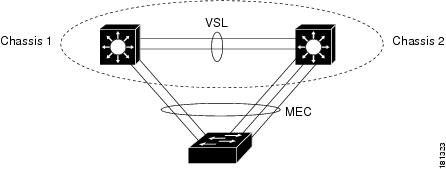
Any incoming traffic to the VSS that is destined to the bottom switch can be egressed via a port on the same physical chassis from which it came in. If however, part of the multichassis etherchannel fails, then the traffic would be switched across the VSL to reach the destination.
I hope this has been helpful!
Laz
---
### Author:  [@bvesel](https://forum.networklessons.com/u/bvesel)
#### Post date: [December 7, 2019, 7:55pm UTC](https://forum.networklessons.com/t/cisco-6500-vss-configuration-example/1054/59 "2019-12-07T19:55:59Z")
Hello Laz,
Thank you very mauch.
---
### Author:  [@Giovanni](https://forum.networklessons.com/u/Giovanni)
#### Post date: [December 21, 2019, 5:29pm UTC](https://forum.networklessons.com/t/cisco-6500-vss-configuration-example/1054/60 "2019-12-21T17:29:10Z")
Hi,
Is there any trick to provide some kind of redundancy at server or devices that connect to the stack with only one cable.
E.g a server or a device that is connected to a patch-panel that ends in a rack with 2 switch in stack.
---
### Author:  [@lagapidis](https://forum.networklessons.com/u/lagapidis)
#### Post date: [January 6, 2020, 7:10am UTC](https://forum.networklessons.com/t/cisco-6500-vss-configuration-example/1054/61 "2020-01-06T07:10:12Z")
Hello Giovanni
The standard for providing network connectivity redundancy to servers is to have two or more network cards on the server, and have each network card physically connected to a different physical switch, either within a stack, a VSS arrangement, or simply to two separate switches. This can be done either using link aggregation, such as LACP/Etherchannel or simply by providing different IP addresses on each network card.
If I have understood correctly, you are looking for a way to have a single physical connection on a server somehow connect to two different switches for redundancy, via a physical patch panel/splitter arrangement. I am not familiar of such a possibility, but it would be possible to create such a splitter. However, because splitters are not active components, there is no way for them to “detect” a failure of one switch port to automatically switch over to the other. In any case, even if it were achieved, you still don’t have the redundancy you need since there is still a single point of failure, which is the network card of the server, the UTP cable itself, and the splitter/patch panel that would implement the redundancy.
The point of redundancy is not to simply connect to two switches, but to provide a backup for all components of connectivity, including the network cards of the servers, as well as the UTP cables that connect to the multiple switches.
I hope this has been helpful!
Laz
[Previous page](https://forum.networklessons.com/t/cisco-6500-vss-configuration-example/1054.md?page=2)
[Next page](https://forum.networklessons.com/t/cisco-6500-vss-configuration-example/1054.md?page=4)