# Cisco ASA Site-to-Site IKEv1 IPsec VPN
**URL:** https://forum.networklessons.com/t/cisco-asa-site-to-site-ikev1-ipsec-vpn/825
**Category:** Lessons Discussion
**Created:** [December 19, 2016, 4:39pm UTC](https://forum.networklessons.com/t/cisco-asa-site-to-site-ikev1-ipsec-vpn/825 "2016-12-19T16:39:50Z")
**Posts on this page:** 20
**Page:** 6
### Author:  [@erik.versec](https://forum.networklessons.com/u/erik.versec)
#### Post date: [November 21, 2021, 2:06pm UTC](https://forum.networklessons.com/t/cisco-asa-site-to-site-ikev1-ipsec-vpn/825/102 "2021-11-21T14:06:46Z")
Hi Rene,
I have question regarding routing with S2S VPN.
In your post we had to configure routing between 2 directly connected ASA FW. But in a case when you add (for example) in between one Router ( so ASA - R - ASA) you only have to specify default routes pointing to R. In the R configuration I do not use any route towards inside interfaces on both ASA Firewalls.
Why is that?
Asa inside interface: 192.168.1.0 /24
ASA outside interface 88.1.1.1 /24
route outside 0.0.0.0 0.0.0.0 88.1.1.2
Router interface g 0/0 88.1.1.2/24
Router interface g 0/1 88.1.2.2/24
ASA outside interface 88.1.2.1/24
ASA 2 inside interface 192.168.2.0/24
route outside 0.0.0.0 0.0.0.0 88.1.2.2
---
### Author:  [@lagapidis](https://forum.networklessons.com/u/lagapidis)
#### Post date: [November 24, 2021, 7:14am UTC](https://forum.networklessons.com/t/cisco-asa-site-to-site-ikev1-ipsec-vpn/825/103 "2021-11-24T07:14:50Z")
Hello Erik
This is a very good question and is important to understand the role of routers in various locations throughout a topology. That router R **doesn’t need to know** how to reach the inside subnets of the ASAs. It will never receive packets with a destination IP of 192.168.1.X or 192.168.2.X.
Remember, the ASAs have created a site-to-site tunnel, so all traffic with such destination addresses will be encapsulated within tunneling packets. This means that the R router will only receive packets with destination IP addresses of the outside interfaces of the ASAs.
I hope this has been helpful!
Laz
---
### Author:  [@erik.versec](https://forum.networklessons.com/u/erik.versec)
#### Post date: [November 24, 2021, 10:47am UTC](https://forum.networklessons.com/t/cisco-asa-site-to-site-ikev1-ipsec-vpn/825/104 "2021-11-24T10:47:23Z")
Hi Lazaros,
Thank you for the reply.
This all makes sense ( when using router ), but what I do not understand is why you have to specify routing when you have directly connected ASA FW. Directly connected ASA FW share same subnet (outside interfaces) and when we encapsulate packets in IPSEC, we know how to get to our peer, we then de encapsulate IPSEC headers ( we are left with source of inside IP and destination of inside IP) and forward in inside interface.
Thank you
---
### Author:  [@lagapidis](https://forum.networklessons.com/u/lagapidis)
#### Post date: [November 26, 2021, 7:32am UTC](https://forum.networklessons.com/t/cisco-asa-site-to-site-ikev1-ipsec-vpn/825/105 "2021-11-26T07:32:31Z")
Hello Erik
Let’s take it step by step. Let’s say you don’t have any routing configured in either ASA. Let’s say you have a host (H1) behind ASA1 with an IP address of 192.168.1.20 and another host (H2) behind ASA2 with an IP address of 192.168.2.40.
Now if H1 sends a ping to H2, that ping…
1. The ping will go to the default gateway, which is ASA 1 at 192.168.1.254.
2. The ASA will look at the destination IP of 192.168.2.40 but it doesn’t have any information about this network in the routing table. There is also no default route. So the packet is dropped.
The ASAs are directly connected, therefore they know about the 10.10.10.0/24 network to which they are both connected. However, ASA1 does not have any info about 192.168.2.0/24.
The solution is to either use the static route as shown in the lesson or introduce a default route in the routing table. That way if a destination doesn’t match anything, in the routing table, it will be sent to the default route. Once that is done, such packets will be sent to ASA2. ASA2 knows the 192.168.2.0/24 network as it is directly connected, and will forward the packet correctly.
I hope this has been helpful!
Laz
---
### Author:  [@tivi30](https://forum.networklessons.com/u/tivi30)
#### Post date: [April 27, 2022, 9:33pm UTC](https://forum.networklessons.com/t/cisco-asa-site-to-site-ikev1-ipsec-vpn/825/106 "2022-04-27T21:33:00Z")
Hi Everybody,
I would like to ask a little help.
I am a beginer network engeener.
My question is:
If i created a s2S Ipsec Ikev1 vpn between 2 asa or 2 router and the interesting traffic are the same on both site. What should i have to do excatly?
I think i should do a NAT but i do not know how?
What kind of NAT do i have to use and how do i have to create NAT in this situation? What network do i have to translate for?
Thank you for your support.
---
### Author:  [@lagapidis](https://forum.networklessons.com/u/lagapidis)
#### Post date: [April 29, 2022, 6:11am UTC](https://forum.networklessons.com/t/cisco-asa-site-to-site-ikev1-ipsec-vpn/825/107 "2022-04-29T06:11:22Z")
Hello Tivadar
Take a look at this lesson:
> **[Cisco ASA Site-to-Site IKEv1 IPsec VPN](https://networklessons.com/cisco/asa-firewall/cisco-asa-site-site-ikev1-ipsec-vpn)**
>
> This lesson explains how to configure and the verification of Site-to-Site IKEv1 IPsec VPN on the Cisco ASA Firewall.
There you will see a detailed step-by-step procedure on how to create a site-to-site IPSec IKEv1 VPN between two ASAs.
If you have further questions about this particular setup, please feel free to let us know!
I hope this has been helpful!
Laz
---
### Author:  [@tivi30](https://forum.networklessons.com/u/tivi30)
#### Post date: [April 29, 2022, 10:25pm UTC](https://forum.networklessons.com/t/cisco-asa-site-to-site-ikev1-ipsec-vpn/825/108 "2022-04-29T22:25:06Z")
HI Lagapides,
My problem is that the interesting traffic is the same on the both ASA or router.
I can not found such a example for it.
ASA1 local network 192.168.1.0/24
ASA2 local network 192.168.1.0/24
I would like that these 2 networks reach each other on S2S Tunnel.
How can i resolve this problem?
Thank you for your support.
---
### Author:  [@lagapidis](https://forum.networklessons.com/u/lagapidis)
#### Post date: [May 2, 2022, 4:01pm UTC](https://forum.networklessons.com/t/cisco-asa-site-to-site-ikev1-ipsec-vpn/825/109 "2022-05-02T16:01:03Z")
Hello Tivadar
I see, thank you for the clarification. It depends on what you want to achieve. There are two possibilities here:
1. You are creating a single subnet of 192.168.1.0/24 that you want to span across two remote sites. Each host in the subnet is unique, in other words, you may have 192.168.1.10 at site 1 but not at site 2, and similarly 192.168.1.11 at site 2 but not at site 1. This essentially means you have a single subnet that is shared across the VPN tunnel, with a total of 254 unique hosts among the two sites.
2. The other case involves two separate subnets, each at each remote location, where you have the same network. So you may have 192.168.1.10 at both locations. This situation would arise if you have two separate branch offices, which happen to use the same IP address ranges, and you want to interconnect them.
If your case is the first, then you can easily do this by creating a Layer 2 tunnel between the two sites using the [Layer 2 Tunnel Protocol (L2TP) as described in the lesson](https://networklessons.com/cisco/ccie-enterprise-infrastructurel2tpv3-layer-2-tunnel-protocol-version-3). Here you must ensure that each host has a unique IP address across both sites.
If your case is the second, then you must find a way to make those addresses unique. There are several ways to do this:
1. Maybe the easiest is to actually change the network addressing on that subnet and make it unique. It’s not always possible, but if it is, it is the cleanest solution. You can then set up a site-to-site VPN with the appropriate routing.
2. If that’s not possible, you should be able to NAT the addresses of one of the sites, as you suggested using static one-to-one NAT between the 192.168.1.0/24 subnet and another subnet that is not in use, such as 192.168.10.0/24. This NATing should be done either on the VPN router at the remote site that contains the subnet to be NATted, or on a router internal to that network, before the traffic reaches the VPN router. For one-to-one static NAT, [take a look at this lesson](https://networklessons.com/cisco/ccie-enterprise-infrastructurehow-to-configure-static-nat-on-cisco-ios-router).
3. Although this is probably not a viable solution for your case, it may be worth mentioning that [MPLS](https://networklessons.com/mpls) is a technology that is designed to be able to discern between multiple remote networks that may be using the same subnets.
Let us know which is your case so that we can help you further.
I hope this has been helpful!
Laz
---
### Author:  [@tivi30](https://forum.networklessons.com/u/tivi30)
#### Post date: [May 4, 2022, 7:16am UTC](https://forum.networklessons.com/t/cisco-asa-site-to-site-ikev1-ipsec-vpn/825/110 "2022-05-04T07:16:07Z")
> [@lagapidis](#):
>
> unique
Hi Lazaros,
Thank you for your support.
I review the one to one NAT lesson.
It is not completely clear yet 🙂
So it may be have a question to you. 🙂
Thank you very much!
---
### Author:  [@lagapidis](https://forum.networklessons.com/u/lagapidis)
#### Post date: [May 4, 2022, 4:37pm UTC](https://forum.networklessons.com/t/cisco-asa-site-to-site-ikev1-ipsec-vpn/825/111 "2022-05-04T16:37:51Z")
Hello Tivadar
> [@tivi30](#):
>
> So it may be have a question to you. 🙂
No problem, that’s what we’re here for! Take a look at your convenience, and if you have any questions, you know where to find us!
Laz
---
### Author:  [@cpj\_68](https://forum.networklessons.com/u/cpj_68)
#### Post date: [May 6, 2022, 2:29am UTC](https://forum.networklessons.com/t/cisco-asa-site-to-site-ikev1-ipsec-vpn/825/112 "2022-05-06T02:29:14Z")
Hi team,
Could you explain the differences between the attributes part for the tunnel-group? What are the differences between ipsec-attributes and general-attributes? How do we decide to choose one
over another?
`tunnel-group 10.10.10.1 ipsec-attributes`
Thank you in advance.
---
### Author:  [@lagapidis](https://forum.networklessons.com/u/lagapidis)
#### Post date: [May 7, 2022, 5:15am UTC](https://forum.networklessons.com/t/cisco-asa-site-to-site-ikev1-ipsec-vpn/825/113 "2022-05-07T05:15:32Z")
Hello Po
According to [Cisco’s command reference](https://www.cisco.com/c/en/us/td/docs/security/asa/asa-cli-reference/T-Z/asa-command-ref-T-Z/m_tl-tz.html#wp2574043950):
- `tunnel-group general-attributes`_“is used to configure settings that are common to all supported tunneling protocols.”_
- `tunnel-group ipsec-attributes`_“is used to configure settings that are specific to the IPSec tunneling protocol.”_
Similarly, there are other attribute groups you can configure including:
- `tunnel-group ppp-attributes`
- `tunnel-group webvpn-attributes`
…both of which can be found in the above command reference link as well.
I hope this has been helpful!
Laz
---
### Author:  [@tivi30](https://forum.networklessons.com/u/tivi30)
#### Post date: [May 8, 2022, 6:26pm UTC](https://forum.networklessons.com/t/cisco-asa-site-to-site-ikev1-ipsec-vpn/825/114 "2022-05-08T18:26:22Z")
HI Lazaros,
I would like to do this in my ASA what you suggested:
If that’s not possible, you should be able to NAT the addresses of one of the sites, as you suggested using static one-to-one NAT between the 192.168.1.0/24 subnet and another subnet that is not in use, such as 192.168.10.0/24. This NATing should be done either on the VPN router at the remote site that contains the subnet to be NATted, or on a router internal to that network, before the traffic reaches the VPN router. For one-to-one static NAT
1. I do the ASA S2S VPN is the same than in lession: Cisco ASA Site-to-Site IKEv1 IPsec VPN
2. I do a Static NAT 192.168.1.0/24 → 192.168.1.11/24 network, this network not in use, and it should be a existing working network (192.168.1.11/24)?
```auto
object network Internal
subnet 192.168.1.0 255.255.255.0
object network Internal2
subnet 192.168.11.0 255.255.255.0
```
I look at static NAT but there i can translate one ip address to one ip address.
How can i translate the internal 192.168.1.0/24 network to the 192.168.11.0/24 internal network?
I don not understand. ☹
---
### Author:  [@lagapidis](https://forum.networklessons.com/u/lagapidis)
#### Post date: [May 11, 2022, 2:12pm UTC](https://forum.networklessons.com/t/cisco-asa-site-to-site-ikev1-ipsec-vpn/825/115 "2022-05-11T14:12:11Z")
Hello Tivadar
> [@tivi30](#):
>
> 1. I do a Static NAT 192.168.1.0/24 → 192.168.1.11/24 network, this network not in use, and it should be a existing working network (192.168.1.11/24)?
I think you have a typo there, I think you meant “existing working network (192.168. **11.0** /24)?”
The you translate to can be anything you like but it should not exist on any other internal network that you want to be able to reach, nor should it use any public IP addresses as this could result in incorrect routing to particular destinations on the Internet.
In order to achieve one to one NAT address translation for a whole range of addresses, you can use the `range` keyword like so:
```auto
object network Internal
range 192.168.1.2 192.168.1.254
object network Internal2
range 192.168.11.2 192.168.11.254
```
You can see more detailed information about such configurations here:
> **[Cisco ASA 5500 Series Configuration Guide using the CLI, 8.4 and 8.6 -...](https://www.cisco.com/c/en/us/td/docs/security/asa/asa84/configuration/guide/asa_84_cli_config/nat_objects.html#71793)**
>
> Configuring Network Object NAT
I hope this has been helpful!
Laz
---
### Author:  [@tivi30](https://forum.networklessons.com/u/tivi30)
#### Post date: [May 11, 2022, 8:18pm UTC](https://forum.networklessons.com/t/cisco-asa-site-to-site-ikev1-ipsec-vpn/825/116 "2022-05-11T20:18:50Z")
HI Lazaros,
It may be OK?
1.I do the ASA S2S VPN is the same than in lession: Cisco ASA Site-to-Site IKEv1 IPsec VPN
2.I do this NAT below
```auto
hostname(config)# object network Internal1 (existing network)
hostname(config-network-object)# range 192.168.1.2 192.168.1.254
hostname(config-network-object)# object network Internal2 (not existing network)
hostname(config-network-object)# range 192.168.11.2 192.168.11.254
hostname(config-network-object)# nat (inside,outside) static Internal1
```
and after that the S2S vpn will work between ASA1 and ASA2 and the same network (192.168.1.0/24) on ASA1 and ASA2 can be reach eachother?
I need create an ACL:
```auto
access-list ACL extended permit ip 192.168.1.0 255.255.255.0 192.168.11.0 255.255.255.0
access group ACL in interface outside
```
Thank you for your support.
---
### Author:  [@lagapidis](https://forum.networklessons.com/u/lagapidis)
#### Post date: [May 15, 2022, 7:23am UTC](https://forum.networklessons.com/t/cisco-asa-site-to-site-ikev1-ipsec-vpn/825/117 "2022-05-15T07:23:20Z")
Hello Tivadar
I had forgotten that we have a lesson on how to achieve static NAT on a whole subnet on the ASA. Although the `range` keyword will work, take a look at this lesson which shows the process step by step. It’s section 2 of the lesson:
> **[Cisco ASA Static NAT Configuration](https://networklessons.com/cisco/asa-firewall/cisco-asa-static-nat-configuration)**
>
> This lesson explains how to configure and verify static (Network Address Translation) NAT on your Cisco ASA Firewall.
If you have further questions let me know.
I hope this has been helpful!
Laz
---
### Author:  [@tivi30](https://forum.networklessons.com/u/tivi30)
#### Post date: [May 19, 2022, 11:45pm UTC](https://forum.networklessons.com/t/cisco-asa-site-to-site-ikev1-ipsec-vpn/825/118 "2022-05-19T23:45:10Z")
> [@tivi30](#):
>
> My problem is that the interesting traffic is the same on the both ASA or router.
> I can not found such a example for it.
>
> ASA1 local network 192.168.1.0/24
> ASA2 local network 192.168.1.0/24
>
> I would like that these 2 networks reach each other on S2S Tunnel.
>
> How can i resolve this problem?
>
> Thank you for your support.
Hi Lazaros,
I looked the static NAT section 2 but i not like do it.
My problem is that the interesting traffic is the same on the both ASA or router.
I can not found such a example for it.
ASA1 local network 192.168.1.0/24 or host ip address
ASA2 local network 192.168.1.0/24 or host ip address
I would like that these 2 networks reach each other on S2S Tunnel.
I do not understand how resolve it a static NAT? ☹
Thank you for your support.
---
### Author:  [@lagapidis](https://forum.networklessons.com/u/lagapidis)
#### Post date: [May 26, 2022, 4:55am UTC](https://forum.networklessons.com/t/cisco-asa-site-to-site-ikev1-ipsec-vpn/825/119 "2022-05-26T04:55:05Z")
Hello Tivadar
Here’s a solution from Cisco that delivers a VPN between two ASAs that have overlapping IP address spaces.
> **[Configuration Example of ASA VPN with Overlapping Scenarios](https://www.cisco.com/c/en/us/support/docs/security/asa-5500-x-series-firewalls/211275-Configuration-Example-of-ASA-VPN-with-Ov.html)**
>
> This document describes the steps used to translate the VPN traffic that travels over a LAN-to-LAN (L2L) IPsec tunnel between two Adaptive Security
Take a look at this and if you have any questions, let us know!
I hope this has been helpful!
Laz
---
### Author:  [@tivi30](https://forum.networklessons.com/u/tivi30)
#### Post date: [June 1, 2022, 9:16pm UTC](https://forum.networklessons.com/t/cisco-asa-site-to-site-ikev1-ipsec-vpn/825/120 "2022-06-01T21:16:15Z")
Thank you for your helping.
---
### Author:  [@amit.dhakne77](https://forum.networklessons.com/u/amit.dhakne77)
#### Post date: [July 1, 2022, 4:48pm UTC](https://forum.networklessons.com/t/cisco-asa-site-to-site-ikev1-ipsec-vpn/825/121 "2022-07-01T16:48:33Z")
Hi Rane
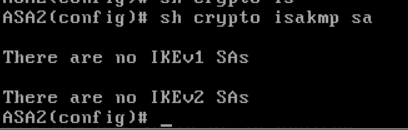
I configure same on both asa but getting error like “There is no IKEv1 sa”
i verify twice but no luck. please help me with this
[Previous page](https://forum.networklessons.com/t/cisco-asa-site-to-site-ikev1-ipsec-vpn/825.md?page=5)
[Next page](https://forum.networklessons.com/t/cisco-asa-site-to-site-ikev1-ipsec-vpn/825.md?page=7)