# Cisco IOS Embedded Event Manager (EEM)
**URL:** https://forum.networklessons.com/t/cisco-ios-embedded-event-manager-eem/1106
**Category:** Lessons Discussion
**Created:** [December 26, 2016, 10:56pm UTC](https://forum.networklessons.com/t/cisco-ios-embedded-event-manager-eem/1106 "2016-12-26T22:56:08Z")
**Posts on this page:** 20
**Page:** 2
### Author:  [@lagapidis](https://forum.networklessons.com/u/lagapidis)
#### Post date: [February 16, 2017, 7:45am UTC](https://forum.networklessons.com/t/cisco-ios-embedded-event-manager-eem/1106/21 "2017-02-16T07:45:52Z")
Hello Alfredo
Yes, it is possible to shutdown and enable specific ports based on time. The following example may shed some light on this:
When using EEM, you must create two applet timer policies, one to “`shutdown`” and the other to “`no shutdown`”. In the following example, the port will be shutdown every day at midnight, and brought back up every day at 8 am.
```
event manager applet shutdown_port
event timer cron cron-entry "0 0 * * *"
action 1.0 cli command "enable"
action 2.0 cli command "config t"
action 3.0 cli command "interface FastEthernet1/0/1"
action 4.0 cli command "shut"
action 5.0 cli command "end"
action 6.0 syslog msg "Interface FastEthernet1/0/1 has been shutdown"
event manager applet noshut_port
event timer cron cron-entry "0 8 * * *"
action 1.0 cli command "enable"
action 2.0 cli command "config t"
action 3.0 cli command "interface FastEthernet1/0/1"
action 4.0 cli command "no shut"
action 5.0 cli command "end"
action 6.0 syslog msg "Interface FastEthernet1/0/1 has been restored"
```
Keep in mind that this will work only if you are running IOS 12.2(40)SE or higher. Also it’s a good idea to have NTP configured on the switch when implementing time based scripts.
I hope this has been helpful!
Laz
---
### Author:  [@Openlearner](https://forum.networklessons.com/u/Openlearner)
#### Post date: [March 17, 2017, 11:22pm UTC](https://forum.networklessons.com/t/cisco-ios-embedded-event-manager-eem/1106/22 "2017-03-17T23:22:39Z")
Hi Lagapides,
I follow the steps you provided but it doesn’t work. See what I collect.
```
show clock: 16:19:24.374 PDT Fri Mar 17 2017
Version 12.2(53)SE2
TEST#sh event manager policy registered
No. Class Type Event Type Trap Time Registered Secu Name
1 applet user timer cron Off Fri Mar 17 16:17:07 2017 none shutdown_port
cron entry {18 16 * * *}
maxrun 20.000
action 1.0 cli command "enable"
action 2.0 cli command "config t"
action 3.0 cli command "interface gigabitEthernet 0/3"
action 4.0 cli command "shut"
action 5.0 cli command "end"
action 6.0 syslog msg "Interface FastEthernet1/0/1 has been shutdown"
2 applet user timer cron Off Fri Mar 17 16:17:19 2017 none noshut_port
cron entry {20 16 * * *}
maxrun 20.000
action 1.0 cli command "enable"
action 2.0 cli command "config t"
action 3.0 cli command "interface gigabitEthernet 0/3"
action 4.0 cli command "no shut"
action 5.0 cli command "end"
action 6.0 syslog msg "Interface FastEthernet1/0/1 has been restored"
```
Please advise
---
### Author:  [@ReneMolenaar](https://forum.networklessons.com/u/ReneMolenaar)
#### Post date: [July 6, 2017, 1:04pm UTC](https://forum.networklessons.com/t/cisco-ios-embedded-event-manager-eem/1106/23 "2017-07-06T13:04:54Z")
I just tried this in Cisco VIRL and it is working here:
```
event manager applet shutdown_port
event timer cron cron-entry "57 12 * * *"
action 1.0 cli command "enable"
action 2.0 cli command "config t"
action 3.0 cli command "interface FastEthernet1/0/1"
action 4.0 cli command "shut"
action 5.0 cli command "end"
action 6.0 syslog msg "Interface FastEthernet1/0/1 has been shutdown"
```
A few minutes later:
```
R1#
*Jul 6 12:57:00.360: %SYS-5-CONFIG_I: Configured from console by on vty0 (EEM:shutdown_port)
*Jul 6 12:57:00.365: %HA_EM-6-LOG: shutdown_port: Interface FastEthernet1/0/1 has been shutdown
```
---
### Author:  [@isvanderpuije](https://forum.networklessons.com/u/isvanderpuije)
#### Post date: [October 10, 2019, 10:13pm UTC](https://forum.networklessons.com/t/cisco-ios-embedded-event-manager-eem/1106/24 "2019-10-10T22:13:23Z")
Hello All,
Is there a show command to list all the built-in EEM environment variables, eg. $\_cli\_result, etc.
Thanks.
---
### Author:  [@lagapidis](https://forum.networklessons.com/u/lagapidis)
#### Post date: [October 11, 2019, 6:06am UTC](https://forum.networklessons.com/t/cisco-ios-embedded-event-manager-eem/1106/25 "2019-10-11T06:06:23Z")
Hello Isaac
Take a look at this Cisco command reference:
> **[Cisco IOS Embedded Event Manager Command Reference - S through Z Commands...](https://www.cisco.com/c/en/us/td/docs/ios-xml/ios/eem/command/eem-cr-book/eem-cr-s1.html#wp2873119837)**
>
> S through Z Commands
This command will display the name and value of the EEM environment variables. You can also take a look at this reference for a list of EEM built in environment variables:
> **[Embedded Event Manager Configuration Guide, Cisco IOS Release 12.4T - Writing...](https://www.cisco.com/c/en/us/td/docs/ios-xml/ios/eem/configuration/12-4t/eem-12-4t-book/eem-policy-cli.html#GUID-48CB6E8C-F456-4398-8B66-CC499331CB49)**
>
> Writing Embedded Event Manager Policies Using the Cisco IOS CLI
I hope this has been helpful!
Laz
---
### Author:  [@robwu8](https://forum.networklessons.com/u/robwu8)
#### Post date: [November 12, 2020, 11:20am UTC](https://forum.networklessons.com/t/cisco-ios-embedded-event-manager-eem/1106/26 "2020-11-12T11:20:02Z")
Hi,
I’m trying to write a EEM applet atm which will do the following;
1. copy run file’x’
2. auto confirm device prompting for ‘Confirm’
3. reload
4. auto confirm device prompting for ‘Confirm’
At the moment I’ve made an ‘alias’ for step 1, and I’m having trouble with how to auto confirm when the device prompts for input.
Cheers,
Rob
---
### Author:  [@lagapidis](https://forum.networklessons.com/u/lagapidis)
#### Post date: [November 16, 2020, 6:03am UTC](https://forum.networklessons.com/t/cisco-ios-embedded-event-manager-eem/1106/27 "2020-11-16T06:03:05Z")
Hello Robert
Before writing up an EEM script is always a good idea to go over the manual implementation of what you want to do. In order to copy the running-config to another file name and reload the device, you must do the following:
```
R2#copy running-config flash0:
Destination filename [running-config]? test.cfg
2949 bytes copied in 2.445 secs (1206 bytes/sec)
R2#reload
Proceed with reload? [confirm]
```
In my example above, I copied the running configuration to a file called `test.cfg`. So in this case, you would have to issue the first command, then wait for the proper prompt to appear and then put in the correct command. (There is no confirmation there).
In the case of the reload, you will have to wait for the `confirm` prompt to appear and then press Enter.
The EEM script would go something like this:
```
action 010 cli command "copy run flash0:" pattern "running-config"
action 020 cli command "test.cfg" pattern "copied"
action 030 cli command "reload" pattern "confirm"
action 040 cli command ""
```
After action 10, it confirms “running-config” appears in the prompt before moving to the next command. Similarly, in action 20, “copied” must appear. In 030 “reload” must appear. Finally, after all patterns are matched, the “” indicates that the Enter key should be applied.
It is the `pattern` keyword that does the matching. Note that I have not tested the above, and you should confirm that it functions before proceeding.
I hope this has been helpful!
Laz
---
### Author:  [@robwu8](https://forum.networklessons.com/u/robwu8)
#### Post date: [November 16, 2020, 9:19am UTC](https://forum.networklessons.com/t/cisco-ios-embedded-event-manager-eem/1106/28 "2020-11-16T09:19:28Z")
Hi Laz,
Thanks for that, will have a play with this in my lab and report back!
One thing on this, with action 020, are we able to build a file name based on say device hostname + fixed string label, ie device-name + base.cfg ?
Cheers,
Rob
---
### Author:  [@lagapidis](https://forum.networklessons.com/u/lagapidis)
#### Post date: [November 18, 2020, 6:31am UTC](https://forum.networklessons.com/t/cisco-ios-embedded-event-manager-eem/1106/29 "2020-11-18T06:31:32Z")
Hello Robert
It is possible to retrieve information such as the hostname of the device. There are many predefined functions that do these types of functions. Specifically, for what you’re looking for you need to use the following command:
`action 01 info type routername`
This command will store the hostname of the device in a predefined variable `called $_info_routername`. You can then call this variable in subsequent actions like so:
`action 02 cli command "$_info_routername-base.cfg"`
This command will concatenate the saved hostname with the `-base.cfg` suffix.
Many more such built-in variables can be found at this Cisco community post:
> **[EEM Built-in "Action" Variables](https://community.cisco.com/t5/networking-knowledge-base/eem-built-in-quot-action-quot-variables/ta-p/3123406)**
>
> Many of the EEM applet actions set some built-in variable to indicate their success status or store some result data. Unfortunately, these variables are not well documented...until now. Below is a list of actions and the variables that...
Unfortunately, I found that Cisco documentation is either inadequate or non-existent (or at least very hard to find!) when it comes to details about EEM features.
I hope this has been helpful!
Laz
---
### Author:  [@robwu8](https://forum.networklessons.com/u/robwu8)
#### Post date: [November 19, 2020, 3:58pm UTC](https://forum.networklessons.com/t/cisco-ios-embedded-event-manager-eem/1106/30 "2020-11-19T15:58:12Z")
Thanks for that Laz, I had a quick glance at that link before but maybe I should have tried the find feature! I will try to post my draft EEM applet once its closer to the task of me semi-automating my lab! Cheers, Rob
---
### Author:  [@robwu8](https://forum.networklessons.com/u/robwu8)
#### Post date: [November 23, 2020, 7:22pm UTC](https://forum.networklessons.com/t/cisco-ios-embedded-event-manager-eem/1106/31 "2020-11-23T19:22:06Z")
Actually, this command below works alot better than an EEM script imo (as I don’t have to wait for reload the device to load a file)
**configure replace flash:router-backup-1 list**
From this networklessons article of course! 🙂
[https://networklessons.com/cisco/ccie-enterprise-infrastructureconfiguration-archive-rollback-cisco-ios](https://networklessons.com/cisco/ccie-enterprise-infrastructureconfiguration-archive-rollback-cisco-ios)
now back to labbing!
Cheers,
---
### Author:  [@lagapidis](https://forum.networklessons.com/u/lagapidis)
#### Post date: [November 25, 2020, 7:53am UTC](https://forum.networklessons.com/t/cisco-ios-embedded-event-manager-eem/1106/32 "2020-11-25T07:53:14Z")
Hello Robert
Great, thanks for sharing that… It’s posts like this that increase the value and usefulness of the forum, as users share their personal experience on what works best for them. Your contributions are much appreciated!
Laz
---
### Author:  [@robwu8](https://forum.networklessons.com/u/robwu8)
#### Post date: [November 25, 2020, 11:25am UTC](https://forum.networklessons.com/t/cisco-ios-embedded-event-manager-eem/1106/33 "2020-11-25T11:25:42Z")
Happy to help, hopefully will be able to contribute with more tips and tricks! Cheers,
---
### Author:  [@aronnericchiuto](https://forum.networklessons.com/u/aronnericchiuto)
#### Post date: [September 24, 2021, 10:00am UTC](https://forum.networklessons.com/t/cisco-ios-embedded-event-manager-eem/1106/34 "2021-09-24T10:00:54Z")
HI Laz,
thanks a lot for your explanation.
I’ve got a question about the time variable.
In my case i would like to copy the cfg to an tftp server but i need to have also the hostname and the time.
```auto
event manager applet TFTP-SAVE
event cli pattern "(write|write memory|copy running-config startup-config)" sync no skip no
action 0.0 syslog msg "salvaggio-TFTP"
action 1.0 cli command "enable"
action 2.0 info type routername
action 3.0 cli command "copy running-config tftp:///2021_$_info_routername.$_event_pub_sec.cfg"
```
WIth this configuration i will have hostname and seconds output but i need the date instead
copied cfg
- 2021\_test.1632471991.cfg
i’ve already tried with
`action 3.0 cli command "copy running-config tftp:///2021_$_info_routername.$_event_pub_time.cfg"`
but the debug looks like that:
```auto
*Sep 24 11:01:46: %HA_EM-6-LOG: TFTP-SAVE : DEBUG(cli_lib) : : OUT : copy running-config tftp:///2021_test.Sep 24 09:01:46.009.cfg
*Sep 24 11:01:46: %HA_EM-6-LOG: TFTP-SAVE : DEBUG(cli_lib) : : OUT : ^
*Sep 24 11:01:46: %HA_EM-6-LOG: TFTP-SAVE : DEBUG(cli_lib) : : OUT : % Invalid input detected at '^' marker.
```
Thanks for a feedback
BR
Aronne
---
### Author:  [@lagapidis](https://forum.networklessons.com/u/lagapidis)
#### Post date: [September 27, 2021, 7:25am UTC](https://forum.networklessons.com/t/cisco-ios-embedded-event-manager-eem/1106/35 "2021-09-27T07:25:15Z")
Hello Aronne
It looks like the problem comes from the fact that there are spaces in the date portion of the file name. It is strange that the ‘^’ marker is pointing after the first space, but I would have to say that this is most likely the problem. I would suggest taking a look at this Cisco community thread that deals with a very similar configuration issue the EEM:
> **[Automatic Backup Using EEM](https://community.cisco.com/t5/network-management/automatic-backup-using-eem/td-p/1876471)**
>
> Dear All, I want to use EEM for automatic backup of all my routers and switches on a TFTP server. Please any 1 can help me ? Regards, Kaven
There you will see various options and configurations that may be helpful. You must however keep in mind that some features, such as those that can manipulate text in order to remove spaces, are supported in EEM 3.0 or higher, so you will have to check your version.
Take a look at the thread and let us know how you get along. If you need more help in the process, you know where to find us!
I hope this has been helpful!
Laz
---
### Author:  [@aronnericchiuto](https://forum.networklessons.com/u/aronnericchiuto)
#### Post date: [January 17, 2022, 12:53pm UTC](https://forum.networklessons.com/t/cisco-ios-embedded-event-manager-eem/1106/36 "2022-01-17T12:53:58Z")
Hi Laz, thanks a lot for your helpful feedback 👍 .
Got another question about EEM.
I have to add a VLAN in TRUNK of multiple Switches. The only thing that helps me to discover which is the “UPLINK” where i have to put in the new VLAN in the Trunk is the description of those link.
Example:
IF G1/0/1
description DA730 - xxxxxxx
Is there a script that allows me to use the “DA” value in the description as trigger for a switchport trunk allowed vlan add command ?
Thanks again for a feedback
Aronne
---
### Author:  [@lagapidis](https://forum.networklessons.com/u/lagapidis)
#### Post date: [January 19, 2022, 7:42am UTC](https://forum.networklessons.com/t/cisco-ios-embedded-event-manager-eem/1106/37 "2022-01-19T07:42:29Z")
Hello Aronne
Hmm, that can become involved. In order to achieve this, you need to determine which ports have the “DA” in their description. There is a command that matches a particular string that can be used.
` action 3.2 cli command "show interface gigabitethernet 1/0/1"`
` action 3.3 string match "*description DA*" "$_cli_result"`
` action 3.4 puts "$_string_result`
The above commands will output the results of the show interface command into the $\_cli\_result variable. Within that output, you will have the description.
The next command searches for a string match that contains the text “description DA” with any other text appended before and after. If it finds it, the variable $\_string\_result will be set to 1. Otherwise, it will be set to 0. The final command simply prints that value to the CLI. In your case, you can use that result in an if statement, to either apply the config you want to that interface or not to apply it.
More info about the string match command can be found here:
> **[Cisco IOS Embedded Event Manager Command Reference - action string through...](https://www.cisco.com/c/en/us/td/docs/ios-xml/ios/eem/command/eem-cr-book/eem-cr-a2.html#wp2508208016)**
>
> action string through D Commands
I hope this has been helpful!
Laz
---
### Author:  [@aronnericchiuto](https://forum.networklessons.com/u/aronnericchiuto)
#### Post date: [January 23, 2022, 8:49am UTC](https://forum.networklessons.com/t/cisco-ios-embedded-event-manager-eem/1106/38 "2022-01-23T08:49:11Z")
Hi Laz!
Thanks for your explanation. Everytime simple and Grest!
Bye bye
Aronne
---
### Author:  [@netwrokoman2024](https://forum.networklessons.com/u/netwrokoman2024)
#### Post date: [October 18, 2022, 5:15pm UTC](https://forum.networklessons.com/t/cisco-ios-embedded-event-manager-eem/1106/39 "2022-10-18T17:15:55Z")
Hi RYAN,
I’m trying to write a EEM applet which will do the following;
1- syslog msg `Line protocol on Interface FastEthernet0/1, changed state to down`
2- syslog msg `Line protocol on Interface FastEthernet0/2, changed state to down`
3- reload router
i want my router reload automatic when `all lines protocol in router change to down`
---
### Author:  [@lagapidis](https://forum.networklessons.com/u/lagapidis)
#### Post date: [October 21, 2022, 6:24am UTC](https://forum.networklessons.com/t/cisco-ios-embedded-event-manager-eem/1106/40 "2022-10-21T06:24:38Z")
Hello Ridhwan
In order to achieve what you’re looking for you must find a way to determine when all line protocols have changed state to down. In order to do this, you must actively keep track of the states of the line protocols. This is not trivial but can be complex if you want to achieve it with an EEM applet. One approach would be to periodically issue the `show interface description` command which lists all of the interfaces, their descriptions as well as their Status and Protocol indicators like so:
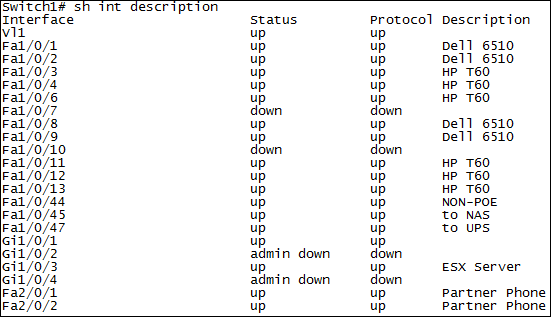
Then you’ll have to save that output into an archive so it can then be parsed. Saving into an archive can be done like so:
```auto
archive
log config
logging enable
```
Once that’s done, you can then parse that archive and search for the correct number of “down” states. If the number matches the requirement, you can then issue the reload command. Now in order for this to work, you must periodically issue this command, say every several seconds, and when the condition is matched, you can issue the command you want.
Now this is one approach, there may be others that are more suitable, however, before we go into any other options, can you share with us the need for this particular operation? What are you trying to achieve with this? Maybe we can help find an alternative solution to the problem you are facing.
I hope this has been helpful!
Laz
[Previous page](https://forum.networklessons.com/t/cisco-ios-embedded-event-manager-eem/1106.md?page=1)
[Next page](https://forum.networklessons.com/t/cisco-ios-embedded-event-manager-eem/1106.md?page=3)