# Cisco IOS Router Password Recovery
**URL:** https://forum.networklessons.com/t/cisco-ios-router-password-recovery/1091
**Category:** Lessons Discussion
**Created:** [December 26, 2016, 10:40pm UTC](https://forum.networklessons.com/t/cisco-ios-router-password-recovery/1091 "2016-12-26T22:40:24Z")
**Posts on this page:** 20
**Page:** 1
### Author:  [@ReneMolenaar](https://forum.networklessons.com/u/ReneMolenaar)
#### Post date: [December 26, 2016, 10:40pm UTC](https://forum.networklessons.com/t/cisco-ios-router-password-recovery/1091/1 "2016-12-26T22:40:24Z")
This topic is to discuss the following lesson:
> **[Cisco IOS Router Password Recovery](https://networklessons.com/system-management/cisco-ios-router-password-recovery)**
>
> This lesson explains how to recover the password of your Cisco IOS Router using rommon and the configuration-register.
---
### Author:  [@jackdbliss](https://forum.networklessons.com/u/jackdbliss)
#### Post date: [July 26, 2016, 10:03pm UTC](https://forum.networklessons.com/t/cisco-ios-router-password-recovery/1091/2 "2016-07-26T22:03:57Z")
When you login to a router or switch how can you tell if someone applied the confreg 0x2142 command,but didn’t set the device back to the config-register 0x2102?
---
### Author:  [@lagapidis](https://forum.networklessons.com/u/lagapidis)
#### Post date: [July 28, 2016, 3:19pm UTC](https://forum.networklessons.com/t/cisco-ios-router-password-recovery/1091/3 "2016-07-28T15:19:10Z")
Hello Jack.
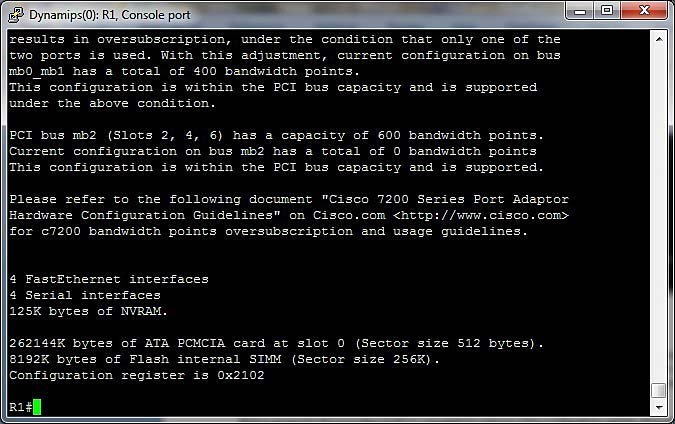
Using the `show version` command, you can see what the current configuration of the config register is. It’s usually the very last line in the output of the command. Take a look at the attached image that shows the output of the command.
I hope this has been helpful!
Laz
---
### Author:  [@lxs.paul](https://forum.networklessons.com/u/lxs.paul)
#### Post date: [August 14, 2016, 4:33pm UTC](https://forum.networklessons.com/t/cisco-ios-router-password-recovery/1091/4 "2016-08-14T16:33:57Z")
Is it possible to perform password recovery without losing configurations?
---
### Author:  [@andrew](https://forum.networklessons.com/u/andrew)
#### Post date: [August 15, 2016, 11:34pm UTC](https://forum.networklessons.com/t/cisco-ios-router-password-recovery/1091/5 "2016-08-15T23:34:22Z")
Alexis,
Yes, the standard procedure for recovering a password does not cause you to lose your startup configuration information. The exact procedure differs slightly for different products, so I will use a 2900 series router as an example below.
A high level overview of the process is:
-Attach the terminal cable to the console port
-Reboot the router and issue a BREAK during the boot
-Change the configuration register so that the device boots to ROMMON (usually 0x2142)
-Issue the Reset command at the rommon\> prompt
* * *
**Important Step for your Question:**
-Copy startup configuration to running configuration ( **make sure you do NOT reverse this!!** ). This step loads your saved configuration into active memory, but since you are already in the privileged mode, you have essentially bypassed any security associated with the startup config.
* * *
-Set the passwords that were lost
-Change your config-register back to the default (probably 0x2102)
-Issue a Write Memory to save your password and config register changes
-Reboot the device
Here is a more detailed Cisco Article:
[http://www.cisco.com/c/en/us/support/docs/routers/2800-series-integrated-services-routers/112033-c2900-password-recovery-00.html](http://www.cisco.com/c/en/us/support/docs/routers/2800-series-integrated-services-routers/112033-c2900-password-recovery-00.html)
---
### Author:  [@adave1103](https://forum.networklessons.com/u/adave1103)
#### Post date: [August 17, 2016, 5:46am UTC](https://forum.networklessons.com/t/cisco-ios-router-password-recovery/1091/6 "2016-08-17T05:46:13Z")
Hi,
So it is correct that once we reboot the router in ROMMON mode - start-up config will be intact ?
Thanks
Abhishek
---
### Author:  [@lagapidis](https://forum.networklessons.com/u/lagapidis)
#### Post date: [August 17, 2016, 5:19pm UTC](https://forum.networklessons.com/t/cisco-ios-router-password-recovery/1091/7 "2016-08-17T17:19:12Z")
Hello Abhishek.
Yes, that is correct. The startup-config remains intact when you boot the router in ROMMON mode.
Laz
---
### Author:  [@swapnilkshirsagar08](https://forum.networklessons.com/u/swapnilkshirsagar08)
#### Post date: [October 9, 2019, 2:42pm UTC](https://forum.networklessons.com/t/cisco-ios-router-password-recovery/1091/8 "2019-10-09T14:42:55Z")
Hello Rene,
Could you please provide the steps to recover the switch password?
Thank you.
Swapnil
---
### Author:  [@lagapidis](https://forum.networklessons.com/u/lagapidis)
#### Post date: [October 10, 2019, 5:32am UTC](https://forum.networklessons.com/t/cisco-ios-router-password-recovery/1091/9 "2019-10-10T05:32:33Z")
Hello Swapnil
You can take a look at this lesson for the recovery of a password from an IOS router. The procedure is very similar for a switch.
> **[Cisco IOS Router Password Recovery](https://networklessons.com/system-management/cisco-ios-router-password-recovery)**
>
> This lesson explains how to recover the password of your Cisco IOS Router using rommon and the configuration-register.
You can also look at this Cisco documentation for more information.
> **[Recovering from a Lost or Forgotten Password - Catalyst 2960, 2960-S, 2960-C,...](https://www.cisco.com/c/en/us/td/docs/switches/lan/catalyst2960/software/release/15-0_2_se/configuration/guide/scg2960/swtrbl.html?dtid=osscdc000283#25330)**
>
> The default configuration for the switch allows an end user with physical access to the switch to recover from a lost password by interrupting the boot process during power-on and by entering a new password. These recovery procedures require that you...
I hope this has been helpful!
Laz
---
### Author:  [@Ajmal.ahmadiine](https://forum.networklessons.com/u/Ajmal.ahmadiine)
#### Post date: [June 24, 2020, 6:11am UTC](https://forum.networklessons.com/t/cisco-ios-router-password-recovery/1091/10 "2020-06-24T06:11:21Z")
Hello Sirs!
Can you tell me that how to reset the password of Cisco 3850 series?
Thanks in advance for the help in this regard.
Regards
Ajmal
---
### Author:  [@lagapidis](https://forum.networklessons.com/u/lagapidis)
#### Post date: [June 26, 2020, 7:20am UTC](https://forum.networklessons.com/t/cisco-ios-router-password-recovery/1091/11 "2020-06-26T07:20:31Z")
Hello Ajmal
You can follow the steps found in this lesson:
> **[Cisco IOS Router Password Recovery](https://networklessons.com/system-management/cisco-ios-router-password-recovery)**
>
> This lesson explains how to recover the password of your Cisco IOS Router using rommon and the configuration-register.
This is for routers, but can also be applied to switches. The only difference is how you enter rommon mode. You can take a look at this post from the Cisco community as well:
> **[Password Recovery on Cisco Catalyst 3850](https://community.cisco.com/t5/networking-knowledge-base/password-recovery-on-cisco-catalyst-3850/ta-p/3154378)**
>
> Power cycle the switch. Immediatly press and hold the Mode button. Hold the button for approximately 12 seconds, the Status LED will go amber. On the console you should be in Boot Loader. Switch: Add the following variables. Switch:...
I hope this has been helpful!
Laz
---
### Author:  [@Ajmal.ahmadiine](https://forum.networklessons.com/u/Ajmal.ahmadiine)
#### Post date: [June 26, 2020, 10:55am UTC](https://forum.networklessons.com/t/cisco-ios-router-password-recovery/1091/12 "2020-06-26T10:55:51Z")
Thank you Liz Sir.
Regards
Ajmal
---
### Author:  [@narad](https://forum.networklessons.com/u/narad)
#### Post date: [June 20, 2021, 7:21pm UTC](https://forum.networklessons.com/t/cisco-ios-router-password-recovery/1091/13 "2021-06-20T19:21:29Z")
Can i recover the password in user mode if i have forgotten the username and password..
one more thing is as rene run the command copy startup-config to runnig config , if i don’t do it , is that mean i will loose my startup configuration ??
---
### Author:  [@lagapidis](https://forum.networklessons.com/u/lagapidis)
#### Post date: [June 28, 2021, 4:19am UTC](https://forum.networklessons.com/t/cisco-ios-router-password-recovery/1091/14 "2021-06-28T04:19:48Z")
Hello Narad
In the example in the lesson, the problem is that the enable password has been forgotten. However, this process can also be used to recover the username and password used to log in to user mode as well. Once you go through the same process, as soon as you issue the `copy startup-config running-config command`, you have full access to modify anything you like, including username and passwords to the local database.
> [@narad](#):
>
> one more thing is as rene run the command copy startup-config to runnig config , if i don’t do it , is that mean i will loose my startup configuration ??
If you don’t issue this command, you won’t lose your startup-config. The startup-config will still be safely stored in the NVRAM. However, by issuing this command, you are reverting the device to the configuration stored there. In other words, the startup-config is moved into RAM and is the currently active config.
I hope this has been helpful!
Laz
---
### Author:  [@ajeet.ccnanp](https://forum.networklessons.com/u/ajeet.ccnanp)
#### Post date: [May 7, 2023, 4:18pm UTC](https://forum.networklessons.com/t/cisco-ios-router-password-recovery/1091/15 "2023-05-07T16:18:15Z")
Hello Friends,
How to reset cisco switch password without losing configuration.
---
### Author:  [@lagapidis](https://forum.networklessons.com/u/lagapidis)
#### Post date: [May 12, 2023, 5:02am UTC](https://forum.networklessons.com/t/cisco-ios-router-password-recovery/1091/16 "2023-05-12T05:02:55Z")
Hello Ajeet
The password recovery process for Cisco IOS switches and routers are very similar. Take a look at this lesson below that will take you through the process.
> **[Cisco IOS Router Password Recovery](https://networklessons.com/system-management/cisco-ios-router-password-recovery)**
>
> This lesson explains how to recover the password of your Cisco IOS Router using rommon and the configuration-register.
If you have any further questions, please feel free to ask!
I hope this has been helpful!
Laz
---
### Author:  [@Mr.cichy91](https://forum.networklessons.com/u/Mr.cichy91)
#### Post date: [June 30, 2024, 4:07pm UTC](https://forum.networklessons.com/t/cisco-ios-router-password-recovery/1091/17 "2024-06-30T16:07:27Z")
**Hello Everyone !**
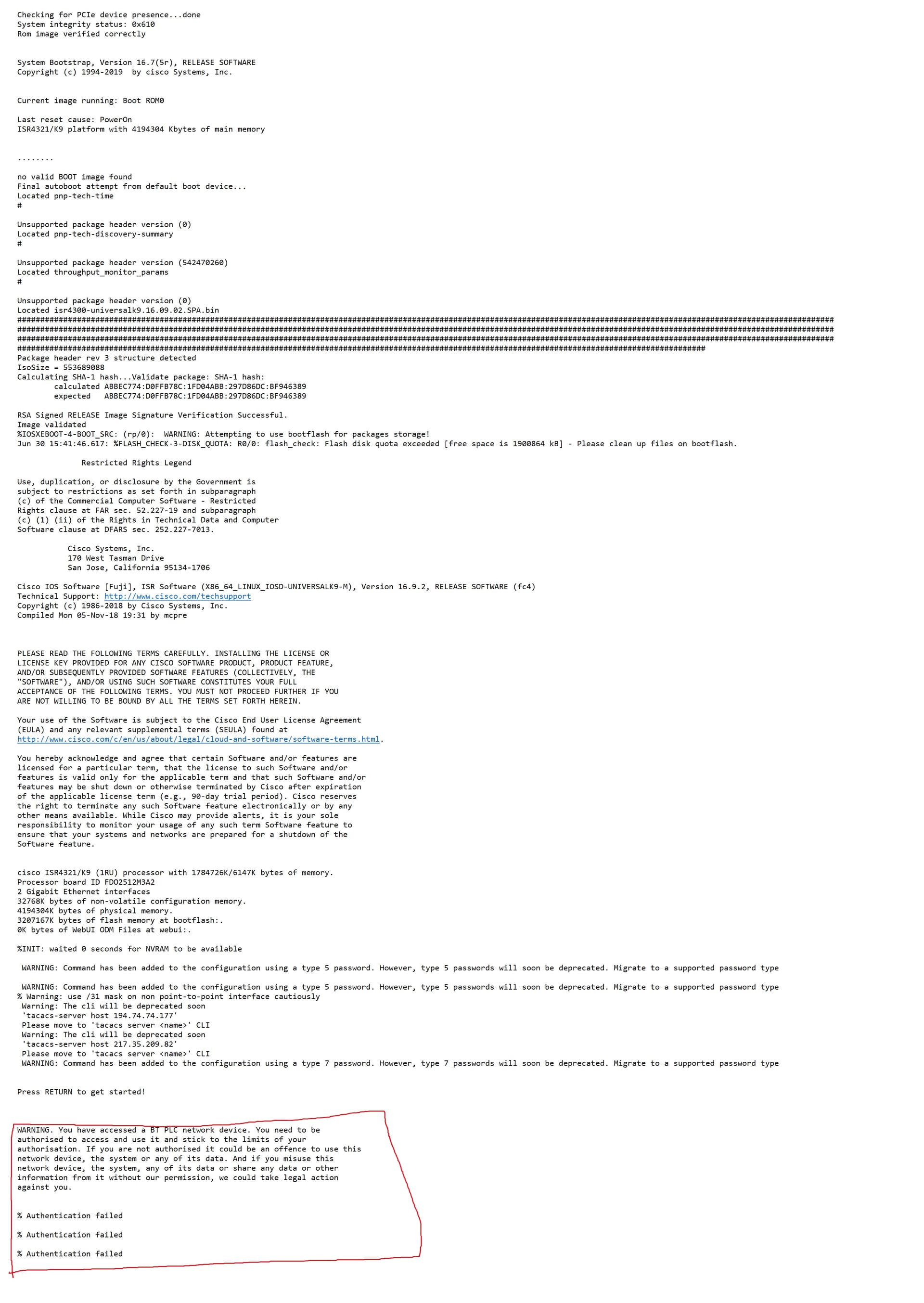
I Bought a router cisco 4321 from ebay for 35 Pounds but there is one issue with it , Its Locked up properly and my knowledge does not let me brake it into it, below I attached booting screen , if there is not an option to break it thru its fine ,psu cost more than all together I get it another one not big deal , sorry for picture but I recommend you to open it in separated window .
Thanks for Help.
---
### Author:  [@lagapidis](https://forum.networklessons.com/u/lagapidis)
#### Post date: [July 2, 2024, 7:12am UTC](https://forum.networklessons.com/t/cisco-ios-router-password-recovery/1091/18 "2024-07-02T07:12:25Z")
Hello Maciej
It looks like you purchased a device that was used on a production network, and they didn’t even bother to clear the configuration!! If the device truly belonged to British Telecom (BT PLC), then it is greatly negligent of them to keep their config intact. Best practice dictates that you should always erase all configurations before reselling such devices to prevent potential malicious users from discovering passwords, IP addresses, and other confidential company information.
In any case, if you want to recover the device, you simply need to perform the password recovery procedure shown in this lesson:
> **[Cisco IOS Router Password Recovery](https://networklessons.com/system-management/cisco-ios-router-password-recovery)**
>
> This lesson explains how to recover the password of your Cisco IOS Router using rommon and the configuration-register.
I hope this has been helpful!
Laz
---
### Author:  [@ekangajoel536](https://forum.networklessons.com/u/ekangajoel536)
#### Post date: [September 30, 2024, 12:52pm UTC](https://forum.networklessons.com/t/cisco-ios-router-password-recovery/1091/19 "2024-09-30T12:52:15Z")
After typing reset, all my configuration gone! i imagine this happen in the production. Is there a way to reset the password and keep the startup config ?
---
### Author:  [@lagapidis](https://forum.networklessons.com/u/lagapidis)
#### Post date: [October 3, 2024, 6:05am UTC](https://forum.networklessons.com/t/cisco-ios-router-password-recovery/1091/20 "2024-10-03T06:05:40Z")
Hello Joel
When you issue the `reset` ROMMON command in the process described in the lesson, you are essentially causing the router to boot up again by bypassing the configuration. So you will find that your running configuration is gone. But not your startup configuration. That still remains intact! If you continue on in the lesson, you will see that once you have privilege executive mode access using the `enable` command, you can copy that startup config back to the running config, change the enable password, and you’re all set!
So the startup config remains intact, but it is the running config that is gone. Does that make sense?
I hope this has been helpful!
Laz