### Author:  [@lagapidis](https://forum.networklessons.com/u/lagapidis)
#### Post date: [October 26, 2020, 11:24am UTC](https://forum.networklessons.com/t/cisco-network-time-protocol-ntp/1104/81 "2020-10-26T11:24:43Z")
Hello Louis
It looks like router B has not synchronized, since it is still in the INIT state under the **ref clock** heading. You can also see that the **reach** is 0 which means it hasn’t received any NTP packets, and the **disp.** is also very high. All of this seems to indicate that it has not successfully synced with the server.
The strange thing is that it does show a stratum of 0 and a \* at the beginning, which seem to be contradicting the rest of the data.
I suggest you troubleshoot NTP connectivity to the server, and once you get connectivity, I believe the issues will be resolved. Take a look at this Cisco documentation, as it may be helpful to you.
> **[Troubleshoot and Debug Network Time Protocol Issues](https://www.cisco.com/c/en/us/support/docs/ip/network-time-protocol-ntp/116161-trouble-ntp-00.html)**
>
> This document describes how to troubleshoot Network Time Protocol (NTP) issues with debug commands and the show ntp command.
I hope this has been helpful!
Laz
---
### Author:  [@peto.frank](https://forum.networklessons.com/u/peto.frank)
#### Post date: [December 9, 2020, 7:34pm UTC](https://forum.networklessons.com/t/cisco-network-time-protocol-ntp/1104/82 "2020-12-09T19:34:02Z")
Hello guys,
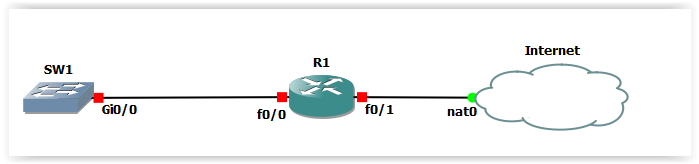
I would like to know whether it is possible to setup NTP via DHCP. I am using simple topology as below where R1 is setup as NTP server and is getting its time from [pool.ntp.org](http://pool.ntp.org). There is DHCP pool on R1 which provides IP address for LAN (where SW1 resides). Quick google says that there is Option 42 in DHCP - this option carries the NTP servers used on the network. I configured “option 42 ip 192.168.10.1” - 10.1 is IP on R1 fa0/0. IP address on SW1 was assigned via DHCP but not the time.
Thanks for help,
Peter
---
### Author:  [@lagapidis](https://forum.networklessons.com/u/lagapidis)
#### Post date: [December 11, 2020, 7:26am UTC](https://forum.networklessons.com/t/cisco-network-time-protocol-ntp/1104/83 "2020-12-11T07:26:46Z")
Hello Peter
The configuration of the DHCP server to send option 42 is quite simple, as you have configured it. However, how a client receives this information depends on various factors. For Cisco devices, if you configure them as DHCP clients, not all IOS versions support the use of Option 42.
For example, according to this [Cisco Community Thread](https://community.cisco.com/t5/switching/ntp-server-via-dhcp-server/td-p/1904627), TAC (Cisco support) seems to have responded that IOS 15.2(2) doesn’t support option 42 as a DHCP client.
Now in order to receive the appropriate DHCP option, you must use the `ip dhcp client request` command in configuration mode of the interface which you are configuring as a DHCP client. Looking at a Cisco CSR running 15.7(3) as an example, I get the following options for this command:
```
R1(config-if)#ip dhcp client request ?
classless-static-route Classless static route (121)
dns-nameserver DNS nameserver (6)
domain-name Domain name (15)
netbios-nameserver NETBIOS nameserver (44)
router Default router option (3)
sip-server-address SIP server address (120)
static-route Static route option (33)
tftp-server-address TFTP server address (150)
vendor-identifying-specific Vendor identifying specific info (125)
vendor-specific Vendor specific option (43)
R1(config-if)#
```
Notice that none of them are NTP option 42, so it seems this device and IOS don’t support it.
For Cisco IOS XE 16.11, this [Cisco documentation](https://www.cisco.com/c/en/us/td/docs/ios-xml/ios/ipaddr_dhcp/configuration/xe-16-11/dhcp-xe-16-11-book/config-dhcp-client-xe.html#GUID-5B3E228A-3C7C-465F-8784-78D6F70FB95E) seems to indicate that it is supported, as it gives you the option of specifying DHCP option 42.
In any case, you will have to see the platform and IOS version of the switch, and see if it accepts the DHCP option for NTP.
I hope this has been helpful!
Laz
---
### Author:  [@ronald.verheij](https://forum.networklessons.com/u/ronald.verheij)
#### Post date: [January 6, 2021, 10:29am UTC](https://forum.networklessons.com/t/cisco-network-time-protocol-ntp/1104/84 "2021-01-06T10:29:49Z")
Hi,
I have a question about NTP.
If the NTP server is in a different timezone.
And you use this NTP server on your switch to sync the time.
Is that going well or do you need to do additional configuration?
So that logging timestams and the clock are the same?
---
### Author:  [@lagapidis](https://forum.networklessons.com/u/lagapidis)
#### Post date: [January 7, 2021, 5:40pm UTC](https://forum.networklessons.com/t/cisco-network-time-protocol-ntp/1104/85 "2021-01-07T17:40:28Z")
Hello Ronald
Authoritative NTP sources that are found on the Internet always use [Coordinated Universal Time (UTC)](https://en.wikipedia.org/wiki/Coordinated_Universal_Time) regardless of where on Earth they are located. UTC is essentially the same as Greenwich Mean Time (GMT).
Each Cisco device that wants to synchronize with an NTP source is configured with the timezone in which it is located. (By default, the timezone is set to UTC). Now you can configure the timezone using the `clock timezone` command. Whenever a Cisco device synchronizes with an NTP source, it makes the necessary adjustments to the time to ensure the correct time zone is calculated. For this reason, it is important to correctly configure the timezone so that the NTP synchronization is done correctly.
More information about this command can be found here:
> **[Clock Commands on Cisco IOS XR Software](https://www.cisco.com/c/en/us/td/docs/routers/xr12000/software/xr12k_r4-0/system_management/command/reference/yr40xr12k_chapter4.html#wp1849862459)**
I hope this has been helpful!
Laz
---
### Author:  [@sisay414](https://forum.networklessons.com/u/sisay414)
#### Post date: [March 1, 2021, 10:39am UTC](https://forum.networklessons.com/t/cisco-network-time-protocol-ntp/1104/86 "2021-03-01T10:39:00Z")
hey rene ,
i didnt understand how the topology work’s when you have one interface connected to two switches ?
---
### Author:  [@lagapidis](https://forum.networklessons.com/u/lagapidis)
#### Post date: [March 2, 2021, 11:33am UTC](https://forum.networklessons.com/t/cisco-network-time-protocol-ntp/1104/87 "2021-03-02T11:33:22Z")
Hello Itzhak
Whenever you see a topology similar to this:
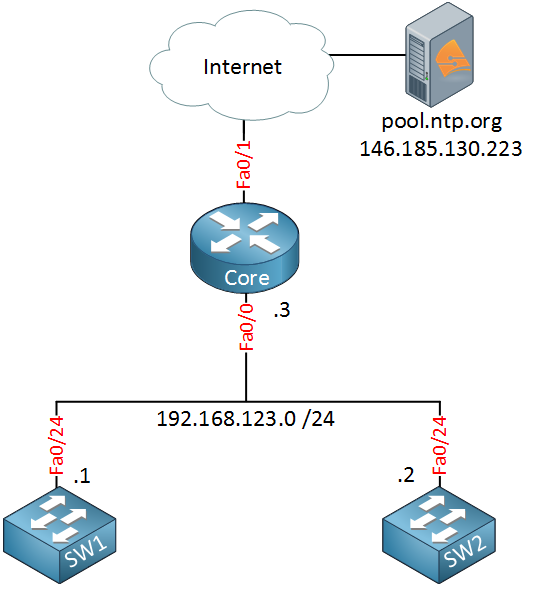
…it simply means that the Fa0/0 interface on the Core, and the Fa0/24 interfaces on the switches are on the same subnet. You can imagine that an unmanaged switch exists there connecting all three devices to the same broadcast domain/network segment. As you can see, all of the interface IP addresses indicate that they are indeed on the same subnet.
I hope this has been helpful!
Laz
---
### Author:  [@sisay414](https://forum.networklessons.com/u/sisay414)
#### Post date: [March 2, 2021, 8:34pm UTC](https://forum.networklessons.com/t/cisco-network-time-protocol-ntp/1104/88 "2021-03-02T20:34:46Z")
hey lazaros ,
thanks for the comment ,
i tried to build the topology again but it doesn’t match to the output of the configuration of the devices in my topology ,
im also tried to work on the HSRP lab and i didn’t understand what to configure when there R1 device in there ,
if there’s any option that you can send the lab’s so i can see how it look like or another option that you think of that would really help.
thank again ,
itzhak.
בתאריך יום ג׳, 2 במרץ 2021 ב-13:43 מאת Lazaros Agapides via [NetworkLessons.com](http://NetworkLessons.com) Community Forum \<[forum@networklessons.com](mailto:forum@networklessons.com)\>:
---
### Author:  [@lagapidis](https://forum.networklessons.com/u/lagapidis)
#### Post date: [March 4, 2021, 5:59am UTC](https://forum.networklessons.com/t/cisco-network-time-protocol-ntp/1104/89 "2021-03-04T05:59:51Z")
Hello Itzhak
Most lessons have a section where you can see the configurations used by Rene. You can use those as a guideline to create your topologies and configure your labs. If you have specific questions about the labs, about particular commands or behaviors that you experience in your topology, please share them in more detail so we can help you specifically.
I hope this has been helpful!
Laz
---
### Author:  [@bavalao1](https://forum.networklessons.com/u/bavalao1)
#### Post date: [June 3, 2022, 7:36pm UTC](https://forum.networklessons.com/t/cisco-network-time-protocol-ntp/1104/90 "2022-06-03T19:36:20Z")
Hello,
you dont need to make Core Router as NTP server (with ntp master command) to the SW because you are pointing from it to an NTP server already ([pool.ntp.org](http://pool.ntp.org)) ?
If you were not pointing to another NTP server you need to make it NTP server to be able to serve NTP to the clients (switches) ?
Is that correct?
Thank you
Regards
---
### Author:  [@lagapidis](https://forum.networklessons.com/u/lagapidis)
#### Post date: [June 6, 2022, 7:36am UTC](https://forum.networklessons.com/t/cisco-network-time-protocol-ntp/1104/91 "2022-06-06T07:36:32Z")
Hello Alexis
When you configure a network device, such as the Core Router in this lesson, to operate as an NTP server, you don’t actually have to explicitly configure it as a server. The fact that the switches are configured with the command `ntp server 192.168.123.3` makes the Core Router the NTP server, and the switches the NTP clients.
The `ntp server pool.ntp.org` command configured on the Core Router actually makes this device an NTP client to the [pool.ntp.org](http://pool.ntp.org) server, but at the same time it retains the role of NTP server for the switches.
Now the `master` command is simply used to let a device know to consider its own clock as valid, and it is also used to manually set a stratum number for this NTP source. This way, clients of this device will adopt their stratum number based on the locally configured one. This type of configuration means that no external NTP sources are used for synchronization.
I hope this has been helpful!
Laz
---
### Author:  [@konstantinos\_dimos](https://forum.networklessons.com/u/konstantinos_dimos)
#### Post date: [February 17, 2023, 7:36pm UTC](https://forum.networklessons.com/t/cisco-network-time-protocol-ntp/1104/92 "2023-02-17T19:36:50Z")
following the below attachment topology i am not able to make r2,r3 to be synchronized on gns3? any suggusetion? i tried almost all the combinations, sw3 point to r1 , then the remaining switches point to the others… , r1 as master, nothing again, then peering nothing…
[https://uniwagr-my.sharepoint.com/:u:/g/personal/cse30244\_uniwa\_gr/EYOeop7OOs9Ho03eRw54ePMBHeRAQk9aX4ZMAXsC4ivvcA?e=7umsHP](https://uniwagr-my.sharepoint.com/:u:/g/personal/cse30244_uniwa_gr/EYOeop7OOs9Ho03eRw54ePMBHeRAQk9aX4ZMAXsC4ivvcA?e=7umsHP)
---
### Author:  [@lagapidis](https://forum.networklessons.com/u/lagapidis)
#### Post date: [February 23, 2023, 7:28am UTC](https://forum.networklessons.com/t/cisco-network-time-protocol-ntp/1104/93 "2023-02-23T07:28:45Z")
Hello Konstantinos
There may be many different reasons for synchronization not taking place in an NTP environment. Although I am not able to take a look at your particular topology, you can use some of the principles found in the following comprehensive Cisco troubleshooting guides for NTP:
> **[Troubleshoot and Debug Network Time Protocol Issues](https://www.cisco.com/c/en/us/support/docs/ip/network-time-protocol-ntp/116161-trouble-ntp-00.html)**
>
> This document describes how to troubleshoot Network Time Protocol (NTP) issues with debug commands and the show ntp command.
> **[Troubleshoot Network Time Protocol (NTP)](https://www.cisco.com/c/en/us/support/docs/ip/network-time-protocol-ntp/108076-ntp-troubleshoot.html)**
>
> This document provides troubleshooting information for common problems with Network Time Protocol.
Now having said that, some of the most common issues that involve NTP include connectivity, stratum numbers too high, or misconfiguration with clock time zone or clock summer time commands.
Go through the troubleshooting process and let us know how you get along. Share some of your debugs and outputs with us so we can help you further if you have not resolved the issue.
I hope this has been helpful!
Laz
---
### Author:  [@shannon.williams](https://forum.networklessons.com/u/shannon.williams)
#### Post date: [April 12, 2023, 1:36am UTC](https://forum.networklessons.com/t/cisco-network-time-protocol-ntp/1104/94 "2023-04-12T01:36:37Z")
Hi!
In the current network I support, all Cisco devices (routers, switches, and firewalls) point to the domain controllers (Windows NTP server) to sync time. Now that we are hardening our posture to be more aligned with security best practices, we must configure NTP authentication keys on every network device so that the communication between the NTP client and server is authenticated. Is it possible to achieve md5 authentication on the Windows NTP server between Cisco devices? If so, how do you configure the md5 key on the windows server?
---
### Author:  [@lagapidis](https://forum.networklessons.com/u/lagapidis)
#### Post date: [April 17, 2023, 6:49am UTC](https://forum.networklessons.com/t/cisco-network-time-protocol-ntp/1104/95 "2023-04-17T06:49:54Z")
Hello Shannon
After doing a bit of research, I have found that, unfortunately, the Windows NTP server, which uses Windows Time Service (W32Time), does not natively support MD5 authentication for NTP as Cisco devices do. If you want to use MD5 you will have to look for another NTP server solution such as using a [Linux server with the NTP daemon “ntpd.”](https://linux.die.net/man/8/ntpd)
I hope this has been helpful!
Laz
---
### Author:  [@davidilles](https://forum.networklessons.com/u/davidilles)
#### Post date: [February 2, 2025, 1:12pm UTC](https://forum.networklessons.com/t/cisco-network-time-protocol-ntp/1104/96 "2025-02-02T13:12:49Z")
Hello, everyone.
Is CML completely broken when it comes to configuring NTP?
```auto
R3(config)#do show ntp ass
address ref clock st when poll reach delay offset disp
*~62.168.94.161 17.253.14.253 2 39 64 1 22.926 146422. 188.49
+~193.87.160.18 217.31.202.100 2 40 64 1 23.925 146423. 188.48
* sys.peer, # selected, + candidate, - outlyer, x falseticker, ~ configured
R3(config)#do show ntp status
Clock is unsynchronized, stratum 3, reference is 62.168.94.161
```
The first command clearly shows that R3 is synced with the first NTP server while the second command says the opposite.
And after a while, it just breaks completely
```auto
R3(config-if)#do show ntp ass
address ref clock st when poll reach delay offset disp
~185.242.56.3 217.31.202.100 2 48 64 17 28.629 9569.43 0.862
~87.197.160.189 217.31.202.100 2 9 64 37 37.338 10694.8 0.945
R3(config-if)#do show ntp stat
Clock is unsynchronized, stratum 16, no reference clock
```
Also, NTP takes around 15 minutes to synchronize in CML which is very long for me, especially when I want to try out different configurations and test different behaviours. Is there no way to speed this up?
David
---
### Author:  [@lagapidis](https://forum.networklessons.com/u/lagapidis)
#### Post date: [February 7, 2025, 6:03am UTC](https://forum.networklessons.com/t/cisco-network-time-protocol-ntp/1104/97 "2025-02-07T06:03:08Z")
Hello David
Let’s take a look at this output first:
> [@davidilles](#):
>
> ```auto
> R3(config)#do show ntp ass
>
> address ref clock st when poll reach delay offset disp
> *~62.168.94.161 17.253.14.253 2 39 64 1 22.926 146422. 188.49
> +~193.87.160.18 217.31.202.100 2 40 64 1 23.925 146423. 188.48
> * sys.peer, # selected, + candidate, - outlyer, x falseticker, ~ configured
>
> R3(config)#do show ntp status
> Clock is unsynchronized, stratum 3, reference is 62.168.94.161
>
> ```
Indeed, according to [Cisco’s official documentation](https://www.cisco.com/c/en/us/td/docs/ios-xml/ios/bsm/command/bsm-cr-book/bsm-cr-n1.html#wp2190072972) the “\*” does mean “synchronized”. The Cisco documentation I am referring to shows this output along with a different legend:
```auto
Device> show ntp associations
address ref clock st when poll reach delay offset disp
~172.31.32.2 172.31.32.1 5 29 1024 377 4.2 -8.59 1.6
+~192.168.13.33 192.168.1.111 3 69 128 377 4.1 3.48 2.3
*~192.168.13.57 192.168.1.111 3 32 128 377 7.9 11.18 3.6
* master (synced), # master (unsynced), + selected, - candidate, ~ configured
```
Note the `* master (synced)` indicator. In the output in your post however, the \* refers to a system peer. So I believe that this distinction is important in understanding your results.
Because I have been unable to find documentation that matches your CML output (which I have confirmed in the lab BTW), my personal hunch is that in your CML scenario, the \* simply means “selected” just like the “+” indicator in Cisco’s documentation. By this logic, the \* only indicates that this NTP server has been selected as the system peer, meaning the router **intends** to synchronize with it, but **is not necessarily synchronized**.
Now this seems to be supported by the fact that the `show ntp status` command shows that you are unsynchronized. Let’s examine why this could be.
Well, we see a very high offset value of 146442 ms. This means there is a significant time difference between your router and the NTP server. This prevents synchronization because NTP **will gradually adjust the clock** instead of making sudden jumps. This may also explain why you are experiencing a long time for synchronization to take place.
You can also see that the `reach` value is only 1 which means that only the last single poll of the server was successful. The reach value is in octal (base 8) which means it can only have the following values with the following meanings:
```auto
0 00000000 No response from server
1 00000001 Only the last poll succeeded
3 00000011 Last 2 polls succeeded
7 00000111 Last 3 polls succeeded
17 00011111 Last 5 polls succeeded
37 00111111 Last 6 polls succeeded
77 01111111 Last 7 polls succeeded
377 11111111 All 8 most recent polls succeeded
```
Now in your second output, you can see a reach value of 17 which means that the last 5 polls were successful, and you can also see that the offset has been reduced which is expected. But it seems that it was too much for NTP, and it simply stopped trying.
I suggest you attempt it again, and try to manually configure the local clock to be closer to the NTP server’s time, so the offset will be smaller and it will synchronize faster. Also ensure that you do indeed have connectivity to the NTP server, and check the reach value to ensure consistent connectivity.
I hope all of this will help you in your troubleshooting. Let us know how it goes!
I hope this has been helpful!
Laz
[Previous page](https://forum.networklessons.com/t/cisco-network-time-protocol-ntp/1104.md?page=4)