# Cisco SD-WAN Service VPN
**URL:** https://forum.networklessons.com/t/cisco-sd-wan-service-vpn/14955
**Category:** Lessons Discussion
**Created:** [July 22, 2021, 1:35pm UTC](https://forum.networklessons.com/t/cisco-sd-wan-service-vpn/14955 "2021-07-22T13:35:13Z")
**Posts on this page:** 20
**Page:** 1
### Author:  [@ReneMolenaar](https://forum.networklessons.com/u/ReneMolenaar)
#### Post date: [July 22, 2021, 1:35pm UTC](https://forum.networklessons.com/t/cisco-sd-wan-service-vpn/14955/1 "2021-07-22T13:35:13Z")
This topic is to discuss the following lesson:
> **[Cisco SD-WAN Service VPN](https://networklessons.com/cisco/cisco-sd-wan/cisco-sd-wan-service-vpn)**
>
> This lesson explains how to configure Cisco SD-WAN Service VPNs through the CLI or with device and feature templates.
---
### Author:  [@manojariyarathna](https://forum.networklessons.com/u/manojariyarathna)
#### Post date: [October 17, 2021, 3:28am UTC](https://forum.networklessons.com/t/cisco-sd-wan-service-vpn/14955/2 "2021-10-17T03:28:40Z")
Hi @ReneMolenaar and @lagapidis ,
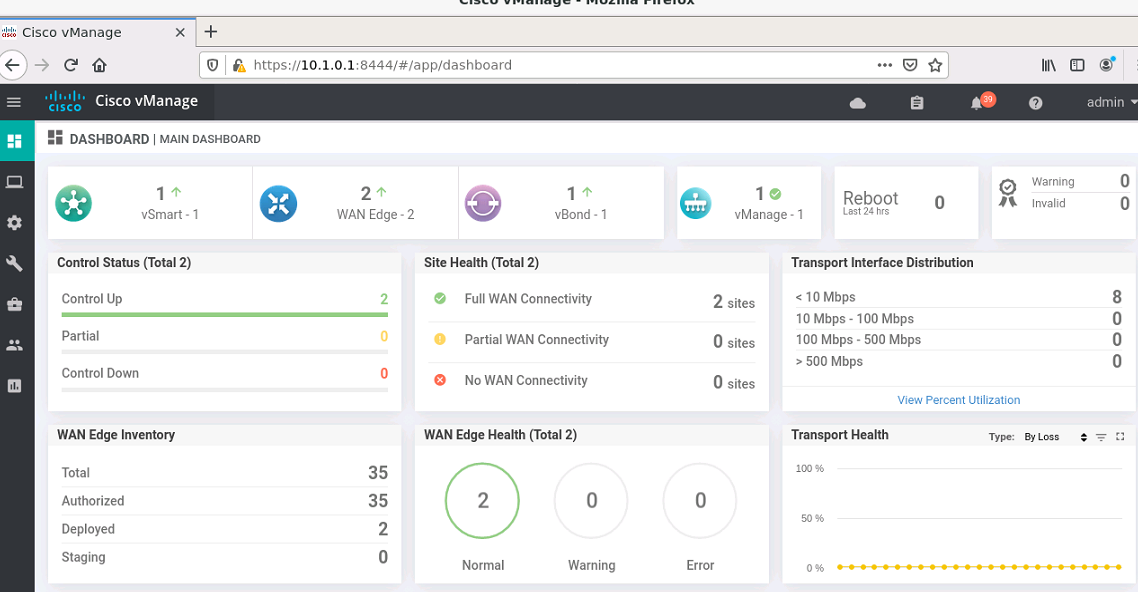
I have tested this with my lab.Service VPN is working fine.But I have some confusion because in my main dashboard it said partial wan connectivity.when I dig deeper I found that BFD sessions between two colors are down.

As far as I know WAN edge routers try to form overlay tunnels to every received TLOC from a different site using every available color.So can you please help me to understand this issue.Your help is highly appriciated
Update 🙂
Actually after I configure default route from both vEdge routers Full WAN connectivity obtained.
But If I create static routes to obtain the same connectivity it is not working…
For a example :
If create following summery routes insted of defult route BFD is down between two colors.
ip route 10.65.0.0/16 10.65.91.100
ip route 10.65.0.0/16 10.65.92.100
Can you please explain what is the logic here ..
---
### Author:  [@himanshusince1989](https://forum.networklessons.com/u/himanshusince1989)
#### Post date: [January 28, 2022, 5:06am UTC](https://forum.networklessons.com/t/cisco-sd-wan-service-vpn/14955/3 "2022-01-28T05:06:24Z")
In vEdge1 why next hop in is towards 10.65.91.100 , why not10.65.92.100…
---
### Author:  [@lagapidis](https://forum.networklessons.com/u/lagapidis)
#### Post date: [January 31, 2022, 7:28am UTC](https://forum.networklessons.com/t/cisco-sd-wan-service-vpn/14955/4 "2022-01-31T07:28:47Z")
Hello Himanshu
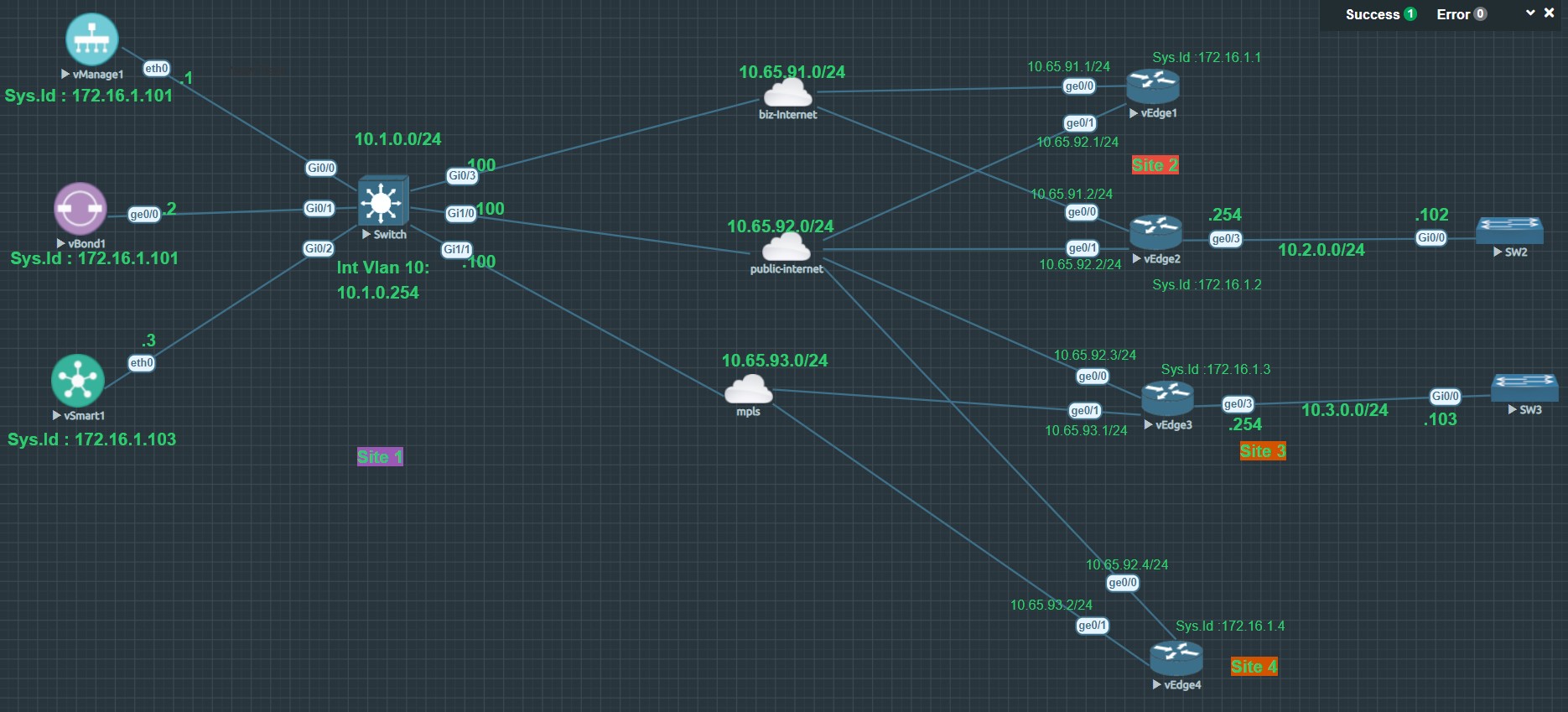
First of all, in this lab, there is no vEdge1, so I am assuming from the context, that you are referring to the output of vEdge3. Indeed, in the routing table of vEdge3, we see that in order to reach the network of 10.1.0.0/24, it says that the next-hop IP is 10.65.91.100.
Now, this is not necessarily incorrect, since, in the network diagram, you can see that vEdge3 does connect to the biz-internet cloud which is the 10.65.91.0/24 network. And you can see that the exit interface for vEdge3 to reach that network is Ge0/0 which is correctly indicated in the routing table.
You can see from the configs that this route is statically configured in vEdge3. It may just be that we want vEdge3 to reach this subnet via the biz-internet WAN rather than the public-internet WAN.
So you see, you can configure whatever routing you like, as long as it conforms to the needs of your network. In this particular case, we can assume that communication between Site1 and Site3 should take place via the “private” biz-internet WAN rather than via the public WAN.
I hope this has been helpful!
Laz
---
### Author:  [@azmuddincisco](https://forum.networklessons.com/u/azmuddincisco)
#### Post date: [December 6, 2022, 6:17am UTC](https://forum.networklessons.com/t/cisco-sd-wan-service-vpn/14955/5 "2022-12-06T06:17:14Z")
Hello,
Let’s say I have a router with 3 interfaces: 1 WAN interface and 2 LAN interfaces. The WAN interface is in VPN 0 and other 2 LAN interfaces are in VPN 10 and VPN 20. Are these three interfaces going to be able to talk to each other? If not, why and how can I make them talk to each other? Thanks a lot in advance.
Best Regards,
Azm
---
### Author:  [@ReneMolenaar](https://forum.networklessons.com/u/ReneMolenaar)
#### Post date: [January 13, 2023, 2:06pm UTC](https://forum.networklessons.com/t/cisco-sd-wan-service-vpn/14955/6 "2023-01-13T14:06:54Z")
Hi @azmuddincisco ,
It is possible to configure route leaking between VPNs yes. It’s called route leaking. Cisco has some examples here:
> **[Cisco Catalyst SD-WAN Routing Configuration Guide, Cisco IOS XE Catalyst...](https://www.cisco.com/c/en/us/td/docs/routers/sdwan/configuration/routing/ios-xe-17/routing-book-xe/m-routing-leaking-for-service-sharing.html)**
>
> Route Leaking Between VPNs
Rene
---
### Author:  [@bansah29](https://forum.networklessons.com/u/bansah29)
#### Post date: [April 6, 2023, 4:59am UTC](https://forum.networklessons.com/t/cisco-sd-wan-service-vpn/14955/7 "2023-04-06T04:59:16Z")
So all my configurations look great but OMP is not advertising connected routes are configured on the VPN10 templates. When I type `show omp routes` I can see the routes pointing to both LAN switches installed but when I type `show ip routes`, I can see the OMP advertised routes and I can not ping across both LANs between sites 2 & 3. Any help? Am using the latest version of the controller and vEdge routers.
See attached and below:
```auto
system
host-name vEdge2
system-ip 172.16.1.2
site-id 2
admin-tech-on-failure
no route-consistency-check
no vrrp-advt-with-phymac
sp-organization-name mknet-sdwan
organization-name mknet-sdwan
vbond 10.1.0.2
aaa
auth-order local radius tacacs
usergroup basic
task system read write
task interface read write
!
usergroup netadmin
!
usergroup operator
task system read
task interface read
task policy read
task routing read
task security read
!
user admin
password $6$siwKBQ==$wT2lUa9BSreDPI6gB8sl4E6PAJoVXgMbgv/whJ8F1C6sWdRazdxorYYTLrL6syiG6qnLABTnrE96HJiKF6QRq1
!
ciscotacro-user true
ciscotacrw-user true
!
logging
disk
enable
!
!
ntp
parent
no enable
stratum 5
exit
!
support
zbfw-tcp-finwait-time 30
zbfw-tcp-idle-time 3600
zbfw-tcp-synwait-time 30
zbfw-udp-idle-time 30
!
!
omp
no shutdown
graceful-restart
advertise connected
advertise static
!
security
ipsec
integrity-type ip-udp-esp esp
!
!
banner
motd "Welcome to MKNet vEdge Router"
!
vpn 0
interface ge0/0
ip address 10.65.91.2/24
tunnel-interface
encapsulation ipsec
color biz-internet
allow-service all
no allow-service bgp
allow-service dhcp
allow-service dns
allow-service icmp
no allow-service sshd
no allow-service netconf
no allow-service ntp
no allow-service ospf
no allow-service stun
allow-service https
!
no shutdown
!
interface ge0/1
ip address 10.65.92.2/24
tunnel-interface
encapsulation ipsec
color public-internet
allow-service all
no allow-service bgp
allow-service dhcp
allow-service dns
allow-service icmp
no allow-service sshd
no allow-service netconf
no allow-service ntp
no allow-service ospf
no allow-service stun
allow-service https
!
no shutdown
!
ip route 10.1.0.0/24 10.65.91.100
!
vpn 10
interface ge0/3
ip address 10.2.0.254/24
no shutdown
!
omp
advertise connected
!
!
vpn 512
interface eth0
shutdown
!
!
```
* * *
```auto
system
host-name vEdge3
system-ip 172.16.1.3
site-id 3
admin-tech-on-failure
no route-consistency-check
no vrrp-advt-with-phymac
organization-name mknet-sdwan
vbond 10.1.0.2
aaa
auth-order local radius tacacs
usergroup basic
task system read
task interface read
!
usergroup netadmin
!
usergroup operator
task system read
task interface read
task policy read
task routing read
task security read
!
usergroup tenantadmin
!
user admin
password $6$3e3dc1598d9bdb68$/F.xg3onyxTe17w8xBu3NbGtrWHVxd5ic.bjr5iGJymzWzy1885H4jQf2/OkdABwI4txtVoyZTmArzYlDKiEE0
!
ciscotacro-user true
ciscotacrw-user true
!
logging
disk
enable
!
!
ntp
parent
no enable
stratum 5
exit
!
support
zbfw-tcp-finwait-time 30
zbfw-tcp-idle-time 3600
zbfw-tcp-synwait-time 30
zbfw-udp-idle-time 30
!
!
omp
no shutdown
graceful-restart
advertise connected
advertise static
!
security
ipsec
integrity-type ip-udp-esp esp
!
!
vpn 0
interface ge0/0
ip address 10.65.92.3/24
ipv6 dhcp-client
tunnel-interface
encapsulation ipsec
color public-internet
allow-service all
no allow-service bgp
allow-service dhcp
allow-service dns
allow-service icmp
no allow-service sshd
no allow-service netconf
no allow-service ntp
no allow-service ospf
no allow-service stun
allow-service https
!
no shutdown
!
interface ge0/1
ip address 10.65.93.1/24
tunnel-interface
encapsulation ipsec
color mpls
allow-service all
no allow-service bgp
allow-service dhcp
allow-service dns
allow-service icmp
no allow-service sshd
no allow-service netconf
no allow-service ntp
no allow-service ospf
no allow-service stun
allow-service https
!
no shutdown
!
ip route 10.1.0.0/24 10.65.92.100
!
vpn 10
interface ge0/3
ip address 10.3.0.254/24
no shutdown
!
omp
advertise connected
!
!
vpn 512
interface eth0
ip dhcp-client
ipv6 dhcp-client
no shutdown
!
!
```
---
### Author:  [@ReneMolenaar](https://forum.networklessons.com/u/ReneMolenaar)
#### Post date: [April 26, 2023, 12:27pm UTC](https://forum.networklessons.com/t/cisco-sd-wan-service-vpn/14955/8 "2023-04-26T12:27:24Z")
Hi @bansah29 ,
You might have solved this by now but if you still have issues, see if your output matches mine here:
[https://notes.networklessons.com/cisco-sd-wan-verify-connectivity-in-service-vpn](https://notes.networklessons.com/cisco-sd-wan-verify-connectivity-in-service-vpn)
Rene
---
### Author:  [@champ](https://forum.networklessons.com/u/champ)
#### Post date: [May 28, 2023, 12:39pm UTC](https://forum.networklessons.com/t/cisco-sd-wan-service-vpn/14955/9 "2023-05-28T12:39:22Z")
Hi Rene and team,
I cannot seem to see my omp routes on vpn 0 route table
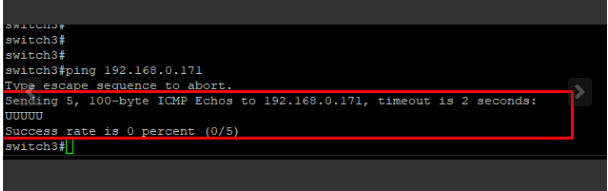
I also cannot ping both vedges WAN form LAN side
Here is the problem below, I do not seem to be able to ping any interface off my LAN interface
Literally drops at the edge
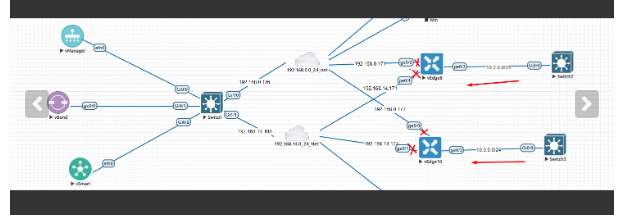
Also, VPN0 routes table not showing omp routes
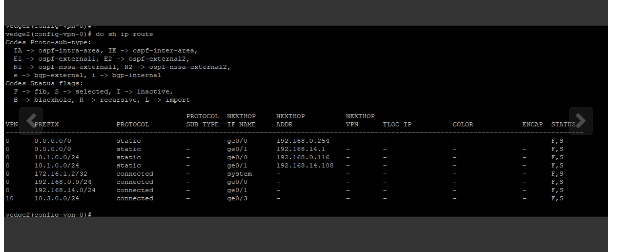
Also, VPN0 routes table not showing omp routes
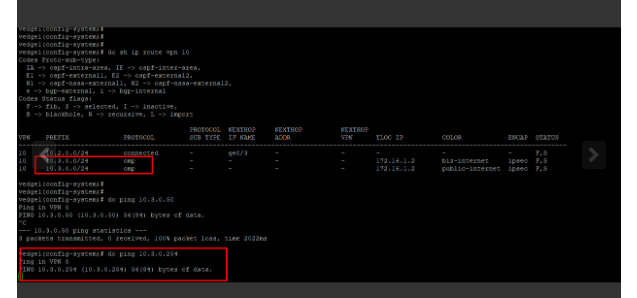
Any thoughts?
---
### Author:  [@kent2612](https://forum.networklessons.com/u/kent2612)
#### Post date: [July 19, 2023, 11:01am UTC](https://forum.networklessons.com/t/cisco-sd-wan-service-vpn/14955/10 "2023-07-19T11:01:39Z")
Hi Rene,
Upon successfully onboarded both vEdge and cEdge, traffic is able to route via MPLS or Biz-internet where I could ping 8.8.8.8. But I notice hosts behind service VPN / VRF (vEdge and cEdge) are not able to ping to 8.8.8.8. Traffic is not passing vEdge and cEdge.
I believed need to Leak Routes between Global VRF and Service VPNs or is there anything I have missed?
Tired the command below, not sure why both route-replicate and global-address-family ipv4 command is missing below on cEdge?
Also for route leak how do I configure using CLI on vEdge?
```auto
cEdge(config-ipv4)# vrf definition 1
cEdge(config-vrf)# address-family ipv4
cEdge(config-ipv4)# route-replicate from vrf global unicast connected
-----------------------^
syntax error: unknown argument
cEdge(config-ipv4)#
**Configuration on cEdge vrf 1**
cEdge-30#sh run vrf
Building configuration...
Current configuration : 546 bytes
vrf definition 1
rd 1:1
!
address-family ipv4
route-target export 1:1
route-target import 1:1
exit-address-family
!
!
interface GigabitEthernet3
description Link to LAN
vrf forwarding 1
ip address 10.0.30.30 255.255.255.0
negotiation auto
no mop enabled
no mop sysid
!
ip route vrf 1 0.0.0.0 0.0.0.0 172.16.10.1 global
ip route vrf 1 0.0.0.0 0.0.0.0 172.16.20.1 global
vrf definition 65528
!
address-family ipv4
exit-address-family
!
!
interface Loopback65528
vrf forwarding 65528
ip address 192.168.1.1 255.255.255.255
!
end
cEdge-30#
**Configuration for vEdge VPN 1**
vEdge-10# show run vpn 1
vpn 1
name INSIDE
router
ospf
router-id 10.10.10.10
timers spf 200 1000 10000
redistribute connected
redistribute omp
area 10
interface ge0/3
exit
exit
!
bgp 10
address-family ipv4-unicast
redistribute omp
!
neighbor 10.0.10.101
no shutdown
remote-as 10
!
!
!
interface ge0/3
description "Service VPN 1"
ip address 10.0.10.10/24
no shutdown
!
interface loopback1
description "Interface loopback1"
ip address 1.1.1.10/32
no shutdown
!
interface loopback2
description "Interface loopback2"
ip address 2.2.2.10/32
no shutdown
!
omp
advertise ospf external
advertise connected
advertise static
!
!
vEdge-10#
```
---
### Author:  [@ReneMolenaar](https://forum.networklessons.com/u/ReneMolenaar)
#### Post date: [July 25, 2023, 9:29am UTC](https://forum.networklessons.com/t/cisco-sd-wan-service-vpn/14955/11 "2023-07-25T09:29:26Z")
Hello @kent2612 ,
With 8.8.8.8, you mean Google DNS right? Not some loopback with this IP address that you use in your topology?
I don’t have an example ready, but what you should look for is Direct Internet Access. It requires NAT and a policy to make it work, but this is what allows a service VPN to access the Internet.
Rene
---
### Author:  [@a.a.selama](https://forum.networklessons.com/u/a.a.selama)
#### Post date: [February 13, 2024, 12:47am UTC](https://forum.networklessons.com/t/cisco-sd-wan-service-vpn/14955/12 "2024-02-13T00:47:10Z")
Hi, It is exactly same problem I have with version 20.1.1.
OMP is not advertising connected routes are configured on the VPN10. I have tried by using cli and templates, in both cases OMP not advertising vpn 10 connected network.
The SDWAN control connections are up; no BFD sessions. I could not make BFD sessions the be up.
---
### Author:  [@lagapidis](https://forum.networklessons.com/u/lagapidis)
#### Post date: [February 14, 2024, 9:10am UTC](https://forum.networklessons.com/t/cisco-sd-wan-service-vpn/14955/13 "2024-02-14T09:10:03Z")
Hello Abdussalam
Have you taken a look at this response from Rene?
> [@Cisco SD-WAN Service VPN](https://forum.networklessons.com/t/cisco-sd-wan-service-vpn/14955/8):
>
> Hi @bansah29 , You might have solved this by now but if you still have issues, see if your output matches mine here: [https://notes.networklessons.com/cisco-sd-wan-verify-connectivity-in-service-vpn](https://notes.networklessons.com/cisco-sd-wan-verify-connectivity-in-service-vpn) Rene
Please take a look and see if you get similar output with that in the lesson. If not, let us know so we can help you further.
I hope this has been helpful!
Laz
---
### Author:  [@a.a.selama](https://forum.networklessons.com/u/a.a.selama)
#### Post date: [February 14, 2024, 9:32am UTC](https://forum.networklessons.com/t/cisco-sd-wan-service-vpn/14955/14 "2024-02-14T09:32:31Z")
Hi,
Yes I have, I cant see omp route in routing table `#show ip route vpn 10`.
The issue is BFD is down, this will cause omp to not work.
I can ping from vEdge to vsmart, vbond and vmanage. vpn 0 is working fine.
---
### Author:  [@ReneMolenaar](https://forum.networklessons.com/u/ReneMolenaar)
#### Post date: [February 19, 2024, 11:11am UTC](https://forum.networklessons.com/t/cisco-sd-wan-service-vpn/14955/15 "2024-02-19T11:11:33Z")
What about pinging between two vEdge routers?
[https://notes.networklessons.com/cisco-sd-wan-verify-connectivity-in-service-vpn#test-reachability](https://notes.networklessons.com/cisco-sd-wan-verify-connectivity-in-service-vpn#test-reachability)
Does that work too?
---
### Author:  [@sathish84be](https://forum.networklessons.com/u/sathish84be)
#### Post date: [November 23, 2024, 2:24pm UTC](https://forum.networklessons.com/t/cisco-sd-wan-service-vpn/14955/16 "2024-11-23T14:24:01Z")
Hello Team,
I replicated the same lab, but I don’t see any OMP routes on either Vedge router.
however i noticed that i dont see any output for bfd and ipsec.
```auto
Vedge-1# show bfd sessions
Vedge-1#
Vedge-1#
Vedge-1# show ipsec inbound-connections
Vedge-1# show ipsec outbound-connections
Vedge-1#
```
![image]()
---
### Author:  [@lagapidis](https://forum.networklessons.com/u/lagapidis)
#### Post date: [November 28, 2024, 5:57am UTC](https://forum.networklessons.com/t/cisco-sd-wan-service-vpn/14955/17 "2024-11-28T05:57:38Z")
Hello Sathish
Let’s take a look at the info you shared. There seems to be a lack of BFD and IPsec connections between the devices. The `Inv,U` status that you indicate in your image shows that the route is invalid and unreachable. The originator of the route is 192.168.1.2, but the route is not propagating correctly or being installed into the routing table.
WIthout knowing more about your setup, the most probable root cause is a control connection issue or data plane misconfiguration (BFD/IPsec). You can start by issuing the `show control connections` command on the vEdge routers to confirm they are connected to the vSmart controller and other control devices. You should also verify your WAN interface configurations and your BFD configs.
Some additional resources to check to help you out include:
- [This post](https://forum.networklessons.com/t/cisco-sd-wan-service-vpn/14955/2) from a previous poster who had a similar problem but resolved it.
- [Cisco’s troubleshooting guide](https://www.cisco.com/c/en/us/support/docs/routers/sd-wan/214509-troubleshoot-control-connections.html) for dealing with SD-WAN control connection problems.
Let us know how you get along and if we can help you further!
I hope this has been helpful!
Laz
---
### Author:  [@thschaff](https://forum.networklessons.com/u/thschaff)
#### Post date: [March 7, 2025, 4:26pm UTC](https://forum.networklessons.com/t/cisco-sd-wan-service-vpn/14955/18 "2025-03-07T16:26:32Z")
Hello team,
maybe the part regarding redistribution of connected interface into OMP has changed.
Based on my lab tests and the following Cisco documentation [here](https://www.cisco.com/c/en/us/td/docs/routers/sdwan/configuration/routing/ios-xe-17/routing-book-xe/m-unicast-routing.html#:~:text=OMP%20automatically%20redistributes%20the%20following%20types%20of%20routes%20that%20it%20learns%20either%20locally%20or%20from%20its%20routing%20peers%3A), we don’t have to specifically toggle the redistribution option for connected interfaces into OMP.
By default the following types are automatically redistributed into OMP:
- Connected
- Static
- OSPF intra-area routes
- OSPF inter-area routes
- OSPFv3 intra-area routes (Address-Family IPv6)
- OSPFv3 inter-area routes (Address-Family IPv6)
If this is correct, it would be great to update the content.
Thank you.
---
### Author:  [@manikanthaws824](https://forum.networklessons.com/u/manikanthaws824)
#### Post date: [March 9, 2025, 10:22am UTC](https://forum.networklessons.com/t/cisco-sd-wan-service-vpn/14955/19 "2025-03-09T10:22:58Z")
Hi @ReneMolenaar
I have Vedge and C8300 Edge Running on SDWAN, Can I configure T-Loc Extension in between them, If yes, could you please show and example with topology
---
### Author:  [@lagapidis](https://forum.networklessons.com/u/lagapidis)
#### Post date: [March 10, 2025, 6:57am UTC](https://forum.networklessons.com/t/cisco-sd-wan-service-vpn/14955/20 "2025-03-10T06:57:26Z")
Hello Thomas
Thanks for your suggestion, I will relay it to @ReneMolenaar to take a look and see if any modifications are needed…
Thanks again!
Laz
[Next page](https://forum.networklessons.com/t/cisco-sd-wan-service-vpn/14955.md?page=2)