# Cisco Terminal Server Configuration Example
**URL:** https://forum.networklessons.com/t/cisco-terminal-server-configuration-example/1090
**Category:** Lessons Discussion
**Created:** [December 26, 2016, 10:39pm UTC](https://forum.networklessons.com/t/cisco-terminal-server-configuration-example/1090 "2016-12-26T22:39:36Z")
**Posts on this page:** 15
**Page:** 2
### Author:  [@stig.the.legend](https://forum.networklessons.com/u/stig.the.legend)
#### Post date: [February 8, 2017, 1:15pm UTC](https://forum.networklessons.com/t/cisco-terminal-server-configuration-example/1090/21 "2017-02-08T13:15:19Z")
Thanks for the fast reply, it’s just a home LAB environment so not too afraid =) Reload in 10 is a great idea - it’s a shame the rollback feature on cisco doesn’t work the same way that junipers implementation does
---
### Author:  [@moorthyy27](https://forum.networklessons.com/u/moorthyy27)
#### Post date: [May 4, 2018, 5:34pm UTC](https://forum.networklessons.com/t/cisco-terminal-server-configuration-example/1090/24 "2018-05-04T17:34:20Z")
hi rene
I am using cisco asa 5505 i want to access cisco asa 5505 from terminal server cisco 2511 in asa i could not find any line con or line vty command what i have configure in cisco asa to access from 2511 like other routers and switches i could not find any thingt on internet i need your help please post me config for asa
---
### Author:  [@ReneMolenaar](https://forum.networklessons.com/u/ReneMolenaar)
#### Post date: [May 11, 2018, 12:11pm UTC](https://forum.networklessons.com/t/cisco-terminal-server-configuration-example/1090/25 "2018-05-11T12:11:00Z")
Hello Rudhra,
By default, an ASA uses the exact same console settings as routers or switches. I also use a 2511 and I use the exact same setting for my routers/switches and ASAs.
Did someone mess up the console settings of your ASA?
Rene
---
### Author:  [@thiernoamadoubah](https://forum.networklessons.com/u/thiernoamadoubah)
#### Post date: [March 27, 2019, 8:13pm UTC](https://forum.networklessons.com/t/cisco-terminal-server-configuration-example/1090/26 "2019-03-27T20:13:13Z")
Hi,
That very well explained, but I just have one question. This brief representation below is to give you an idea on I’m about to explain.
R1-\>R2-\>X1, X2, X3
We have one terminal server, Which R1 represent, set up in my workplace and I would like to use one octal cable to plug in another router, R2, which will have couple of switches(X1,X2,X3) connected to it for my CCNP switch practice. The issue I have is when I’m consoled into one of the switches and want to move to another switch, I usually type CTR+SHIFT+6 and then X, but this command send me back to the R1 instead of R2 And if I clear the line and try to console back to R2, it automatically send me to the switch I was consoled into last, it skip R2. To be able to console to R2 and get to a different switch, I’ll have to reboot it every time. I just want to know if there a more efficient way to move around the switches or connect to them simultaneously.
---
### Author:  [@ReneMolenaar](https://forum.networklessons.com/u/ReneMolenaar)
#### Post date: [April 3, 2019, 7:35am UTC](https://forum.networklessons.com/t/cisco-terminal-server-configuration-example/1090/27 "2019-04-03T07:35:20Z")
Hi Thierno,
I think this should work:
CTRL-SHIFT-6
Let go, then do:
CTRL-SHIFT-6-X
Let me know if it works 🙂
Rene
---
### Author:  [@conradchamerski](https://forum.networklessons.com/u/conradchamerski)
#### Post date: [March 19, 2020, 8:47pm UTC](https://forum.networklessons.com/t/cisco-terminal-server-configuration-example/1090/28 "2020-03-19T20:47:18Z")
Hello,
I’m trying to configure a terminal server ISR4221, but I can’t find any information about the port mapping and the telnet port for this device. Any ideas? Thanks
---
### Author:  [@lagapidis](https://forum.networklessons.com/u/lagapidis)
#### Post date: [March 20, 2020, 8:32am UTC](https://forum.networklessons.com/t/cisco-terminal-server-configuration-example/1090/29 "2020-03-20T08:32:42Z")
Hello Conrad
In order to use the ISR4221 as a terminal server, you will require the use of an Asynchronous Terminal Server Interface Module that will provide you with multiple serial ports to connect to your devices. You can find out more info about those here:
> **[Asynchronous Terminal Server Interface Modules for Cisco 4000 Series...](https://www.cisco.com/c/en/us/products/collateral/routers/4000-series-integrated-services-routers-isr/datasheet-c78-739968.html)**
>
> Asynchronous Terminal Server Interface Modules for Cisco 4000 Series Integrated Services Routers Data Sheet
Once installed, you can simply use the show line command to check the TTY line summary information. This will show you information about the mapping between the serial interfaces, and the line numbers. An example of this can be found at this Cisco documentation:
> **[Installing the Cisco Asynchronous Serial NIM - 16/24 Port for Cisco 4000...](https://www.cisco.com/c/en/us/td/docs/routers/access/interfaces/NIM/software/configuration/guide/Async-Serial-NIM-16-24-Port-xe-16-book.html#concept_A4E906C5709A42FC958E73428DD0CB36)**
>
> Installing the Cisco Asynchronous Serial NIM - 16/24 Port for Cisco 4000 Series ISRs -Quick Start Guide: Installing the Cisco Asynchronous Serial NIM - 16/24 Port for Cisco 4000 Series ISRs
Something tells me though that I may not be adequately answering your question, so if this is the case, please clarify and we can respond more appropriately.
I hope this has been helpful!
Laz
---
### Author:  [@conradchamerski](https://forum.networklessons.com/u/conradchamerski)
#### Post date: [March 20, 2020, 2:33pm UTC](https://forum.networklessons.com/t/cisco-terminal-server-configuration-example/1090/30 "2020-03-20T14:33:16Z")
Hi Laz,
thanks for the quick reply. Yes the ISR came installed with the Asynch modules, the problem I’m having is "I dont know which ports to allocate in the following command:
`ip host SwitchA #?#? 1.1.1.1`
I saw an example where the port mapping was in the range of 200x, but where is this information? Why does it start in the 2000s?
Thanks!
---
### Author:  [@lagapidis](https://forum.networklessons.com/u/lagapidis)
#### Post date: [March 21, 2020, 6:35am UTC](https://forum.networklessons.com/t/cisco-terminal-server-configuration-example/1090/31 "2020-03-21T06:35:05Z")
Hello Conrad
This is an excellent question, and it has given the opportunity for further research. It seems that Cisco has predefined various ports for use with TTY lines. Specifically, for Async ports, you use the absolute numbers of the Async ports (1 to 16 for example) and prepend 20 at the beginning. In the book [CCIE Practical Studies Volume 1](https://books.google.gr/books?id=JQZLV_n__PQC&dq=ip+host+table+for+reverse+telnet&source=gbs_navlinks_s), page 55, it states:
> Lines 1 through 16 are TTY lines. you use these lines for the reverse Telnet sessions. To configure a reverse Telnet session, simply add a 20 in front of the absolute line number. The syntax is in one of the following two forms. From the console mode, it is
>
> `telnet` _`ip_address`_ **`20xx`**
>
> where xx is the absolute line number (in this case 1 to 16)… The next way to configure reverse Telnet is entered from configuation mode, in the form of an IP host table. From the configuration mode, use
>
> `ip host` _`hostname`_ `20xx` _`ip_address`_.
>
> The IP address used should be the one on a loopback interface. This way you can use a reverse Telnet session while other physical interfaces are down.
I have also found that Cisco has defined ports 20xx for use as TTY rotary lines. Rotary lines seems to refer to the async type connections.
Finally, I have also found that there are various port ranges that are used for different Telnet access scenarios. In the [High-Speed Cisco networks book](https://books.google.gr/books?id=lhRhVEfGU5kC&dq=(TTY+rotary+lines+start+at+port+2000)&source=gbs_navlinks_s) by John Vacca, on page 511 it shows the following table:
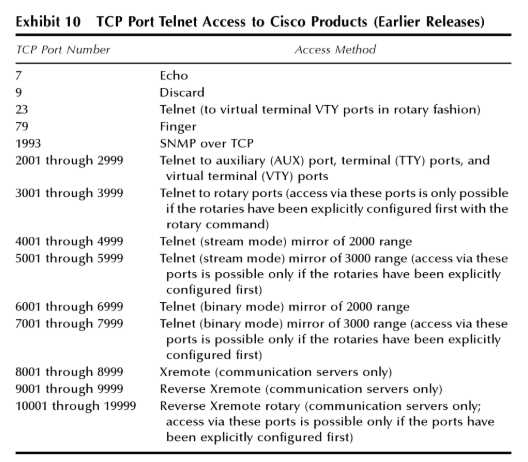
Here you can see that the 2001 to 2999 range is used for AUX and Terminal TTY ports.
So ultimately, I believe it is just a matter of convention. Use 20XX and place the absolute number of the async connection where the XX is and there you go.
I hope this has been helpful!
Laz
---
### Author:  [@conradchamerski](https://forum.networklessons.com/u/conradchamerski)
#### Post date: [March 23, 2020, 2:51pm UTC](https://forum.networklessons.com/t/cisco-terminal-server-configuration-example/1090/32 "2020-03-23T14:51:50Z")
Thanks for the great response!
---
### Author:  [@moorthyy27](https://forum.networklessons.com/u/moorthyy27)
#### Post date: [August 12, 2020, 1:37pm UTC](https://forum.networklessons.com/t/cisco-terminal-server-configuration-example/1090/33 "2020-08-12T13:37:17Z")
this is my confioguration 2511 as rj
```
User Access Verification
Username:
Username: admin
Password:
access>
access>en
Password:
access#sh run
Building configuration...
Current configuration:
!
version 12.0
service timestamps debug uptime
service timestamps log uptime
no service password-encryption
!
hostname access
!
aaa new-model
enable password admin
!
username admin privilege 15 password 0 admin
ip subnet-zero
ip host r1 2001 10.10.10.10
ip host r2 2002 10.10.10.10
ip host r3 2003 10.10.10.10
ip host s1 2004 10.10.10.10
ip host s2 2005 10.10.10.10
ip host s3 2006 10.10.10.10
ip host asa1 2007 10.10.10.10
ip host srx 2008 10.10.10.10
ip host s4 2009 10.10.10.10
ip host s5 2010 10.10.10.10
ip host asa2 2011 10.10.10.10
ip host r4 2012 10.10.10.10
clock timezone in 5 30
!
!
!
interface Loopback0
ip address 10.10.10.10 255.255.255.255
no ip directed-broadcast
!
interface Ethernet0
ip address 192.168.0.100 255.255.255.0
no ip directed-broadcast
!
interface Serial0
no ip address
no ip directed-broadcast
no ip mroute-cache
shutdown
no fair-queue
!
ip classless
!
!
line con 0
```
i am unable to telnet to devices
i am using rj45 roll back back to back
---
### Author:  [@lagapidis](https://forum.networklessons.com/u/lagapidis)
#### Post date: [August 14, 2020, 9:35am UTC](https://forum.networklessons.com/t/cisco-terminal-server-configuration-example/1090/34 "2020-08-14T09:35:48Z")
Hello Rudhra
It is not possible to connect from one device to another direction from one console port to another. Two options you can use is to connect from the AUX port to the console port or from one AUX port to another. You can find out information on how to configure this at the following two links:
> **[Configure Terminal Server through Menu Options](https://www.cisco.com/c/en/us/support/docs/dial-access/asynchronous-connections/200462-Terminal-server-configuration-using-Menu.html)**
>
> This document describes the use of Menu options to manage the access of devices connected to a Router terminal server.
> **[Connecting Routers Back-to-Back Through the AUX Ports](https://www.cisco.com/c/en/us/support/docs/dial-access/asynchronous-connections/10365-auxback.html)**
>
> This sample configuration shows you how to directly connect two routers,without a modem or other data communication equipment (DCE) devices. For more information on how to configure modems on auxiliary (AUX) or console ports,see Modem-Router...
The best way however to do this is to use a proper terminal server that will give you the option of connecting to multiple devices via the console.
I hope this has been helpful!
Laz
---
### Author:  [@mohamadzakwan88](https://forum.networklessons.com/u/mohamadzakwan88)
#### Post date: [April 22, 2021, 6:50am UTC](https://forum.networklessons.com/t/cisco-terminal-server-configuration-example/1090/35 "2021-04-22T06:50:02Z")
Hello,
Today in my work I see customer login into terminal server with this command.
```
ssh -l username:19 10.1.1.20
ssh -l username:20 10.1.1.20
```
What is does the colon:numeric means in this command?
---
### Author:  [@lagapidis](https://forum.networklessons.com/u/lagapidis)
#### Post date: [April 24, 2021, 4:56am UTC](https://forum.networklessons.com/t/cisco-terminal-server-configuration-example/1090/36 "2021-04-24T04:56:01Z")
Hello Mohamad
Taking a look at [this Cisco command line reference](https://www.cisco.com/c/en/us/td/docs/ios-xml/ios/security/s1/sec-s1-xe-3se-5700-cr-book/sec-s1-xe-3se-5700-cr-book_chapter_0100.html#wp3333084566), the command is the following:
`ssh -l userid : vrfname number ip-address`
where:
- the “:” used signifies the fact that a port number and IP address will follow the user ID
- vrfname - this is used to denote the VRF used. In your case there is no VRF mentioned, so the default VRF is used.
- number - this is the terminal or auxiliary line number
- ip-address - this is the IP address of the terminal server.
The reference also states the following:
> The `userid` argument and `: number ip-address` delimiter and arguments must be used **if you are configuring reverse SSH by including port information in the `userid` field** (a method that is easier than the longer method of listing each terminal or auxiliary line on a separate command configuration line). The `vrfname` allows SSH to establish sessions with hosts whose addresses are in a VRF instance.
I hope this has been helpful!
Laz
---
### Author:  [@mohamadzakwan88](https://forum.networklessons.com/u/mohamadzakwan88)
#### Post date: [April 25, 2021, 12:49am UTC](https://forum.networklessons.com/t/cisco-terminal-server-configuration-example/1090/37 "2021-04-25T00:49:19Z")
Hello Lagapides,
Thanks for answering. In my case, since my customer is actually ssh’ing into a terminal router, then it’s most probably be this command.
`ssh -l userid :rotary number ip-address`
[Previous page](https://forum.networklessons.com/t/cisco-terminal-server-configuration-example/1090.md?page=1)