# Cisco Wireless LAN Controller (WLC) Basic Configuration
**URL:** https://forum.networklessons.com/t/cisco-wireless-lan-controller-wlc-basic-configuration/8604
**Category:** Lessons Discussion
**Created:** [October 21, 2019, 2:47pm UTC](https://forum.networklessons.com/t/cisco-wireless-lan-controller-wlc-basic-configuration/8604 "2019-10-21T14:47:13Z")
**Posts on this page:** 20
**Page:** 2
### Author:  [@mpsuliga](https://forum.networklessons.com/u/mpsuliga)
#### Post date: [January 15, 2021, 6:32pm UTC](https://forum.networklessons.com/t/cisco-wireless-lan-controller-wlc-basic-configuration/8604/21 "2021-01-15T18:32:18Z")
Hi,
I think this is a related question.
I have this set up that stops working at some point and I can’t figure out why.
Sw1 connects to the DHCP server, to the WLC and to Sw2 and Sw3. WLC has management IP address of 10.0.0.11 and server is 10.0.0.10.
Sw2 connects to Lightweight APs and to the end-user laptop.
The APs and the laptop use DHCP and the laptop can log in to the WLC through its GUI - [https://10.0.0.11](https://10.0.0.11).
Everything works fine, wireless users authenticate to APs, APs have CAPWAP tunnels to the WLC.
When I create VLANs for management and sales etc. I assign the laptop’s interface on Sw2 to the management vlan, create other VLANs and set up a trunk between Sw2 and Sw1, and from Sw1 to the WLC, I cannot access the WLC’s GUI anymore. The native vlans on trunks are the same and other VLAN’s settings are fine, the interfaces trunk, but the connection between the laptop and the WLC’s GUI is lost.
Can anyone explain the problem with this set up, please?
Does each vlan need a dhcp pool?
Thank you in advance
Marcin
---
### Author:  [@lagapidis](https://forum.networklessons.com/u/lagapidis)
#### Post date: [January 17, 2021, 10:46am UTC](https://forum.networklessons.com/t/cisco-wireless-lan-controller-wlc-basic-configuration/8604/23 "2021-01-17T10:46:35Z")
Hello Marcin
Take a look at this response:
> [@WLC connection lost when switches trunk](https://forum.networklessons.com/t/wlc-connection-lost-when-switches-trunk/13335/2):
>
> Hello Marcin There could be several things that are going on here. Initially, you are able to access the DHCP server (since the laptop obtains an IP address) and the WLC from the laptop since they are on the same subnet and same VLAN. Now when you introduce new VLANs, you must ensure that each VLAN has its own IP addressing space, that is, a defined subnet, and that the DHCP server is providing IP addressing information for all of these subnets. You must also ensure that the devices you want…
I hope this has been helpful!
Laz
---
### Author:  [@nevescutambo](https://forum.networklessons.com/u/nevescutambo)
#### Post date: [March 11, 2021, 8:41pm UTC](https://forum.networklessons.com/t/cisco-wireless-lan-controller-wlc-basic-configuration/8604/24 "2021-03-11T20:41:37Z")
Hi All,
Can U help, plz
The service-port interface is used for out-of-band management of the controller. If the management workstation is in a remote subnet, it may be necessary to add a IPv4 route on the controller in order to manage the controller from the remote workstation.
It is important to note that the service-port IP address must not reside on the same subnet as the Manager/AP-Manager interface.
II didn’t understand, what does out-of-band management mean?
---
### Author:  [@lagapidis](https://forum.networklessons.com/u/lagapidis)
#### Post date: [March 13, 2021, 5:52am UTC](https://forum.networklessons.com/t/cisco-wireless-lan-controller-wlc-basic-configuration/8604/25 "2021-03-13T05:52:45Z")
Hello Neves
Take a look at this post:
> [@In-band vs out-of-band](https://forum.networklessons.com/t/in-band-vs-out-of-band/13642/2):
>
> Hello Miguel In-band device management means that you connect to the management interface of a device (using Telnet, or SSH for example), via the network infrastructure as well as the device interface that is also used for user data traffic. Out-of-band device management means that you use an alternate path, different from the one used by the user data traffic, to gain access to the management interface of the device. You can understand the difference even more clearly when you think about it…
If you have any further questions, let us know!
I hope this has been helpful!
Laz
---
### Author:  [@nevescutambo](https://forum.networklessons.com/u/nevescutambo)
#### Post date: [March 14, 2021, 9:19pm UTC](https://forum.networklessons.com/t/cisco-wireless-lan-controller-wlc-basic-configuration/8604/26 "2021-03-14T21:19:07Z")
Hello everyone,
I’m setting up a small wlan, but whenever I create a vlan x, just for management, I can’t even ping the wlc. The interface that connects the WLC is configured as a trunk and has permission for all vlans and the host that manages it is in vlan 10.
How do I resolve this, plz?
```
interface FastEthernet0/10
descripiton PC
switchport access vlan 10
switchport mode access
interface GigabitEthernet0/1
switchport trunk native vlan 10
switchport mode trunk
!
interface Vlan10
mac-address 0004.9ae8.8301
ip address 192.168.10.254 255.255.255.0
```
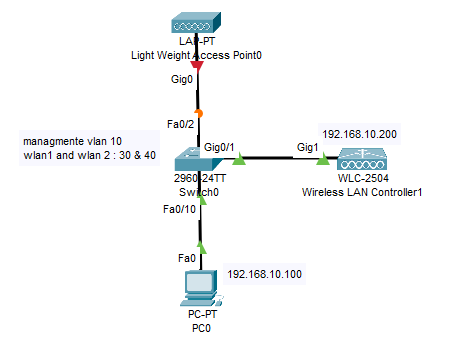
---
### Author:  [@lagapidis](https://forum.networklessons.com/u/lagapidis)
#### Post date: [March 17, 2021, 8:12am UTC](https://forum.networklessons.com/t/cisco-wireless-lan-controller-wlc-basic-configuration/8604/27 "2021-03-17T08:12:12Z")
Hello Neves
In the lesson, only VLAN 10 was used. APs, management PC, WLC, as well as hosts all used that VLAN all within the same subnet, even though multiple VLANs were created. In order to deploy a topology in which multiple VLANs will be created and used, you must configure the controller appropriately, as shown in the following lesson:
> **[Cisco WLC WPA2 PSK Authentication](https://networklessons.com/cisco/ccna-200-301/cisco-wlc-wpa2-psk-authentication#WLC)**
>
> Lesson Contents | This lesson explains how to configure the Cisco WLC to create a new wireless network with WPA2 Pre-Shared Key (PSK) authentication.
Make sure you include all of the appropriate VLANs on the WLC.
> [@nevescutambo](#):
>
> I can’t even ping the wlc.
Where are you attempting to ping the WLC from? The management PC? Follow the steps in the above link and let us know if you face any additional issues.
I hope this has been helpful!
Laz
---
### Author:  [@nevescutambo](https://forum.networklessons.com/u/nevescutambo)
#### Post date: [March 17, 2021, 5:56pm UTC](https://forum.networklessons.com/t/cisco-wireless-lan-controller-wlc-basic-configuration/8604/28 "2021-03-17T17:56:28Z")
Hi Laz,
let me ask you another question, can the wlc receive a tagged frame?
I say this because, I don’t know if it’s because I’m using the packet tracer, but when I don’t configure the interface that connects wlc as native to the management vlan, wlc doesn’t respond to packages.
Is this behavior normal?
Can the wlc receive tagged frames?
---
### Author:  [@lagapidis](https://forum.networklessons.com/u/lagapidis)
#### Post date: [March 22, 2021, 5:36am UTC](https://forum.networklessons.com/t/cisco-wireless-lan-controller-wlc-basic-configuration/8604/29 "2021-03-22T05:36:53Z")
Hello Neves
The quick answer to your question is yes, it can. The long answer is below:
You can create what are called dynamic interfaces, also known as VLAN interfaces on a WLC and assign them to the physical ports of the WLC. The idea is the same as the configuration of subinterfaces on the port of a router. However, it works slightly differently. Each dynamic interface is configured to be on a different VLAN or a different IP subnet. If dynamic ports are untagged, then all dynamic interfaces must be on different IP subnets than any other dynamic interface configured on the specific port.
More info about this, how it works, and how to configure it can be found at this Cisco documentation:
> **[Configure VLANs on Wireless LAN Controllers](https://www.cisco.com/c/en/us/support/docs/wireless-mobility/wireless-vlan/68100-wlan-controllers-vlans.html#anc5)**
>
> This document describes how to configure Virtual LANs (VLANs) on Wireless LAN controllers (WLCs).
I hope this has been helpful!
Laz
---
### Author:  [@nevescutambo](https://forum.networklessons.com/u/nevescutambo)
#### Post date: [March 26, 2021, 12:54pm UTC](https://forum.networklessons.com/t/cisco-wireless-lan-controller-wlc-basic-configuration/8604/30 "2021-03-26T12:54:04Z")
Hi Laz,
Thanks ir was really helpful!
---
### Author:  [@conor.maton](https://forum.networklessons.com/u/conor.maton)
#### Post date: [May 2, 2021, 8:53pm UTC](https://forum.networklessons.com/t/cisco-wireless-lan-controller-wlc-basic-configuration/8604/31 "2021-05-02T20:53:37Z")
Good evening,
I was wondering if you could recommend a cheap Cisco AP so I can familiarise myself with a Cisco AP GUI as per the above lesson?
Thanks in advance!
---
### Author:  [@lagapidis](https://forum.networklessons.com/u/lagapidis)
#### Post date: [May 6, 2021, 7:35am UTC](https://forum.networklessons.com/t/cisco-wireless-lan-controller-wlc-basic-configuration/8604/32 "2021-05-06T07:35:17Z")
Hello Conor
The 1800 series access points are the entry level access points that can be used with a wireless controller in an environment similar to that shown in the lesson. You can take a look at these devices at the following Cisco site:
> **[Cisco Aironet 1800 Access Points](https://www.cisco.com/c/en/us/support/wireless/aironet-1800-access-points/series.html)**
>
> Cisco Aironet 1800 Access Points - Technical support documentation, downloads, tools and resources
If you can find a cheap used Aironet 700 or 1600 which are older series not sold anymore, they too can be incorporated into a WLC enviroment.
I hope this has been helpful!
Laz
---
### Author:  [@giacomo.monari](https://forum.networklessons.com/u/giacomo.monari)
#### Post date: [November 7, 2021, 11:06am UTC](https://forum.networklessons.com/t/cisco-wireless-lan-controller-wlc-basic-configuration/8604/33 "2021-11-07T11:06:25Z")
Hello,
I see in the WLC configuration that 802.11n is not mentioned among the other standard.
Is it a limitation of the used WLC or there is another reason?
thanks
```auto
Enable 802.11b Network [YES][no]:
Enable 802.11a Network [YES][no]:
Enable 802.11g Network [YES][no]:
```
---
### Author:  [@lagapidis](https://forum.networklessons.com/u/lagapidis)
#### Post date: [November 9, 2021, 5:59am UTC](https://forum.networklessons.com/t/cisco-wireless-lan-controller-wlc-basic-configuration/8604/34 "2021-11-09T05:59:08Z")
Hello Giacomo
According to the Cisco data sheet, the WLC2504 does support the 802.11n standard. I’m not sure why this doesn’t appear in the lesson, it may be that an older firmware version is being used. I’ll ask Rene to take a look and let us know…
Laz
---
### Author:  [@wali1972](https://forum.networklessons.com/u/wali1972)
#### Post date: [January 24, 2022, 2:58am UTC](https://forum.networklessons.com/t/cisco-wireless-lan-controller-wlc-basic-configuration/8604/35 "2022-01-24T02:58:41Z")
What about Virtual WLC, does it work normal
---
### Author:  [@lagapidis](https://forum.networklessons.com/u/lagapidis)
#### Post date: [January 27, 2022, 8:10am UTC](https://forum.networklessons.com/t/cisco-wireless-lan-controller-wlc-basic-configuration/8604/36 "2022-01-27T08:10:31Z")
Hello Wali
The Virtual WLC is a virtual form-factor controller that can run on VMWare Hypervisor ESXi. Virtual WLC is similar to a hardware WLC, but it does have some differences such as the fact that the virtual WLC cannot act as an anchor controller. Also, all APs must be in [FlexConnect](https://networklessons.com/cisco/ccna-200-301/cisco-wireless-ap-modes#FlexConnect) mode for virtual WLC to operate.
You can find out more about the Virtual WLC here:
> **[Cisco Virtual Wireless Controller Data Sheet](https://www.cisco.com/c/en/us/products/collateral/wireless/virtual-wireless-controller/data_sheet_c78-714543.html)**
>
> A virtual form-factor controller that enables flexible and cost-effective networking for small and medium-sized deployments
Note that the [end of sale and end of life](https://www.cisco.com/c/en/us/products/collateral/wireless/virtual-wireless-controller/eos-eol-notice-c51-744428.html) has been announced for the virtual WLC, with end of sale set for January 31st of 2022, and a last day of support set for January 31st of 2027.
Cisco’s recommended migration option is to move to Cisco DNA Center.
I hope this has been helpful!
Laz
---
### Author:  [@costaoliveira404](https://forum.networklessons.com/u/costaoliveira404)
#### Post date: [March 10, 2022, 10:56pm UTC](https://forum.networklessons.com/t/cisco-wireless-lan-controller-wlc-basic-configuration/8604/37 "2022-03-10T22:56:11Z")
hi laz,
iam having the same issue. even having the AP in the same VLAN as the WLC, I can not ping the Management IP of the WLC from the PC connected to the AP. should not this be possible, as they are on the same vlan?
---
### Author:  [@lagapidis](https://forum.networklessons.com/u/lagapidis)
#### Post date: [March 13, 2022, 7:00am UTC](https://forum.networklessons.com/t/cisco-wireless-lan-controller-wlc-basic-configuration/8604/38 "2022-03-13T07:00:14Z")
Hello Costa
First of all, I’m not sure which issue you are referring to. The post you are replying to is dealing with a different topic. However, I see that you are trying to reach the management IP of the WLC from a wireless client on the same VLAN.
It is considered best practice to ensure that wireless clients are unable to gain direct access to the management interface from the wireless network. Indeed, [Cisco documentation](https://www.cisco.com/c/en/us/td/docs/wireless/controller/7-4/configuration/guides/consolidated/b_cg74_CONSOLIDATED/b_cg74_CONSOLIDATED_chapter_010011011.html) states the following:
> To prevent or block a wired or wireless client from accessing the management network on a controller (from the wireless client dynamic interface or VLAN), the network administrator should ensure that only authorized clients gain access to the management network through proper CPU ACLs, or use a firewall between the client dynamic interface and the management network.
It could be that precautions have been configured to disallow this communication. Now if that is the case, you should be able to create an exception in the ACL for a PC on the wireless network, so that if you as an administrator connect, you will have management access.
Let us know how you get along in your troubleshooting.
I hope this has been helpful!
Laz
---
### Author:  [@wali1972](https://forum.networklessons.com/u/wali1972)
#### Post date: [May 12, 2022, 12:59am UTC](https://forum.networklessons.com/t/cisco-wireless-lan-controller-wlc-basic-configuration/8604/39 "2022-05-12T00:59:09Z")
Thanks a lot for explanation, greatly appreciate it
---
### Author:  [@A1A1](https://forum.networklessons.com/u/A1A1)
#### Post date: [August 26, 2022, 11:25am UTC](https://forum.networklessons.com/t/cisco-wireless-lan-controller-wlc-basic-configuration/8604/40 "2022-08-26T11:25:58Z")
Hi,
is it necessary for the trunk link between WLC and switch to support management VLAN since CAPWAP tunnel is operating at layer 3?
---
### Author:  [@A1A1](https://forum.networklessons.com/u/A1A1)
#### Post date: [August 27, 2022, 1:30pm UTC](https://forum.networklessons.com/t/cisco-wireless-lan-controller-wlc-basic-configuration/8604/42 "2022-08-27T13:30:44Z")
In addition, is there any scenario where we don’t need to configure the management wlan on the trunk link?
For example, if WLC and APs are in different subnet and there is only Layer 3 routing in some part between them, do we still need to enable the management wlan on the trunk link?
[Previous page](https://forum.networklessons.com/t/cisco-wireless-lan-controller-wlc-basic-configuration/8604.md?page=1)
[Next page](https://forum.networklessons.com/t/cisco-wireless-lan-controller-wlc-basic-configuration/8604.md?page=3)