# Difference between SPAN and NetFlow
**URL:** https://forum.networklessons.com/t/difference-between-span-and-netflow/9917
**Category:** Network Management
**Created:** [February 20, 2020, 4:48pm UTC](https://forum.networklessons.com/t/difference-between-span-and-netflow/9917 "2020-02-20T16:48:26Z")
**Posts on this page:** 2
**Page:** 1
### Author:  [@aquas19](https://forum.networklessons.com/u/aquas19)
#### Post date: [February 20, 2020, 4:48pm UTC](https://forum.networklessons.com/t/difference-between-span-and-netflow/9917/1 "2020-02-20T16:48:26Z")
Hi,
Can someone please advise what is the difference between the two.Both talk about monitoring the traffic on interfaces.
---
### Author:  [@lagapidis](https://forum.networklessons.com/u/lagapidis)
#### Post date: [February 21, 2020, 7:19am UTC](https://forum.networklessons.com/t/difference-between-span-and-netflow/9917/2 "2020-02-21T07:19:48Z")
Hello Naila
SPAN is a feature on Cisco switches that allows you to copy traffic on specific interfaces, and output it on a single monitoring interface. You can then have a packet analyzer connected to this monitoring interface that will capture all of the traffic and can analyze it. For example, take a look at the following network:
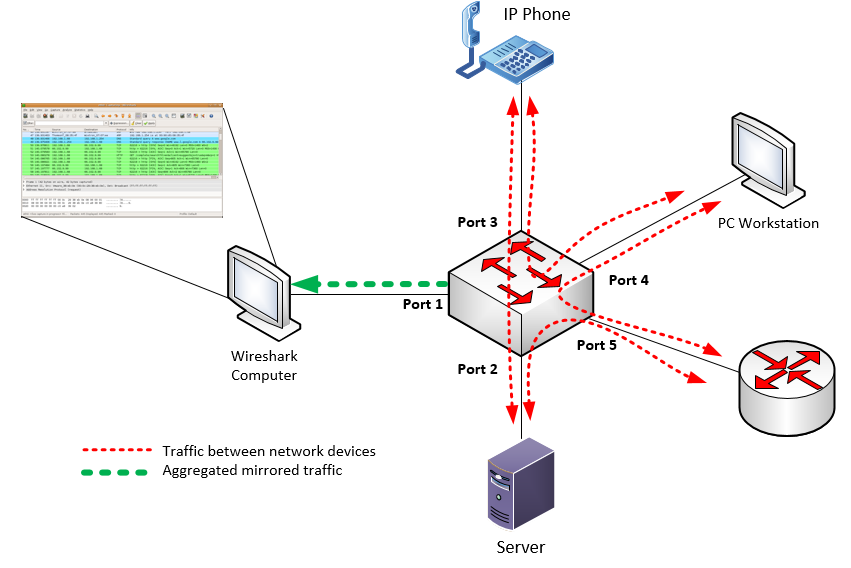
Here you have various devices all sending traffic to each other. Ports 2 to 5 are both sending and receiving data from these devices. The switch can be configured with SPAN such that all the traffic on ports 2 to 5 will be copied and sent out of port1, where a computer with a packet analyzer such as wireshark is connected. It can capture all of these packets and store them for future analysis. The original traffic between the network devices remains unchanged.
So SPAN doesn’t actually do any monitoring, it simply redirects traffic to an external monitoring system. You can find out more about how to configure it at the following lesson:
> **[Cisco IOS SPAN and RSPAN](https://networklessons.com/switching/cisco-ios-span-rspan)**
>
> This tutorial explains how to configure SPAN and RSPAN on Cisco Catalyst Switches. This allows you to forward traffic and monitor it.
NetFlow on the other hand is a feature on Cisco Layer 3 devices (routers and L3 switches) that captures flows and exports them to an external server for analysis. Unlike SPAN which simply dumps everything it sees on specific ports to the monitoring port, NetFlow will provide more structured information.
Specifically, NetFlow tracks flows. A flow is a stream of packets that share the same characteristics, such as source/destination port, address, protocol, type, QoS markings and more. For example, and IP phone conversation is considered a flow. An FTP session is considered a flow. The viewing of a web page is a flow.
These flows are sent over the network to a particular server which examines these and performs complex computations and analyses which result in detailed and useful statistics that are both visualised and numerated. This high level detailed information can then be used to solve problems like bottlenecks, identify what applications are being used on the network, and how much bandwidth each consumes. This allows us to tweak our network more appropriately to employ QoS mechanisms more responsibly, and to design networks more effectively.
You can find out more about how to configure NetFlow at the following lesson:
[https://networklessons.com/cisco/ccie-enterprise-infrastructureintroduction-to-cisco-netflow](https://networklessons.com/cisco/ccie-enterprise-infrastructureintroduction-to-cisco-netflow)
I hope this has been helpful!
Laz