DMVPN Dual Hub Dual Cloud

Hello Parfait

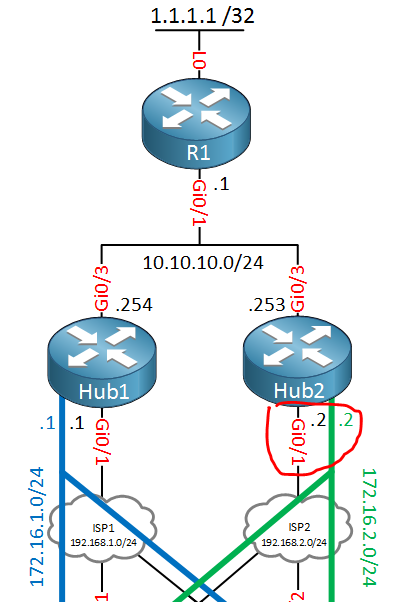
In the configuration of Hub2, the tunnel source interface is configured as GigabitEthernet 0/1. As you can see from the following diagram, you will see that the interface being used by the mGRE tunnel is indeed Gi0/1 and not Gi0/2:

Also, in the Spoke1 configuration, the ip nhrp map command must match the Hub2 Gi0/1 interface which is indeed 172.16.2.2. So the configurations look correct in the lesson. Can you clarify where you see the error?

I hope this has been helpful!

Laz

Hi Rene

thanks for the lessons. could you please also explain how to configure Dual Hub Dual DMVPN using Ospf routing in phase 2

Hello Pushpender

After going through this lesson, as well as some of the DMVPN lessons involving OSPF routing, I suggest you attempt to create the topology yourself. It will be an excellent exercise to get you more familiar with the topology and the technologies used. As you go along, if you find you’re having difficulty, let us know and we can help you out.

Let us know how you get along!

I hope this has been helpful!

Laz

Hello, I am afraid I am having the same confusion as agouassou1 above with regards to Hub 2.

I agree the diagram shows g0/1 however from the config this seems to be part of the Tunnel 1/ISP1 cloud (192.168.1.0/24), used as the source for Tunnel2. If Tunnel 2 source was re-configured to g0/2 (or the interface configs swapped) then it seems to be that would be the correct ISP (2) for tunnel 2 (192.168.2.0/24).

I noticed also that the second interface in the Hub configs has a config for the second cloud but do not appear to have an interface connection on the diagram.
In a dual hub, dual cloud set up, is it the case that the clouds should be effectively separate with no communication between them though DMVPN? So in the example, we wouldn’t expect connectivity from Hub loopbacks (if configured) other than through the additional 10.10.10.0/24 network which interconnects them at R1?

Thanks

Hello Jamie

You are indeed correct about the configurations, it seems that there is a slight confusion there. I will let Rene know to make any necessary corrections. As for the second link to the second cloud for each hub, that too looks strange. I will mention it to Rene as well to make any needed corrections.

Thanks for pointing these out!

Laz

Hi Rene,
Thanks for the topic. I followed exactly the configuration, successfully ping R1 . When I shut tunnel interface on hub1, traffic will choose the path through hub2, which is successfull. But then when I no shut tunnel interface on hub1 again, nhrp mapping has type incomplete, , flags : negative , routing on tunnel interface become flapping. I turn on debug on hub1, It said cannot mapping.

Hello Nguyen

There are several issues that can arise when using DMVPN with two hubs. The issues have to do with the way NHRP reconverges after a failure and a recovery. This differs based on several parameters, including whether a dual cloud or single cloud is used.

Sometimes the failure recovers if enough time is given, sometimes up to three minutes. In your case, I suggest the following:

  1. Try to give several minutes to your topology to recover. See if it’s simply a matter of timers.
  2. Secondly, take a look at some of the following troubleshooting documentation and community threads that may help in your troubleshooting process:

Let us know how you get along and if you need any further assistance.

I hope this has been helpful!

Laz

1 Like

Thanks for your replying.
I created the topology to test. And I realized that I just turn off spoke’s tunnel interface and turn it on back will trigger a new NHRP Registration Request to hub, and everything is fine. One thing I noticed is that, when hub is on, show ip nhrp detail command won’t show mapping information. If we just trigger one spoke to register to the hub, only that spoke mapping information will be cache by hub. Even though the timers expired, hub’s cache only show 1 spoke that trigger NHRP Registration Request. So I decided to trigger the other spoke and it worked fine.

Hello Nguyen

Thanks for sharing your experience with us, it’s always useful to have such information posted on the forum, as it helps others facing similar situations.

Thanks again!

Laz

Hello everyone. I read the article and im still dont understand the use of tunnel key. Since the spoke routers have two different physical interfaces so the delivery header has different source ip why the hub cant know which tunnel to use? The hub is in different subnet and the spokes have one interface each in tha same subnet. Im a bit of confused :confused:

ΓΔÎčα ÏƒÎżÏ… ΘέΌη! (Hello Themis!)

Strictly speaking, for the specific topology in question, you are correct. The tunnel key is unnecessary due to the unique IP addressing of tunnel interfaces, the fact that different interfaces are used at the spokes for connection to each hub, and because each hub has only a single tunnel. However, it is always best practice in such a case to use the tunnel key, because the topology does not always operate under “normal operation”. Even in a dual hub, dual cloud scenario, tunnel keys can still play an important role, depending on the network design and the requirements. Having the tunnel key will aid in the following areas:

  1. Scalability - As your network grows, you may add more hubs and spokes, and this time add them by terminating the tunnels on the same interface, thus necessitating the use of the tunnel key.
  2. Traffic engineering - The tunnel key can also be used as a parameter to route different types of traffic via different tunnels. You can also use the tunnel keys to enforce specific routing policies.
  3. Troubleshooting, traffic monitoring, and ease of configuration - Having tunnel keys will help to monitor and troubleshoot traffic, and they can also be used as “labels” to help you keep track of the tunnels that you create, especially in more complex scenarios.

It is best practice to use the tunnel keys simply because they will typically be needed as your network grows, and/or in situations where a particular part of the network may fail, and redundancy kicks in.

I hope this has been helpful!

Laz

Hi Rene.

How is spoke-to-spoke communication handled? Since those are on-demand tunnels, how can you influence which DMVPN cloud is used to communicate between spokes?

thanks!

Hello Wuilmer

This is actually done in a similar way as that shown in the lesson for traffic to the R1 router. Take a look at the routing table of one SPOKE1:

Spoke1#show ip route eigrp 

      1.0.0.0/32 is subnetted, 1 subnets
D        1.1.1.1 [90/27008256] via 172.16.2.2, 00:03:40, Tunnel2
                 [90/27008256] via 172.16.1.1, 00:03:40, Tunnel1
      4.0.0.0/32 is subnetted, 1 subnets
D        4.4.4.4 [90/28288000] via 172.16.2.2, 00:02:06, Tunnel2
                 [90/28288000] via 172.16.1.1, 00:02:06, Tunnel1
      10.0.0.0/24 is subnetted, 1 subnets
D        10.10.10.0 [90/26880256] via 172.16.2.2, 00:03:40, Tunnel2
                    [90/26880256] via 172.16.1.1, 00:03:40, Tunnel1

The 4.4.4.4 destination is behind SPOKE2. As you can see, there are two equal cost paths to 4.4.4.4, one via 172.16.1.1 and another via 172.16.2.2, which are the two hubs. To determine which cloud you will use to reach the other spoke, you simply have to adjust the EIGRP metrics so that the cloud you want is used. Remember, when using DMVPN, you use NHRP to determine the next hop IP (that of the remote spoke) by querying the hub. The routing table on the spoke determines which hub is queried and therefore which cloud will be used to route traffic, based on the EIGRP metrics. If you query the correct hub, it will give you the next hop IP of the spoke found within the corresponding cloud.

So you can use EIGRP metrics to ensure that the cloud you want is used.

I hope this has been helpful!

Laz

I am seeing some weird output that I was not expecting from the topology below
 I will include screenshot of tunnel configs but all is going through switch no routing has been setup at this time. I am focusing simply on the DMVPN config. The Spoke is showing a dynamic relationship with HUB2 and I am not sure why I am seeing this
 I did this design to address what could be issues with HUB one having networks that HUB 2 might want to see. So, I thought this design might be one answer to that question. Thank you, Alan

DMVPN

Spoke 3

HUB2

HUB1

Hello Alan

What I am seeing looks to be normal for the configs you have. In this design, each Spoke has two tunnel interfaces, one for each DMVPN cloud.

  • Tunnel10 points to HUB1, using NHS 172.16.123.1
  • Tunnel11 points to HUB2, using NHS 172.16.124.1

So when Spoke3 comes up on Tunnel1, it sends an NHRP registration to HUB2. HUB2 then learns Spoke3 dynamically, which is why HUB2 shows Spoke3 with the D attribute in the show dmvpn output. From Spoke3’s point of view, however, HUB2 is shown as S because Spoke3 has a static NHRP mapping to HUB2:

ip nhrp map 172.16.124.1 192.168.123.2
ip nhrp map multicast 192.168.123.2
ip nhrp nhs 172.16.124.1

So the difference is just perspective:

  • On the spoke, the hub/NHS is static.
  • On the hub, the spoke is dynamically registered.

One other important detail: HUB2 is also configured as a spoke toward HUB1 on Tunnel0, because it has HUB1 configured as its NHS there. That is why HUB1 shows HUB2 as a dynamic NHRP peer.

Once you add routing, you will see the full behavior more clearly. But from a pure DMVPN/NHRP perspective, the D entry on HUB2 is expected and not a problem.

I hope this has been helpful!

Laz

1 Like

Laz,

To be completely honest with you, this has to be one of the larger brain farts I have had and then posted hahaha. I think I may have been labbing too long, I am dreaming about it now. The spokes always have static relationships due to their nhrp mappings. Where the hubs of their given networks have dynamic because they lack the mappings
 So hub 2 is static to hub 1 network as its a spoke to it and spoke 2 is static to both
 I am not sure what i was thinking here. Sorry for wasting your time but I see it now thanks to you.

I guess if there was a question I had left on this
 if there are networks behind each hub in a dual hub dual cloud config. What is the best way to handle sharing those routes so its not learned through a spoke with EIGRP. Or using ibgp setup is there a recommended solution to this?

Another thought, if using ibgp for dmvpn should you use loopback as the source? I thought this was considered best practice.

Thank you Laz,

Alan

Hello Alan

Thanks for the follow-up, and no worries at all! :joy: Brain farts like that are part of the process, and it happens to everyone who has gone deep into the topics. It’s great that you worked through that NHRP mapping logic. That clarity you’ve gained will definitely pay off as you scale your designs.

Your remaining question about dual-hub, dual-cloud routing is a really good one, and it’s a real-world operational concern. The answer hinges on whether you want to stick with EIGRP or adopt BGP. Here is a brief overview of each option, and the reasoning behind choosing one over the other.

With EIGRP in dual-hub dual-cloud, you must disable split-horizon on the hub tunnel interfaces (no ip split-horizon eigrp 1). This is a DMVPN requirement. However, it opens the door for Hub1’s LAN networks to leak through a spoke and be relearned by Hub2 (or vice versa). The NetworkLessons dual hub lesson shows both hubs sharing a back-end LAN segment where routes exchange directly, and in such a scenario, this is not an issue. But in real deployments where hubs are geographically separated, this becomes problematic.

With two tunnel interfaces per spoke, EIGRP metric engineering (specifically, tuning the delay on the secondary tunnel) becomes fragile and hard to maintain. Routes can end up preferring the longer spoke-via-hub path for hard-to-predict reasons.

Now, for larger and more controlled DMVPN designs, iBGP is often the preferred solution, but it has an issue, too. But this issue is readily solvable. For this reason, iBGP is considered the recommended approach here. Let me give you some more details.

With iBGP, Hub1 and Hub2 peer directly with each other (over a back-end LAN or separate link) and both act as Route Reflectors for their respective spoke groups. When this is done, the problem is that when an RR propagates a prefix to a spoke, it doesn’t change the next-hop address. The spoke has no route to the next hop included in the UPDATE message, and it doesn’t install the route.

By default, a route reflector does NOT change the next-hop of reflected routes. For this reason, we need to put in the neighbor next-hop-self all command in the BGP configuration of the Hubs so that the reflected routes will also have their next hops changed to those of the RRs, which are the hubs.

This is also beneficial because iBGP provides automatic loop prevention via RR loop-prevention mechanisms using originator IDs and cluster IDs, so you don’t need route-map filtering logic to prevent loops.

I hope this has been helpful!

Laz
1 Like

Laz,

This brings up more questions for me. I thought that when I had a DMVPN phase 3 lab I did the route reflector option and it was working totally fine with out next hop self put on the hub RR. Correct me if I am wrong but you use RR on phase 2 because you need the specific prefixes for that design where Phase 3 you can do a summary route and all is fine. Of course in phase 3 you could still do the RR if you wanted but your route table on the spokes is going to be huge. In the Phase 2 lesson I thought RR is shown but it does not mention next hop self. Or am I totally wrong and missing something.

Thank you,

Alan

Hello Alan

You’re right about the Phase 2/Phase 3 distinction, especially for spoke-to-spoke routes. In Phase 2, we generally want the spoke prefix to retain the originating spoke as the next hop, so applying next-hop-self broadly toward the spokes can defeat the intended Phase 2 shortcut behavior.

But my original point was mainly about a slightly different case: networks behind the hubs. If Hub1 has LAN prefixes behind it and Hub2 advertises those prefixes to its own spokes, then Hub2 may need to set itself as the next hop. Otherwise, the spoke may receive Hub1 (or some other device behind the hub) as the next hop, and that next hop may not be reachable from that spoke’s DMVPN cloud.

So I should have been more precise: for spoke-to-spoke routes in Phase 2, preserving the original spoke next hop is important. But for hub-side routes exchanged between hubs and then advertised to spokes, next-hop-self is often needed to make the receiving hub the reachable next hop for its own spokes.

In Phase 3, this is less restrictive because spokes can use summaries or defaults toward the hub, and NHRP redirects/shortcuts can optimize forwarding. But even there, for hub-side prefixes, setting the local hub as the next hop is often cleaner and more predictable.

Does that make sense?

I hope this has been helpful!

Laz

1 Like

Laz,

I am confused, sorry. I am reading back over the DMVPN stuff to make sure I am not making a huge mistake in my thinking on this. I guess my issues here or confusion is why BGP is acting how it does for DMVPN. I am really confused why phase 2 with route reflector the spokes see the correct next hop over ibgp and not the hub IP as the next hop (I thought here I would need to use next-hop-self on the hub). In phase 1 ibgp does not even share the spokes loopbacks to the other spokes due to split horizon rule for loop prevention. All of this is bleeding over to how I get prefixes (internal networks) at hub sites to be routable to other hub sites on different DMVPN clouds. My two solutions I have found: 1. make a specific tunnel or connection between the two hubs and create a bgp neighborship between the p2p link or, 2. have one cloud act as a spoke to the other hub’s cloud. Now which is “better” of these solutions I am struggling with because I am lost in the sauce on why bgp is acting so dang odd.

If I am reading your last post correctly it sounds like option 1 is the way to go. Have a p2p connection between the two hubs. Then have the hubs be RRs to each other with next hop self all so they get each other’s prefixes. Hopefully I am getting this correct.

Sorry for a long winded response on this.

Alan

#### EDIT ####

I did a huge lab today to try and figure this out. Lab was dual hub, dual cloud with a point to point connection between the hub using a simple tunnel interface. I then put iBGP on all the routers and hubs to include the point to point
 Bingo you can then see the loopback of hub2 on hub1 and vice versa via BGP
 But why stop there haha. So I enable route reflector on hubs point to each other and bam! you see the routes again but from the ip of the second hub cloud
 well that will not work since hub1 has no idea how to route to that subnet/prefix of hub2 cloud. So as Laz mentioned “next-hop-self all” and boom I see the p2p subnet pop up on the next hop so now hub1 can route through hub2 to get to spokes loopbacks. There is a kicker here though that I found. Your spokes need to have a route to that p2p prefix or it does not work since I was sending a summary route out hub1. When hub1 sends out this /16 summary it has a next hop of the p2p link which the spokes were clueless about. Lessons learned: RR does not change next hop, ibgp split horizon explains a lot of my frustration with ibgp.

Question I still have is would it be recommended in a DMVPN/BGP setup such as this to use loopbacks for your iBGP source? Would there be any good reason for hub1 to be aware and able to route to hub2 cloud and vice versa?

Thank you,

Alan