EBGP Multihop

Hello Charles

The static routes were configured in this case in order to achieve connectivity between the BGP peers. Remember, in order for BGP to operate, BGP peers must be able to find each other. That means that routing between those BGP peers must already be established, either by using IGPs or by using static routes.

This might sound a little bit strange because BGP is a routing protocol. Why do you need other routing protocols to enable communication between BGP peers, in order to exchange routes? Take a look at this NetworkLessons note on why we need an IGP for BGP to work, and if you have any further questions, please let us know.

I hope this has been helpful!

Laz

Hello!

When configuring eBGP peering between two routers with two redundant connections using their Loopback interfaces, is it better to configure it like this

neighbor x.x.x.x ebgp-multihop 2

or

neighbor x.x.x.x disable-connected-check

Since in both situations, the adjacency would establish successfully.

Hello David

Take a look at this NetworkLessons note on the difference and interaction between multihop and disable-connected-check for more information. These two commands do different things, but as you suggest, they may be used in this particular scenario to achieve the same thing.

I hope this has been helpful!

Laz

Hello Laz

I appreciate your help, thank you!

David

1 Like

Hi,

Great work as always. I had a question. I see this type of redundancy creating static routes with BGP. In this example what if there were 6 routers to hop? I understand you configure the multi hop to 6 but would I then also have to create a static for all the routers so I can achieve connectivity and be able to reach each other? Or is there a more simple and easy way for this.

Thanks.

Hello Cameron

If there were 6 routers/hops between the two eBGP peers, then yes you would configure the multihop value to 6 or larger. But the other prerequisite is that the two eBGP routers must be reachable to each other. In other words, the two eBGP peers must have routing established between them, over those 6 hops, to be able to achieve an eBGP peering.

That routing can be established using any method you like, static routing, or some dynamic routing protocol such as OSPF, EIGRP, or IS-IS. As long as routing is established between them, they will be able to create the eBGP peering. Does that make sense?

I hope this has been helpful!

Laz

Yes this makes sense.

Thank you for the help as always.

1 Like

When using the ebgp multihop to peer with loopbacks, I want to see if I understand. This may not be bgp multipath but wouldn’t the next hop for all prefix’s be the other neighbors loopback? If so then wouldn’t this end up in a load balancing situation for all advertised prefix’s (because of the statics) even if its technically not using bgp multipath? An L3 channel should give the same result as well correct?

Hello Justn

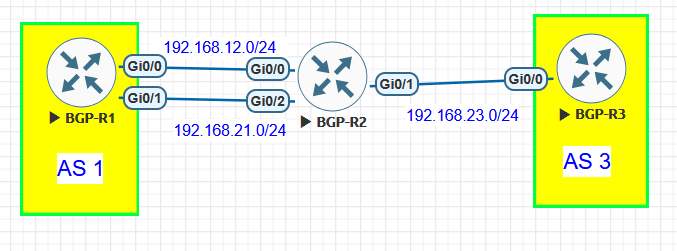
OK, first of all, you’re referring to this particular topology, right?

To quickly answer your question, yes, you will see load balancing across the links BUT that’s due to the static routes delivering equal cost load balancing. BGP plays no role whatsoever in this behavior. In this lesson, the only thing that is being done with BGP is creating BGP peerings. There are actually no routes being advertised or exchanged between BGP peers in this lesson.

The purpose of the lesson is to show how BGP peerings behave and the related best practices when using eBGP multihop to deal with using loopbacks as the source of BGP messages, and with multiple links between routers.

Now if BGP were to use this peering to advertise routes, by default it would advertise only a single path. This is because the best path algorithm ensures that only a single path is advertised by definition. In this case, for both links the router ID is the same (since both links lead to the same router), so the very last tie breaker is the Neighbor IP address. From the point of view of R1, the neighbor IP address of R2 for the first link is 192.168.12.2 and for the second link is 192.168.21.2. This attribute CANNOT be equal, thus it will always break the tie, thus you will never have load balancing.

Take a look at the BGP attributes and path selection lesson for more information:

Do you mean EtherChannel? Hmm, well actually no, because an L3 EtherChannel would be seen by all processes as a single logical link, so the mechanisms for load balancing across the two physical links will not be applied by the equal cost static routes, but via the EtherChannel load balancing algorithms. Similarly, BGP would see this as a single link, so there would be no BGP best path algorithm process taking place.

I hope this has been helpful!

Laz

1 Like

Hello Guys.
Big question here. If I want to use my interfaces loopbacks for ebgp peering I need to use ebg Multihop right? If I want to use interface loopbacks for ibgp I can omitted multihop?

Hello Daniel

Yes, you are absolutely correct. By default, eBGP requires that peerings take place between sources on the same subnet and that is why the multihop feature is necessary.

iBGP has no such restriction. Remember that within a single AS, all iBGP routers within that AS must have a full mesh peering. In other words, all iBGP speakers within an AS must be peered with all other iBGP speakers in the AS. And this means even iBGP peers that are several hops away. So, iBGP peerings don’t need the multihop feature because they can inherently peer with iBGP routers that are several hops away, as long as their IP addresses are reachable. This is also why we need an IGP within the AS for BGP to work.

I hope this has been helpful!

Laz

Hi team,

Firstly sorry if this has already been answered, it’s a bit hard to track this thread with so many chats and responses over the years. Anyway, my question:
I noticed in my lab that you actually don’t need to specify a value when entering the ebgp-multihop command:

R1(config-router)#neighbor 192.0.2.1 ebgp-multihop ?
  <1-255>  maximum hop count
  <cr>     <cr>

R1(config-router)#

Is there a reason we wouldn’t just enter the command without a maximum hop count value then whenever it’s needed? Is it just for config cleanliness? Or having too high of a TTL value can cause issues?

Thanks,
Kyle

Hello Kyle

It is possible to issue the command without a value for the hop count. By default, the value will be the maximum 255 if you do that. So, essentially, by not including the hop count value, you allow an eBGP peering to take place between virtually any two routers, no matter how many hops away they are.

However, this should never be done in a real production network as it can cause problems. Indeed, ebgp multihop with any hop count value should be used only under very specific situations and with great care.

I hope this has been helpful!

Laz

Hi Laz - Thanks for the explanation!

1 Like

Hi guys!!
Today I learned that we need a specific route to our BGP neighbor.
In the first example I configured a default route on R1 and R3 pointing to R2.
The neighborship never came up. I changed the default route for a specific route to the neighbor IP and finally it worked!!

Hello Daniel

Nice to see you again! Yes, this is indeed the case. Before BGP attempts to establish a TCP session with a neighbor, it performs a reachability check by looking in the routing table or RIB for a route to the neighbor’s IP address. This check intentionally ignores the default route.

Even though a default route provides functional IP connectivity (ping works fine), the BGP process will not use it to validate that a configured neighbor is reachable. This is done to avoid the possibility of black holes, asymmetric or transient paths, and to ensure security and predictability.

RFC 4271 does not explicitly state that the default route must be ignored. The RFC only requires that the BGP process verify the reachability of the neighbor address via the local routing table before attempting the TCP session. What qualifies as sufficient reachability is left to the implementation. In practice, most major vendors require a more specific route than the default, making this behavior a de facto standard.

I hope this has been helpful!

Laz

1 Like

Hello, everyone!

Ever since I started studying BGP, I never understood why a default route cannot be used when we want to form a multihop adjacency. In other words, the router will refuse to use the default route to reach the IP specified in the neighbor command.

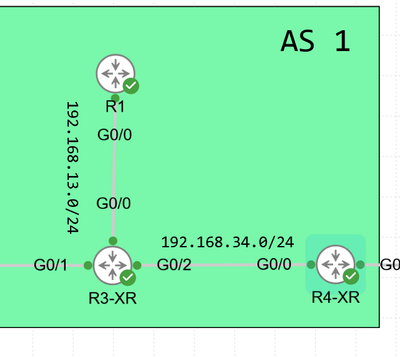
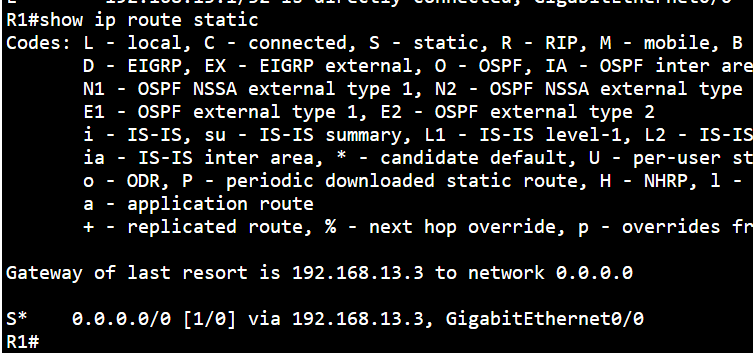
I want to form a multi-hop adjacency between R1 and R4-XR. They do not have specific routes to reach eachother but instead a default route.

obrĂĄzok

*Feb  9 13:47:05.719: BGP: 192.168.34.4 Active open failed - no route to peer, open active delayed 11264ms (35000ms max, 60% jitter) route static

Why can’t a default route be used to establish the peering? Even weirder thing is, if I do decide to configure a specific route on one of the routers, the adjacency establishes.

obrĂĄzok

R4-XR still has a default route only but the adjacency is working.

Can anyone provide some insight please about what is going on here? This part was never clear to me.

Thank you
David

Hi, Rene

Great explanation for establishing non-directed eBGP neighbors!

I followed your article, and found something interesting.
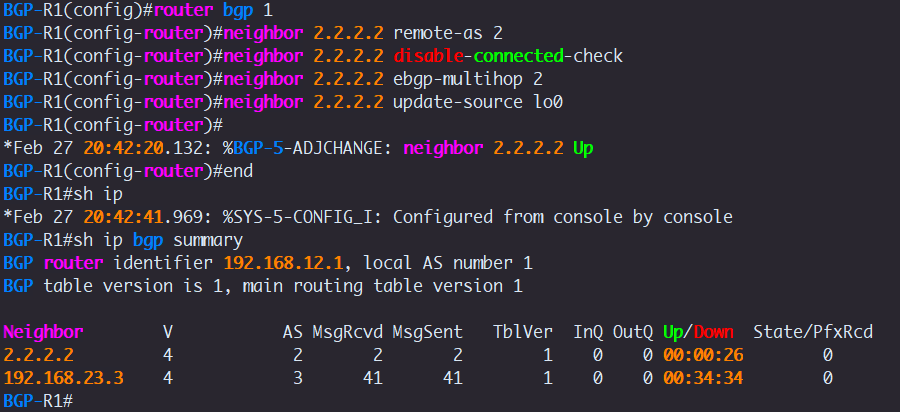
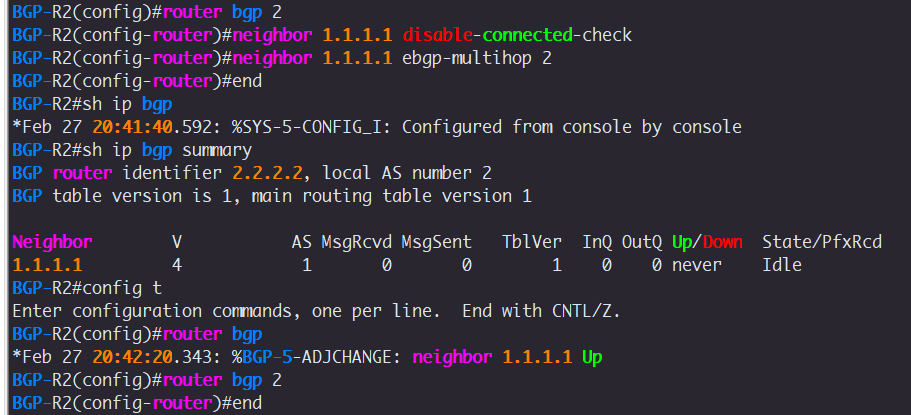
After issuing the command below:

router bgp 1
neighbor 2.2.2.2 remote-as 2
neighbor 2.2.2.2 disable-connected-check
neighbor 2.2.2.2 ebgp-multihop 2

BGP-R1 and BGP-R2 cannot still establish eBGP neighbors with each other.

But when I issue the command: neighbor 2.2.2.2 update-source lo0
The eBGP adjacency between BGP-R1 and BGP-R2 is up immediately.

I do not have to issue the command on both routers.
Could you explain it for me?

And does it work in a production network?

Thanks a lot in advance!

Hello Galen

This is actually expected behavior.

When you configure a BGP neighbor using a loopback address (for example 2.2.2.2), the router will attempt to establish a TCP session to that address. However, unless you configure update-source, the router will use the IP address of the outgoing interface as the source of the TCP session.

So with these configs:

R1:

neighbor 2.2.2.2 remote-as 2
neighbor 2.2.2.2 disable-connected-check
neighbor 2.2.2.2 ebgp-multihop 2

R2:

neighbor 1.1.1.1 remote-as 1
neighbor 1.1.1.1 disable-connected-check
neighbor 1.1.1.1 ebgp-multihop 2


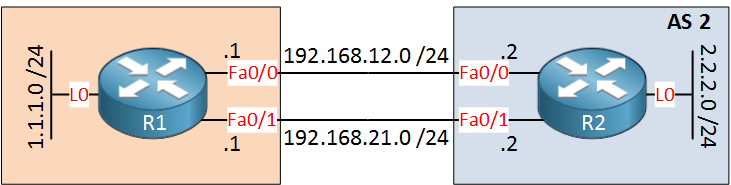
both R1 and R2 will attempt to establish a TCP session between the local exit interface IP and the remote loopback IP, and based on your diagram:

  • R1 will use a source IP of 192.168.12.1 or 192.168.21.1 and a destination IP of 2.2.2.2
  • R2 will use a source IP of 192.168.12.2 or 192.168.21.2 and a destination IP of 1.1.1.1

This causes the session to fail because BGP performs a strict neighbor check:

  • R2 expects a TCP connection from 1.1.1.1
  • But it receives a connection from 192.168.12.1
  • Therefore, it rejects the session (neighbor mismatch)

The same thing happens on R1 as well.

Now if you issue this command, neighbor 2.2.2.2 update-source lo0 on R1, the source IP of the TCP SYN packets becomes 1.1.1.1 (the loopback).

At that point, R2 receives a TCP connection whose source matches its configured neighbor (1.1.1.1), so it accepts the session and the BGP adjacency comes up immediately.

This is why you only need the command on one side for the session to form, as long as at least one router initiates a connection with the correct source IP, the other side can accept it.

Does this work in production?

Yes, but in production networks it is strongly recommended to configure update-source loopback on both routers when peering via loopbacks. This ensures:

  • Stable peering independent of physical link failures
  • Predictable session sourcing
  • Clean and symmetric configuration
  • Proper session re-establishment from either side

Running it asymmetrically may work, but it is not considered best practice and can lead to troubleshooting confusion later. Make sense?

I hope this has been helpful!

Laz
Hello David

BGP, as a protocol, has no restrictions concerning how the IP address of the neighbor is resolved. Strictly speaking, the RFC allows the use of a default route to resolve the IP address of the BGP peer.

Now having said that, your syslog message is quite telling.

*Feb  9 13:47:05.719: BGP: 192.168.34.4 Active open failed - no route to peer, open active delayed 11264ms (35000ms max, 60% jitter) route static

It says it cannot find a route to the peer. I am not convinced this is from the behavior of the IOS/IOS-XE operating system. To analyze the syslog in more detail:

  • “Active open failed – no route to peer”
    • means: a RIB lookup for 192.168.34.4 returned “no usable route.”
  • So BGP isn’t “refusing default routes” in principle, it’s saying the default route is not actually usable/installed in the routing table that BGP is using (or there is no matching route at all in that table).

Please confirm that the peers can indeed ping each other.

Now, having said that, if the issue is indeed due to the default route restriction you mention, this must be a Cisco-specific feature of BGP. There are various reasons why a vendor would do this, but all have to do with the behavior of the protocol at a very large scale, a scale that we rarely experience in enterprise networks. Typically, this provides stability assurance. This way, BGP ensures there’s a specific, known path to the peer before establishing a critical routing protocol session. A specific path is more stable than a default route.

The answer to this is found in this post here:

I hope this has been helpful!

Laz