# EBGP not have advertises network to ibgp
**URL:** https://forum.networklessons.com/t/ebgp-not-have-advertises-network-to-ibgp/31380
**Category:** BGP
**Created:** [October 12, 2022, 5:23am UTC](https://forum.networklessons.com/t/ebgp-not-have-advertises-network-to-ibgp/31380 "2022-10-12T05:23:28Z")
**Posts on this page:** 7
**Page:** 1
### Author:  [@donho1987](https://forum.networklessons.com/u/donho1987)
#### Post date: [October 12, 2022, 5:23am UTC](https://forum.networklessons.com/t/ebgp-not-have-advertises-network-to-ibgp/31380/1 "2022-10-12T05:23:28Z")
I try to setup a control panel for BGP 300 and the data plane with private BGP 70000, i have ar01 configured as a router reflector, pr01 as a client, and net-hop-self to ar01 device, i configure is-is from ar01 to csw router.
The Csw, ASW router is not advertising the network 192.168.3.0, but it configures IBGP on the neighbor interface only,
ar01 can ping loop 3.3.3.3
csw can ping loop 1.1.1.1
I question how to conf on pr01 and csw to make asw1 and ar01 ping their loop back. And able to advertise all routes to peer network
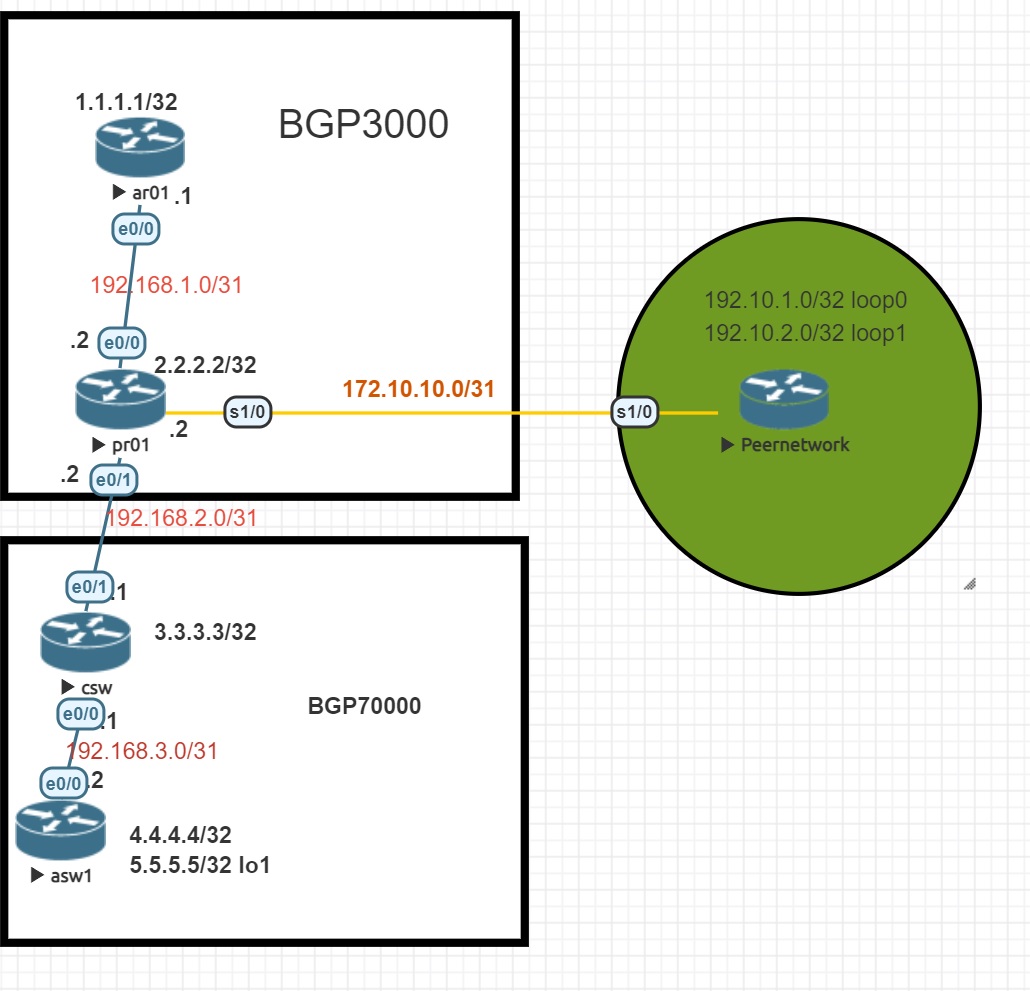
---
### Author:  [@lagapidis](https://forum.networklessons.com/u/lagapidis)
#### Post date: [October 14, 2022, 4:56am UTC](https://forum.networklessons.com/t/ebgp-not-have-advertises-network-to-ibgp/31380/2 "2022-10-14T04:56:03Z")
Hello Duong
Here are a few of my concerns with what you’ve described.
1. You say you’ve set next-hop-self on the AR01 device. Ideally, this should be configured on the device with the eBGP peering, which is the PR01 device. Otherwise, when PR01 advertises the 1.1.1.1/32 network to BGP 70000, it will give a next hop IP of 192.168.1.1 which is that of AR01. But that address is not reachable from the other ASes. Take a look at the [BGP Next Hop Self lesson](https://networklessons.com/bgp/bgp-next-hop-self) for more information on how that works.
2. You say you have configured IS-IS from AR01 to CSW. This is an unorthodox approach, as you are running an IGP from one AS to another. In order to avoid unpredictable routing, it is best practice to keep IGPs within ASes, and have only eBGP share routes between ASes.
3. You’re using an ASN of 70000 for one of the ASes. This is a 32-bit ASN since it is larger than 65535. Make sure all of your devices support 32-bit ASNs, otherwise the topology won’t work.
4. I’m not sure what role the green Peer network router is playing, but since you don’t mention it, I assume it is not involved.
> [@donho1987](#):
>
> I question how to conf on pr01 and csw to make asw1 and ar01 ping their loop back. And able to advertise all routes to peer network
My suggestion would be to do the following:
1. Ensure that your IGP is running only within each AS
2. Make sure BGP is configured to advertise all the prefixes correctly
3. Make sure that the prefixes being advertised are found within the routing tables of the local routers. This is a prerequisite for advertising a BGP route.
4. Make sure the next hop self feature is configured on the eBGP router that connects to another AS. In your case, it should be configured on the csw and the pr01 routers so that they advertise themselves as the next hop for all prefixes of their AS.
Take a look at the following two lessons that detail how to share routes between ASes.
> **[Internal BGP (Border Gateway Protocol) explained](https://networklessons.com/bgp/internal-bgp-border-gateway-protocol-explained)**
>
> This lesson explains why we need Internal BGP, what IBGP split horizon is about and how to configure IBGP on Cisco IOS Routers.
> **[How to configure EBGP (External BGP)](https://networklessons.com/bgp/how-to-configure-ebgp-external-bgp)**
>
> In this lesson, you will learn how to configure EBGP (External BGP) between two Autonomous Systems on a Cisco IOS router.
I hope this has been helpful!
Laz
---
### Author:  [@donho1987](https://forum.networklessons.com/u/donho1987)
#### Post date: [October 15, 2022, 1:00pm UTC](https://forum.networklessons.com/t/ebgp-not-have-advertises-network-to-ibgp/31380/3 "2022-10-15T13:00:05Z")
My ar01 got next hop via IP to add 2.2.2.2. this bgp3000 in a roll control plane and bgp70000 in a data plane, Peernetwork, as costumer ixp, i do configure pr01 next-hop-self toward ar01.01, no next hop seft on ar01. The is-is from ar01 to csw is acceptable because BGP 70000 is my private AS, i have seen this configure in a production network. My, configure bellow.
```auto
ar01#show running-config | begin isis
ip router isis
!
interface Ethernet0/0
description et-0-0:pr01
ip address 192.168.1.1 255.255.255.252
ip router isis
duplex auto
!
router isis
net 49.0001.0010.0100.1001.00
log-adjacency-changes
router bgp 3000
bgp log-neighbor-changes
network 1.1.1.1 mask 255.255.255.255
neighbor 2.2.2.2 remote-as 3000
neighbor 2.2.2.2 update-source Loopback0
neighbor 2.2.2.2 route-reflector-client
Neighbor V AS MsgRcvd MsgSent TblVer InQ OutQ Up/Down State/PfxRcd
2.2.2.2 4 3000 2 2 1 0 0 00:00:00 0sho
Network Next Hop Metric LocPrf Weight Path
*> 1.1.1.1/32 0.0.0.0 0 32768 i
r>i 2.2.2.2/32 2.2.2.2 0 100 0 i
r>i 3.3.3.3/32 2.2.2.2 0 100 0 70000 i
*>i 4.4.4.4/32 2.2.2.2 0 100 0 70000 i
*>i 5.5.5.5/32 2.2.2.2 0 100 0 70000 i
ar01#show ip route bgp
Codes: L - local, C - connected, S - static, R - RIP, M - mobile, B - BGP
D - EIGRP, EX - EIGRP external, O - OSPF, IA - OSPF inter area
N1 - OSPF NSSA external type 1, N2 - OSPF NSSA external type 2
E1 - OSPF external type 1, E2 - OSPF external type 2
i - IS-IS, su - IS-IS summary, L1 - IS-IS level-1, L2 - IS-IS level-2
ia - IS-IS inter area, * - candidate default, U - per-user static route
o - ODR, P - periodic downloaded static route, H - NHRP, l - LISP
a - application route
+ - replicated route, % - next hop override, p - overrides from PfR
Gateway of last resort is not set
4.0.0.0/32 is subnetted, 1 subnets
B 4.4.4.4 [200/0] via 2.2.2.2, 00:01:08
5.0.0.0/32 is subnetted, 1 subnets
B 5.5.5.5 [200/0] via 2.2.2.2, 00:01:08
ar01#
```
===============================================================================
```auto
pr01#show running-config | begin isis
ip router isis
!
interface Ethernet0/0
description et-0-0:ar01
ip address 192.168.1.2 255.255.255.252
ip router isis
duplex auto
!
interface Ethernet0/1
description et-0-0:csw1
ip address 192.168.2.2 255.255.255.252
ip router isis
duplex auto
router isis
net 49.0001.0020.0200.2002.00
is-type level-1
!
router bgp 3000
bgp log-neighbor-changes
network 2.2.2.2 mask 255.255.255.255
neighbor 1.1.1.1 remote-as 3000
neighbor 1.1.1.1 update-source Loopback0
neighbor 1.1.1.1 next-hop-self
neighbor 172.10.10.1 remote-as 4000
neighbor 172.10.10.1 description Peer-as4000:u=CID-ABC:I=CID-netwokr:BE2
neighbor 192.168.2.1 remote-as 70000
Neighbor V AS MsgRcvd MsgSent TblVer InQ OutQ Up/Down State/PfxRcd
1.1.1.1 4 3000 9 11 6 0 0 00:05:14 1
172.10.10.1 4 4000 2 9 6 0 0 00:00:00 0
192.168.2.1 4 70000 10 10 6 0 0 00:05:13 3
Origin codes: i - IGP, e - EGP, ? - incomplete
RPKI validation codes: V valid, I invalid, N Not found
Network Next Hop Metric LocPrf Weight Path
r>i 1.1.1.1/32 1.1.1.1 0 100 0 i
*> 2.2.2.2/32 0.0.0.0 0 32768 i
*> 3.3.3.3/32 192.168.2.1 0 0 70000 i
*> 4.4.4.4/32 192.168.2.1 0 70000 i
*> 5.5.5.5/32 192.168.2.1 0 70000 i
pr01# sho
pr01# show ip route bgp
Codes: L - local, C - connected, S - static, R - RIP, M - mobile, B - BGP
D - EIGRP, EX - EIGRP external, O - OSPF, IA - OSPF inter area
N1 - OSPF NSSA external type 1, N2 - OSPF NSSA external type 2
E1 - OSPF external type 1, E2 - OSPF external type 2
i - IS-IS, su - IS-IS summary, L1 - IS-IS level-1, L2 - IS-IS level-2
ia - IS-IS inter area, * - candidate default, U - per-user static route
o - ODR, P - periodic downloaded static route, H - NHRP, l - LISP
a - application route
+ - replicated route, % - next hop override, p - overrides from PfR
Gateway of last resort is not set
3.0.0.0/32 is subnetted, 1 subnets
B 3.3.3.3 [20/0] via 192.168.2.1, 00:04:53
4.0.0.0/32 is subnetted, 1 subnets
B 4.4.4.4 [20/0] via 192.168.2.1, 00:04:53
5.0.0.0/32 is subnetted, 1 subnets
B 5.5.5.5 [20/0] via 192.168.2.1, 00:04:53
pr01#
```
===============================================================================
```auto
csw1#show running-config | begin isis
ip router isis
!
interface Ethernet0/0
description et-0-0:asw1
ip address 192.168.3.1 255.255.255.252
duplex auto
!
interface Ethernet0/1
description et-0-1:pr01
ip address 192.168.2.1 255.255.255.252
ip router isis
duplex auto
router isis
net 49.0001.0030.0300.3003.00
is-type level-1
!
router bgp 70000
bgp log-neighbor-changes
network 3.3.3.3 mask 255.255.255.255
neighbor 192.168.2.2 remote-as 3000
neighbor 192.168.3.2 remote-as 70000
neighbor 192.168.3.2 next-hop-self
!
Neighbor V AS MsgRcvd MsgSent TblVer InQ OutQ Up/Down State/Pfx
Rcd
192.168.2.2 4 3000 13 13 8 0 0 00:07:17 4
192.168.3.2 4 70000 12 14 8 0 0 00:07:12 2
Origin codes: i - IGP, e - EGP, ? - incomplete
RPKI validation codes: V valid, I invalid, N Not found
Network Next Hop Metric LocPrf Weight Path
*> 1.1.1.1/32 192.168.2.2 0 3000 i
*> 2.2.2.2/32 192.168.2.2 0 0 3000 i
*> 3.3.3.3/32 0.0.0.0 0 32768 i
*>i 4.4.4.4/32 192.168.3.2 0 100 0 i
*>i 5.5.5.5/32 192.168.3.2 0 100 0 i
*> 192.10.1.0/32 192.168.2.2 0 3000 4000 i
*> 192.10.2.0/32 192.168.2.2 0 3000 4000 i
csw1#
csw1#show ip rou
csw1#show ip route bgp
Codes: L - local, C - connected, S - static, R - RIP, M - mobile, B - BGP
D - EIGRP, EX - EIGRP external, O - OSPF, IA - OSPF inter area
N1 - OSPF NSSA external type 1, N2 - OSPF NSSA external type 2
E1 - OSPF external type 1, E2 - OSPF external type 2
i - IS-IS, su - IS-IS summary, L1 - IS-IS level-1, L2 - IS-IS level-2
ia - IS-IS inter area, * - candidate default, U - per-user static route
o - ODR, P - periodic downloaded static route, H - NHRP, l - LISP
a - application route
+ - replicated route, % - next hop override, p - overrides from PfR
Gateway of last resort is not set
1.0.0.0/32 is subnetted, 1 subnets
B 1.1.1.1 [20/0] via 192.168.2.2, 00:07:14
2.0.0.0/32 is subnetted, 1 subnets
B 2.2.2.2 [20/0] via 192.168.2.2, 00:07:14
4.0.0.0/32 is subnetted, 1 subnets
B 4.4.4.4 [200/0] via 192.168.3.2, 00:07:22
5.0.0.0/32 is subnetted, 1 subnets
B 5.5.5.5 [200/0] via 192.168.3.2, 00:07:22
192.10.1.0/32 is subnetted, 1 subnets
B 192.10.1.0 [20/0] via 192.168.2.2, 00:02:13
192.10.2.0/32 is subnetted, 1 subnets
B 192.10.2.0 [20/0] via 192.168.2.2, 00:02:13
csw1#
```
============================================================================
asw
```auto
interface Loopback0
ip address 4.4.4.4 255.255.255.255
!
interface Loopback1
ip address 5.5.5.5 255.255.255.255
!
interface Ethernet0/0
description e-0-0:csw1
ip address 192.168.3.2 255.255.255.252
duplex auto
!
router bgp 70000
bgp log-neighbor-changes
network 4.4.4.4 mask 255.255.255.255
network 5.5.5.5 mask 255.255.255.255
neighbor 192.168.3.1 remote-as 70000
show io
asw1#
asw1#show ip bgp sum
asw1#show ip bgp summary
BGP router identifier 5.5.5.5, local AS number 70000
BGP table version is 8, main routing table version 8
7 network entries using 1008 bytes of memory
7 path entries using 588 bytes of memory
4/4 BGP path/bestpath attribute entries using 640 bytes of memory
2 BGP AS-PATH entries using 48 bytes of memory
0 BGP route-map cache entries using 0 bytes of memory
0 BGP filter-list cache entries using 0 bytes of memory
BGP using 2284 total bytes of memory
BGP activity 7/0 prefixes, 7/0 paths, scan interval 60 secs
Neighbor V AS MsgRcvd MsgSent TblVer InQ OutQ Up/Down State/PfxRcd
192.168.3.1 4 70000 20 18 8 0 0 00:13:11 5
asw1#show ip bgp
BGP table version is 8, local router ID is 5.5.5.5
Status codes: s suppressed, d damped, h history, * valid, > best, i - internal,
r RIB-failure, S Stale, m multipath, b backup-path, f RT-Filter,
x best-external, a additional-path, c RIB-compressed,
t secondary path,
Origin codes: i - IGP, e - EGP, ? - incomplete
RPKI validation codes: V valid, I invalid, N Not found
Network Next Hop Metric LocPrf Weight Path
*>i 1.1.1.1/32 192.168.3.1 0 100 0 3000 i
*>i 2.2.2.2/32 192.168.3.1 0 100 0 3000 i
*>i 3.3.3.3/32 192.168.3.1 0 100 0 i
*> 4.4.4.4/32 0.0.0.0 0 32768 i
*> 5.5.5.5/32 0.0.0.0 0 32768 i
*>i 192.10.1.0/32 192.168.3.1 0 100 0 3000 4000 i
*>i 192.10.2.0/32 192.168.3.1 0 100 0 3000 4000 i
asw1#show ip rou
asw1#show ip route bgp
Codes: L - local, C - connected, S - static, R - RIP, M - mobile, B - BGP
D - EIGRP, EX - EIGRP external, O - OSPF, IA - OSPF inter area
N1 - OSPF NSSA external type 1, N2 - OSPF NSSA external type 2
E1 - OSPF external type 1, E2 - OSPF external type 2
i - IS-IS, su - IS-IS summary, L1 - IS-IS level-1, L2 - IS-IS level-2
ia - IS-IS inter area, * - candidate default, U - per-user static route
o - ODR, P - periodic downloaded static route, H - NHRP, l - LISP
a - application route
+ - replicated route, % - next hop override, p - overrides from PfR
Gateway of last resort is not set
1.0.0.0/32 is subnetted, 1 subnets
B 1.1.1.1 [200/0] via 192.168.3.1, 00:12:20
2.0.0.0/32 is subnetted, 1 subnets
B 2.2.2.2 [200/0] via 192.168.3.1, 00:12:20
3.0.0.0/32 is subnetted, 1 subnets
B 3.3.3.3 [200/0] via 192.168.3.1, 00:12:28
192.10.1.0/32 is subnetted, 1 subnets
B 192.10.1.0 [200/0] via 192.168.3.1, 00:07:19
192.10.2.0/32 is subnetted, 1 subnets
B 192.10.2.0 [200/0] via 192.168.3.1, 00:07:19
asw1#
```
===============================================================================
```auto
BGP router identifier 192.10.2.0, local AS number 4000
BGP table version is 8, main routing table version 8
7 network entries using 1008 bytes of memory
7 path entries using 588 bytes of memory
4/4 BGP path/bestpath attribute entries using 640 bytes of memory
2 BGP AS-PATH entries using 48 bytes of memory
0 BGP route-map cache entries using 0 bytes of memory
0 BGP filter-list cache entries using 0 bytes of memory
BGP using 2284 total bytes of memory
BGP activity 7/0 prefixes, 7/0 paths, scan interval 60 secs
Neighbor V AS MsgRcvd MsgSent TblVer InQ OutQ Up/Down State/Pfx
Rcd
172.10.10.2 4 3000 17 11 8 0 0 00:06:54 5
Peernetwork#show rou
Peernetwork#show ip rou
Peernetwork#show ip route bgp
Codes: L - local, C - connected, S - static, R - RIP, M - mobile, B - BGP
D - EIGRP, EX - EIGRP external, O - OSPF, IA - OSPF inter area
N1 - OSPF NSSA external type 1, N2 - OSPF NSSA external type 2
E1 - OSPF external type 1, E2 - OSPF external type 2
i - IS-IS, su - IS-IS summary, L1 - IS-IS level-1, L2 - IS-IS level-2
ia - IS-IS inter area, * - candidate default, U - per-user static route
o - ODR, P - periodic downloaded static route, H - NHRP, l - LISP
a - application route
+ - replicated route, % - next hop override, p - overrides from PfR
Gateway of last resort is not set
1.0.0.0/32 is subnetted, 1 subnets
B 1.1.1.1 [20/0] via 172.10.10.2, 00:06:06
2.0.0.0/32 is subnetted, 1 subnets
B 2.2.2.2 [20/0] via 172.10.10.2, 00:06:06
3.0.0.0/32 is subnetted, 1 subnets
B 3.3.3.3 [20/0] via 172.10.10.2, 00:06:06
4.0.0.0/32 is subnetted, 1 subnets
B 4.4.4.4 [20/0] via 172.10.10.2, 00:06:06
5.0.0.0/32 is subnetted, 1 subnets
B 5.5.5.5 [20/0] via 172.10.10.2, 00:06:06
Peernetwork#
```
---
### Author:  [@lagapidis](https://forum.networklessons.com/u/lagapidis)
#### Post date: [October 19, 2022, 10:54am UTC](https://forum.networklessons.com/t/ebgp-not-have-advertises-network-to-ibgp/31380/4 "2022-10-19T10:54:47Z")
Hello again Duong
> [@donho1987](#):
>
> I question how to conf on pr01 and csw to make asw1 and ar01 ping their loop back. And able to advertise all routes to peer network
Going back to your original question, in order to get this up and running you must ensure that:
1. ASW1 has in its IGP routing table a route to CSW.
2. ASW1 must have an iBGP peering with CSW
3. CSW must have a successful eBGP peering with PR01
4. PR01 must have a successful iBGP peering with AR01
5. CSW must advertise 1.1.1.1/32 that it learns from PR01 to ASW1 **with itself as the next hop IP**.
6. Similarly, PR01 must advertise 5.5.5.5/32 that it learns from CSW to AR01 **with itself as the next hop IP**
In your troubleshooting process, you should check to see within each AS, what prefixes appear in the IGP routing table and what prefixes appear in the BGP table. Once you find a prefix that is missing from a particular table, you can then troubleshoot that specific advertisement.
Let us know how you get along!
I hope this has been helpful!
Laz
---
### Author:  [@donho1987](https://forum.networklessons.com/u/donho1987)
#### Post date: [October 19, 2022, 11:44pm UTC](https://forum.networklessons.com/t/ebgp-not-have-advertises-network-to-ibgp/31380/5 "2022-10-19T23:44:35Z")
Hello Lagapides
Thank you for your help going to steps 1 to 6; I’m very sure that steps 1 to 4 it good; the problem is i don’t know how to conf advertise on csw and pr01.
but i checked again today i did not change anything configured i can ping using the source IP
any idea why
```auto
ar01#ping 5.5.5.5 source 1.1.1.1
Type escape sequence to abort.
Sending 5, 100-byte ICMP Echos to 5.5.5.5, timeout is 2 seconds:
Packet sent with a source address of 1.1.1.1
!!!!!
Success rate is 100 percent (5/5), round-trip min/avg/max = 1/1/2 ms
ar01#ping 5.5.5.5
Type escape sequence to abort.
Sending 5, 100-byte ICMP Echos to 5.5.5.5, timeout is 2 seconds:
.....
Success rate is 0 percent (0/5)
ar01#
```
```auto
% Type "show ?" for a list of subcommands
asw1#ping 1.1.1.1 so
asw1#ping 1.1.1.1 source 5.5.5.5
Type escape sequence to abort.
Sending 5, 100-byte ICMP Echos to 1.1.1.1, timeout is 2 seconds:
Packet sent with a source address of 5.5.5.5
!!!!!
Success rate is 100 percent (5/5), round-trip min/avg/max = 1/1/1 ms
asw1#ping 1.1.1.1
Type escape sequence to abort.
Sending 5, 100-byte ICMP Echos to 1.1.1.1, timeout is 2 seconds:
...
```
---
### Author:  [@lagapidis](https://forum.networklessons.com/u/lagapidis)
#### Post date: [October 21, 2022, 6:56am UTC](https://forum.networklessons.com/t/ebgp-not-have-advertises-network-to-ibgp/31380/6 "2022-10-21T06:56:59Z")
Hello Duong
Ah yes, that makes perfect sense now. This is indeed normal behavior and I will explain.
When you don’t specify the source interface or source IP address of the ping, the source used is always the IP address of the exit interface indicated by the routing table for the particular destination being pinged. So when you ping 5.5.5.5 from AR01, you are using a source IP address of 192.168.1.1 which is the IP address of the exit interface e0/0. The echo request reaches ASW1, but ASW1 must now send a reply to 192.168.1.1. Does ASW1 know about the 192.168.1.0/31 network? No, so the echo reply fails. Something similar happens when you ping from ASW1 to 1.1.1.1.
However, when you use 1.1.1.1 as your source, when the ping reaches ASW1, it creates an echo reply with a destination of 1.1.1.1. It knows how to get to that destination, because it has learned about it from BGP, so the echo reply is successful.
Take a look at the [NetworkLessons note on ping troubleshooting concepts](https://notes.networklessons.com/ping-troubleshooting-concepts) for more info about this.
The good news is that your setup is working as expected, so you’re all set!
I hope this has been helpful!
Laz
---
### Author:  [@donho1987](https://forum.networklessons.com/u/donho1987)
#### Post date: [October 22, 2022, 9:38pm UTC](https://forum.networklessons.com/t/ebgp-not-have-advertises-network-to-ibgp/31380/7 "2022-10-22T21:38:31Z")
Hello Lagaoides
Thank you for your explanation. That is a perfect match sense, i will continue work on my lap, i may need to configure a VLAN on aws1, and i need to figure out how to give the peer network communication with that VLAN, but anyway, thank you for your help so much appreciate. 👍 👍 👍 👍 👍 👍 👍 👍 🙏 🙏 🙏