# EIGRP Neighbor and Topology Table Explained
**URL:** https://forum.networklessons.com/t/eigrp-neighbor-and-topology-table-explained/912
**Category:** Lessons Discussion
**Created:** [December 22, 2016, 12:55am UTC](https://forum.networklessons.com/t/eigrp-neighbor-and-topology-table-explained/912 "2016-12-22T00:55:36Z")
**Posts on this page:** 20
**Page:** 2
### Author:  [@hussien.samer](https://forum.networklessons.com/u/hussien.samer)
#### Post date: [September 14, 2015, 11:09pm UTC](https://forum.networklessons.com/t/eigrp-neighbor-and-topology-table-explained/912/21 "2015-09-14T23:09:02Z")
I have one more question :-
can you explain the different between ( R - Reply & r - reply Status ) in detail ?
---
### Author:  [@ReneMolenaar](https://forum.networklessons.com/u/ReneMolenaar)
#### Post date: [September 24, 2015, 3:48pm UTC](https://forum.networklessons.com/t/eigrp-neighbor-and-topology-table-explained/912/22 "2015-09-24T15:48:16Z")
Hi Hussein,
1. The route will become “active” first and then the router will start sending query packets.
2. The “U” for update means that an update packet has been sent to this destination.
3. The “R” for reply means that an update packet has been sent to this destination.
You’ll have to be fast to actually see the update and reply status in the EIGRP topology table as this happens really fast, it will be easier to see this process by enabling a debug.
Rene
---
### Author:  [@ReneMolenaar](https://forum.networklessons.com/u/ReneMolenaar)
#### Post date: [September 24, 2015, 3:50pm UTC](https://forum.networklessons.com/t/eigrp-neighbor-and-topology-table-explained/912/23 "2015-09-24T15:50:31Z")
Hi Hussein,
Did you see this post?
> **[EIGRP Queries and Stuck in Active](https://networklessons.com/eigrp/eigrp-queries-and-stuck-in-active)**
>
> EIGRP uses a query process when it loses routes. We'll take a look at this query process and also what SIA (Stuck In Active) is and how to deal with it.
Rene
---
### Author:  [@kirkukinternet](https://forum.networklessons.com/u/kirkukinternet)
#### Post date: [December 6, 2015, 6:55pm UTC](https://forum.networklessons.com/t/eigrp-neighbor-and-topology-table-explained/912/24 "2015-12-06T18:55:31Z")
thank you dear for your amazing explanation ..it just like eating Italian pasta …delicious and useful
---
### Author:  [@drbk563](https://forum.networklessons.com/u/drbk563)
#### Post date: [January 3, 2016, 6:07am UTC](https://forum.networklessons.com/t/eigrp-neighbor-and-topology-table-explained/912/25 "2016-01-03T06:07:30Z")
Hi Rene,
How does EIGRP come up with the local metric for the interface it’s using to reach the destination network? And where can we see it. Thank you
---
### Author:  [@ReneMolenaar](https://forum.networklessons.com/u/ReneMolenaar)
#### Post date: [January 3, 2016, 4:02pm UTC](https://forum.networklessons.com/t/eigrp-neighbor-and-topology-table-explained/912/26 "2016-01-03T16:02:20Z")
Hi Victor,
EIGRP uses this formula to calculate the metric:
> **[EIGRP K Values Formula](https://networklessons.com/eigrp/eigrp-k-values-formula)**
>
> This lesson explains how EIGRP uses its K values (bandwidth, load, reliability, delay and MTU) to select the best path.
Here is an example of a directly connected gigabit interface with a network that is advertised in EIGRP:
```auto
R1#show ip eigrp topology 192.168.12.0/24
EIGRP-IPv4 Topology Entry for AS(1)/ID(11.11.11.11) for 192.168.12.0/24
State is Passive, Query origin flag is 1, 1 Successor(s), FD is 2816
Descriptor Blocks:
0.0.0.0 (GigabitEthernet0/1), from Connected, Send flag is 0x0
Composite metric is (2816/0), route is Internal
Vector metric:
Minimum bandwidth is 1000000 Kbit
Total delay is 10 microseconds
Reliability is 255/255
Load is 1/255
Minimum MTU is 1500
Hop count is 0
Originating router is 11.11.11.11
```
You can see the metrics that are used for the formula (bandwidth and delay by default) and the FD which is 2816.
Rene
---
### Author:  [@shantel](https://forum.networklessons.com/u/shantel)
#### Post date: [December 22, 2016, 12:55am UTC](https://forum.networklessons.com/t/eigrp-neighbor-and-topology-table-explained/912/27 "2016-12-22T00:55:47Z")
19 posts were merged into an existing topic: [EIGRP Neighbor and Topology Table Explained](https://forum.networklessons.com/t/eigrp-neighbor-and-topology-table-explained/912)
---
### Author:  [@vinod.kr.agrahari](https://forum.networklessons.com/u/vinod.kr.agrahari)
#### Post date: [August 25, 2018, 3:31pm UTC](https://forum.networklessons.com/t/eigrp-neighbor-and-topology-table-explained/912/28 "2018-08-25T15:31:53Z")
Hi Rane,
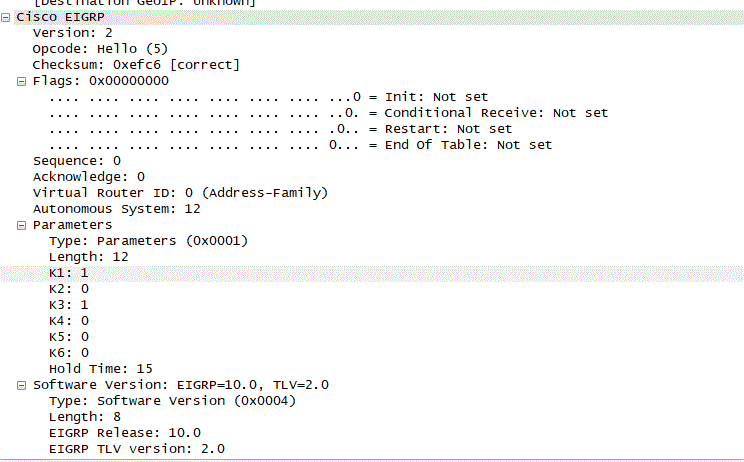
I was walking across EIGRP Hello packet in wireshark ,i see there are value from K1 to K6 .
I read contents where we have K values are start from K1 to K5.
Its not indicating TOS as well becuase its always zero where as it is one in this case.
please refer attached . I am using topology given in your blog (lo --R1----R2–Lo)
---
### Author:  [@lagapidis](https://forum.networklessons.com/u/lagapidis)
#### Post date: [August 29, 2018, 6:41am UTC](https://forum.networklessons.com/t/eigrp-neighbor-and-topology-table-explained/912/29 "2018-08-29T06:41:38Z")
Hello Vinod
K6 is a new addition to the EIGRP protocol that was added in IOS version 15.2(2)T. See the following Cisco documentation for details:
> **[Cisco IOS IP Routing: EIGRP Command Reference - I through R \[Support\]](https://www.cisco.com/c/en/us/td/docs/ios-xml/ios/iproute_eigrp/command/ire-cr-book/ire-i1.html#wp3835409071)**
>
> I through R
Now K6 is restricted in its use since it can only be used under address family configuration mode. Because it is relatively new, and it is somewhat beyond the scope of CCNA or even CCNP, it’s not a concern until you get to the CCIE certifications, although I’m not sure that it has made its way into the curriculum yet.
Cisco’s [RFC about the EIGRP protocol](https://tools.ietf.org/html/draft-savage-eigrp-00) describes K6 like so:
> K6 has been introduced with Wide Metric support and is used to allow for Extended Attributes, which can be used to reflect in a higher aggregate metric than those having lower energy usage. Currently there are two Extended Attributes, jitter and energy, defined in the scope of this document.
I hope this has been helpful!
Laz
---
### Author:  [@fchukwudi](https://forum.networklessons.com/u/fchukwudi)
#### Post date: [January 24, 2019, 9:16am UTC](https://forum.networklessons.com/t/eigrp-neighbor-and-topology-table-explained/912/30 "2019-01-24T09:16:46Z")
Hi Rene,
Thank you for the explaintions, is clear and easy to understand.
---
### Author:  [@andysjunkmale](https://forum.networklessons.com/u/andysjunkmale)
#### Post date: [April 24, 2019, 7:25pm UTC](https://forum.networklessons.com/t/eigrp-neighbor-and-topology-table-explained/912/31 "2019-04-24T19:25:18Z")
Great write-up as usual Rene. Quick question:
You said "Network 1.1.1.0 0.0.0.255 mean that I’m advertising the 1.1.1.0 network with wildcard 0.0.0.255. "
From what I’ve read elsewhere, the network EIGRP will advertise is the network that’s configured on the **INTERFACE** (not the mask configured under router eigrp). So, if you had a network statement:
network 10.0.0.0
but on the interface, it was:
10.10.10.1 255.255.255.0
it would advertise a /24 mask and not a /8, correct?
---
### Author:  [@lagapidis](https://forum.networklessons.com/u/lagapidis)
#### Post date: [April 30, 2019, 6:08am UTC](https://forum.networklessons.com/t/eigrp-neighbor-and-topology-table-explained/912/32 "2019-04-30T06:08:34Z")
Hello Andy
It is true that EIGRP will advertise the network that’s configured on the interface, and not on the mask configured using the network command. What the network command does is it tells the router “if you find any interfaces with networks found within this range of addresses, advertise them.”
Let’s say you have a router with three interfaces configured with IP addresses 192.168.1.1/24 192.168.2.1/24 and 192.168.3.1/24. You can make all three networks participate in EIGRP by issuing the following commands under `router eigrp` configuration mode:
```
Router(config)# router eigrp 1
Router(config-router)# network 192.168.1.0 0.0.0.255
Router(config-router)# network 192.168.2.0 0.0.0.255
Router(config-router)# network 192.168.3.0 0.0.0.255
```
or you could issue this command:
```
Router(config)# router eigrp 1
Router(config-router)# network 192.168.0.0 0.0.3.255
```
In the second case, all three networks are contained within the network command. So this network command says “advertise all networks of interfaces that are found within the range specified in the network command.” What is advertised however is the mask of the interface, and not of the network command.
Now if you enter a network command without a wildcard mask, then the classful wildcard mask will be used. **This doesn’t mean that the classful wildcard mask will be advertised.** So in your case, if you have an interface with an IP address of 10.10.10.1 255.255.255.0, then a command of `network 10.0.0.0` will include this interface’s network range. Thus, the interface network with its subnet mask will be advertised.
I hope this has been helpful!
Laz
---
### Author:  [@samehmahmoud7](https://forum.networklessons.com/u/samehmahmoud7)
#### Post date: [April 7, 2020, 4:12am UTC](https://forum.networklessons.com/t/eigrp-neighbor-and-topology-table-explained/912/33 "2020-04-07T04:12:03Z")
Hi Rene,
What’s the difference bw Hold timer and SIK(Stuck in Active), it’s not the same? , Both will drop the Adjacency neighbour.
Thanks
---
### Author:  [@lagapidis](https://forum.networklessons.com/u/lagapidis)
#### Post date: [April 7, 2020, 6:34am UTC](https://forum.networklessons.com/t/eigrp-neighbor-and-topology-table-explained/912/34 "2020-04-07T06:34:56Z")
Hello Sameh
The hold or holddown timer is a timer that expires when new hello or any EIGRP packets are received from a particular EIGRP neighbor. By default it is set to 15, and counts down to 0. Every time a hello or any other EIGRP packet is received form a particular neighbor, this timer is reset. **If 15 seconds pass without any EIGRP packets arriving from that particular neighbor, the neighbor adjacency is dropped.**
The Stuck in Active state is a situation where an EIGRP router doesn’t receive any replies to query packets from a neighbor. If the time in stuck in active exceeds 3 minutes, the neighbor adjacency is dropped. **During SIA, hello packets are still exchanged between neighbors** so the holddown timer doesn’t expire.
SIA doesn’t mean that neighbors can’t communicate. It simply means that a response to a particular query has not been received. SIA can occur for several reasons, and is further described in the following lesson:
> **[EIGRP Queries and Stuck in Active](https://networklessons.com/eigrp/eigrp-queries-and-stuck-in-active)**
>
> EIGRP uses a query process when it loses routes. We'll take a look at this query process and also what SIA (Stuck In Active) is and how to deal with it.
I hope this has been helpful!
Laz
---
### Author:  [@samehmahmoud7](https://forum.networklessons.com/u/samehmahmoud7)
#### Post date: [April 8, 2020, 2:31am UTC](https://forum.networklessons.com/t/eigrp-neighbor-and-topology-table-explained/912/35 "2020-04-08T02:31:27Z")
Thanks Laz , good explanation
---
### Author:  [@edmundsiew71](https://forum.networklessons.com/u/edmundsiew71)
#### Post date: [June 9, 2020, 1:33am UTC](https://forum.networklessons.com/t/eigrp-neighbor-and-topology-table-explained/912/36 "2020-06-09T01:33:46Z")
Hi,
The output of `show ip eigrp topo` doesn’t show the prefixes in ascending order. Not sure why is this so for EIGRP, unlike other protocol like BGP where the `show ip bgp` output is in ascending order. Is there a way to have the prefixes being shown in order?
Thanks…
---
### Author:  [@lagapidis](https://forum.networklessons.com/u/lagapidis)
#### Post date: [June 10, 2020, 8:28am UTC](https://forum.networklessons.com/t/eigrp-neighbor-and-topology-table-explained/912/37 "2020-06-10T08:28:24Z")
Hello Edmund
That’s a really good question. I did some research, including looking over the RFC, but I have not found any information concerning the order in which the output of the EIGRP topology command appears. I spoke to Rene as well, and he also could not determine the logic behind the order. By changing the bandwidth/delay or advertising networks on different routers, the order doesn’t seem to change. It is indeed sorted in some way, but it is not easy to determine.
Sorry that we couldn’t have been more helpful! If anyone finds this one out, please share!
Laz
---
### Author:  [@abidmsibhai](https://forum.networklessons.com/u/abidmsibhai)
#### Post date: [March 30, 2021, 9:20pm UTC](https://forum.networklessons.com/t/eigrp-neighbor-and-topology-table-explained/912/38 "2021-03-30T21:20:58Z")
Hi Rene,
Is is possible to configure EIGRP unequal cost load balancing if there is no Feasible Successor in the topology table.
Will appreciate your input on this.
Thanks
---
### Author:  [@lagapidis](https://forum.networklessons.com/u/lagapidis)
#### Post date: [April 1, 2021, 5:11am UTC](https://forum.networklessons.com/t/eigrp-neighbor-and-topology-table-explained/912/39 "2021-04-01T05:11:55Z")
Hello Abid
In order for a path to be used in load balancing, it must be a feasible successor. If you have a path in the topology table that doesn’t fulfil the feasibility condition (_the advertised distance of the feasible successor has to be lower than the feasible distance of the successor_), then it cannot be used in load balancing. You can try to put in a variance, however, the route will never appear in the routing table.
I hope this has been helpful!
Laz
---
### Author:  [@sathish84be](https://forum.networklessons.com/u/sathish84be)
#### Post date: [September 29, 2024, 7:01am UTC](https://forum.networklessons.com/t/eigrp-neighbor-and-topology-table-explained/912/40 "2024-09-29T07:01:38Z")
Hi Rene, Any post have made on this ? If yes please share here
[Previous page](https://forum.networklessons.com/t/eigrp-neighbor-and-topology-table-explained/912.md?page=1)
[Next page](https://forum.networklessons.com/t/eigrp-neighbor-and-topology-table-explained/912.md?page=3)