# Etherchannel on Cisco IOS Catalyst Switch
**URL:** https://forum.networklessons.com/t/etherchannel-on-cisco-ios-catalyst-switch/1084
**Category:** Lessons Discussion
**Created:** [December 26, 2016, 10:31pm UTC](https://forum.networklessons.com/t/etherchannel-on-cisco-ios-catalyst-switch/1084 "2016-12-26T22:31:15Z")
**Posts on this page:** 20
**Page:** 8
### Author:  [@lagapidis](https://forum.networklessons.com/u/lagapidis)
#### Post date: [November 3, 2020, 11:04am UTC](https://forum.networklessons.com/t/etherchannel-on-cisco-ios-catalyst-switch/1084/145 "2020-11-03T11:04:46Z")
Hello Scott
Whenever you are configuring EtherChannel and you see amber lights on all but one link of the EtherChannel bundle, then it is very likely that STP has kicked in and is blocking all but one link. This seems to indicate that there is a misconfiguration of EtherChannel on one end of the link. The configuration you posted looks good, but it may be that the other end is not configured correctly. Ensure that the config is correct. Some more detailed configuration rules and restrictions for EtherChannel can be found at the following Cisco documentation:
> **[Catalyst 3750-X and 3560-X Switch Software Configuration Guide, Release...](https://www.cisco.com/c/en/us/td/docs/switches/lan/catalyst3750x_3560x/software/release/12-2_55_se/configuration/guide/3750xscg/swethchl.html#pgfId-1275881)**
>
> Configuring EtherChannels
I hope this has been helpful!
Laz
---
### Author:  [@ReneMolenaar](https://forum.networklessons.com/u/ReneMolenaar)
#### Post date: [November 3, 2020, 2:31pm UTC](https://forum.networklessons.com/t/etherchannel-on-cisco-ios-catalyst-switch/1084/146 "2020-11-03T14:31:54Z")
In addition to what @lagapidis mentioned.
If all your VMs are in the same subnet, a trunk is not required. However, your ESX management interface will also be in the same subnet.
If you want your management interface in another subnet than your VMs, you should create a trunk and use a different VLAN for each.
Rene
---
### Author:  [@sjlotan](https://forum.networklessons.com/u/sjlotan)
#### Post date: [November 13, 2020, 11:30pm UTC](https://forum.networklessons.com/t/etherchannel-on-cisco-ios-catalyst-switch/1084/147 "2020-11-13T23:30:02Z")
Connecting to a UCS server, ESXI management is on a dedicated switch for OOB access, production servers all in the same vlan attaching to their own switch. I think the problem may be in the NIC teaming and the load balancing algorithm. Cisco default on 9300 I think is src-mac. What is the best algorithm for this scenario?
Connecting to a UCS server, ESXI management is on a dedicated switch for OOB access, production servers all in the same vlan attaching to their own switch. I think the problem may be in the NIC teaming and the load balancing algorithm. Cisco default on 9300 I think is src-mac. What is the best algorithm for this scenario?
---
### Author:  [@lagapidis](https://forum.networklessons.com/u/lagapidis)
#### Post date: [November 16, 2020, 9:30am UTC](https://forum.networklessons.com/t/etherchannel-on-cisco-ios-catalyst-switch/1084/148 "2020-11-16T09:30:20Z")
Hello Scott
Remember that the load balancing algorithm used on the switches when applied to NIC teaming is always applied to traffic going **from the switch to the server**. For the other direction, the load balancing is dictated by the server.
If you are expecting traffic destined to the server to come from **multiple hosts outside of the local subnet** , then then the **source IP address** would be the best choice to use in your algorithm. If you used source MAC in such a scenario, then the same source MAC would be seen all the time (from the default gateway from which all such traffic will come) so only one of the links will be used. If you are expecting traffic to come from multiple hosts on the same subnet, then either source MAC or source IP will work the same. You would never use destination MAC or IP, since that will always be the same (the address of the server itself) and would not efficiently load balance.
I hope this has been helpful!
Laz
---
### Author:  [@ccnp.manami](https://forum.networklessons.com/u/ccnp.manami)
#### Post date: [December 4, 2020, 7:09pm UTC](https://forum.networklessons.com/t/etherchannel-on-cisco-ios-catalyst-switch/1084/149 "2020-12-04T19:09:30Z")
Hi Rene,
1.
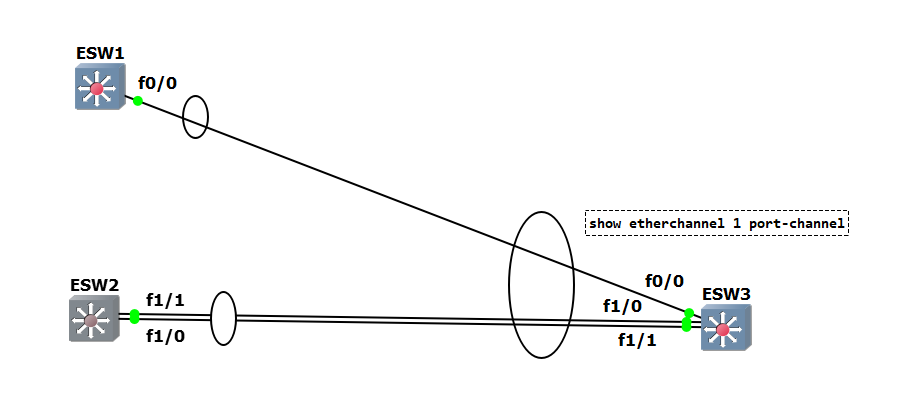
I just wanted to build the logic about EtherChannel. I know this will not work but wanted to know how many channel will be coming up if we issue show etherchannel 1 port-channel command.
Can you please let me know the EtherChannel Traffic flow?
1. Can you please help me to understand MLAG with a diagram and how packet flows in MLAG.
Thank you
Manami
---
### Author:  [@lagapidis](https://forum.networklessons.com/u/lagapidis)
#### Post date: [December 7, 2020, 7:16am UTC](https://forum.networklessons.com/t/etherchannel-on-cisco-ios-catalyst-switch/1084/150 "2020-12-07T07:16:21Z")
Hello Manami
> [@ccnp.manami](#):
>
> I know this will not work but wanted to know how many channel will be coming up if we issue show etherchannel 1 port-channel command.
The answer is, **it depends on the portchannel configuration**. If you unconditionally create a portchannel on all of the interfaces involved using the `channel-group 1 mode on` command, the portchannel will look like it is functioning correctly between ESW2 and ESW3. The port between ESW3 and ESW1 will be observed as “stand-alone” in the output of the `show etherchannel summary` command, meaning that the link is isolated and cannot be integrated into the bundle.
If you use PAgP or LACP, you will find similar situations, where only the two links between switches 2 and 3 are active. The other link will simply not be used.
MLAG is multi-chassis link aggregation and is a generic term that refers to the creation of EtherChannel or port-channel links across multiple devices, much like in your diagram. Cisco has several ways in which this can be accomplished. One of these methods is to use what is known as a [virtual port channel or vPC](https://www.cisco.com/c/en/us/products/collateral/switches/nexus-5000-series-switches/configuration_guide_c07-543563.html#:~:text=A%20virtual%20PortChannel%20(vPC)%20allows,or%20any%20other%20networking%20device.). Now this is a feature that is specific to the Cisco Nexus series of switches and is not available on IOS devices. However, there are solutions to implement MLAG on IOS devices, and these are described in the following post, with appropriate links:
> [@Spine and Leaf Architecture](https://forum.networklessons.com/t/spine-and-leaf-architecture/8418/24):
>
> Hello Kapil Yes, vPCs are a feature that is supported by Nexus series devices. However, it is possible to create a similar arrangement when using Cisco IOS devices. Such a feature is called Multichassis Etherchannel. There are various ways to implement this using IOS devices: Using [VSS](https://networklessons.com/cisco/ccie-routing-switching-written/cisco-6500-vss-configuration-example) you can make two switches act virtually as one, and create an etherchannel with links coming from both physical devices. Using [StackWise](https://networklessons.com/switching/cisco-stackwise), you can connect two or more physical devices into a single logical sw…
I hope this has been helpful!
Laz
---
### Author:  [@musalyh](https://forum.networklessons.com/u/musalyh)
#### Post date: [December 22, 2020, 3:08pm UTC](https://forum.networklessons.com/t/etherchannel-on-cisco-ios-catalyst-switch/1084/151 "2020-12-22T15:08:46Z")
In my opinion, dst mac looks better for load balancing. Are there any cases where src mac is advantageous??
---
### Author:  [@lagapidis](https://forum.networklessons.com/u/lagapidis)
#### Post date: [December 24, 2020, 8:42am UTC](https://forum.networklessons.com/t/etherchannel-on-cisco-ios-catalyst-switch/1084/152 "2020-12-24T08:42:15Z")
Hello YongHun
`src-mac` is useful when you have many hosts on a network segment that will be sending traffic over an Etherchannel link. The following post explains various scenarios, and it includes `src-mac` as one of them:
> [@Etherchannel on Cisco IOS Catalyst Switch](https://forum.networklessons.com/t/etherchannel-on-cisco-ios-catalyst-switch/1084/115):
>
> Hello Giovanni In order to know which load balancing algorithm is best to use for your particular situation, it must be made clear that each algorithm must be applied in a particular direction on the etherchannel. And this direction will also affect the choice you make. For example, take a look at the following diagram: [image] This is a network with many hosts on Network A, and only one host (the edge router) on Network B. The edge router is the default gateway for all of the hosts on Net…
I hope this has been helpful!
Laz
---
### Author:  [@harishussain123](https://forum.networklessons.com/u/harishussain123)
#### Post date: [January 14, 2021, 1:32pm UTC](https://forum.networklessons.com/t/etherchannel-on-cisco-ios-catalyst-switch/1084/153 "2021-01-14T13:32:55Z")
Hi,
In case of copying multiple file from same source to same destination, ether channel will always use same link if the algorithm is source & Dest IP address. So there will be congestion even though we have other links available with enough bandwidth.
---
### Author:  [@lagapidis](https://forum.networklessons.com/u/lagapidis)
#### Post date: [January 16, 2021, 6:01am UTC](https://forum.networklessons.com/t/etherchannel-on-cisco-ios-catalyst-switch/1084/154 "2021-01-16T06:01:47Z")
Hello Haris
If you have a single host communicating with a single host across an Ethernet bundle, and between them there is an etherchannel link, then the only load balancing algorithm that you can really use is load balancing using TCP/UDP ports. In the lesson this option is not included due to the platform being used, but that would be the best to use for the situation you describe in your post. There are three options:
```
port-channel load-balance dst-port
port-channel load-balance src-port
port-channel load-balance src-dst-port
```
These are described in more detail in the following CIsco command line reference documentation:
> **[Catalyst 4500 Series Switch Cisco IOS Command Reference, 12.2(20)EWA -...](https://www.cisco.com/c/en/us/td/docs/switches/lan/catalyst4500/12-2/20ewa/command/reference/cmdref/int_sess.html#wp1977735)**
>
> interface port-channel through shape
I know that platforms such as the 6500/6800/6900 and 4500/4900 series switches support these, and the newer 9400 and 9600 series that replaced them also support them. I’m not sure about lower-end devices, you’ll have to check those out in their specs.
Otherwise, if you don’t use the TCP/UDP ports, the communication between your two hosts in the scenario you describe will only use a single link of the Etherchannel because they have the same source and destination IP and MAC addresses for all communication even though multiple files are being sent simultaneously.
I hope this has been helpful!
Laz
---
### Author:  [@gsaraswathi004](https://forum.networklessons.com/u/gsaraswathi004)
#### Post date: [February 11, 2021, 10:00am UTC](https://forum.networklessons.com/t/etherchannel-on-cisco-ios-catalyst-switch/1084/155 "2021-02-11T10:00:49Z")
Could you please share the packet information on pagp and Lacp ? and also how port-channel forward the packet across the link?, Thanks
---
### Author:  [@lagapidis](https://forum.networklessons.com/u/lagapidis)
#### Post date: [February 13, 2021, 10:28am UTC](https://forum.networklessons.com/t/etherchannel-on-cisco-ios-catalyst-switch/1084/156 "2021-02-13T10:28:19Z")
Hello Lavanya
Do you mean wireshark packet captures? Rene has not created any packet captures for this specific lab, however, you can see some [PAGP packets at this cloudshark link](https://www.cloudshark.org/captures/b7c0bb2dcded) and some [LACP packets at this link](https://www.cloudshark.org/captures/9ecc8b3e9a86). I would also suggest that you attempt the lab and do some packet captures for yourself as well. This helps to give you a deeper understanding of the concepts.
As for how port channel forwards the packets across the link, this is explained in detail in the [Load Balancing section of the lesson found at this link](https://networklessons.com/switching/etherchannel-cisco-ios-catalyst-switch/#Load_Balancing).
I hope this has been helpful!
Laz
---
### Author:  [@ronald.verheij](https://forum.networklessons.com/u/ronald.verheij)
#### Post date: [February 21, 2021, 2:06pm UTC](https://forum.networklessons.com/t/etherchannel-on-cisco-ios-catalyst-switch/1084/157 "2021-02-21T14:06:35Z")
Hi,
If I have 2 swiitches and have to trunks with the same set of VLANs allowd.
What is the best option toe avoid spanning tree on these trunks?
---
### Author:  [@lagapidis](https://forum.networklessons.com/u/lagapidis)
#### Post date: [February 25, 2021, 8:58am UTC](https://forum.networklessons.com/t/etherchannel-on-cisco-ios-catalyst-switch/1084/158 "2021-02-25T08:58:51Z")
Hello Ronald
If you have two or more connections between two switches, it is usually best practice to use Etherchannel, especially since you are using the same trunks across both links. This way you can avoid STP, and take advantage of the full bandwidth that both links deliver.
I hope this has been helpful!
Laz
---
### Author:  [@lagapidis](https://forum.networklessons.com/u/lagapidis)
#### Post date: [March 1, 2021, 5:51am UTC](https://forum.networklessons.com/t/etherchannel-on-cisco-ios-catalyst-switch/1084/159 "2021-03-01T05:51:23Z")
Hello Ronald
It seems you responded only by email, so I’ll post your question here:
> Hello Lazeros,
>
> Thanks for your answere
> But that was not the answere I exspected.
> I know it is better to make etherchannels
>
> But if you don’t do that, that was the question.
> How to avoid STP in that case.
>
> BPDU guard?
> Loopguard?
> Portfast?
>
> Kind regards,
>
> Ronald Verheij
If we don’t use EtherChannel then there is no way to “avoid STP” under normal circumstances. STP must function in order to avoid layer 2 loops. The features you mention ([BPDU guard](https://networklessons.com/spanning-tree/spanning-tree-bpduguard), [Loopguard](https://networklessons.com/spanning-tree/spanning-tree-loopguard-udld), [Portfast](https://networklessons.com/switching/cisco-portfast-configuration)) are features of STP and are used to allow it to function in particular ways, but they don’t act as alternatives to STP.
Some alternatives to STP that are used in modern data centers that may achieve what you want include vPCs which are exclusive to Cisco Nexus devices, [Multi-Chassis Link Aggregation](https://www.cisco.com/c/en/us/td/docs/solutions/Enterprise/Data_Center/DCI/vpls/vpls_asr9k/VPLS-ASR9K_4.html#wp1212237), or [VSS](https://networklessons.com/switching/cisco-6500-vss-configuration-example). You can also interconnect multiple switches using [stackwise](https://networklessons.com/switching/cisco-stackwise) technology.
All of these are specialized cases and may not apply to the platform you are using or to the requirements you have for your topology.
Can you share with us what it is that you want to acheive? Is there something specific that you want to do in your topology? If you share it with us maybe we can help you further.
I hope this has been helpful!
Laz
---
### Author:  [@maxborodin](https://forum.networklessons.com/u/maxborodin)
#### Post date: [November 2, 2021, 12:56am UTC](https://forum.networklessons.com/t/etherchannel-on-cisco-ios-catalyst-switch/1084/160 "2021-11-02T00:56:51Z")
Hi Rene,
Can you please create tutorial on the load balancing option to better understand them ?
like when do we use one or another ?
I have searched everywhere and cant find anything about it, just wage explanation.
However your explenation on `port-channel load-balance dst-mac` was pretty good
---
### Author:  [@lagapidis](https://forum.networklessons.com/u/lagapidis)
#### Post date: [November 3, 2021, 8:38am UTC](https://forum.networklessons.com/t/etherchannel-on-cisco-ios-catalyst-switch/1084/161 "2021-11-03T08:38:55Z")
Hello Maxborodin
Take a look at the following posts that talk about load balancing across an EtherChannel link in more detail:
> [@Etherchannel on Cisco IOS Catalyst Switch](https://forum.networklessons.com/t/etherchannel-on-cisco-ios-catalyst-switch/1084/107):
>
> Hello Po When we talk about load balancing between physical connections of etherchannels, we must use some criteria to determine which physical link a particular frame will go over. Take a look at the following diagram: [image] Devices in Network A will be communicating with devices in Network B. Each of the frames traversing the link will have a source and destination MAC, and at Layer 3, will have a source and destination IP address. Remember first of all that load balancing must be empl…
> [@Etherchannel on Cisco IOS Catalyst Switch](https://forum.networklessons.com/t/etherchannel-on-cisco-ios-catalyst-switch/1084/113):
>
> Hello Po Let me explain with an example. If we have this topology: [image] …and there is traffic going between all of the hosts on the left and the server on the right, then all traffic in both directions will have: source and destination MAC addresses of the hosts and of the server. source and destination IP addresses of the hosts and of the server. In this case, src-ip for Network A to B (IP addresses of the 60 hosts) and src-mac for Network A to B (MAC addresses of the 60 hosts) will h…
> [@Etherchannel on Cisco IOS Catalyst Switch](https://forum.networklessons.com/t/etherchannel-on-cisco-ios-catalyst-switch/1084/115):
>
> Hello Giovanni In order to know which load balancing algorithm is best to use for your particular situation, it must be made clear that each algorithm must be applied in a particular direction on the etherchannel. And this direction will also affect the choice you make. For example, take a look at the following diagram: [image] This is a network with many hosts on Network A, and only one host (the edge router) on Network B. The edge router is the default gateway for all of the hosts on Net…
I hope this has been helpful!
Laz
---
### Author:  [@hishamabdelghanygami](https://forum.networklessons.com/u/hishamabdelghanygami)
#### Post date: [December 21, 2021, 4:36pm UTC](https://forum.networklessons.com/t/etherchannel-on-cisco-ios-catalyst-switch/1084/162 "2021-12-21T16:36:09Z")
Hello,
In the example listed for PAGP in this lesson, SW2 G0/1 and G0/2 are left as access, how come the etherchannel is still up with no issues, while as per my understanding the port mode should match between both switches
Thanks
Hisham
---
### Author:  [@lagapidis](https://forum.networklessons.com/u/lagapidis)
#### Post date: [December 23, 2021, 9:32am UTC](https://forum.networklessons.com/t/etherchannel-on-cisco-ios-catalyst-switch/1084/163 "2021-12-23T09:32:34Z")
Hello Hisham
You’ll notice that ports G0/1 and G0/2 on SW2 have no `switchport mode` configuration. This means that by default, they are indeed in access mode. But remember that Dynamic Trunking Protocol (DTP) is enabled by default on both switches as well. This means that if you configure the SW1 port-channel as a trunk (which in turn configures the physical ports as trunks), DTP packets will be sent to SW2. When SW2 receives DTP packets that request to form a trunk, the SW2 interfaces will change to trunk mode.
More about DTP (and how to disable it) can be found in the following lesson:
> **[Cisco DTP (Dynamic Trunking Protocol) Negotiation](https://networklessons.com/switching/cisco-dtp-dynamic-trunking-protocol-negotiation)**
>
> This lesson explains how to change Dynamic Trunking Protocol (DTP) on Cisco Switches. DTP decides whether an interface should be a trunk or in access mode
I hope this has been helpful!
Laz
---
### Author:  [@hishamabdelghanygami](https://forum.networklessons.com/u/hishamabdelghanygami)
#### Post date: [December 23, 2021, 10:11am UTC](https://forum.networklessons.com/t/etherchannel-on-cisco-ios-catalyst-switch/1084/164 "2021-12-23T10:11:31Z")
Hello,
SW2 configuration doesn’t have `no switchport` under the interface, here is the snippet from the lesson:
```auto
hostname SW2
!
interface GigabitEthernet0/1
channel-group 1 mode auto
!
interface GigabitEthernet0/2
channel-group 1 mode auto
!
interface port-channel 1
!
end
```
[Previous page](https://forum.networklessons.com/t/etherchannel-on-cisco-ios-catalyst-switch/1084.md?page=7)
[Next page](https://forum.networklessons.com/t/etherchannel-on-cisco-ios-catalyst-switch/1084.md?page=9)