# How to configure Dynamic NAT on Cisco IOS Router
**URL:** https://forum.networklessons.com/t/how-to-configure-dynamic-nat-on-cisco-ios-router/893
**Category:** Lessons Discussion
**Created:** [December 22, 2016, 12:36am UTC](https://forum.networklessons.com/t/how-to-configure-dynamic-nat-on-cisco-ios-router/893 "2016-12-22T00:36:12Z")
**Posts on this page:** 20
**Page:** 2
### Author:  [@lagapidis](https://forum.networklessons.com/u/lagapidis)
#### Post date: [June 28, 2017, 5:47am UTC](https://forum.networklessons.com/t/how-to-configure-dynamic-nat-on-cisco-ios-router/893/21 "2017-06-28T05:47:08Z")
Hello Sumit[quote=“sshar057, post:20, topic:893”]
This means we can use extendable keyword only when we are mapping port to an IP address..??
[/quote]
If you are mapping only the IP address (without specifying ports), you would use a command such as this:
`ip nat inside source static tcp 192.168.1.4 199.198.5.1`
However, if you want to map multiple ports of the same IP address pair, you would have to specify the transport layer protocol (tcp/udp) and the ports being mapped. In the example I gave above, you can see that multiple instances of the same IP address are used, however it is the ports that are changing. (Also, if you don’t put in the `extendable` keyword, IOS will put it in for you in the config).
> [@sshar057](#):
>
> Reversible means we can use inside to outside route map for outside to inside case..??
Reversible means that you can apply a route map on outside to inside translation, yes, without the need for the creation of an initial inside to outside translation first.
> [@sshar057](#):
>
> Also can you please let me know the use of both keywords in the same line of natting statement.
Because the extendable keyword is used only when referring to specific IP addresses and ports and the reversible keyword is only used with route maps, you wouldn’t be able to employ both in the same statement and have it function correctly. Each is used in a different sort of NAT application.
Do you have any examples where you’ve seen both used in the same statement? If so, please share it and we can further discuss it.
I hope this has been helpful!
Laz
---
### Author:  [@chrisnewnham17](https://forum.networklessons.com/u/chrisnewnham17)
#### Post date: [July 3, 2018, 2:29pm UTC](https://forum.networklessons.com/t/how-to-configure-dynamic-nat-on-cisco-ios-router/893/22 "2018-07-03T14:29:49Z")
What difference does the prefix length really make? I mean you’ve selected 11 possible host addresses, so I struggle to see the relevance of it.
---
### Author:  [@lagapidis](https://forum.networklessons.com/u/lagapidis)
#### Post date: [July 4, 2018, 4:01pm UTC](https://forum.networklessons.com/t/how-to-configure-dynamic-nat-on-cisco-ios-router/893/23 "2018-07-04T16:01:01Z")
Hello Chris
This is a very valid question. Essentially, in a command such as the following, the `prefix-length` parameter is essentially a sanity check.
`NAT(config)#ip nat pool MYPOOL 192.168.23.10 192.168.23.20 prefix-length 24`
You could have easily used the prefix length of 23 or 25 and it would work correctly with the above IP addresses. However, it is always best practice to confirm that you use the real prefix length of the actual subnet in question.
I hope this has been helpful!
Laz
---
### Author:  [@Sumantonnet](https://forum.networklessons.com/u/Sumantonnet)
#### Post date: [August 22, 2018, 3:08am UTC](https://forum.networklessons.com/t/how-to-configure-dynamic-nat-on-cisco-ios-router/893/25 "2018-08-22T03:08:23Z")
Hi Lazaros
Can you please tell me how can we use prefix-length of 23 or 25 instead of 24..
Regards
Sumant
---
### Author:  [@lagapidis](https://forum.networklessons.com/u/lagapidis)
#### Post date: [August 28, 2018, 5:07pm UTC](https://forum.networklessons.com/t/how-to-configure-dynamic-nat-on-cisco-ios-router/893/26 "2018-08-28T17:07:29Z")
Hello Sumant
When you implement a NAT translation such as the one in the lesson:
`NAT(config)#ip nat pool MYPOOL 192.168.23.10 192.168.23.20 prefix-length 24`
it is always best practice to use the prefix length that has been given to you by the ISP (in the case of an enterprise edge configuration) or the actual subnet mask that you want the translated external IP to have. The reason for this is that the prefix will actually apply the corresponding subnet mask to the translated IP address, so the router will know which destination IP addresses are in the subnet and which are not (and should subsequently be sent to the default gateway of the subnet).
So to clarify my point, whether you use 23 or 25, the range of the pool will still be in that prefix range, however, the actual subnet mask of the specific translated IP address will be different. For this reason, it is important to us the appropriate prefix based on the subnet to be used for the specific translated address.
I hope this has been helpful!
Laz
---
### Author:  [@kent2612](https://forum.networklessons.com/u/kent2612)
#### Post date: [July 6, 2019, 5:57am UTC](https://forum.networklessons.com/t/how-to-configure-dynamic-nat-on-cisco-ios-router/893/27 "2019-07-06T05:57:51Z")
Hi Rene,
As you mentioned it’s possible to create an entry in our NAT router that whenever one of the hosts sends a ping to an IP address (let’s say 5.5.5.5) that it will be forwarded to Web1.
Based on your diagram would you be able to provide an example of how this can be done? Thanks.
---
### Author:  [@lagapidis](https://forum.networklessons.com/u/lagapidis)
#### Post date: [July 8, 2019, 7:20am UTC](https://forum.networklessons.com/t/how-to-configure-dynamic-nat-on-cisco-ios-router/893/28 "2019-07-08T07:20:00Z")
Hello Kenneth
The following lesson describes this configuration using the `ip nat outside source` command.
[https://networklessons.com/cisco/ccie-enterprise-infrastructureip-nat-inside-source-vs-ip-nat-outside-source](https://networklessons.com/cisco/ccie-enterprise-infrastructureip-nat-inside-source-vs-ip-nat-outside-source)
I hope this has been helpful!
Laz
---
### Author:  [@sachin3072004](https://forum.networklessons.com/u/sachin3072004)
#### Post date: [August 15, 2019, 1:12am UTC](https://forum.networklessons.com/t/how-to-configure-dynamic-nat-on-cisco-ios-router/893/29 "2019-08-15T01:12:18Z")
Hello Laz,
Under what condition ‘outside local’ ip address will not be equal to ‘outside global’ address ?
Can you please explain such scenario ?
Thanks,
Sachin
---
### Author:  [@lagapidis](https://forum.networklessons.com/u/lagapidis)
#### Post date: [August 16, 2019, 6:39am UTC](https://forum.networklessons.com/t/how-to-configure-dynamic-nat-on-cisco-ios-router/893/30 "2019-08-16T06:39:21Z")
Hello Sachin
Although it is somewhat rare to have such a configuration where the outside local address is not equal to the outside global address, it is useful in some situations. For example, take a look at the following diagram.
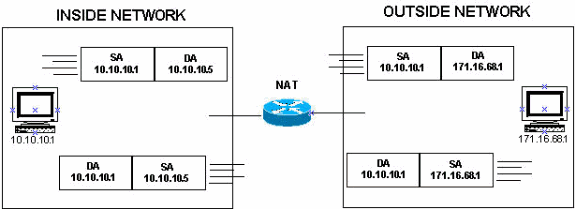
The internal device with an IP address of 10.10.10.1 can reach the external device with an IP address of 171.16.68.1 by using a destination address of 10.10.10.5. This can be done by creating the appropriate NAT translation in the NAT router. This allows the inside host to reach the outside host using an IP address on its own subnet. As far as it is concerned, the destination host is on the same LAN and subnet.
In this situation, for a communication from the inside host to the outside host, the inside global address is 10.10.10.5 while the outside global address is 171.16.68.1.
I hope this has been helpful!
Laz
---
### Author:  [@dorosv](https://forum.networklessons.com/u/dorosv)
#### Post date: [February 17, 2020, 9:05pm UTC](https://forum.networklessons.com/t/how-to-configure-dynamic-nat-on-cisco-ios-router/893/31 "2020-02-17T21:05:31Z")
Hi all,
I’m trying to replicate this lab in GNS3 with my trusty 7200 routers IOS 15.2. I’ve configured the routers more or less the same as in the example, I used a /24 subnet between the “WebServer” and “NatRouter”. For the pool I used a range of IPs in the same /24, not assigned to the interface towards “Webserver”. The NAT translation works.
I’m curious how you made the ping work with just those configs because for me the ARP fails when the “WebServer” tries to find out the MAC address of the NAT IP address ( that’s normal, I think, as it not being assigned to an interface, nothing will reply with the MAC)?
Thank you,
Vlad
---
### Author:  [@lagapidis](https://forum.networklessons.com/u/lagapidis)
#### Post date: [February 18, 2020, 6:44am UTC](https://forum.networklessons.com/t/how-to-configure-dynamic-nat-on-cisco-ios-router/893/32 "2020-02-18T06:44:05Z")
Hello Vlad
The ping from a host to the web server should work with just that configuration because when the NAT translation takes place, the resulting packet sent to the web server has a source IP address of 192.168.23.X where X is somewhere between 10 and 20 based on the NAT configuration. These IP addresses are in the same subnet as the web server, so when the server prepares the echo reply, it will use this address for the ARP request, which it will find on the interface Fa1/0.
Examining it even deeper, the web server should not even send out an ARP request, since the initial echo request that reaches the web server will have a source IP of 192.168.23.X and a source MAC of the Fa1/0 interface of the NAT router. This information will be placed in the ARP table, so that when the echo reply is prepared, it will use this information to populate the destination MAC field in the Ethernet header.
The only situation in which ARP would fail is if the web server attempted to reach the host using its inside address, with which of course there is no direction communication.
I hope this has been helpful!
Laz
---
### Author:  [@dorosv](https://forum.networklessons.com/u/dorosv)
#### Post date: [February 18, 2020, 9:32am UTC](https://forum.networklessons.com/t/how-to-configure-dynamic-nat-on-cisco-ios-router/893/33 "2020-02-18T09:32:43Z")
Hi Laz,
Thank you for the reply. I tried it again, reconfigured from scratch, now it worked. Strange.. maybe I did something wrong the first time.
Thank you,
Vlad
---
### Author:  [@mahamedahmed1989](https://forum.networklessons.com/u/mahamedahmed1989)
#### Post date: [June 20, 2020, 10:40am UTC](https://forum.networklessons.com/t/how-to-configure-dynamic-nat-on-cisco-ios-router/893/34 "2020-06-20T10:40:30Z")
Hello,
I don’t know why my nat translattions is empty. But I can ping to internet.
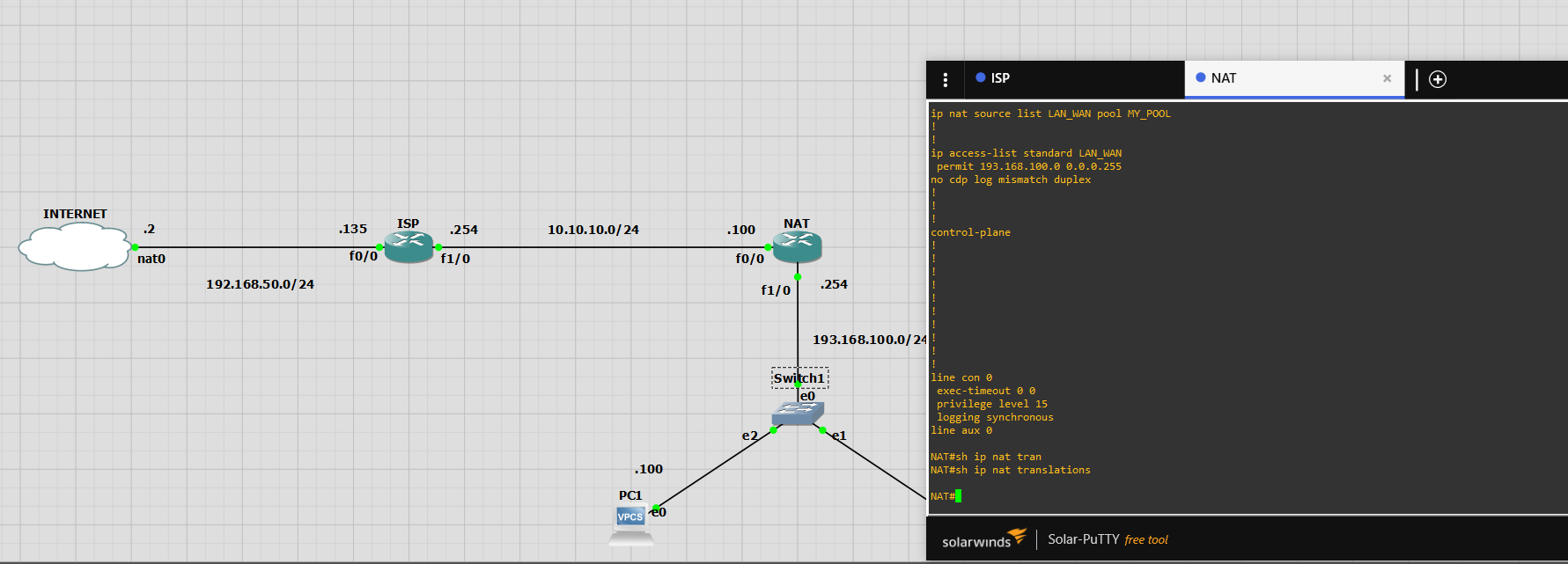
my config
```
ISP:
interface FastEthernet0/0
ip address dhcp
duplex auto
speed auto
!
interface FastEthernet1/0
ip address 10.10.10.254 255.255.255.0
duplex auto
speed auto
!
interface FastEthernet2/0
no ip address
shutdown
duplex auto
speed auto
!
no ip http server
no ip http secure-server
!
ip route 193.168.100.0 255.255.255.0 10.10.10.100
NAT:
interface FastEthernet0/0
ip address 10.10.10.100 255.255.255.0
ip nat outside
ip virtual-reassembly
duplex auto
speed auto
!
interface FastEthernet1/0
ip address 193.168.100.254 255.255.255.0
ip nat inside
ip virtual-reassembly
duplex auto
speed auto
!
interface FastEthernet2/0
no ip address
shutdown
duplex auto
speed auto
!
no ip http server
no ip http secure-server
!
ip route 0.0.0.0 0.0.0.0 10.10.10.254
!
ip nat pool MY_POOL 10.10.10.10 10.10.10.20 prefix-length 24
ip nat source list LAN_WAN pool MY_POOL
!
!
ip access-list standard LAN_WAN
permit 193.168.100.0 0.0.0.255
no cdp log mismatch duplex
```
---
### Author:  [@lagapidis](https://forum.networklessons.com/u/lagapidis)
#### Post date: [June 22, 2020, 7:49am UTC](https://forum.networklessons.com/t/how-to-configure-dynamic-nat-on-cisco-ios-router/893/35 "2020-06-22T07:49:00Z")
Hello Mohamed
It seems that there is a problem with this command:
> [@mahamedahmed1989](#):
>
> `ip nat source list LAN_WAN pool MY_POOL`
It is missing the “inside” keyword. It should look like this:
`ip nat inside source list LAN_WAN pool MY_POOL`
The command you entered, without the “inside” specification, is used for virtual interfaces, as shown in this [Cisco command reference](https://www.cisco.com/c/en/us/td/docs/ios-xml/ios/ipaddr/command/ipaddr-cr-book/ipaddr-i4.html#wp2359081168).
You are still able to reach the Internet because the NAT router simply performs routing. In a real-world scenario, this wouldn’t work, especially if the internal addresses are private, and the external are public routable addresses.
I hope this has been helpful!
Laz
---
### Author:  [@thor.fjaer](https://forum.networklessons.com/u/thor.fjaer)
#### Post date: [November 3, 2020, 12:20pm UTC](https://forum.networklessons.com/t/how-to-configure-dynamic-nat-on-cisco-ios-router/893/36 "2020-11-03T12:20:26Z")
```
NAT#show ip nat translations
Pro Inside global Inside local Outside local Outside global
icmp 192.168.23.10:4 192.168.123.1:4 192.168.23.3:4 192.168.23.3:4
--- 192.168.23.10 192.168.123.1 --- ---
icmp 192.168.23.11:2 192.168.123.2:2 192.168.23.3:2 192.168.23.3:2
--- 192.168.23.11 192.168.123.2 ---
```
What is :4 192.168.123.1:4?
---
### Author:  [@lagapidis](https://forum.networklessons.com/u/lagapidis)
#### Post date: [November 5, 2020, 7:12am UTC](https://forum.networklessons.com/t/how-to-configure-dynamic-nat-on-cisco-ios-router/893/37 "2020-11-05T07:12:50Z")
Hello Thor
Whenever you see an IP address followed by a semicolon “:” and then a number, this indicates the Transport Layer port that is being used. In the output of the NAT translations command, this indicates the port that is being used. This is useful information, especially whenever `overload` is being used. By using various ports, NAT is able to translate multiple inside local addresses into multiple inside global addresses. You can see more details about how this can be achieved at the following lesson:
[https://networklessons.com/cisco/ccie-enterprise-infrastructurehow-to-configure-pat-on-cisco-ios-router](https://networklessons.com/cisco/ccie-enterprise-infrastructurehow-to-configure-pat-on-cisco-ios-router)
In there you will find an example of a set of NAT translations that translate multiple internal addresses to the same public address by simply using different ports.
I hope this has been helpful!
Laz
---
### Author:  [@thor.fjaer](https://forum.networklessons.com/u/thor.fjaer)
#### Post date: [November 5, 2020, 7:47am UTC](https://forum.networklessons.com/t/how-to-configure-dynamic-nat-on-cisco-ios-router/893/38 "2020-11-05T07:47:10Z")
Hi
Why port 2 and 4?
Thor
---
### Author:  [@lagapidis](https://forum.networklessons.com/u/lagapidis)
#### Post date: [November 8, 2020, 7:54am UTC](https://forum.networklessons.com/t/how-to-configure-dynamic-nat-on-cisco-ios-router/893/39 "2020-11-08T07:54:53Z")
Hello Thor
Dynamic NAT attempts to preserve the original source port whenever performing translations. If this source port is already being used, dynamic NAAT will assign the first available port number starting from the beginning of the appropriate group (Well-known, Registered, and Dynamic).
However, the packets in the above output are from ICMP, which is dealt with in a special way. This is because ICMP does not include a Transport Layer component which means it doesn’t use TCP or UDP, which means, it doesn’t use ports. So how does a router deal with these “portless” ICMP packets?
Well, it must in some way assign a port so that translation can take place. NAT will use the ICMP **ident value** that is included in the ICMP header for the value of the port. This field is used primarily for dealing with fragmentation and reassembly of ICMP packets, but also has this function when used with NAT. So in your scenario above, it just happens that the ident value in the ICMP packet was 2 and 4 in these particular cases.
I hope this has been helpful!
Laz
---
### Author:  [@kisangap](https://forum.networklessons.com/u/kisangap)
#### Post date: [January 6, 2022, 2:35am UTC](https://forum.networklessons.com/t/how-to-configure-dynamic-nat-on-cisco-ios-router/893/40 "2022-01-06T02:35:12Z")
Hello,
don’t we need to apply the access-list on the interface?
---
### Author:  [@lagapidis](https://forum.networklessons.com/u/lagapidis)
#### Post date: [January 10, 2022, 7:45am UTC](https://forum.networklessons.com/t/how-to-configure-dynamic-nat-on-cisco-ios-router/893/41 "2022-01-10T07:45:11Z")
Hello Patrice
Access lists can be used for many purposes, including to filter traffic on interfaces, as well as to match traffic for use in other operations, such as NAT, route maps, prefix lists, and others.
In this instance, the access list is used to **match the IP addresses that will be translated by the NAT operation**. This is done using the `ip nat inside source list 1 pool MYPOOL` command, where the “`list 1`” part of the command references access-list 1.
You apply access lists to interfaces **only when you want to filter traffic** as you would in this lesson:
[https://networklessons.com/cisco/ccie-enterprise-infrastructurestandard-access-list-example-on-cisco-router](https://networklessons.com/cisco/ccie-enterprise-infrastructurestandard-access-list-example-on-cisco-router)
I hope this has been helpful!
Laz
[Previous page](https://forum.networklessons.com/t/how-to-configure-dynamic-nat-on-cisco-ios-router/893.md?page=1)
[Next page](https://forum.networklessons.com/t/how-to-configure-dynamic-nat-on-cisco-ios-router/893.md?page=3)