# How to configure GRE Tunnel on Cisco IOS Router
**URL:** https://forum.networklessons.com/t/how-to-configure-gre-tunnel-on-cisco-ios-router/997
**Category:** Lessons Discussion
**Created:** [December 26, 2016, 5:51pm UTC](https://forum.networklessons.com/t/how-to-configure-gre-tunnel-on-cisco-ios-router/997 "2016-12-26T17:51:22Z")
**Posts on this page:** 20
**Page:** 3
### Author:  [@ReneMolenaar](https://forum.networklessons.com/u/ReneMolenaar)
#### Post date: [January 17, 2016, 9:43pm UTC](https://forum.networklessons.com/t/how-to-configure-gre-tunnel-on-cisco-ios-router/997/41 "2016-01-17T21:43:55Z")
Hi Adrian,
When you use the tunnel source command, you can define an interface or an IP address. When you use the interface, the router will check for the IP address on the interface and use that so the end result is the same.
The tunnel source and destination addresses are only used to build the tunnel, that’s it. When you use this to tunnel something over the Internet, we typically use the public IP address on the outside interfaces for this.
You can use loopbacks as the source addresses if you want redundancy. Let’s say we have two routers that are connected with two physical interfaces. You could establish a tunnel using the IP addresses of one of the physical interfaces but that means that when that link goes down, the tunnel also goes down. In this case, you could establish the tunnel using loopback addresses. Your routing protocol will make sure that when one of the physical links goes down, it will reroute it using the other physical link.
About the IP addresses that we use, take a look at this wireshark capture:
> **[CS Personal on cloudshark.org](https://www.cloudshark.org/captures/368dcd1ddc06)**
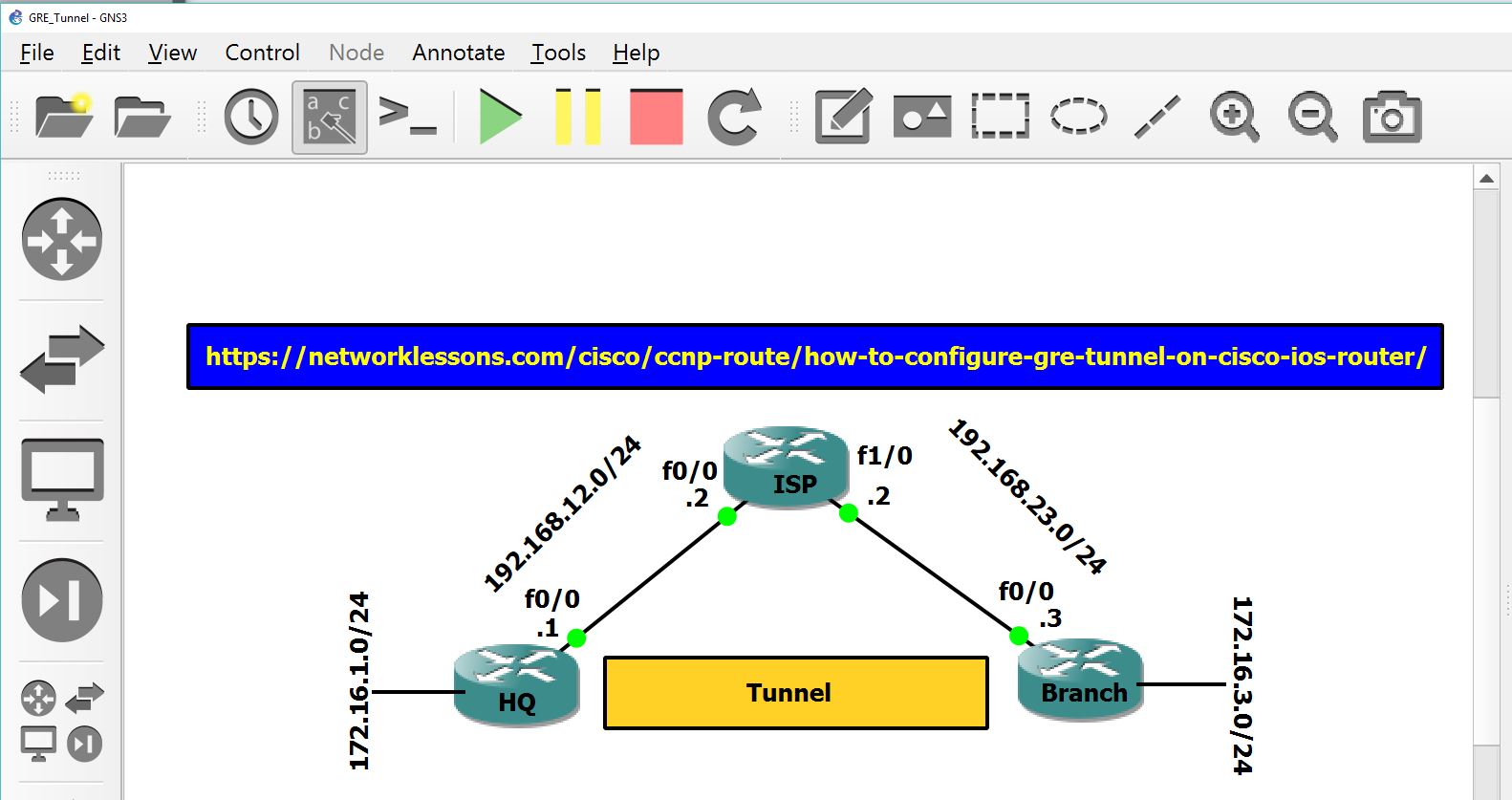
The IP packet with the outer header uses the IP addresses on the outside interfaces, this is what we use to route the packet. You can see it has a GRE header, the second IP header is for the ping between the loopback interfaces. We use the IP addresses on the tunnel interfaces as the next hops.
Hope this helps, if not just ask 🙂
Rene
---
### Author:  [@adriantaranu11](https://forum.networklessons.com/u/adriantaranu11)
#### Post date: [January 18, 2016, 12:09pm UTC](https://forum.networklessons.com/t/how-to-configure-gre-tunnel-on-cisco-ios-router/997/42 "2016-01-18T12:09:47Z")
Thank you a lot Rene! It’s clear now.
One more thing though: I expected to see somewhere ( I am not sure where 🙂 ) in the Wireshark capture, the IP of the tunnel interface 192.168.13.1 … Should’t it exist somewhere? Do I miss something? Thank you!
---
### Author:  [@adriantaranu11](https://forum.networklessons.com/u/adriantaranu11)
#### Post date: [January 19, 2016, 8:40am UTC](https://forum.networklessons.com/t/how-to-configure-gre-tunnel-on-cisco-ios-router/997/43 "2016-01-19T08:40:58Z")
(contd.)
probably related:
We know that both sides of the tunnel should be in the same subnet. But why? Remote side of the tunnel receive a packet that doesn’t seem to include ip address of the HQ side of the tunnel (192.168.13.1), so why does remote end cares? Thank you!
---
### Author:  [@ReneMolenaar](https://forum.networklessons.com/u/ReneMolenaar)
#### Post date: [January 19, 2016, 8:56am UTC](https://forum.networklessons.com/t/how-to-configure-gre-tunnel-on-cisco-ios-router/997/44 "2016-01-19T08:56:05Z")
Hi Adrian,
Once the GRE tunnel is up, it acts like a regular interface. With normal interfaces we also don’t see the next hop IP address within the IP packet.
Here’s the logic of the router:
1. When HQ sends a packet with destination 172.16.3.3 it has to check its routing table for a match:
```auto
HQ#show ip route eigrp
172.16.0.0/16 is variably subnetted, 3 subnets, 2 masks
D 172.16.3.0/24 [90/27008000] via 192.168.13.3, 00:00:07, Tunnel1
```
1. Above you can see that the next hop is the remote IP address of the tunnel. Now it has to do another lookup to figure out how to get there:
```auto
HQ#show ip route 192.168.13.3
Routing entry for 192.168.13.0/24
Known via "connected", distance 0, metric 0 (connected, via interface)
Redistributing via eigrp 13
Routing Descriptor Blocks:
* directly connected, via Tunnel1
Route metric is 0, traffic share count is 1
```
1. To the router, the tunnel interface is “directly connected”. With regular interfaces (FastEthernet / Gigabit etc) this means we can do an ARP for the IP address and reach it directly. However this time, the router knows we are using a GRE interface so it will encapsulate the IP packet…its puts a GRE header in front of it and a new IP header with the source/destination IP addresses that we used to build the tunnel:
```auto
HQ#show interfaces tunnel 1 | include source
Tunnel source 192.168.12.1, destination 192.168.23.3
```
1. Now the router will have to figure out how to get to 192.168.23.3, the tunnel destination so it does another lookup:
```auto
HQ#show ip route 192.168.23.3
Routing entry for 192.168.23.3/32
Known via "static", distance 1, metric 0
Routing Descriptor Blocks:
* 192.168.12.2
Route metric is 0, traffic share count is 1
```
1. It sees there is a static route for 192.168.23.3/3 with 192.168.12.2 as the next hop. Time to figure out how to get there:
```auto
HQ#show ip route 192.168.12.2
Routing entry for 192.168.12.0/24
Known via "connected", distance 0, metric 0 (connected, via interface)
Routing Descriptor Blocks:
* directly connected, via GigabitEthernet0/1
Route metric is 0, traffic share count is 1
```
This IP address can be reached directly since we have an interface that is directly connected to 192.168.12.0/24. Time to figure out the L2 address:
```auto
HQ#show ip arp 192.168.12.2
Protocol Address Age (min) Hardware Addr Type Interface
Internet 192.168.12.2 10 fa16.3e73.b9df ARPA GigabitEthernet0/1
```
Now we have the L2 address and the Ethernet frame will be on its way…
Hope this helps!
Rene
---
### Author:  [@adriantaranu11](https://forum.networklessons.com/u/adriantaranu11)
#### Post date: [January 21, 2016, 11:13am UTC](https://forum.networklessons.com/t/how-to-configure-gre-tunnel-on-cisco-ios-router/997/45 "2016-01-21T11:13:50Z")
Thank you Rene! It really helped a lot!
---
### Author:  [@electrogoth](https://forum.networklessons.com/u/electrogoth)
#### Post date: [March 2, 2016, 12:31am UTC](https://forum.networklessons.com/t/how-to-configure-gre-tunnel-on-cisco-ios-router/997/46 "2016-03-02T00:31:08Z")
Hi Rene, thanks for this great explanation 🙂 can you tell me what software are you using to connect to the routers?
---
### Author:  [@ReneMolenaar](https://forum.networklessons.com/u/ReneMolenaar)
#### Post date: [March 2, 2016, 1:14pm UTC](https://forum.networklessons.com/t/how-to-configure-gre-tunnel-on-cisco-ios-router/997/47 "2016-03-02T13:14:15Z")
Hi Cristian,
Do you mean to access the consoles? I used Xshell for awhile but nowadays I use secureCRT for everything.
Rene
---
### Author:  [@drashti30.desai](https://forum.networklessons.com/u/drashti30.desai)
#### Post date: [May 11, 2016, 5:22pm UTC](https://forum.networklessons.com/t/how-to-configure-gre-tunnel-on-cisco-ios-router/997/48 "2016-05-11T17:22:55Z")
Hi Rene,
In the above example, when we ping Branch loopback 172.16.3.3 from HQ without specifying any source in ping command, then in the wireshark I can see the source IP of the ICMP ping packet is the IP address of tunnel interface i.e. 192.168.13.1 and same thing in the EIGRP Hello packet.
So can we say that any packet going out of f0/0 of R1 will have source IP 192.168.13.1 (i.e. IP address of tunnel for which f0/0 is configured as source)? as we have configured f0/0 as tunnel source.
And also I think we cannot configure one interface as a source for more than one tunnel..right?
Regards,
Nanu
---
### Author:  [@andrew](https://forum.networklessons.com/u/andrew)
#### Post date: [May 12, 2016, 7:42pm UTC](https://forum.networklessons.com/t/how-to-configure-gre-tunnel-on-cisco-ios-router/997/49 "2016-05-12T19:42:29Z")
Hi Nanu,
`So can we say that any packet going out of f0/0 of R1 will have source IP 192.168.13.1 (i.e. IP address of tunnel for which f0/0 is configured as source)?`
The answer to this is No. A simple counter-example would be any packet going from HQ to the ISP. Presumably, the ISP has no idea that the Tunnel IP space exists, so the packet must be sourced from 192.168.12.1. The key for HQ figuring out whether to use the 192.168.12.1 or 192.168.13.1 address would be what its routing table says is the next hop of the destination. If the next hop is in the Tunnel address space, it will use that.
`I think we cannot configure one interface as a source for more than one tunnel..right?`
You are correct. While you can have a single interface be the source of a tunnel with multiple destinations (DMVPN does this), technically, this is just a single tunnel. In order to have multiple tunnels, you will need to create loopbacks and source the tunnels from there.
---
### Author:  [@drashti30.desai](https://forum.networklessons.com/u/drashti30.desai)
#### Post date: [May 12, 2016, 7:59pm UTC](https://forum.networklessons.com/t/how-to-configure-gre-tunnel-on-cisco-ios-router/997/50 "2016-05-12T19:59:09Z")
Hi Andrew,
Your explanation has cleared my doubts..thanks a lot..🙂
Regards,
Nanu
---
### Author:  [@trevorhubbard](https://forum.networklessons.com/u/trevorhubbard)
#### Post date: [August 26, 2016, 8:52pm UTC](https://forum.networklessons.com/t/how-to-configure-gre-tunnel-on-cisco-ios-router/997/51 "2016-08-26T20:52:32Z")
Rene
Will you do / explain how to do this lab with the IGP being iBGP, with the loopbacks being redistributed into BGP?
Thank you.
Trevor
---
### Author:  [@ReneMolenaar](https://forum.networklessons.com/u/ReneMolenaar)
#### Post date: [August 29, 2016, 11:52am UTC](https://forum.networklessons.com/t/how-to-configure-gre-tunnel-on-cisco-ios-router/997/52 "2016-08-29T11:52:28Z")
Hi Trevor,
The goal of this example is to demonstrate how GRE tunneling works, you could use any other routing protocol. Here’s a quick example though how you can use BGP instead.
First we create an access-list that matches the loopback interface and we create a route-map:
```auto
R1(config)#ip access-list standard L0
R1(config-std-nacl)#permit 172.16.1.0 0.0.0.255
R1(config)#route-map L0_ONLY permit 10
R1(config-route-map)#match ip address L0
R1(config)#route-map L0_ONLY permit 20
```
Now you can configure BGP, configure the remote neighbor and redistribute only the loopback interface:
```auto
R1(config)#router bgp 13
R1(config-router)#neighbor 192.168.13.3 remote-as 13
R1(config-router)#redistribute connected route-map L0_ONLY
```
Hope this helps!
Rene
---
### Author:  [@shantel](https://forum.networklessons.com/u/shantel)
#### Post date: [December 26, 2016, 5:51pm UTC](https://forum.networklessons.com/t/how-to-configure-gre-tunnel-on-cisco-ios-router/997/53 "2016-12-26T17:51:49Z")
19 posts were merged into an existing topic: [How to configure GRE Tunnel on Cisco IOS Router](https://forum.networklessons.com/t/how-to-configure-gre-tunnel-on-cisco-ios-router/997)
---
### Author:  [@alcornet](https://forum.networklessons.com/u/alcornet)
#### Post date: [May 16, 2017, 12:58pm UTC](https://forum.networklessons.com/t/how-to-configure-gre-tunnel-on-cisco-ios-router/997/54 "2017-05-16T12:58:28Z")
Hello Rene,
I was not able to advertise Lo via tunnel Eigrp process with the given /24 config of yours. I fixed it using /32 bit prefix. It seems LOs cant build adjacency till 32 bit prefix is configured on loopback interface. Also I used successfully a source on one side of the setup as MLPPP and testes tunnel stability when flapped one of the PPP link.
---
### Author:  [@ReneMolenaar](https://forum.networklessons.com/u/ReneMolenaar)
#### Post date: [May 19, 2017, 8:22am UTC](https://forum.networklessons.com/t/how-to-configure-gre-tunnel-on-cisco-ios-router/997/55 "2017-05-19T08:22:00Z")
Hi Vitaly,
The loopbacks won’t affect your neighbor adjacency whatsoever. The neighbor adjacency is established on the tunnel interface so any other interfaces don’t have any effect on it. It won’t matter if you use a /24 or /32 on the loopback interfaces 🙂
Do you still have your config with the /24s on the loopback that is not working?
Rene
---
### Author:  [@ishanimp.patel](https://forum.networklessons.com/u/ishanimp.patel)
#### Post date: [March 28, 2018, 8:12pm UTC](https://forum.networklessons.com/t/how-to-configure-gre-tunnel-on-cisco-ios-router/997/56 "2018-03-28T20:12:14Z")
Hi,
How does a router, in this example HQ or Branch would know to send packets to GRE application to encapsulate those inner packets within the GRE header? Another way to interpret the question is how the control plane of GRE work and is there a way so that only some of the hosts behind the HQ/Branch uses the GRE and some other do not use the tunnel and send the packets using traditional routing (w/o tunneling.)
Thanks.
---
### Author:  [@ReneMolenaar](https://forum.networklessons.com/u/ReneMolenaar)
#### Post date: [April 3, 2018, 2:20pm UTC](https://forum.networklessons.com/t/how-to-configure-gre-tunnel-on-cisco-ios-router/997/57 "2018-04-03T14:20:39Z")
Hello Ishan,
When the router receives a packet, it checks the destination and does a lookup in the routing table. It finds that the outgoing interface is the tunnel interface, checks the encapsulation type of the tunnel and does its job.
For example, the HQ router receives a packet that is destined to 172.16.3.3. In the routing table, the outgoing interface is the Tunnel1 interface, which means the router has to add a GRE header.
The outer IP header has a destination IP address of 192.168.23.3 so the HQ router does another lookup in the routing table, figures out that 12.2 is the next hop and forwards the IP packet to the ISP router.
The default routing table is global so if you create an entry, it applies to all packets. However, you can use policy-based routing to tell the router that certain packets should be forwarded on another interface. Here’s an example:
[https://networklessons.com/cisco/ccie-enterprise-infrastructurehow-to-configure-policy-based-routing/](https://networklessons.com/cisco/ccie-enterprise-infrastructurehow-to-configure-policy-based-routing/)
---
### Author:  [@wilder7bc](https://forum.networklessons.com/u/wilder7bc)
#### Post date: [October 1, 2018, 4:03pm UTC](https://forum.networklessons.com/t/how-to-configure-gre-tunnel-on-cisco-ios-router/997/58 "2018-10-01T16:03:07Z")
> [@ReneMolenaar](#):
>
> This topic is to discuss the following lesson:
>
>  [NetworkLessons.com – 10 Apr 13](https://networklessons.com/cisco/ccie-enterprise-infrastructurehow-to-configure-gre-tunnel-on-cisco-ios-router/)
>
> 
>
> ### [How to configure GRE Tunnel on Cisco IOS Router | NetworkLessons.com](https://networklessons.com/cisco/ccie-enterprise-infrastructurehow-to-configure-gre-tunnel-on-cisco-ios-router/)
>
> GRE Tunneling encapsulates packets so that they can be tunneled. I’ll show you how this works on a Cisco IOS router.
I am still working through this but the following information is incorrect for the static route. The configuration that is currently in the lesson for the static route portion does not work.
Need to change to network instead of the specific IP. This is the case on my Cisco equipment anyway.
Need to change to the following:
> HQ(config)#ip route 192.168.23.0 255.255.255.0 192.168.12.2
> HQ(config)#end
>
> Branch(config)#ip route 192.168.12.0 255.255.255.0 192.168.23.2
> Branch(config)#end
---
### Author:  [@lagapidis](https://forum.networklessons.com/u/lagapidis)
#### Post date: [October 10, 2018, 2:56pm UTC](https://forum.networklessons.com/t/how-to-configure-gre-tunnel-on-cisco-ios-router/997/59 "2018-10-10T14:56:18Z")
Hello Brian
Hmmm, that’s interesting. I tried to lab it up as well and it worked for me with just the specific IP addresses in the `ip route` commands rather than the whole subnet. I was able to get the tunnel up and running as well as the EIGRP neighbourship. Want to take a look at it again and see if there’s another glitch somewhere?
I hope this has been helpful!
Laz
---
### Author:  [@pinkideb8](https://forum.networklessons.com/u/pinkideb8)
#### Post date: [January 23, 2019, 11:18am UTC](https://forum.networklessons.com/t/how-to-configure-gre-tunnel-on-cisco-ios-router/997/60 "2019-01-23T11:18:26Z")
hello Rene, why do we need tunneling, when we already have static and dynamic routing protocol? what’s the need of tunnelng ? maybe if you’ve mentioned but i am still not clear about the advantage and use of Tunnel.
[Previous page](https://forum.networklessons.com/t/how-to-configure-gre-tunnel-on-cisco-ios-router/997.md?page=2)
[Next page](https://forum.networklessons.com/t/how-to-configure-gre-tunnel-on-cisco-ios-router/997.md?page=4)