# How to configure IPv6 EIGRP on Cisco IOS Router
**URL:** https://forum.networklessons.com/t/how-to-configure-ipv6-eigrp-on-cisco-ios-router/901
**Category:** Lessons Discussion
**Created:** [December 22, 2016, 12:45am UTC](https://forum.networklessons.com/t/how-to-configure-ipv6-eigrp-on-cisco-ios-router/901 "2016-12-22T00:45:37Z")
**Posts on this page:** 12
**Page:** 1
### Author:  [@ReneMolenaar](https://forum.networklessons.com/u/ReneMolenaar)
#### Post date: [December 22, 2016, 12:45am UTC](https://forum.networklessons.com/t/how-to-configure-ipv6-eigrp-on-cisco-ios-router/901/1 "2016-12-22T00:45:37Z")
This topic is to discuss the following lesson:
> **[IPv6 EIGRP on Cisco IOS Router](https://networklessons.com/ipv6/how-to-configure-ipv6-eigrp-on-cisco-ios-router)**
>
> This example explains how to configure IPv6 EIGRP on Cisco IOS routers and how to advertise two prefixes on loopback interfaces.
---
### Author:  [@ReneMolenaar](https://forum.networklessons.com/u/ReneMolenaar)
#### Post date: [July 14, 2014, 12:16am UTC](https://forum.networklessons.com/t/how-to-configure-ipv6-eigrp-on-cisco-ios-router/901/2 "2014-07-14T00:16:34Z")
Very helpful and easy to learn!
---
### Author:  [@johnfrades](https://forum.networklessons.com/u/johnfrades)
#### Post date: [August 6, 2015, 7:09pm UTC](https://forum.networklessons.com/t/how-to-configure-ipv6-eigrp-on-cisco-ios-router/901/3 "2015-08-06T19:09:58Z")
easy to understand! thanks!
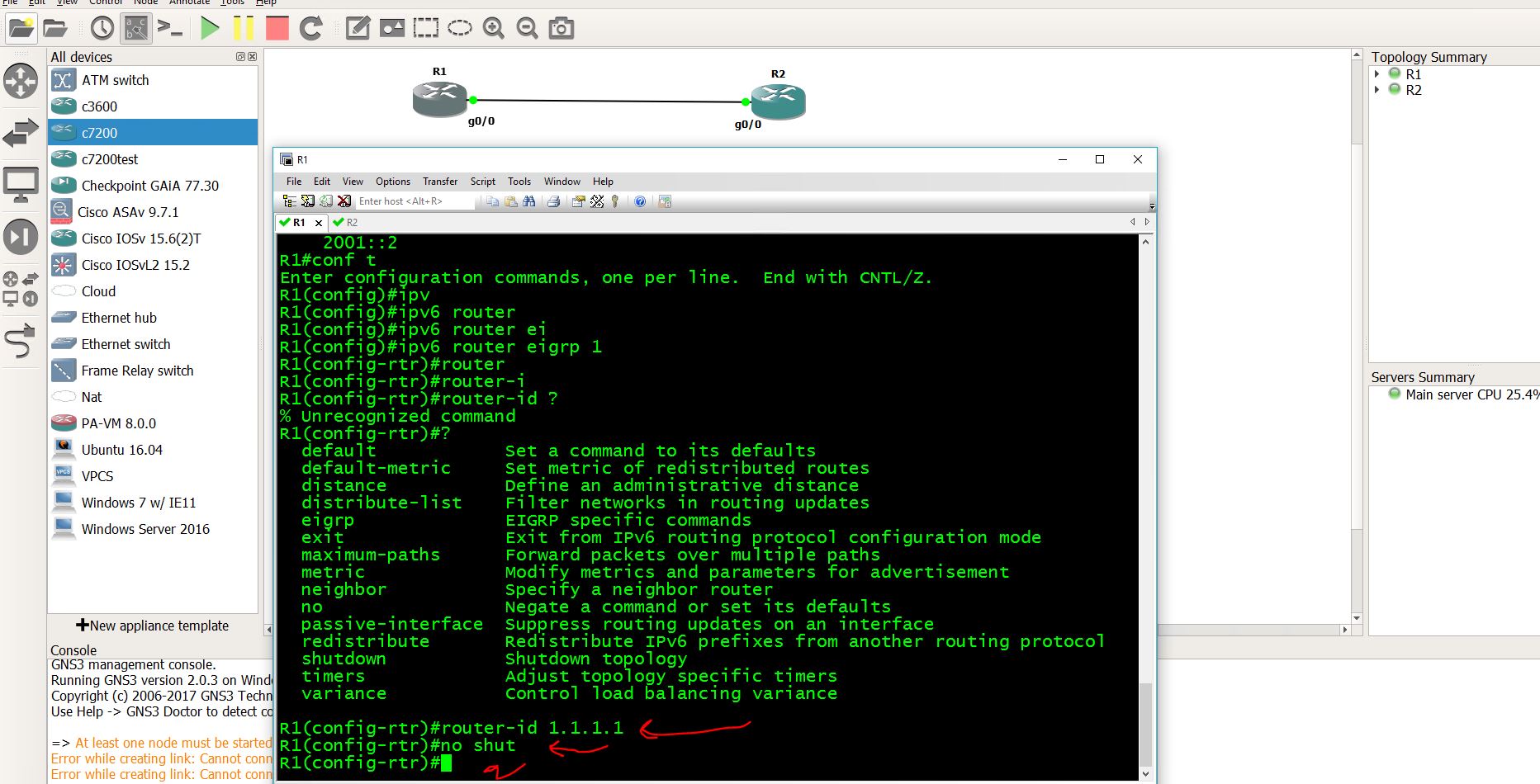
just fyi, i simulate it on GNS3, using 7200 15.2ios. under ipv6 router eigrp 1, theres no “router-id” command, you need to go “eigrp router-id 1.1.1.1”
---
### Author:  [@monishbk](https://forum.networklessons.com/u/monishbk)
#### Post date: [May 31, 2016, 4:59am UTC](https://forum.networklessons.com/t/how-to-configure-ipv6-eigrp-on-cisco-ios-router/901/4 "2016-05-31T04:59:11Z")
The neighbor of futura router is `FE80::C00F:1AFF:FEA7:0`, But this IP doesnot show in output of `Destiny#show ipv6 interface brief`. Is there some output error of `show ipv6 interface brief` of both the routers??
---
### Author:  [@ReneMolenaar](https://forum.networklessons.com/u/ReneMolenaar)
#### Post date: [June 1, 2016, 11:22am UTC](https://forum.networklessons.com/t/how-to-configure-ipv6-eigrp-on-cisco-ios-router/901/5 "2016-06-01T11:22:51Z")
Hi Pavithra,
I think I had a copy/paste error here. Just fixed the show commands, they are showing the correct addresses now.
Rene
---
### Author:  [@wilder7bc](https://forum.networklessons.com/u/wilder7bc)
#### Post date: [October 18, 2017, 3:13pm UTC](https://forum.networklessons.com/t/how-to-configure-ipv6-eigrp-on-cisco-ios-router/901/6 "2017-10-18T15:13:15Z")
I also did this lab and just as the first poster stated there is no Router-ID command.
note I tested this on the newest cisco VIRL IOS that I have imported into GNS3 and I also tested on the 7200 model. So neither of the routers can use this command. this means it must be something legacy or a typo. also the 7200 gns3 image is quite a bit older than the newer cisco VIRL image that both did not work says this has probably not been an option for a while.
===================================EDITED==================================================
I did go back and just type it in though and it worked… so it cannot use the help command but If you type it in that seems to take.
see below:
---
### Author:  [@rohan.henry](https://forum.networklessons.com/u/rohan.henry)
#### Post date: [November 1, 2017, 10:18pm UTC](https://forum.networklessons.com/t/how-to-configure-ipv6-eigrp-on-cisco-ios-router/901/7 "2017-11-01T22:18:23Z")
EIGRP was sending HELLOs only on my Loopback0 interface despite “ipv6 enable” on my FastEthernet interface. Neighbor adjacency was formed only after adding a global unicast IP on my FastEthernet interface connecting my routers.
Rohan
---
### Author:  [@lagapidis](https://forum.networklessons.com/u/lagapidis)
#### Post date: [November 6, 2017, 6:12am UTC](https://forum.networklessons.com/t/how-to-configure-ipv6-eigrp-on-cisco-ios-router/901/8 "2017-11-06T06:12:42Z")
Hello Rohan
I tried to replicate your description, however I was able to get a neighbor adjacency without global unicast addresses on the interfaces. You might want to try to restart the EIGRP process or try bouncing the interfaces to get the adjacency to form.
Try it out again and let us know your results.
I hope this has been helpful!
Laz
---
### Author:  [@samer.rafid](https://forum.networklessons.com/u/samer.rafid)
#### Post date: [August 6, 2018, 11:49am UTC](https://forum.networklessons.com/t/how-to-configure-ipv6-eigrp-on-cisco-ios-router/901/9 "2018-08-06T11:49:27Z")
Hi,
It would be great to add EIGRP v6 in named mode in here as well…thanks.
---
### Author:  [@ReneMolenaar](https://forum.networklessons.com/u/ReneMolenaar)
#### Post date: [August 14, 2018, 12:10pm UTC](https://forum.networklessons.com/t/how-to-configure-ipv6-eigrp-on-cisco-ios-router/901/10 "2018-08-14T12:10:19Z")
Hi Samer,
I do have an example for IPv4 EIGRP named mode:
> **[EIGRP Named Mode Configuration](https://networklessons.com/eigrp/eigrp-named-mode-configuration)**
>
> This lesson explains how to configure EIGRP Named Mode on Cisco IOS 15.x routers.
I’ll see if I can update it for IPv6.
Rene
---
### Author:  [@bthethy](https://forum.networklessons.com/u/bthethy)
#### Post date: [July 9, 2024, 7:15am UTC](https://forum.networklessons.com/t/how-to-configure-ipv6-eigrp-on-cisco-ios-router/901/11 "2024-07-09T07:15:48Z")
Here is the config for named mode, on R2. Seems that in named mode you don’t need to issue no shut like in classic mode.
R2
```auto
!
interface Ethernet0/0
no ip address
ipv6 enable
!
interface Loopback0
no ip address
ipv6 address 2001::2/128
end
!
router eigrp R2_EIGRP_NAMED
!
address-family ipv6 unicast autonomous-system 12
!
af-interface Loopback0
passive-interface
exit-af-interface
!
topology base
exit-af-topology
eigrp router-id 2.2.2.2
exit-address-family
!
ipv6 unicast-routing
```
---
### Author:  [@lagapidis](https://forum.networklessons.com/u/lagapidis)
#### Post date: [July 17, 2024, 6:50am UTC](https://forum.networklessons.com/t/how-to-configure-ipv6-eigrp-on-cisco-ios-router/901/12 "2024-07-17T06:50:10Z")
Hello Bhawandeep
I tried labbing this up and indeed, on Cisco’s CML, if the EIGRP process is up by default. You don’t need to issue the `no shutdown` command. I suspected that this has more to do with EIGRP named mode rather than with EIGRP in IPv6, so I tried labbing named mode up, and on CML I still found that the EIGRP process is up and running by default.
I even found [Cisco documentation](https://www.cisco.com/c/en/us/support/docs/ip/enhanced-interior-gateway-routing-protocol-eigrp/200156-Configure-EIGRP-Named-Mode.html#anc6) that states that in named mode, the EIGRP process is down by default and you must issue the `no shutdown` command. 🤪
In any case, it’s good to keep in mind that these defaults are not always implemented in the same way on all platforms, so keep an eye out for such discrepancies.
I hope this has been helpful!
Laz