# How to configure IPv6 OSPFv3 on Cisco IOS Router
**URL:** https://forum.networklessons.com/t/how-to-configure-ipv6-ospfv3-on-cisco-ios-router/902
**Category:** Lessons Discussion
**Created:** [December 22, 2016, 12:46am UTC](https://forum.networklessons.com/t/how-to-configure-ipv6-ospfv3-on-cisco-ios-router/902 "2016-12-22T00:46:49Z")
**Posts on this page:** 20
**Page:** 1
### Author:  [@ReneMolenaar](https://forum.networklessons.com/u/ReneMolenaar)
#### Post date: [December 22, 2016, 12:46am UTC](https://forum.networklessons.com/t/how-to-configure-ipv6-ospfv3-on-cisco-ios-router/902/1 "2016-12-22T00:46:49Z")
This topic is to discuss the following lesson:
> **[IPv6 OSPFv3 on Cisco IOS Router](https://networklessons.com/ipv6/how-to-configure-ipv6-ospfv3-on-cisco-ios-router)**
>
> OSPF has been updated to OSPFv3 for IPv6. In this lesson, you will learn how to configure OSPFv3 on a Cisco IOS router.
---
### Author:  [@Openlearner](https://forum.networklessons.com/u/Openlearner)
#### Post date: [January 11, 2015, 1:46am UTC](https://forum.networklessons.com/t/how-to-configure-ipv6-ospfv3-on-cisco-ios-router/902/2 "2015-01-11T01:46:26Z")
Hi Rene,
Do areas work the same way ON IPV6 as on OSPF v2?
---
### Author:  [@ReneMolenaar](https://forum.networklessons.com/u/ReneMolenaar)
#### Post date: [January 14, 2015, 1:26pm UTC](https://forum.networklessons.com/t/how-to-configure-ipv6-ospfv3-on-cisco-ios-router/902/3 "2015-01-14T13:26:01Z")
Hi Alfredo,
The areas are still the same, basically OSPFv2 and OSPFv3 operate in the same way but there are some differences when it comes to LSAs, building the LSDB, addressing, etc.
I’ll cover this in another lesson if you are interested.
Rene
---
### Author:  [@Openlearner](https://forum.networklessons.com/u/Openlearner)
#### Post date: [January 15, 2015, 12:25am UTC](https://forum.networklessons.com/t/how-to-configure-ipv6-ospfv3-on-cisco-ios-router/902/4 "2015-01-15T00:25:25Z")
I will be interested.
Thanks
---
### Author:  [@alok1902](https://forum.networklessons.com/u/alok1902)
#### Post date: [April 11, 2015, 12:44pm UTC](https://forum.networklessons.com/t/how-to-configure-ipv6-ospfv3-on-cisco-ios-router/902/5 "2015-04-11T12:44:28Z")
Hey,
Why we use global Unicast address? isn’t it public address? I understand when its local communication we can get away with link local address and when we require routing we use Global Unicast or Unique local, right? Can we use unique local address in above example instead of Global unicast? implied we are not going to route outside it is just going to be site and inter-site based routing, so in that case we can use Unique local?
Thanks,
AD
---
### Author:  [@alok1902](https://forum.networklessons.com/u/alok1902)
#### Post date: [April 11, 2015, 12:45pm UTC](https://forum.networklessons.com/t/how-to-configure-ipv6-ospfv3-on-cisco-ios-router/902/6 "2015-04-11T12:45:24Z")
Also, please show how to assign a unique local address?
Thanks,
---
### Author:  [@ReneMolenaar](https://forum.networklessons.com/u/ReneMolenaar)
#### Post date: [April 12, 2015, 2:08pm UTC](https://forum.networklessons.com/t/how-to-configure-ipv6-ospfv3-on-cisco-ios-router/902/7 "2015-04-12T14:08:24Z")
You can configure it like this:
interface fa0/0
ipv6 address FE80::1 link-local
Just make sure it starts with FE80 and don’t forget “link-local” at the end.
---
### Author:  [@ReneMolenaar](https://forum.networklessons.com/u/ReneMolenaar)
#### Post date: [April 12, 2015, 2:10pm UTC](https://forum.networklessons.com/t/how-to-configure-ipv6-ospfv3-on-cisco-ios-router/902/8 "2015-04-12T14:10:55Z")
Hi AD,
Link-local addresses are only used on the local link. These addresses are not routable and used only for things like neighbor discovery or to establish OSPF / EIGRP neighbor adjacencies and such.
The idea behind IPv6 is that every device connected to the Internet should have a global unicast address. NAT/PAT for IPv4 were only “tricks” to get around the lack of available IPv4 addresses.
On your own networks, you could use the unique local addresses in the fc00::/7 range. These are equal to IPv4 private range addresses.
Rene
---
### Author:  [@mario\_ramales](https://forum.networklessons.com/u/mario_ramales)
#### Post date: [January 12, 2016, 1:00am UTC](https://forum.networklessons.com/t/how-to-configure-ipv6-ospfv3-on-cisco-ios-router/902/9 "2016-01-12T01:00:20Z")
can you make a topic on how to read the opsv3 database? for example, in the following output:
Net Link States (Area 0)
```
ADV Router Age Seq# Link ID Rtr count
1.1.1.1 305 0x80000002 8 2
```
what is link id 8 referring to? is there a mapping to the link ip address?
---
### Author:  [@ReneMolenaar](https://forum.networklessons.com/u/ReneMolenaar)
#### Post date: [January 13, 2016, 4:27pm UTC](https://forum.networklessons.com/t/how-to-configure-ipv6-ospfv3-on-cisco-ios-router/902/10 "2016-01-13T16:27:17Z")
Hi Mario,
I will cover this in another lesson, OSPFv3 has some differences compared to OSPFv2.
One of them is that each router will assign each interface a unique interface ID. This interface ID can be found in some packets like the hello packet, link-local SA and router LSA.
This interface ID is also used as the link ID which you can see in the OSPF database.
Rene
---
### Author:  [@ryan.mills1](https://forum.networklessons.com/u/ryan.mills1)
#### Post date: [February 12, 2016, 9:28am UTC](https://forum.networklessons.com/t/how-to-configure-ipv6-ospfv3-on-cisco-ios-router/902/11 "2016-02-12T09:28:27Z")
So we use an IPV4 Address for the Router-ID for IPV6 OSPF and EIGRP?
Can you not use an IPV6 address for this?
---
### Author:  [@andrew](https://forum.networklessons.com/u/andrew)
#### Post date: [February 12, 2016, 4:11pm UTC](https://forum.networklessons.com/t/how-to-configure-ipv6-ospfv3-on-cisco-ios-router/902/12 "2016-02-12T16:11:10Z")
Ryan,
You are correct. OSPF and EIGRP will only accept 32-bit numbers in an ipv4 address form as router-ids. Furthermore, they will only accept decimal numbers–trying to use A-F as Hex characters will be rejected. Below is the output will you see for the IOS accepted format for both OSPF and EIGRP router-ids for IPv6:
OSPF:
```
R1(config-rtr)#router-id ?
A.B.C.D OSPF router-id in IP address format
```
EIGRP:
```
R1(config-rtr)#eigrp router-id ?
A.B.C.D EIGRP Router-ID in IP address format
```
–Andrew
---
### Author:  [@dachoa](https://forum.networklessons.com/u/dachoa)
#### Post date: [April 12, 2016, 3:46pm UTC](https://forum.networklessons.com/t/how-to-configure-ipv6-ospfv3-on-cisco-ios-router/902/13 "2016-04-12T15:46:54Z")
HI
How to config with many area .could you pls exam. thanks a lots
---
### Author:  [@ReneMolenaar](https://forum.networklessons.com/u/ReneMolenaar)
#### Post date: [April 17, 2016, 9:49pm UTC](https://forum.networklessons.com/t/how-to-configure-ipv6-ospfv3-on-cisco-ios-router/902/14 "2016-04-17T21:49:12Z")
Hi Ho H,
It’s the exact same thing, just use different area numbers and that’s it.
Rene
---
### Author:  [@sksumanonline](https://forum.networklessons.com/u/sksumanonline)
#### Post date: [August 31, 2016, 5:55pm UTC](https://forum.networklessons.com/t/how-to-configure-ipv6-ospfv3-on-cisco-ios-router/902/15 "2016-08-31T17:55:46Z")
I am getting this error at both router.
Process OSPFv3-1-IPv6 could not pick a router-id, please configure manually
Kindly suggest.
---
### Author:  [@lagapidis](https://forum.networklessons.com/u/lagapidis)
#### Post date: [August 31, 2016, 6:18pm UTC](https://forum.networklessons.com/t/how-to-configure-ipv6-ospfv3-on-cisco-ios-router/902/16 "2016-08-31T18:18:58Z")
Hello Sanjiv.
In order to clarify why you’re getting the error, first let’s look back on how a router chooses its router ID. A router ID is always in the format of an IPv4 address. The router ID is chosen in the following order:
1. If a router ID is configured in the ospf configuration, this is used as the router ID.
2. If no router ID is configured, then it uses the highest IP address of a loopback interface
3. If no loopback interface exists, it will use the highest IP address of any physical interface in the “up” state.
Now if you’re using IPv4, then one of the above will be configured so you will NEVER get the above error message. If you’re using ONLY IPV6, you may have NONE of the above configured. So if that is the case, you get the error message that you observed in your configuration.
To solve the problem, define a router ID using one of the above three entities. It is always best practice however, whether you use IPv4 or IPv6, to define a router ID in the ospf configuration. This will allow you to more easily identify routers in neighbor tables when troubleshooting and when changing configurations.
I hope this has been helpful!
Laz
---
### Author:  [@chrisnewnham17](https://forum.networklessons.com/u/chrisnewnham17)
#### Post date: [March 21, 2018, 2:22pm UTC](https://forum.networklessons.com/t/how-to-configure-ipv6-ospfv3-on-cisco-ios-router/902/17 "2018-03-21T14:22:02Z")
Can I ask what is the difference between the following 2 commands?
“ospfv3 1 ipv6 area 0”
“ipv6 ospf 1 area 0”
I just tried this and it shows up differently under the running config:
> interface Ethernet0/0
> no ip address
> shutdown
> ipv6 enable
> **ospfv3 1 ipv6 area 0**
> !
> interface Ethernet0/1
> no ip address
> shutdown
> ipv6 enable
> **ipv6 ospf 1 area 0**
> !
---
### Author:  [@ReneMolenaar](https://forum.networklessons.com/u/ReneMolenaar)
#### Post date: [March 23, 2018, 2:06pm UTC](https://forum.networklessons.com/t/how-to-configure-ipv6-ospfv3-on-cisco-ios-router/902/18 "2018-03-23T14:06:59Z")
Hello Chris,
Good question, this can be confusing. Originally, OSPFv3 was created only for IPv6:
> **[RFC 5340: OSPF for IPv6](https://datatracker.ietf.org/doc/html/rfc5340)**
>
> This document describes the modifications to OSPF to support version 6 of the Internet Protocol (IPv6). The fundamental mechanisms of OSPF (flooding, Designated Router (DR) election, area support, Short Path First (SPF) calculations, etc.) remain...
Later, OSPFv3 was updated to support address-families:
> **[Home](https://wiki.ietf.org)**
This means you can run it for IPv6 and IPv4 (and some other address families like multicast).
The “ipv6 ospf” commands are the “old” commands and the “ospfv3” commands are the newer commands.
If you use “ipv6 ospf” on an interface and later use “ospfv3” then you’ll see that the “ipv6 ospf” command will disappear.
“ipv6 router ospf” is the old way to start an IPv6 OSPF process. “router ospfv3” is the new way to start OSPFv3 with address family support.
Hope this helps!
Rene
---
### Author:  [@chrisnewnham17](https://forum.networklessons.com/u/chrisnewnham17)
#### Post date: [March 24, 2018, 8:13pm UTC](https://forum.networklessons.com/t/how-to-configure-ipv6-ospfv3-on-cisco-ios-router/902/19 "2018-03-24T20:13:42Z")
Thanks for that, very helpful!
---
### Author:  [@wilder7bc](https://forum.networklessons.com/u/wilder7bc)
#### Post date: [September 29, 2018, 3:43pm UTC](https://forum.networklessons.com/t/how-to-configure-ipv6-ospfv3-on-cisco-ios-router/902/20 "2018-09-29T15:43:55Z")
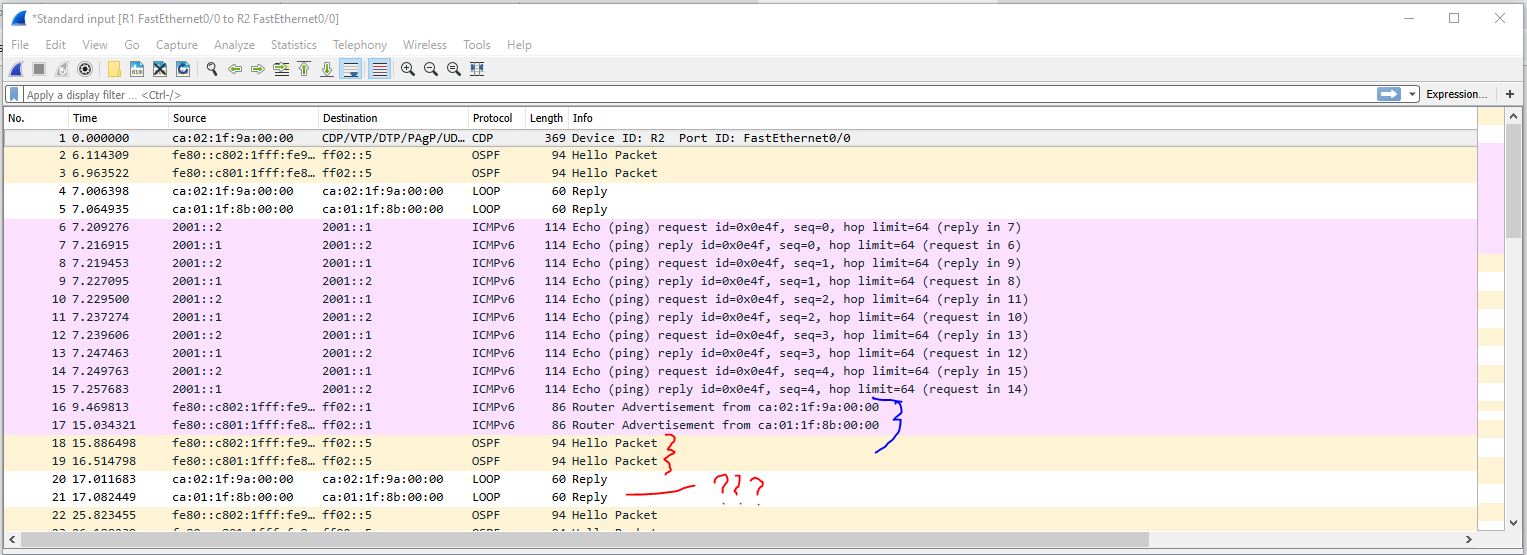
something which is mentioned in other lessons but is still kind of cool to see is how OSPF uses the Link Local for all the management type data its sending…
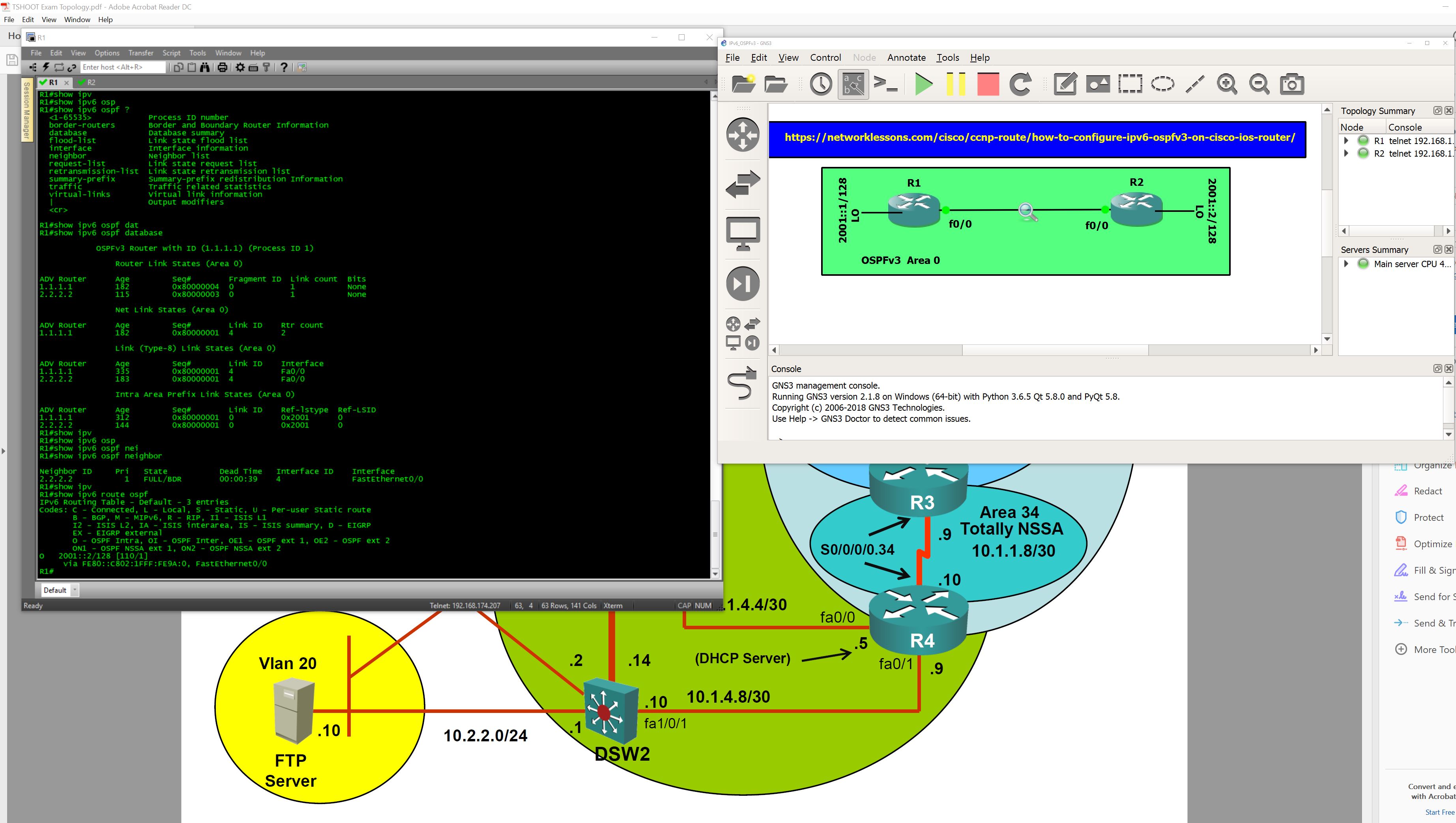
Since I am studying for the Tshoot I am trying to lab up the majority of the topics that is covered for the exam. So I am building a ton of GNS3 labs.
I would say that really be familiar in how IPV6 OSPF is setup for example being able to identify if something was missing from the show running configuration could be paramount to passing.
My topology just mirrors this lesson in this case its simply but effective! Great lesson easy to ingest and understand
wire shark was cool understood all of it but the ca: reply form loop not sure exactly what that is but know it has to do with loop back speaking. (Edited that was the MAC address)
[Next page](https://forum.networklessons.com/t/how-to-configure-ipv6-ospfv3-on-cisco-ios-router/902.md?page=2)