How to configure OSPF Default Route

Hello Justin

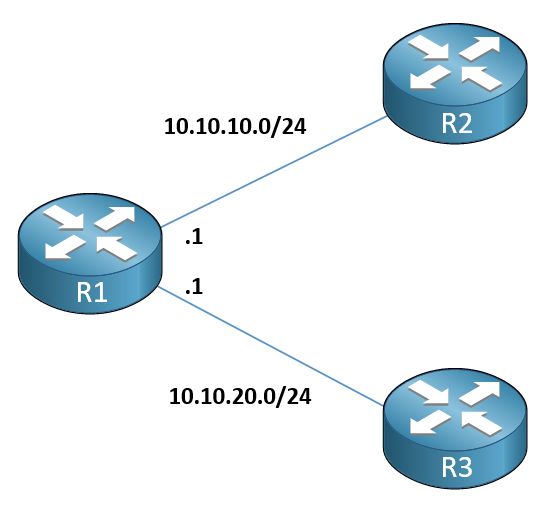
You are correct. OSPF will advertise a default route to neighbors, and will use the IP address of the interface out of which the advertisement was sent. For example, take a look at this diagram:

R2 would receive an advertised default route with a next hop IP of 10.10.10.1 while R3 would receive an advertised default route with a next hop IP of 10.10.20.1.

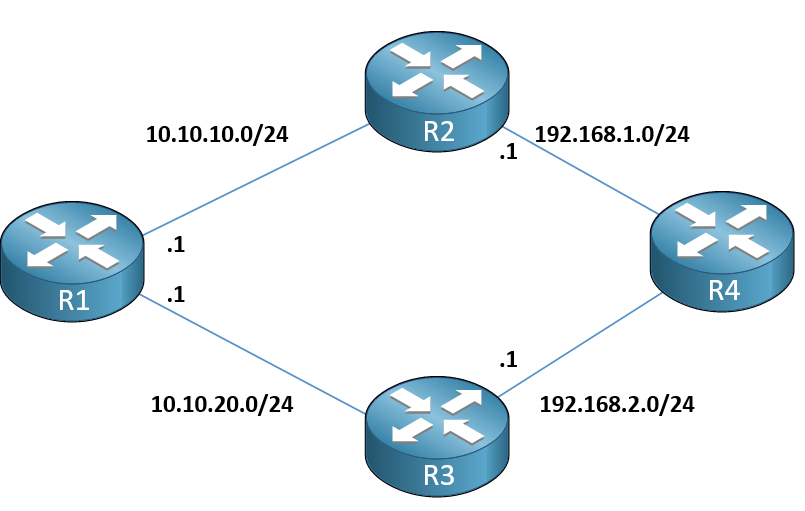
Now if you add R4 downstream, what would happen? Take a look at this diagram:

What default route and next hop would appear in R4? What will happen is actually completely independent of the default-information originate always command on R1. The resulting next hop address in R4 for the default route will simply follow the rules of OSPF path selection.

The shortest path will take precedence. If that is via R2, then the next hop IP of the default route will be set to 192.18.1.1. If it is via R3, then the next hop IP of the default route would be set to 192.168.2.1.

If the cost to both R3 and R2 is the same, then equal cost multipath (ECMP) routing will take place, and both paths (via 192.168.1.1 and 192.168.2.1) will be placed in the routing table. If ECMP is disabled or not supported, then the highest router ID of R2 and R3 will be chosen as the best path. Does that make sense?

I hope this has been helpful!

Laz

1 Like

I don’t understand why we need to use the always keyword like what’s the actual purpose of it apart from just the default route originating thing??

I first install a default route on R1 and then I use the distribute list originate so it didn’t show any route in R2, then I use the always keyword that also didn’t help. Finally I removed the default route from R1 and then the external route shows up. What is this strange behaviour??

Hello speedosuper.

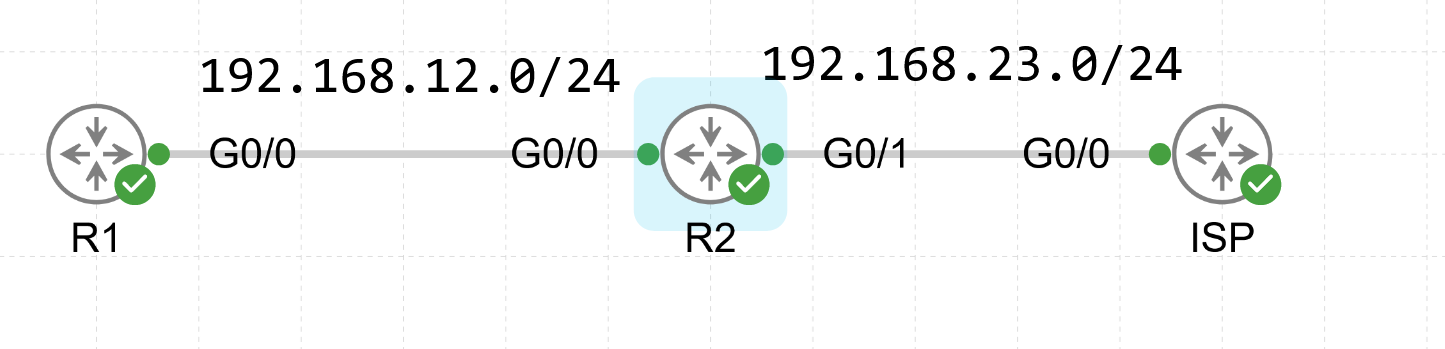
In this topology, R1 and R2 are running OSPF. We want R2 to advertise a default route into OSPF to R1. The default-information originate command can be used to achieve that.

R2(config)#router ospf 110
R2(config-router)#default-information originate

Now if we check the routing table on R1

R1(config)#do show ip route ospf

Codes: L - local, C - connected, S - static, R - RIP, M - mobile, B - BGPD - EIGRP, EX - EIGRP external, O - OSPF, IA - OSPF inter areaN1 - OSPF NSSA external type 1, N2 - OSPF NSSA external type 2E1 - OSPF external type 1, E2 - OSPF external type 2i - IS-IS, su - IS-IS summary, L1 - IS-IS level-1, L2 - IS-IS level-2ia - IS-IS inter area, * - candidate default, U - per-user static routeo - ODR, P - periodic downloaded static route, H - NHRP, l - LISPa - application route+ - replicated route, % - next hop override, p - overrides from PfR

Gateway of last resort is not set

R1(config)#

We can see that it didn’t receive a default route. Why? The default route is only sent to neighbors if the advertising router actually has it configured. R2 doesn’t have a default route configured so it won’t advertise it even if you issue this command.

We can simply fix this by actually configuring a default route on R2.

R2(config)#ip route 0.0.0.0 0.0.0.0 G0/1 192.168.23.3

R1(config)#do show ip route ospf

Codes: L - local, C - connected, S - static, R - RIP, M - mobile, B - BGPD - EIGRP, EX - EIGRP external, O - OSPF, IA - OSPF inter areaN1 - OSPF NSSA external type 1, N2 - OSPF NSSA external type 2E1 - OSPF external type 1, E2 - OSPF external type 2i - IS-IS, su - IS-IS summary, L1 - IS-IS level-1, L2 - IS-IS level-2ia - IS-IS inter area, * - candidate default, U - per-user static routeo - ODR, P - periodic downloaded static route, H - NHRP, l - LISPa - application route+ - replicated route, % - next hop override, p - overrides from PfR

Gateway of last resort is 192.168.12.2 to network 0.0.0.0

O*E2  0.0.0.0/0 [110/1] via 192.168.12.2, 00:00:19, GigabitEthernet0/0

R1(config)#

Since R2 now has a default route configured and we issued the default-information originate command, it will happily advertise it to R1. The only requirement is to have the advertising router (R2) actually configured with a static default route.

Now, is it possible for R2 to advertise a default route even if it has none configured?

R2(config)#no ip route 0.0.0.0 0.0.0.0 G0/1 192.168.23.3

The answer is yes. All you need to do is to type the same command but with the addition of the always keyword. This tells R2 to always advertise the default route, even if it’s not actually configured.

R2(config)#router ospf 110
R2(config-router)#default-information originate always
R1(config)#do show ip route ospf

Codes: L - local, C - connected, S - static, R - RIP, M - mobile, B - BGPD - EIGRP, EX - EIGRP external, O - OSPF, IA - OSPF inter areaN1 - OSPF NSSA external type 1, N2 - OSPF NSSA external type 2E1 - OSPF external type 1, E2 - OSPF external type 2i - IS-IS, su - IS-IS summary, L1 - IS-IS level-1, L2 - IS-IS level-2ia - IS-IS inter area, * - candidate default, U - per-user static routeo - ODR, P - periodic downloaded static route, H - NHRP, l - LISPa - application route+ - replicated route, % - next hop override, p - overrides from PfR

Gateway of last resort is 192.168.12.2 to network 0.0.0.0

O*E2  0.0.0.0/0 [110/1] via 192.168.12.2, 00:00:19, GigabitEthernet0/0

R1(config)#

So the differences are:

default-information originate - advertise a default route to your neighbors in OSPF but only if you have the default route configured

default-information originate always - always advertise a default route to your neighbors in OSPF, even if it’s not configured on you, the advertising router.

As for your lab, it’s hard to tell what exactly happened without the topology or any form of output. If you still have it, feel free to provide it!

David
Okay, I got it now and I also figured out that if you ran the default-information originate always on R2 and also give a default route toward R1 so R1 won’t have any default route in his routing table.

Hello speedosuper.

I’m not sure if I understand what you’re trying to say. If you run the command with the always keyword, R2 will always advertise a default route (regardless of whether it’s configured on R2 or not) so R1 will have a default route in the routing table.

David

What I am saying is I configured a default route on R2 towards R1 and also ran default-information originate always on R2. Now R1 don’t have the default route, but R3 do. Topology is like R1-R2-R3

R2 has:

ip route 0.0.0.0 0.0.0.0 12.1.1.1
router ospf 1
network 12.1.1.0 0.0.0.255 area 0
network 23.1.1.0 0.0.0.255 area 0
default-information originate always

R1 routing table of ospf:

Gateway of last resort is not set

[23.0.0.0/24](http://23.0.0.0/24) is subnetted, 1 subnets
O 23.1.1.0 [110/2] via 12.1.1.2, 00:03:32, FastEthernet0/0

R3 routing table of ospf:

Gateway of last resort is 23.1.1.2 to network 0.0.0.0

O*E2 [0.0.0.0/0](http://0.0.0.0/0) [110/1] via 23.1.1.2, 00:03:14, FastEthernet0/0
[12.0.0.0/24](http://12.0.0.0/24) is subnetted, 1 subnets
O 12.1.1.0 [110/2] via 23.1.1.2, 00:03:32, FastEthernet0/0

Hello speedosuper.

There is actually a very good reason for why it doesn’t have the route.

If R2 has a default route pointing towards R1 and decides to advertise this default route to R1, R1 would install the default route which would point to the advertising router (R2).

Again, R2 has a default route towards R1 → R2 advertises the default route to R1 → R1 installs the default route which points towards the advertising router (R2) → R1 now has a default route that points towards R2.

If R2’s default route points towards R1 and R1’s default route points towards R2, you’ll end up with a routing loop in your topology.

If R2 pings something like 4.6.5.4 which is matched by the default route and sends it to R1, R1’s default route will also match this IP and R1 will send it back to R2 and the cycle will continue :smiley:

Let me know if that’s clear. It might sound confusing at first.

David

So dumb of me, I get it now.