# How to Configure OSPF MD5 Authentication
**URL:** https://forum.networklessons.com/t/how-to-configure-ospf-md5-authentication/941
**Category:** Lessons Discussion
**Created:** [December 24, 2016, 6:15pm UTC](https://forum.networklessons.com/t/how-to-configure-ospf-md5-authentication/941 "2016-12-24T18:15:06Z")
**Posts on this page:** 20
**Page:** 1
### Author:  [@ReneMolenaar](https://forum.networklessons.com/u/ReneMolenaar)
#### Post date: [December 24, 2016, 6:15pm UTC](https://forum.networklessons.com/t/how-to-configure-ospf-md5-authentication/941/1 "2016-12-24T18:15:06Z")
This topic is to discuss the following lesson:
> **[How to Configure OSPF MD5 Authentication](https://networklessons.com/ospf/how-to-configure-ospf-md5-authentication)**
>
> This lesson will teach you how to configure OSPF MD5 Authentication per area or interface on Cisco IOS Routers.
---
### Author:  [@system](https://forum.networklessons.com/u/system)
#### Post date: [March 2, 2014, 2:31pm UTC](https://forum.networklessons.com/t/how-to-configure-ospf-md5-authentication/941/2 "2014-03-02T14:31:56Z")
thank you so much.. this helped me
---
### Author:  [@jmwalker24](https://forum.networklessons.com/u/jmwalker24)
#### Post date: [February 3, 2016, 10:43pm UTC](https://forum.networklessons.com/t/how-to-configure-ospf-md5-authentication/941/3 "2016-02-03T22:43:44Z")
Rene… in order to configure MD5 for an entire area… do we have to (at a minimum) configure a single subnet first - interface on Router A and connecting interface on Router B – using the
```auto
ip ospf authentication message-digest
ip ospf message-digest key 1 dm5 PASSWORD
```
Does that have to be done first? If yes – then the - Area 1 authentication message digest – command applies authentication to every other router and its interface in the entire area? … with the same key and password?
---
### Author:  [@ReneMolenaar](https://forum.networklessons.com/u/ReneMolenaar)
#### Post date: [February 4, 2016, 12:48pm UTC](https://forum.networklessons.com/t/how-to-configure-ospf-md5-authentication/941/4 "2016-02-04T12:48:33Z")
Hi Jason,
If you enable those two commands on the interface then MD5 authentication will be used, but only if the interface is running OSPF. You need to make sure you have a network command that covers the subnet of the interface. Otherwise…the interface won’t run OSPF so we also won’t have any authentication 🙂
Rene
---
### Author:  [@nokturnes](https://forum.networklessons.com/u/nokturnes)
#### Post date: [March 5, 2016, 6:24am UTC](https://forum.networklessons.com/t/how-to-configure-ospf-md5-authentication/941/5 "2016-03-05T06:24:02Z")
Easy to understand, Thanks.
---
### Author:  [@adkatamba](https://forum.networklessons.com/u/adkatamba)
#### Post date: [April 18, 2016, 2:03am UTC](https://forum.networklessons.com/t/how-to-configure-ospf-md5-authentication/941/6 "2016-04-18T02:03:07Z")
what if i have instances of different OSPF area, and I want the different areas to communicate. is it still the exact same or I need to have a different key number and the same password.
---
### Author:  [@ReneMolenaar](https://forum.networklessons.com/u/ReneMolenaar)
#### Post date: [April 18, 2016, 4:06pm UTC](https://forum.networklessons.com/t/how-to-configure-ospf-md5-authentication/941/7 "2016-04-18T16:06:54Z")
Hi Adriel,
Authentication and the authentication key can be configured per interface. You could use the same key everywhere but for security reasons, it might be a better idea to use a different key for each neighbor adjacency.
Rene
---
### Author:  [@shanmugasivak](https://forum.networklessons.com/u/shanmugasivak)
#### Post date: [May 28, 2016, 7:55pm UTC](https://forum.networklessons.com/t/how-to-configure-ospf-md5-authentication/941/8 "2016-05-28T19:55:47Z")
Hi Rene,
Thanks for explanations. I have questions regarding authentication.
1. Why we have two authentication method?. Is there any security level difference between two?.
2. Can you pls paste the running config of the plain text and md5 authentication keys, just to make sure the encryption of both.
(The above are interview questions)
---
### Author:  [@ReneMolenaar](https://forum.networklessons.com/u/ReneMolenaar)
#### Post date: [May 30, 2016, 11:25am UTC](https://forum.networklessons.com/t/how-to-configure-ospf-md5-authentication/941/9 "2016-05-30T11:25:16Z")
Hi Shanmugasiva,
Authentication methods change often throughout the years. Plain text isn’t very secure since (as the name implies) everything is clear text. If you use a sniffer like wireshark then you can see the password in the packet capture. MD5 is a bit more secure since it uses hashing.
On IOS XE, OSPF also supports SHA256 for authentication which is even more secure than MD5.
You can find the output of the running configuration at the bottom of each lesson:
How to configure OSPF MD5 Authentication
[OSPF Plain Text Authentication](https://networklessons.com/ospf/how-to-configure-ospf-plain-text-authentication/)
[OSPF MD5 Authentication](https://networklessons.com/ospf/how-to-configure-ospf-md5-authentication/)
Rene
---
### Author:  [@takedo2008](https://forum.networklessons.com/u/takedo2008)
#### Post date: [January 4, 2017, 1:43am UTC](https://forum.networklessons.com/t/how-to-configure-ospf-md5-authentication/941/10 "2017-01-04T01:43:32Z")
hi Rene,
there is something i don’t understand.
if we enable authentication globally on an area by using this cmd area authentication message-digest.
why did we confugre again ip ospf authentication message-digest under interface level ?
---
### Author:  [@lagapidis](https://forum.networklessons.com/u/lagapidis)
#### Post date: [January 4, 2017, 8:04pm UTC](https://forum.networklessons.com/t/how-to-configure-ospf-md5-authentication/941/11 "2017-01-04T20:04:29Z")
Hello Stephane Carlos
You can either enable MD5 authentication globally in an area, or individually on specific interfaces. So you either enter the command `area X authentication message-digest` under the OSPF configuration or the ` ip ospf authentication message-digest` command under each interface you want to enable it for.
It’s not quite clear in Rene’s lesson. I’ll let him know to clarify that.
Thanks!
Laz
---
### Author:  [@aniketgandhi58](https://forum.networklessons.com/u/aniketgandhi58)
#### Post date: [January 25, 2017, 2:16pm UTC](https://forum.networklessons.com/t/how-to-configure-ospf-md5-authentication/941/12 "2017-01-25T14:16:38Z")
Hi Rene
Still i am confused about the same ? if i configure MD5 or plain text on interface then why we need to configure authentication on area ? could you please explain me briefly
---
### Author:  [@lagapidis](https://forum.networklessons.com/u/lagapidis)
#### Post date: [January 26, 2017, 8:01am UTC](https://forum.networklessons.com/t/how-to-configure-ospf-md5-authentication/941/13 "2017-01-26T08:01:17Z")
Hello Aniket
There are essentially two parts to the configuration of MD5 authentication for OSPF. One is the configuration of the parameters themselves such as key number and password. This is performed on the interface in question with the command **_ip ospf message-digest-key X md5 password_**.
The second part to the configuration has to do with the actual activation of the functionality. This can be done in two ways:
One is to activate the authentication functionality on a **per interface basis**. This involves implementing the ip **_ospf authentication message-digest_** command on every interface where you configure OSPF authentication.
The other option is to activate the authentication functionality on a **per area** basis, so all interfaces in the area are activated with authentication. This can be done with the command **_area X authentication message-digest_** where X is the area for which you want to activate it.
I hope this has been helpful!
Laz
---
### Author:  [@wilder7bc](https://forum.networklessons.com/u/wilder7bc)
#### Post date: [September 20, 2017, 4:46pm UTC](https://forum.networklessons.com/t/how-to-configure-ospf-md5-authentication/941/14 "2017-09-20T16:46:51Z")
In regards to what Rene was saying if you use GNS3 it has that built in wireshark which is very nice. to check out see pic below where you can see clear text password with wireshark in the OSPF header.
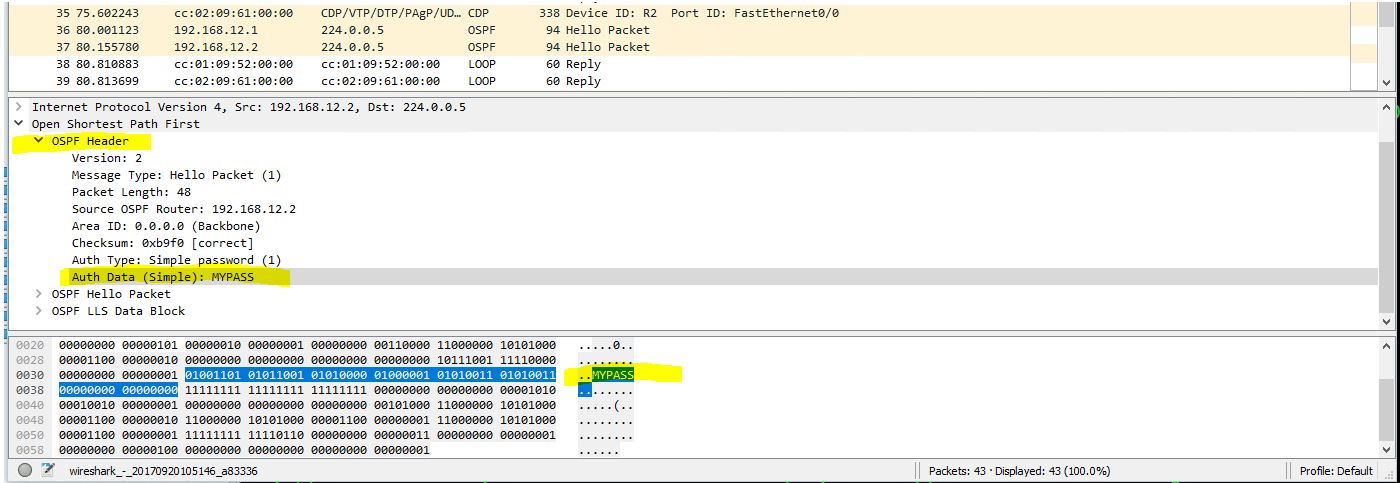
Also you have to understand I am no wireshark expert I am just starting to learn and play around with it more since starting my network studies. So if a novice could find it just think what pros could do and find!
---
### Author:  [@mrayubzada](https://forum.networklessons.com/u/mrayubzada)
#### Post date: [April 24, 2019, 9:26am UTC](https://forum.networklessons.com/t/how-to-configure-ospf-md5-authentication/941/15 "2019-04-24T09:26:44Z")
Hi Lazaros,
As Rene has configured the key number and password in interface f0/0 do we use this in area 0 or we configure another? Because that is for f0/0.
---
### Author:  [@lagapidis](https://forum.networklessons.com/u/lagapidis)
#### Post date: [April 24, 2019, 9:42am UTC](https://forum.networklessons.com/t/how-to-configure-ospf-md5-authentication/941/16 "2019-04-24T09:42:27Z")
Hello Muhammad
There are two ways to configure authentication. The first is to configure it on a per interface basis. In this case, you configure the commands as shown on the interfaces themsevles. This will enable authentication only between OSPF routers that are connected via interfaces that have been configured.
The second way to configure it is for all OSPF routers in the area. By enabling it under the OSPF configuration, all participating interfaces will attempt to authenticate with their neighbors that are in the same area. In this case, you don’t configure the `ip ospf authentication message-digest` command on each interface. Whether you do or not will not affect the end result.
I hope this has been helpful!
Laz
---
### Author:  [@abdul.basit.shoaib](https://forum.networklessons.com/u/abdul.basit.shoaib)
#### Post date: [November 4, 2022, 5:17am UTC](https://forum.networklessons.com/t/how-to-configure-ospf-md5-authentication/941/17 "2022-11-04T05:17:47Z")
Hi Rene,
what if both authentation methods (Plan-Text and MD5) are configured on the same device, one on area level and one interface level. which method with will take precedence? if one authentication method has a mismatch will it use the
other method to authenticate? if one device has authentication configured on an interface level and the other on area level, will they for neighbourship?
---
### Author:  [@lagapidis](https://forum.networklessons.com/u/lagapidis)
#### Post date: [November 6, 2022, 6:25am UTC](https://forum.networklessons.com/t/how-to-configure-ospf-md5-authentication/941/18 "2022-11-06T06:25:18Z")
Hello Abdul
The authentication type specified on the interface **always takes precedence**. If no authentication type is configured on the interface, only then will the authentication type of the area be used.
For more info, take a look at this Cisco command reference:
> **[Cisco IOS IP Routing: OSPF Command Reference - OSPF Commands: A through ip...](https://www.cisco.com/c/en/us/td/docs/ios-xml/ios/iproute_ospf/command/iro-cr-book/m_ospf-a1.html#wp9750141680)**
>
> OSPF Commands: A through ip ospf demand-circuit
I hope this has been helpful!
Laz
---
### Author:  [@warucker36](https://forum.networklessons.com/u/warucker36)
#### Post date: [April 13, 2025, 3:26pm UTC](https://forum.networklessons.com/t/how-to-configure-ospf-md5-authentication/941/19 "2025-04-13T15:26:05Z")
Why does OSPF area authentication work even if I do not configure a key?
---
### Author:  [@lagapidis](https://forum.networklessons.com/u/lagapidis)
#### Post date: [April 14, 2025, 4:24pm UTC](https://forum.networklessons.com/t/how-to-configure-ospf-md5-authentication/941/20 "2025-04-14T16:24:57Z")
Hello William
I labbed this one up to examine the behavior. What I have found i that if you configure two OSPF routers, each with the `area 0 authentication` command within the OSPF configuration mode, without specifying message digest, then you are enabling what is known as Type 1 authentication for OSPF. The following Cisco command reference specifies this specific configuration option:
> **[interface ethernet 0 ip address 192.168.251.201 255.255.255.0 ip ospf... - Cisco...](https://www.cisco.com/c/en/us/td/docs/ios-xml/ios/iproute_ospf/command/iro-cr-book/ospf-a1.html#wp1566045523)**
>
> To enable authentication for an Open Shortest Path First (OSPF) area, use the area authentication command in router configuration mode. To remove an authentication specification of an area or a specified area from the configuration, use the no form...
Specifically, it states:
> Specifying authentication for an area sets the authentication to Type 1 (simple password) as specified in RFC 1247. If this command is not included in the configuration file, authentication of Type 0 (no authentication) is assumed.
Now within the OSPF hello packets in such a configuration, you will see an auth type of 1:
![image]()
Now, taking a look at [RFC 1247, specifically in Appendix E](https://datatracker.ietf.org/doc/html/rfc1247#appendix-E) it states the following:
> E.2 Autype 1 – Simple password
>
> Using this authentication type, a 64-bit field is configured on a per-
> network basis. All packets sent on a particular network must have this
> configured value in their OSPF header 64-bit authentication field. This
> essentially serves as a “clear” 64-bit password.
>
> This guards against routers inadvertently coming up in the area. They
> must first be configured with their attached networks’ passwords before
> they can join the routing domain.
So, this is a predefined OSPF authentication type (type 1) that allows for a clear (i.e. unencrypted) password. By default there is no configured password, but you can configure it using the `ip ospf authentication-key` on the interface through which an OSPF adjacency takes place. The password can be undefined, and it will work, but it is best practice to define it. Does that make sense?
I hope this has been helpful!
Laz