Hello @lagapidis
Thanks for your answer. I’m using the same topology, but On R2 I’m getting LSA type5. On R3 I stop to get it and I see the route 0.0.0.0/0
I will share my topology
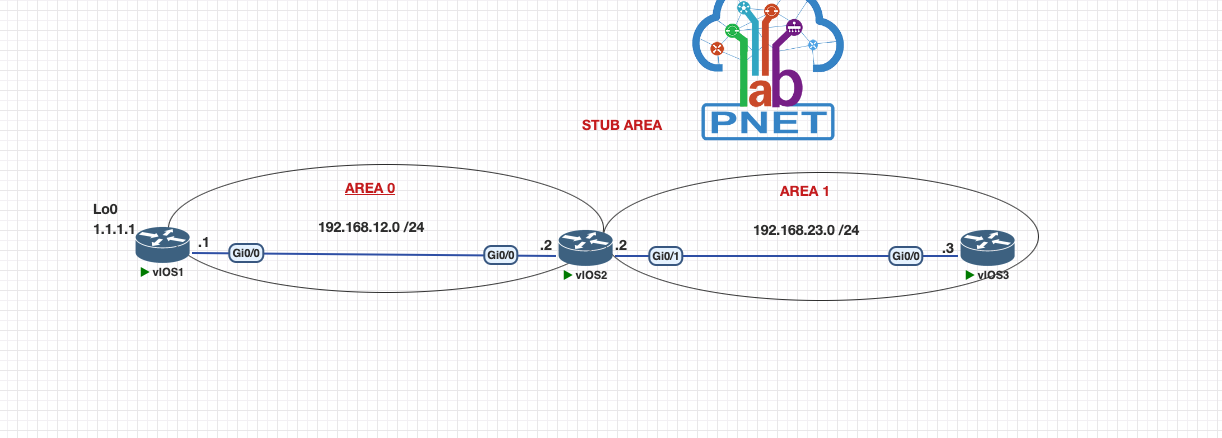
Mi configuration en R1 is this:
interface Loopback0
 ip address 1.1.1.1 255.255.255.0
!
interface GigabitEthernet0/0
 ip address 192.168.12.1 255.255.255.0
 ip ospf 1 area 0
 duplex auto
 speed auto
 media-type rj45
!
!
router ospf 1
 router-id 0.0.0.1
 redistribute connected subnets
!
Mi configuration on R2 is this:
!
interface GigabitEthernet0/0
 ip address 192.168.12.2 255.255.255.0
 ip ospf 1 area 0
 duplex auto
 speed auto
 media-type rj45
!
interface GigabitEthernet0/1
 ip address 192.168.23.2 255.255.255.0
 ip ospf 1 area 1
 duplex auto
 speed auto
 media-type rj45
!
router ospf 1
 router-id 0.0.0.2
 area 1 stub
The configuration on R3 is this:
!
router ospf 1
 router-id 0.0.0.2
 area 1 stub
!
router ospf 1
 router-id 0.0.0.3
 area 1 stub
Now the database and routing table on R3 look like this:
R3#show ip ospf database

            OSPF Router with ID (0.0.0.3) (Process ID 1)

Router Link States (Area 1)

Link ID         ADV Router      Age         Seq#       Checksum Link count
0.0.0.2         0.0.0.2         1392        0x80000054 0x00379F 1
0.0.0.3         0.0.0.3         104         0x80000054 0x0032A2 1

Net Link States (Area 1)

Link ID         ADV Router      Age         Seq#       Checksum
192.168.23.3    0.0.0.3         104         0x80000051 0x0077E8

Summary Net Link States (Area 1)

Link ID         ADV Router      Age         Seq#       Checksum
0.0.0.0         0.0.0.2         1392        0x8000004E 0x000BE3
192.168.12.0    0.0.0.2         1392        0x8000004F 0x00D2A5
R3# show ip route
O*IA  0.0.0.0/0 [110/2] via 192.168.23.2, 1d19h, GigabitEthernet0/0
O IA  192.168.12.0/24 [110/2] via 192.168.23.2, 1d19h, GigabitEthernet0/0
      192.168.23.0/24 is variably subnetted, 2 subnets, 2 masks
C        192.168.23.0/24 is directly connected, GigabitEthernet0/0
L        192.168.23.3/32 is directly connected, GigabitEthernet0/0
Now the big question is about R2, cause I still se LSA type 5 and I’m not sure if that is a normal behavior
Link ID         ADV Router      Age         Seq#       Checksum Link count
0.0.0.1         0.0.0.1         236         0x80000054 0x0021CC 1
0.0.0.2         0.0.0.2         40          0x80000054 0x001CCF 1

Net Link States (Area 0)

Link ID         ADV Router      Age         Seq#       Checksum
192.168.12.2    0.0.0.2         40          0x8000004F 0x00CEA0

Summary Net Link States (Area 0)

Link ID         ADV Router      Age         Seq#       Checksum
192.168.23.0    0.0.0.2         40          0x8000004F 0x003B30
Router Link States (Area 1)

Link ID         ADV Router      Age         Seq#       Checksum Link count
0.0.0.2         0.0.0.2         1536        0x80000054 0x00379F 1
0.0.0.3         0.0.0.3         250         0x80000054 0x0032A2 1

Net Link States (Area 1)

Link ID         ADV Router      Age         Seq#       Checksum
192.168.23.3    0.0.0.3         250         0x80000051 0x0077E8

Summary Net Link States (Area 1)

Link ID         ADV Router      Age         Seq#       Checksum
0.0.0.0         0.0.0.2         1536        0x8000004E 0x000BE3
192.168.12.0    0.0.0.2         1536        0x8000004F 0x00D2A5

Type-5 AS External Link States

Link ID         ADV Router      Age         Seq#       Checksum Tag
1.1.1.0         0.0.0.1         236         0x8000004F 0x00212D 0

R2#show ip route

Gateway of last resort is not set

      1.0.0.0/24 is subnetted, 1 subnets
O E2     1.1.1.0 [110/20] via 192.168.12.1, 1d19h, GigabitEthernet0/0
      192.168.12.0/24 is variably subnetted, 2 subnets, 2 masks
C        192.168.12.0/24 is directly connected, GigabitEthernet0/0
L        192.168.12.2/32 is directly connected, GigabitEthernet0/0
      192.168.23.0/24 is variably subnetted, 2 subnets, 2 masks
C        192.168.23.0/24 is directly connected, GigabitEthernet0/1
L        192.168.23.2/32 is directly connected, GigabitEthernet0/1