# How to configure Static NAT on Cisco IOS Router
**URL:** https://forum.networklessons.com/t/how-to-configure-static-nat-on-cisco-ios-router/892
**Category:** Lessons Discussion
**Created:** [December 22, 2016, 12:35am UTC](https://forum.networklessons.com/t/how-to-configure-static-nat-on-cisco-ios-router/892 "2016-12-22T00:35:30Z")
**Posts on this page:** 20
**Page:** 2
### Author:  [@kayoumt](https://forum.networklessons.com/u/kayoumt)
#### Post date: [October 4, 2017, 1:23am UTC](https://forum.networklessons.com/t/how-to-configure-static-nat-on-cisco-ios-router/892/21 "2017-10-04T01:23:07Z")
I did a little bit more sophisticated nat static lab. I want to validate something with you about the addresses in the following command : ip nat inside source static w.x.y.z **a.b.c.d**.
It seems a.b.c.d must be the address that is configured in the same network interface as the ip nat outside command ?
```
NAT(config)#interface fastEthernet 0/0
NAT(config-if)#ip nat outside
NAT(config-if)#ip add **a.b.c.d ...**
```
For w.x.y.z, it seems that any inside address routable to the NAT does work ?
---
### Author:  [@ReneMolenaar](https://forum.networklessons.com/u/ReneMolenaar)
#### Post date: [October 4, 2017, 10:59am UTC](https://forum.networklessons.com/t/how-to-configure-static-nat-on-cisco-ios-router/892/22 "2017-10-04T10:59:33Z")
Hi @kayoutoure,
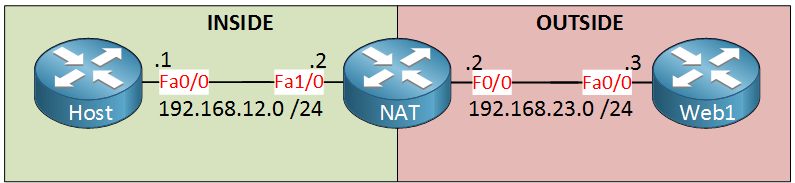
With the **ip nat inside source static** command, you’ll need an inside local + inside global address. The inside local can be any address that is routable on the inside. For the inside global address, you can pick **any IP address** that falls within the network of any of your interfaces that has the ip nat outside command. Usually, you’ll pick the IP address on your outside interface, but this is not really required. For example, this also works:
[ ](https://networklessons.com/wp-content/uploads/2013/02/static-nat-inside-outside.png)
Let’s create a new loopback:
```
NAT(config)#interface loopback 0
NAT(config-if)#ip nat outside
NAT(config-if)#ip address 2.2.2.2 255.255.255.0
NAT(config)#ip nat inside source static 192.168.12.1 2.2.2.1
```
2.2.2.1 belongs to the 2.2.2.0/24 network on loopback 0. Let’s enable a debug on the “host”:
```
HOST#debug ip packet
IP packet debugging is on
```
And do a quick ping:
```
WEB1#ping 2.2.2.1
Type escape sequence to abort.
Sending 5, 100-byte ICMP Echos to 2.2.2.1, timeout is 2 seconds:
!!!!!
Success rate is 100 percent (5/5), round-trip min/avg/max = 6/7/9 ms
```
Which works:
```
HOST#
IP: s=192.168.23.3 (GigabitEthernet0/1), d=192.168.12.1, len 100, input feature, MCI Check(109), rtype 0, forus FALSE, sendself FALSE, mtu 0, fwdchk FALSE
```
---
### Author:  [@kayoumt](https://forum.networklessons.com/u/kayoumt)
#### Post date: [October 4, 2017, 12:14pm UTC](https://forum.networklessons.com/t/how-to-configure-static-nat-on-cisco-ios-router/892/23 "2017-10-04T12:14:31Z")
Ok. I see.
By the way (if you have time to correct it) ; you are using R1, R2, R3 router names, while the schema is using Host, NAT, Web1.
---
### Author:  [@ReneMolenaar](https://forum.networklessons.com/u/ReneMolenaar)
#### Post date: [October 26, 2017, 9:54am UTC](https://forum.networklessons.com/t/how-to-configure-static-nat-on-cisco-ios-router/892/24 "2017-10-26T09:54:48Z")
You are right, just fixed it 🙂
---
### Author:  [@lundgrenolof](https://forum.networklessons.com/u/lundgrenolof)
#### Post date: [April 1, 2018, 5:23pm UTC](https://forum.networklessons.com/t/how-to-configure-static-nat-on-cisco-ios-router/892/25 "2018-04-01T17:23:31Z")
Just a little type I guess. “on” not “no” in the first sentence?
---
### Author:  [@ReneMolenaar](https://forum.networklessons.com/u/ReneMolenaar)
#### Post date: [April 3, 2018, 2:52pm UTC](https://forum.networklessons.com/t/how-to-configure-static-nat-on-cisco-ios-router/892/26 "2018-04-03T14:52:52Z")
Hi Olof,
That’s a typo yes 😄 Thanks for letting me know, I just fixed it.
Rene
---
### Author:  [@ccnp.manami](https://forum.networklessons.com/u/ccnp.manami)
#### Post date: [April 20, 2018, 8:43pm UTC](https://forum.networklessons.com/t/how-to-configure-static-nat-on-cisco-ios-router/892/27 "2018-04-20T20:43:14Z")
Hi Rene,
What will happen if we configure like this:-
```
interface xxx
ip nat inside
ip nat outside source static a.a.a.a b.b.b.b
interface yyy
ip nat outside
ip nat inside source static c.c.c.c d.d.d.d
```
Will it work at all and if at all it works how would be the packet flow?
---
### Author:  [@ccnp.manami](https://forum.networklessons.com/u/ccnp.manami)
#### Post date: [April 21, 2018, 10:37am UTC](https://forum.networklessons.com/t/how-to-configure-static-nat-on-cisco-ios-router/892/28 "2018-04-21T10:37:31Z")
Okay, My another doubt :-
For Cisco VASI Configuration, what we are doing -
```
Interface Physical_Interface1 (may be LAN Interface)
IP nat inside
```
```
Interface VasiLeft1
IP nat outside
ip nat inside source static 1.1.1.1 100.100.100.100.1
ip nat outside source static 2.2.2.2 200.200.200.2
interface VasiRight1
ip nat inside source static 5.5.5.5 500.500.500.5
ip nat outside source static 6.6.6.6 600.600.600.6
```
Please rectify me if I am wrong:-
When traffic enters “Physical\_Interface1” it will translate the LAN Side IP as per “ip nat inside” command and forward it to VasiLeft1 Interface. Here it is mentioned as “Outside” so send it to VasiRight1 as usual.
My doubt is what it will do with “inside NAT statement” here in VasiLest1 interface?
it reaches VasiRight1 automatically.
Now here gain we see “inside” and “outside” NAT Statement. What would be the traffic flow?
For return traffic,
Where it will D-NAT? On VasiRight or on VasiLeft?
it should be on any one of the interface. Not on both. Why we are configuring “inside” “outside” combined NAT Statement on both the interface vasiright and vasileft?
Totally Confused about packet flow.
Will eagerly wait to get your answer.
---
### Author:  [@lagapidis](https://forum.networklessons.com/u/lagapidis)
#### Post date: [April 30, 2018, 11:13am UTC](https://forum.networklessons.com/t/how-to-configure-static-nat-on-cisco-ios-router/892/29 "2018-04-30T11:13:02Z")
Hello Manami
I assume in your example you mean the following:
```
router(config)#interface xxx
router(config-if)#ip nat inside
router(config-if)#exit
router(config#) ip nat outside source static a.a.a.a b.b.b.b
router(config)#interface yyy
router(config-if)#ip nat outside
router(config-if)#exit
router(config)#ip nat inside source static c.c.c.c d.d.d.d
```
I’ve never actually configured something like this, but I don’t see why it wouldn’t work. You may have some restrictions as to the IP addresses being used. I suggest you try it out in a lab environment and see what happens. Share your results with us if you can.
I hope this has been helpful!
Laz
---
### Author:  [@troy.hall](https://forum.networklessons.com/u/troy.hall)
#### Post date: [May 7, 2018, 4:10am UTC](https://forum.networklessons.com/t/how-to-configure-static-nat-on-cisco-ios-router/892/30 "2018-05-07T04:10:10Z")
I’m still trying to understand this lesson–but please allow me a quick question regarding “overlapping” networks… where multiple networks share common IP addresses?
If I need to connect multiple different networks together, but they share a common IP scheme (192.168.115.0/24), can I do that with NAT?
Thanks–trying to find the practical solution for a real world problem.
Troy
---
### Author:  [@lagapidis](https://forum.networklessons.com/u/lagapidis)
#### Post date: [May 7, 2018, 1:58pm UTC](https://forum.networklessons.com/t/how-to-configure-static-nat-on-cisco-ios-router/892/31 "2018-05-07T13:58:45Z")
Hello Troy
In the specific reference to overlapping address spaces, what is being referred to here is if you have an inside network address that is the same as an address on the outside.
> [@troy.hall](#):
>
> If I need to connect multiple different networks together, but they share a common IP scheme (192.168.115.0/24), can I do that with NAT?
For this specific question, you’ll have to be a little more specific. Are these multiple different networks remote locations all using the same private address space of 192.168.115.0/24 internally? When you say connect them together, what do you want to achieve? Have each network have access to all other networks as if they were in the same physical location or just have access to specific resources at each location such as a web or email server?
In general, NAT is not a technology used to connect remote networks, but allows the use of one address scheme on the “inside” network to be translated to another on the “outside” network. The inside network is almost always a private address scheme while the outside network is almost always the Internet.
For connectivity between remote sites, technologies such as VPNs are an option for remote connectivity, but this will require even internal address schemes to be unique. If they are not unique, NAT can be employed to translate appropriately but this becomes unnecessarily complex for a relatively simple solution.
I hope this gives you some insight into what you need to do. Feel free to comment or provide additional information so we can look into the issue in more detail.
I hope this has been helpful!
Laz
---
### Author:  [@troy.hall](https://forum.networklessons.com/u/troy.hall)
#### Post date: [May 8, 2018, 5:14am UTC](https://forum.networklessons.com/t/how-to-configure-static-nat-on-cisco-ios-router/892/32 "2018-05-08T05:14:03Z")
Thanks for these questions, Laz–and the opportunity to learn from this exercise.
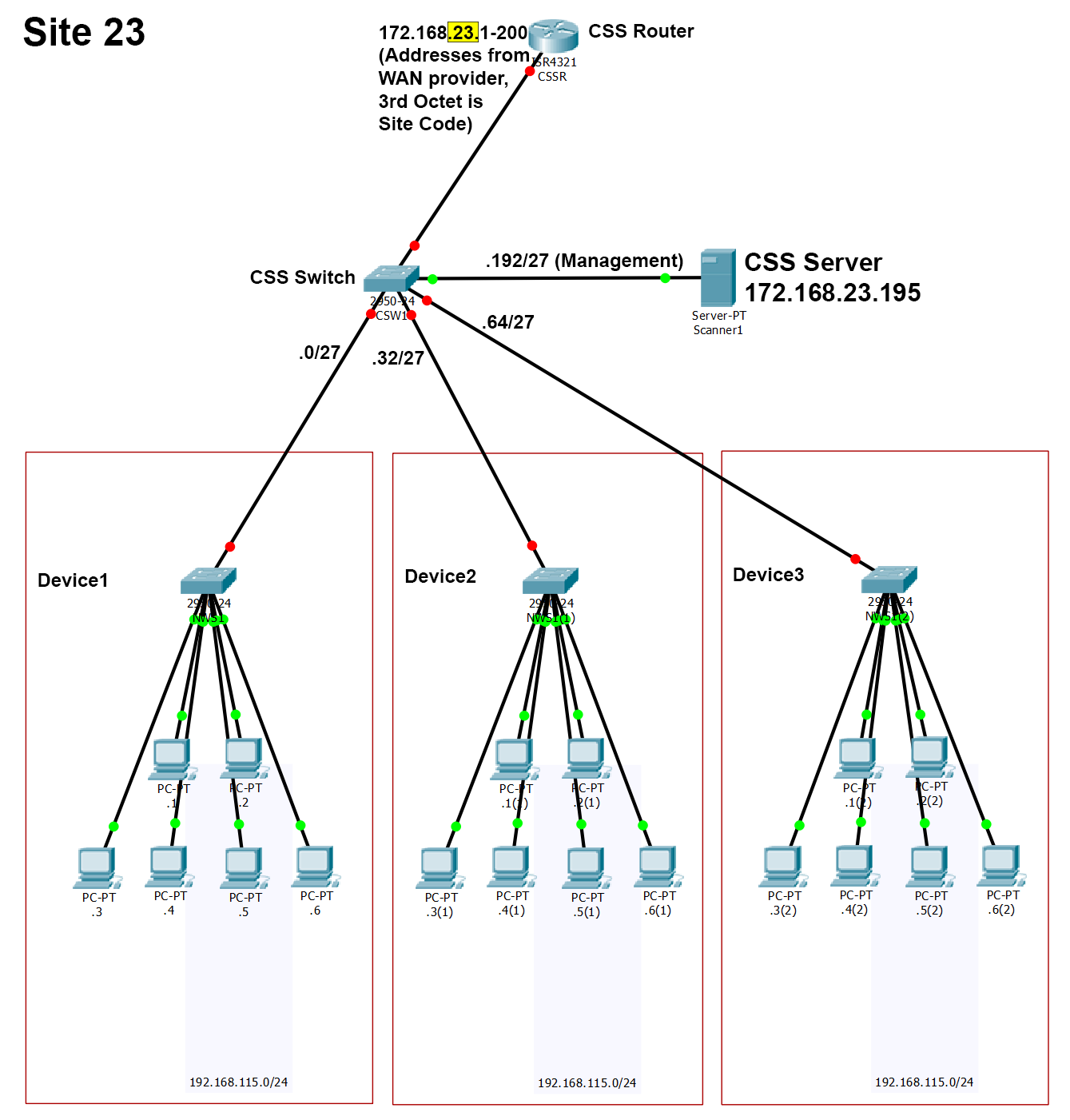
These are multiple devices per site, each utilizing the same static IP scheme–changing it is not practical. Each device does not and should not communicate with any other, but I need to access each client on each device in order to scan them. The scanner will run on a server, to be installed at each site. The WAN provider has given me 200 addresses for each site, and those are the addresses I will use to reach each client.
I intend to subnet those 200 addresses into seven /27 networks, enough for six devices and a few addresses left over for management. The static IPs on the devices are contiguous (.1-.25) within the local 192.168.115.0/24 address space. The problem I am trying to solve is to transcend the “public” IPs and reach the local IPs remotely. Is this possible with NAT? If so, can it be done on the router in the diagram? Or do I need additional L3 devices between the switches?
Troy
---
### Author:  [@lagapidis](https://forum.networklessons.com/u/lagapidis)
#### Post date: [May 8, 2018, 2:36pm UTC](https://forum.networklessons.com/t/how-to-configure-static-nat-on-cisco-ios-router/892/33 "2018-05-08T14:36:42Z")
Hello Troy
Can you clarify the following:
1. The scanner will run on a server to be installed at each site. Will this scanner have an internal IP address of the form 192.168.115.X?
2. The 200 addresses, are those routable? i.e. not private?
3. You say that the WAN provider has given you 200 address for each site. That’s 200 for each site?
4. Where is the central device from which you want to access all of the internal clients? What is it’s IP address?
5. What role do the servers at each site play? not sure I understood that part.
At first glance, what you will require is some nat translation with port forwarding so that you can access each individual client, but I must more fully understand the network topology before i can answer.
I await your response!
Laz
---
### Author:  [@troy.hall](https://forum.networklessons.com/u/troy.hall)
#### Post date: [May 8, 2018, 4:14pm UTC](https://forum.networklessons.com/t/how-to-configure-static-nat-on-cisco-ios-router/892/34 "2018-05-08T16:14:50Z")
My preference would be to keep the scanner off the 192.168.115.x network, but instead route its 172 address to all the clients on site. Yes, I have 200 addresses at each site and can route to them from a central server at a different site (ie. 172.168.22.195), for the purpose of initiating and collecting the scans at all of the other sites.
Ideally, I want a one-to-one translation between the local 192.168.115.1-30 to a 172.168.23.1-30 public address. Then repeat that scheme for the next one on site–192.168.115.1-30 can be reached from the outside by 172.168.23.33-62, and so on. Is NAT right for me?
Troy
---
### Author:  [@lagapidis](https://forum.networklessons.com/u/lagapidis)
#### Post date: [May 17, 2018, 7:18am UTC](https://forum.networklessons.com/t/how-to-configure-static-nat-on-cisco-ios-router/892/35 "2018-05-17T07:18:52Z")
Hello Troy
Sorry for the late response. If you have a one to one relationship between the internal and external IP addresses for the clients, then yes, NAT would work for what you want to do. Sounds like an interesting setup, let us know how it goes!
I hope this has been helpful!
Laz
---
### Author:  [@alshawimhnd](https://forum.networklessons.com/u/alshawimhnd)
#### Post date: [August 15, 2018, 7:45pm UTC](https://forum.networklessons.com/t/how-to-configure-static-nat-on-cisco-ios-router/892/36 "2018-08-15T19:45:28Z")
the following config is in the C891F-K9 in a production network my Question is why they config the ip nat static with route-map option
```
router#sh running-config interface g8
Building configuration...
Current configuration : 357 bytes
!
interface GigabitEthernet8
description WAN
bandwidth 512
bandwidth receive 3000
ip address x.x.x.x 255.255.255.248
ip access-group BLOCK_RECURSIVE in
ip nat outside
ip ips myips in
ip virtual-reassembly in
zone-member security INTERNET-ZONE
duplex auto
speed auto
crypto map primarymap
service-policy output MP_STD_4QUEUE
end
ip nat inside source static 10.1.1.1 10.87.11.11 route-map NAT_MAP
route-map NAT_MAP permit 10
match ip address NAT_LIST
match interface GigabitEthernet8
ip access-list extended NAT_LIST
deny ip 10.0.0.0 0.255.255.255 168.182.0.0 0.0.255.255
deny ip 10.0.0.128 0.255.255.63 any
permit ip 10.0.0.0 0.255.255.255 any
```
---
### Author:  [@lagapidis](https://forum.networklessons.com/u/lagapidis)
#### Post date: [August 17, 2018, 2:43pm UTC](https://forum.networklessons.com/t/how-to-configure-static-nat-on-cisco-ios-router/892/37 "2018-08-17T14:43:37Z")
Hello Mohanad
Using a route map to define a static NAT is helpful because it adds a lot of flexibility. You can easily adjust which addresses are allowed and which are not. This is especially the case for one to one static NAT like the one you show in your post where users from the Internet (or from the outside network) can directly access the device on the inside via this static NAT translation. By adding the route-map and placing entries in the associated access list, you are blocking incoming requests from the specific IPs that are listed there.
You can limit and filter who has access from the outside to the device you are translating to. This is typical good practice especially when this is something that you want to adjust over the days and months of its operation.
I hope this has been helpful!
Laz
---
### Author:  [@wilder7bc](https://forum.networklessons.com/u/wilder7bc)
#### Post date: [September 26, 2018, 8:11pm UTC](https://forum.networklessons.com/t/how-to-configure-static-nat-on-cisco-ios-router/892/38 "2018-09-26T20:11:12Z")
PLease check under the NAT Router this configuration has the wrong IPs listed.. they have
```
!
interface FastEthernet0/0
ip address 192.18.23.2 255.255.255.0
ip nat outside
!
interface FastEthernet1/0
ip address 192.18.12.2 255.255.255.0
ip nat inside
```
I am having problems with the PAT so I came to this one to back track and so I had just copied the configs from the config tabs.
that is why its not working for people!!!
should be 192.“168”.x.x on both
Ok I have tested this one and it works…. minus the changes that need to be made that I posted above. I also did ` no ip routing` on the Web server… before I did that I could not ping from host to web but after I did that I could… odd!
---
### Author:  [@lagapidis](https://forum.networklessons.com/u/lagapidis)
#### Post date: [September 29, 2018, 3:08pm UTC](https://forum.networklessons.com/t/how-to-configure-static-nat-on-cisco-ios-router/892/39 "2018-09-29T15:08:19Z")
Hello Brian
Thanks for catching that, I’ll let Rene know!
Laz
---
### Author:  [@chrisnewnham17](https://forum.networklessons.com/u/chrisnewnham17)
#### Post date: [November 23, 2018, 8:22am UTC](https://forum.networklessons.com/t/how-to-configure-static-nat-on-cisco-ios-router/892/40 "2018-11-23T08:22:42Z")
Is there a tangible difference between
> ip nat inside source static 192.168.12.1 192.168.23.2
and
> ip nat outside source static 192.168.23.2 192.168.12.1
?
[Previous page](https://forum.networklessons.com/t/how-to-configure-static-nat-on-cisco-ios-router/892.md?page=1)
[Next page](https://forum.networklessons.com/t/how-to-configure-static-nat-on-cisco-ios-router/892.md?page=3)