# How to configure trunk on Cisco Catalyst Switch
**URL:** https://forum.networklessons.com/t/how-to-configure-trunk-on-cisco-catalyst-switch/869
**Category:** Lessons Discussion
**Created:** [December 20, 2016, 10:09pm UTC](https://forum.networklessons.com/t/how-to-configure-trunk-on-cisco-catalyst-switch/869 "2016-12-20T22:09:09Z")
**Posts on this page:** 11
**Page:** 6
### Author:  [@lagapidis](https://forum.networklessons.com/u/lagapidis)
#### Post date: [June 17, 2023, 6:34am UTC](https://forum.networklessons.com/t/how-to-configure-trunk-on-cisco-catalyst-switch/869/108 "2023-06-17T06:34:28Z")
Hello Hemant
If you want to find out more about how trunk ports and access ports are configured on a switch, take a look at this lesson:
> **[Trunking on Cisco IOS Switch](https://networklessons.com/switching/how-to-configure-trunk-on-cisco-catalyst-switch)**
>
> Trunks are used to carry VLANs. In this lesson you will learn how to configure Trunk on a Cisco Catalyst Switch.
There you will find the various options for dynamic desirable and dynamic auto. These configurations are part of what is know as [Dynamic Trunking Protocol (DTP)](https://networklessons.com/switching/cisco-dtp-dynamic-trunking-protocol-negotiation) which is the protocol that operates this negotiation feature.
Some more useful links for you include:
- [Switchport modes](https://notes.networklessons.com/switchport-modes)
- [Trunk ports](https://notes.networklessons.com/switchport-trunk)
- [Access ports](https://notes.networklessons.com/switchport-access)
If you need any further help on more specific scenarios, please let us know!
I hope this has been helpful!
Laz
---
### Author:  [@psf1575](https://forum.networklessons.com/u/psf1575)
#### Post date: [April 16, 2024, 8:13pm UTC](https://forum.networklessons.com/t/how-to-configure-trunk-on-cisco-catalyst-switch/869/109 "2024-04-16T20:13:53Z")
Hello Laz!
Some questions I had: Towards the end of this lesson, on SW1, we configured int Fa0/14 as a static access port, but the lesson provides the following output after that:
```auto
SW1#show interfaces f0/14 switchport
Name: Fa0/14
Switchport: Enabled
Administrative Mode: static access
Operational Mode: trunk
```
Why does the operational mode say trunk if we configured it as a static access port using the `switchport mode access` command? It should be in access mode correct?
Second question, if we configure a link connecting two switches as manual trunk ports using the `switchport mode trunk` command, but dont apply the nonegotiate command to turn of DTP, would this affect the switchports at all? I believe they will remain as trunk ports even if both sides are still sending DTP frames since we manually made them trunks, is this correct?
Finally, the lesson mentions that “Dynamic auto will prefer to become an access port, but if the other interface has been configured as a trunk we will end up with a trunk”, however wouldnt this scenario only apply if the trunk port in question is sending DTP frames? Because if we turn off auto negotiation, and no DTP frames are hitting the switchport configured as dynamic auto, then it does indeed run as an access port right?
Thank you Laz!
---
### Author:  [@lagapidis](https://forum.networklessons.com/u/lagapidis)
#### Post date: [April 18, 2024, 6:03am UTC](https://forum.networklessons.com/t/how-to-configure-trunk-on-cisco-catalyst-switch/869/110 "2024-04-18T06:03:36Z")
Hello Paul
> [@psf1575](#):
>
> Why does the operational mode say trunk if we configured it as a static access port using the “switchport mode access” command? It should be in access mode correct?
The administrative mode is what we have manually configured on the port itself. The operational mode is the actual mode that the port is in as a result of negotiation or additional factors. More about these differences between the two can be found in [this NetworkLessons note](https://notes.networklessons.com/ethernet-administrative-operational-mode).
Now having said that, there is no situation in which you would have an administrative mode of “static access” and an operation mode of “trunk”. If you statically configure the port to be an access port, then the operational mode should be access. So you are indeed correct, and this is likely a typo, that I will let Rene know about. For comparison, an example of a possible combination could be an administrative mode of “dynamic auto”, and an operation mode of “access”.
> [@psf1575](#):
>
> Second question, if we configure a link connecting two switches as manual trunk ports using the “switchport mode trunk” command, but dont apply the nonegotiate command to turn of DTP, would this affect the switchports at all? I believe they will remain as trunk ports even if both sides are still sending DTP frames since we manually made them trunks, is this correct?
Yes, you are correct. To find out how to actually disable DTP, take a look at [this NetworkLessons note](https://notes.networklessons.com/dtp-how-to-disable).
> [@psf1575](#):
>
> Finally, the lesson mentions that “Dynamic auto will prefer to become an access port, but if the other interface has been configured as a trunk we will end up with a trunk”, however wouldnt this scenario only apply if the trunk port in question is sending DTP frames? Because if we turn off auto negotiation, and no DTP frames are hitting the switchport configured as dynamic auto, then it does indeed run as an access port right?
Yes, that is correct as well. If DTP is disabled, then this will not happen. Possibly a better wording would be:
> Dynamic auto will prefer to become an access port, but if the other interface has been configured as a trunk (and DTP has not been disabled), we will end up with a trunk.
I hope this has been helpful!
Laz
---
### Author:  [@onerobertone](https://forum.networklessons.com/u/onerobertone)
#### Post date: [June 3, 2024, 4:13pm UTC](https://forum.networklessons.com/t/how-to-configure-trunk-on-cisco-catalyst-switch/869/111 "2024-06-03T16:13:23Z")
Hello -
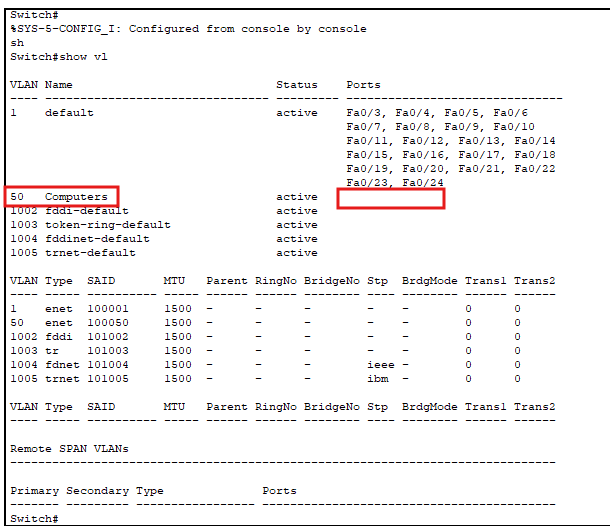
Following along using Packet Tracer with two 2950-24’s, I never see the Ports listed like in your “show vlan” screenshot. What am I doing wrong?
---
### Author:  [@lagapidis](https://forum.networklessons.com/u/lagapidis)
#### Post date: [June 5, 2024, 8:04am UTC](https://forum.networklessons.com/t/how-to-configure-trunk-on-cisco-catalyst-switch/869/112 "2024-06-05T08:04:21Z")
Hello Robert
I tried recreating your scenario in my Packet Tracer, but I don’t get the same results as you:
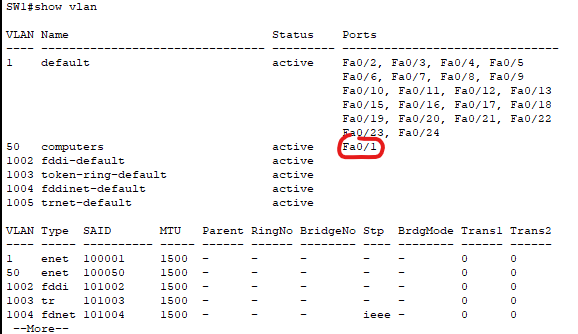
I get the same results as the lesson.
Remember, only **access ports** will appear in the output of the `show vlan` command.
If Fa0/1 doesn’t appear, then that means that the port has been configured as a trunk. I suspect that’s what happened, but take a look to confirm this. I also notice that your Fa0/2 doesn’t appear in the output, have you configured both of those interfaces as trunks? Check it out and let us know.
If you have further problems, let us know and we’ll do our best to help you out.
I hope this has been helpful!
Laz
---
### Author:  [@sathish84be](https://forum.networklessons.com/u/sathish84be)
#### Post date: [June 30, 2024, 10:32am UTC](https://forum.networklessons.com/t/how-to-configure-trunk-on-cisco-catalyst-switch/869/113 "2024-06-30T10:32:11Z")
As i tested this in LAB with two PC behing switches and not able to ping each other.
---
### Author:  [@kuldeep.kaira](https://forum.networklessons.com/u/kuldeep.kaira)
#### Post date: [January 30, 2025, 6:39am UTC](https://forum.networklessons.com/t/how-to-configure-trunk-on-cisco-catalyst-switch/869/114 "2025-01-30T06:39:19Z")
hi Rene,
what is the emulator you used for this lab, it looks amazing and cool.
please let me know the name.
---
### Author:  [@lagapidis](https://forum.networklessons.com/u/lagapidis)
#### Post date: [February 1, 2025, 5:11am UTC](https://forum.networklessons.com/t/how-to-configure-trunk-on-cisco-catalyst-switch/869/115 "2025-02-01T05:11:02Z")
Hello Kuldeep
Rene typically uses Cisco Modeling Labs (CML) whenever he uses an emulator for the labs. However, in this lab and in the video, no emulator was shown. In the labs, he has an image of the topology, which is typically created using Microsoft Visio, and he has his command line interface, which he uses SecureCRT for. Is that maybe what you meant? Let us know!!
I hope this has been helpful!
Laz
---
### Author:  [@mx.linx76](https://forum.networklessons.com/u/mx.linx76)
#### Post date: [January 2, 2026, 1:00pm UTC](https://forum.networklessons.com/t/how-to-configure-trunk-on-cisco-catalyst-switch/869/116 "2026-01-02T13:00:48Z")
![Screenshot 2026-01-02 at 8.58.21 PM]()
Hi, can I check for this image in the lesson is it supposed to “`show interface fa0/14 trunk`” or “`show interface trunk`”?
The second command works in Cisco Packet Tracer. Please advise.
Thank you.
---
### Author:  [@lagapidis](https://forum.networklessons.com/u/lagapidis)
#### Post date: [January 4, 2026, 2:24pm UTC](https://forum.networklessons.com/t/how-to-configure-trunk-on-cisco-catalyst-switch/869/117 "2026-01-04T14:24:59Z")
Hello Kader
These are two different commands, and each one shows something different. The `show interfaces fa0/14 trunk` command shows the trunk-related information about **the specific interface you specify**. As you can see from your output, the port in question seems to be functioning as a trunk, and you can see the mode, the encapsulation and the VLANs that are alowed on the trunk. Here is the output of the same command for a port that is currently an access port:
```auto
SW1#show interfaces gigabitEthernet 0/0 trunk
Port Mode Encapsulation Status Native vlan
Gi0/0 auto negotiate not-trunking 1
Port Vlans allowed on trunk
Gi0/0 1
Port Vlans allowed and active in management domain
Gi0/0 1
Port Vlans in spanning tree forwarding state and not pruned
Gi0/0 1
SW1#
```
You can see from the output that the port is in a “non-trunking” status.
Now the `show interfaces trunk` command is different. It shows you a summary overview of all of the trunks that have been configured on the switch as well as the allowed VLANs on each. For more info on this command, take a look at [this Cisco command reference](https://www.cisco.com/c/en/us/td/docs/ios-xml/ios/interface/command/ir-cr-book/ir-s4.html#wp4112214085).
So each command has its use and displays different information.
I hope this has been helpful!
Laz
---
### Author:  [@mx.linx76](https://forum.networklessons.com/u/mx.linx76)
#### Post date: [January 5, 2026, 10:32am UTC](https://forum.networklessons.com/t/how-to-configure-trunk-on-cisco-catalyst-switch/869/118 "2026-01-05T10:32:33Z")
Thank you very much
[Previous page](https://forum.networklessons.com/t/how-to-configure-trunk-on-cisco-catalyst-switch/869.md?page=5)