# How to post configuration snippets
**URL:** https://forum.networklessons.com/t/how-to-post-configuration-snippets/4557
**Category:** Rules / Guidelines / Policies
**Created:** [August 8, 2018, 2:56pm UTC](https://forum.networklessons.com/t/how-to-post-configuration-snippets/4557 "2018-08-08T14:56:22Z")
**Posts on this page:** 3
**Page:** 1
### Author:  [@ReneMolenaar](https://forum.networklessons.com/u/ReneMolenaar)
#### Post date: [August 8, 2018, 2:56pm UTC](https://forum.networklessons.com/t/how-to-post-configuration-snippets/4557/1 "2018-08-08T14:56:22Z")
**How to post configuration snippets**
[![]() ](https://vimeo.com/284215336)
The discourse forum software supports code snippets. To keep everything nice and readable, please “code” your configuration snippets.
**How not to add configuration snippets**
Don’t do this:
hostname PE1
interface Loopback0
ip address 2.2.2.2 255.255.255.255
!
interface GigabitEthernet0/0
ip address 10.255.2.113 255.255.0.0
shutdown
duplex auto
speed auto
media-type rj45
It’s difficult to see the difference between regular text and configuration snippets. It’s messy!
**Use the code button**
Select your configuration snippet and use the code button. See screen shot below:
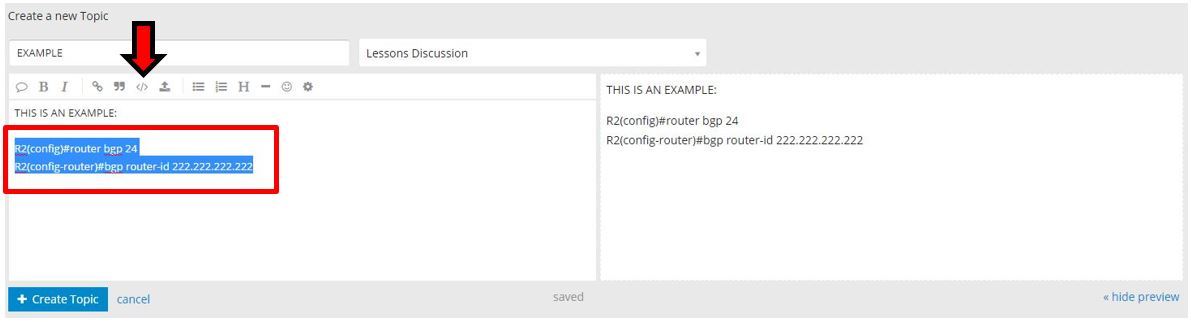
You will know when it works, as the text you selected will become indented. Over in the preview pane, you will see the text coded with a colored background.
Your configuration snippet now looks like this:
```
hostname PE1
interface Loopback0
ip address 2.2.2.2 255.255.255.255
!
interface GigabitEthernet0/0
ip address 10.255.2.113 255.255.0.0
shutdown
duplex auto
speed auto
media-type rj45
```
Much, much cleaner!
- Instead of the code button, you can also use HTML:
- `my configuration snippet
` for configuration snippets.
- or `hostname R1` for commands.
**Add only the relevant configuration snippet**
Don’t post the entire configuration. For example, if you only have a question about MP-BGP on your router then don’t paste the entire configuration:
```
Building configuration...
Current configuration : 3769 bytes
!
! Last configuration change at 14:41:41 UTC Wed Aug 8 2018
!
version 15.6
service timestamps debug datetime msec
service timestamps log datetime msec
no service password-encryption
!
hostname PE1
!
boot-start-marker
boot-end-marker
!
!
!
no aaa new-model
!
!
!
mmi polling-interval 60
no mmi auto-configure
no mmi pvc
mmi snmp-timeout 180
!
!
!
!
!
!
!
!
ip vrf CUSTOMER
rd 1:1
route-target export 1:1
route-target import 1:1
!
!
!
!
ip cef
no ipv6 cef
!
multilink bundle-name authenticated
!
!
!
!
!
redundancy
!
!
!
!
!
!
!
!
!
!
!
!
!
!
interface Loopback0
ip address 2.2.2.2 255.255.255.255
!
interface GigabitEthernet0/0
ip address 10.255.2.113 255.255.0.0
shutdown
duplex auto
speed auto
media-type rj45
!
interface GigabitEthernet0/1
ip vrf forwarding CUSTOMER
ip address 192.168.12.2 255.255.255.0
duplex auto
speed auto
media-type rj45
!
interface GigabitEthernet0/2
ip address 192.168.23.2 255.255.255.0
duplex auto
speed auto
media-type rj45
!
router ospf 2 vrf CUSTOMER
redistribute bgp 234 subnets
network 192.168.12.0 0.0.0.255 area 0
!
router ospf 1
mpls ldp autoconfig
network 2.2.2.2 0.0.0.0 area 0
network 192.168.23.0 0.0.0.255 area 0
!
router bgp 234
bgp log-neighbor-changes
neighbor 4.4.4.4 remote-as 234
neighbor 4.4.4.4 update-source Loopback0
!
address-family ipv4
no neighbor 4.4.4.4 activate
exit-address-family
!
address-family vpnv4
neighbor 4.4.4.4 activate
neighbor 4.4.4.4 send-community extended
exit-address-family
!
address-family ipv4 vrf CUSTOMER
redistribute ospf 2
exit-address-family
!
ip forward-protocol nd
!
!
no ip http server
no ip http secure-server
ip ssh server algorithm encryption aes128-ctr aes192-ctr aes256-ctr
ip ssh client algorithm encryption aes128-ctr aes192-ctr aes256-ctr
!
ipv6 ioam timestamp
!
!
!
control-plane
!
banner exec ^C
**************************************************************************
* IOSv is strictly limited to use for evaluation, demonstration and IOS *
* education. IOSv is provided as-is and is not supported by Cisco's *
* Technical Advisory Center. Any use or disclosure, in whole or in part, *
* of the IOSv Software or Documentation to any third party for any *
* purposes is expressly prohibited except as otherwise authorized by *
* Cisco in writing. *
************************************************************************** ^C
banner incoming ^C
**************************************************************************
* IOSv is strictly limited to use for evaluation, demonstration and IOS *
* education. IOSv is provided as-is and is not supported by Cisco's *
* Technical Advisory Center. Any use or disclosure, in whole or in part, *
* of the IOSv Software or Documentation to any third party for any *
* purposes is expressly prohibited except as otherwise authorized by *
* Cisco in writing. *
************************************************************************** ^C
banner login ^C
**************************************************************************
* IOSv is strictly limited to use for evaluation, demonstration and IOS *
* education. IOSv is provided as-is and is not supported by Cisco's *
* Technical Advisory Center. Any use or disclosure, in whole or in part, *
* of the IOSv Software or Documentation to any third party for any *
* purposes is expressly prohibited except as otherwise authorized by *
* Cisco in writing. *
************************************************************************** ^C
!
line con 0
line aux 0
line vty 0 4
login
transport input none
!
no scheduler allocate
!
end
```
Besides the junk and empty lines, we don’t need the login banners and SSH configuration.
Only paste the relevant configuration snippet that we need to answer your question:
```
router bgp 234
bgp log-neighbor-changes
neighbor 4.4.4.4 remote-as 234
neighbor 4.4.4.4 update-source Loopback0
!
address-family ipv4
no neighbor 4.4.4.4 activate
exit-address-family
!
address-family vpnv4
neighbor 4.4.4.4 activate
neighbor 4.4.4.4 send-community extended
exit-address-family
!
address-family ipv4 vrf CUSTOMER
redistribute ospf 2
exit-address-family
```
Nice, clean, and easy on the eyes.
**Don’t add sensitive information**
Our forum is read-only to the public so remove any sensitive information like IP addresses or usernames in your configuration snippets!
---
### Author:  [@ReneMolenaar](https://forum.networklessons.com/u/ReneMolenaar)
#### Post date: [August 8, 2018, 3:09pm UTC](https://forum.networklessons.com/t/how-to-post-configuration-snippets/4557/2 "2018-08-08T15:09:25Z")
---
### Author:  [@erikmolenaar](https://forum.networklessons.com/u/erikmolenaar)
#### Post date: [August 24, 2018, 11:24am UTC](https://forum.networklessons.com/t/how-to-post-configuration-snippets/4557/4 "2018-08-24T11:24:53Z")