# How to Read the BGP Table
**URL:** https://forum.networklessons.com/t/how-to-read-the-bgp-table/1234
**Category:** Lessons Discussion
**Created:** [December 29, 2016, 5:32pm UTC](https://forum.networklessons.com/t/how-to-read-the-bgp-table/1234 "2016-12-29T17:32:52Z")
**Posts on this page:** 20
**Page:** 3
### Author:  [@lagapidis](https://forum.networklessons.com/u/lagapidis)
#### Post date: [September 26, 2019, 5:59am UTC](https://forum.networklessons.com/t/how-to-read-the-bgp-table/1234/41 "2019-09-26T05:59:11Z")
Hello Juan
When a path fails, BGP must reconverge to find a new path to the destination, (or if no other path exists, to remove it from the table). The way in which this is done can be seen in the following lesson:
> **[BGP Next Hop Address Tracking](https://networklessons.com/bgp/bgp-next-hop-address-tracking)**
>
> BGP next-hop address tracking improves BGP convergence times.It detects events in the routing table and updates next hop info in the BGP table.
This lesson talks about next hop address tracking, which is a feature that allows for faster convergence, but is enabled by default on Cisco devices. The lesson describes the reconvergence process.
More generally, the BGP routing process accepts multiple incoming routing updates, and advertises only the best routes to its peers. BGP does not utilize periodic updates, and thus **route invalidation is not based on expiring any timers or information**. Instead, BGP uses explicit withdrawal information that is found within the triggered UPDATE messages to signal neighbors of the loss of the particular path. In addition to the explicit withdrawals, BGP also supports implicit signaling, where newer information for the same prefix from the same peer replaces the previously learned information.
I hope this has been helpful!
Laz
---
### Author:  [@Payal.sharma86](https://forum.networklessons.com/u/Payal.sharma86)
#### Post date: [October 16, 2019, 6:46pm UTC](https://forum.networklessons.com/t/how-to-read-the-bgp-table/1234/42 "2019-10-16T18:46:28Z")
Hi Laz
Could you please explain below things to me in the configuration?
1. what are those AS numbers
2. what is the IP 62.6.10.134
3. what is Community: 12641:6201
` #sh ip bgp 0.0.0.0`
` BGP routing table entry for 0.0.0.0/0, version 3624`
` Paths: (1 available, best #1, table default)`
` Multipath: iBGP`
` Advertised to update-groups:`
` 1`
` Refresh Epoch 2`
` 12661 2876 64800`
` 10.19.2.26 from 10.19.2.26 (62.6.10.134)`
` Origin incomplete, localpref 100, valid, external, best`
` Community: 12641:6201`
` rx pathid: 0, tx pathid: 0x0`
---
### Author:  [@lagapidis](https://forum.networklessons.com/u/lagapidis)
#### Post date: [October 17, 2019, 5:57am UTC](https://forum.networklessons.com/t/how-to-read-the-bgp-table/1234/43 "2019-10-17T05:57:12Z")
Hello Payal
> [@Payal.sharma86](#):
>
> - what are those AS numbers
I’m assuming you mean `12661 2876 64800` in the output. These represent the path that must be taken in order to reach the desired destination. If you were to issue the `show ip bgp` command, you would see these AS numbers in the last column of the BGP table for this particular destination.
> [@Payal.sharma86](#):
>
> - what is the IP 62.6.10.134
The value in brackets on this line indicates the BGP router ID. This is either explicitly configured using the `bgp router-id` command, is the highest IP address on a loopback interface, or is the highest IP address on a physical interface.
> [@Payal.sharma86](#):
>
> 1. what is Community: 12641:6201
These communities are attributes that are used to allow a group of prefixes to be treated the same way. You can find out more about communities at the following lesson:
> **[BGP Communities Explained](https://networklessons.com/bgp/bgp-communities-explained)**
>
> BGP communities are used to "add" some extra information to prefixes. This can be used for dynamic routing policies or traffic engineering.
I hope this has been helpful!
Laz
---
### Author:  [@bthethy](https://forum.networklessons.com/u/bthethy)
#### Post date: [December 7, 2020, 3:47pm UTC](https://forum.networklessons.com/t/how-to-read-the-bgp-table/1234/44 "2020-12-07T15:47:46Z")
Hi Rene,
Thanks for showing use of weight to prefer leaving AS 1. I noticed even with the original lab config, if you bounce the right interface, it will cause a different route to be used as best path and as a result, a router which only had 1 path (at all) now has 2. e.g. if you shut down Fa0/1 on R2, it will prefer a path through R3. Once you unshut Fa0/1, it prefers the path through R4, but it shows both paths (path from R4 and R3).
So yes the best path is advertised, but is it also true to say depending on the order in which the routers come up, this can influence how many paths you see in the BGP db?
Additionally, could you also do a lesson please on why R1 is advertising the path with next hop 192.168.12.2 back to R2. I read on a blog this has something to do with grouping advertisements by AFI when there are multiple neighbors and peering groups are not used, but would appreciate if you could do an article on it.
Thanks
---
### Author:  [@lagapidis](https://forum.networklessons.com/u/lagapidis)
#### Post date: [December 9, 2020, 8:14am UTC](https://forum.networklessons.com/t/how-to-read-the-bgp-table/1234/45 "2020-12-09T08:14:19Z")
Hello Bhawandeep
> [@bthethy](#):
>
> if you shut down Fa0/1 on R2, it will prefer a path through R3. Once you unshut Fa0/1, it prefers the path through R4, but it shows both paths (path from R4 and R3).
I have been unable to reproduce your results in this experiment. I labbed up the lesson, and under normal circumstances, R1 will route traffic to 4.4.4.4 via R3. I shutdown the Fa0/1 interface of R3, and R1 did indeed change its routing to go via R2. Once the port was brought back up, R1 returned to its original routing via R3.
This is because BGP uses the specific attributes to decided upon the route. These attributes choose only one path, and **will always choose the same path under the same network conditions**. In your case, it could be that BGP took longer to reconverge, and you saw the routing before it completely converged.
> [@bthethy](#):
>
> Additionally, could you also do a lesson please on why R1 is advertising the path with next hop 192.168.12.2 back to R2.
All eBGP routers will advertise all of their routes to all other eBGP routers. The question is, will an eBGP router accept this route and place it in the routing table? eBGP uses the AS-Path attribute to prevent routing loops. A router will drop BGP advertisements when it sees its own AS number in the AS path attribute. So R1 may send the advertisement to R2, but R2 will reject it and not add it to its table.
I hope this has been helpful!
Laz
---
### Author:  [@narad](https://forum.networklessons.com/u/narad)
#### Post date: [July 20, 2021, 7:43pm UTC](https://forum.networklessons.com/t/how-to-read-the-bgp-table/1234/46 "2021-07-20T19:43:15Z")
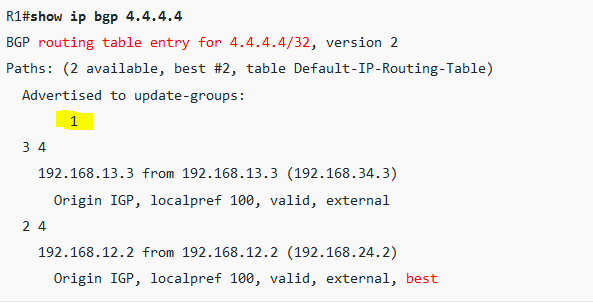
Whats the meaning of 1 here in this output??( **Yellow marked** )
whats the meaning of table default-IP-Routing-Table ??
What is history entry means in BGP table ?
---
### Author:  [@lagapidis](https://forum.networklessons.com/u/lagapidis)
#### Post date: [September 2, 2021, 4:54am UTC](https://forum.networklessons.com/t/how-to-read-the-bgp-table/1234/47 "2021-09-02T04:54:31Z")
Hello Narad
> [@narad](#):
>
> Whats the meaning of 1 here in this output??( **Yellow marked** )
This number indicates the number of update-groups that have been sent out. What is an update-group? Well, update-groups were developed to help BGP processing be more efficient. BGP processing creates routing updates for each BGP peer separately and independantly. If a router has three neighbors, it goes through the process of creating routing updates three times, once for each neighbor, even if all three neighbors get exactly the same advertisements!!
With the use of update-groups, you can send the same updates to multiple neighbors without the need to recompute them. The router generates a single update and sends it out three times.
That number shows the number of update groups that have been sent out. In the case of this lesson, there is only one, since there is only one peering.
> [@narad](#):
>
> whats the meaning of table default-IP-Routing-Table ??
In the output, you see the term “Paths:”. Here the number of available paths and the number of installed best paths will be indicated. The “Default-IP-Routing-Table” appears **when the best path is installed in the IP routing table**.
> [@narad](#):
>
> What is history entry means in BGP table ?
The “history” status code in the BGP table simply means that BGP knows about this network, but does not currently have a valid route for it.
I hope this has been helpful!
Laz
---
### Author:  [@Networking\_heart](https://forum.networklessons.com/u/Networking_heart)
#### Post date: [October 16, 2021, 8:01pm UTC](https://forum.networklessons.com/t/how-to-read-the-bgp-table/1234/48 "2021-10-16T20:01:21Z")
Hi Rene/NL,
First, thank you for sharing for this very good topic.
I have question below.
How can we find a prefix that is owned or advertised by router? and by your company (Same AS)?
I do understand we can use show ip bgp neighbor advertise command.
But this is dependent to neighbor and not simple if we have multiple neighbors, say 10 neighbors.
TIA
---
### Author:  [@lagapidis](https://forum.networklessons.com/u/lagapidis)
#### Post date: [October 19, 2021, 9:13am UTC](https://forum.networklessons.com/t/how-to-read-the-bgp-table/1234/49 "2021-10-19T09:13:59Z")
Hello TIA
It depends on what you mean when you say “find a prefix”. Prefixes are advertised using BGP by either the `network` command or by redistribution. More on this can be found in the following lesson:
> **[How to advertise networks in BGP](https://networklessons.com/bgp/how-to-advertise-networks-in-bgp)**
>
> This lesson teaches you the different methods how you can advertises networks in BGP (Border Gateway Protocol) on Cisco IOS devices.
You can determine what prefixes are being advertised by the local BGP router by viewing the BGP table. You can also view what prefixes are being advertised by other BGP routers in other AS’es by looking at the BGP routing table of an eBGP router.
This allows you to see both locally advertised as well as remotely advertised networks. Any networks that are not advertised directly to a device cannot be seen.
If you want to take a look at various BGP prefixes that are being advertised on the internet, take a look at a [looking glass server](https://networklessons.com/bgp/how-to-read-the-bgp-table#BGP_Looking_Glass_Server). These are routers on the Internet that allow you to take a read-only look at their BGP tables, where you can see a large portion of the advertised public IP address spaces.
lI hope this has been helpful!
Laz
---
### Author:  [@Networking\_heart](https://forum.networklessons.com/u/Networking_heart)
#### Post date: [October 19, 2021, 1:30pm UTC](https://forum.networklessons.com/t/how-to-read-the-bgp-table/1234/50 "2021-10-19T13:30:13Z")
Hi Laz,
I have further questions or clarifications regarding below statements.
“You can determine what prefixes are being advertised by the local BGP router by viewing the BGP table.”
I have took an example from one of topics.
```auto
R1#show ip bgp | begin Network
Network Next Hop Metric LocPrf Weight Path
*> 1.0.0.0 0.0.0.0 0 32768 i
*> 1.1.1.0/24 0.0.0.0 0 32768 i
*> 11.11.11.11/32 0.0.0.0 0 32768 i
*> 111.111.111.0/24 0.0.0.0 0 32768 ?
```
From bgp table, to capture all prefixes that local router advertised is that the next hop is 0.0.0.0.
Therefore, verification command I can do is `show ip bgp | in 0.0.0.0`?
---
### Author:  [@lagapidis](https://forum.networklessons.com/u/lagapidis)
#### Post date: [October 21, 2021, 5:29am UTC](https://forum.networklessons.com/t/how-to-read-the-bgp-table/1234/51 "2021-10-21T05:29:26Z")
Hello TIA
When you see 0.0.0.0 in the Next Hop column of the BGP table, it does indeed mean that that particular prefix originated on the local router. By looking at all of the entries that have 0.0.0.0 as a next hop, you are indeed seeing all networks that originated locally using the `network` command.
However, a BGP router may advertise a prefix that didn’t originate on the local router. If you’re looking to see what prefixes are being **advertised** , regardless of their source, then all of the prefixes in the BGP table are being advertised.
Even so, you can filter what prefixes are being advertised using route maps applied to particular BGP neighbors. Some prefixes may be advertised to some BGP neighbors while not to others, due to filtering. This is why I mentioned before, it depends on what you mean when you say “all prefixes that a local router advertises”. Do you mean:
- prefixes that originated locally?
- prefixes that are actually being sent to other BGP neighbors regardless of their source?
- do you include prefixes that may have been filtered?
So there may be various ways in which you can determine what you are actually looking for.
I hope this has been helpful!
Laz
---
### Author:  [@Networking\_heart](https://forum.networklessons.com/u/Networking_heart)
#### Post date: [October 29, 2021, 11:57pm UTC](https://forum.networklessons.com/t/how-to-read-the-bgp-table/1234/52 "2021-10-29T23:57:31Z")
HI Laz,
I’m trying to look for prefix that is advertised locally by the router.
And also local to AS.
Thank you
---
### Author:  [@lagapidis](https://forum.networklessons.com/u/lagapidis)
#### Post date: [November 2, 2021, 9:58am UTC](https://forum.networklessons.com/t/how-to-read-the-bgp-table/1234/53 "2021-11-02T09:58:29Z")
Hello TIA
In order to determine this, you must look at the `network` commands in your router, the BGP table, the routing table, and any route maps that you may have applied to any neighbors or to any interfaces. From all of that info, you can determine what prefixes will be advertised and to which neighbors.
I hope this has been helpful!
Laz
---
### Author:  [@jallen314](https://forum.networklessons.com/u/jallen314)
#### Post date: [January 17, 2023, 2:54pm UTC](https://forum.networklessons.com/t/how-to-read-the-bgp-table/1234/54 "2023-01-17T14:54:01Z")
One thing that has always confused me is that BGP path has the path and the origin code in the same column. The path in the BGP table includes the AS path and the origin code. I guess it could also be that there is no column for origin code, but ya either way I thought I would mention it.
---
### Author:  [@lagapidis](https://forum.networklessons.com/u/lagapidis)
#### Post date: [January 21, 2023, 6:19am UTC](https://forum.networklessons.com/t/how-to-read-the-bgp-table/1234/55 "2023-01-21T06:19:07Z")
Hello Justin
Yes, it is a bit strange how the origin code is simply added at the end of each row of the BGP table without any header to the column. Even worse, if the route being advertised was locally generated, the Path column remains empty, and the origin code seems to be part of the path column! The [Cisco command reference documentation](https://www.cisco.com/c/en/us/td/docs/ios/iproute_bgp/command/reference/irg_book/irg_bgp5.html#wp1156281) explains it this way:
> The origin code is placed at the end of each line in the table.
It would be nice if it had its own column! 🤨 But it’s good that you point it out to keep it in mind and avoid confusion. Thanks for sharing that!
I hope this has been helpful!
Laz
---
### Author:  [@network23](https://forum.networklessons.com/u/network23)
#### Post date: [February 7, 2023, 3:58pm UTC](https://forum.networklessons.com/t/how-to-read-the-bgp-table/1234/56 "2023-02-07T15:58:56Z")
Question - Is a bgp locally generated prefix always fall under 32768?
---
### Author:  [@lagapidis](https://forum.networklessons.com/u/lagapidis)
#### Post date: [February 10, 2023, 8:33am UTC](https://forum.networklessons.com/t/how-to-read-the-bgp-table/1234/57 "2023-02-10T08:33:14Z")
Hello Network
Yes, by default, BGP assigns the weight value of 32768 to all locally advertised prefixes. Those are prefixes that are generated using the `network` or `aggregate-address` commands, or via route redistribution. The default weight for learned routes (from BGP neighbors) is 0.
Why is this? Well, remember that weight is only locally significant. Routes with a higher weight value take precedence when multiple routes to the same destination exist. It is always preferable therefore to prefer those routes generated locally rather than those learned from other BGP routers. This is further described in this Cisco documentation:
> **[Examine Border Gateway Protocol Case Studies](https://www.cisco.com/c/en/us/support/docs/ip/border-gateway-protocol-bgp/26634-bgp-toc.html#weight)**
>
> This document describes five Border Gateway Protocol (BGP) case studies.
I hope this has been helpful!
Laz
---
### Author:  [@renukaraaj](https://forum.networklessons.com/u/renukaraaj)
#### Post date: [July 14, 2023, 4:17pm UTC](https://forum.networklessons.com/t/how-to-read-the-bgp-table/1234/58 "2023-07-14T16:17:46Z")
Hi Rene,
I have a question on the output displayed for R2 router,
```auto
R2#show ip bgp
BGP table version is 2, local router ID is 192.168.24.2
Status codes: s suppressed, d damped, h history, * valid, > best, i - internal,
r RIB-failure, S Stale
Origin codes: i - IGP, e - EGP, ? - incomplete
Network Next Hop Metric LocPrf Weight Path
*> 4.4.4.4/32 192.168.24.4 0 0 4 i
```
Will R2 not have another path via 1 3 4 for network 4.4.4.4/32 via nexthop 192.168.12.1 ?
I see R3 has 2 nexthops for reaching R4 and the best is selected (\>).
I was expecting a similar output in R2 as well using `show ip bgp` command in R2. But I see only nexthop for reaching R4 from R2 in the output of R2 router.
Am I missing something? can you please clarify ?
---
### Author:  [@lagapidis](https://forum.networklessons.com/u/lagapidis)
#### Post date: [July 18, 2023, 6:30am UTC](https://forum.networklessons.com/t/how-to-read-the-bgp-table/1234/59 "2023-07-18T06:30:11Z")
Hello Renuka
Yes, that does look strange, doesn’t it? Well, it has to do with the fact that each router will advertise **only its best route to the destination**. Let’s take a look at each case:
For R3
- R3 receives an update from R4 about the destination of the 4.4.4.4 network, sharing its best route to the destination. The network is directly connected to R4, so of course this is its best route.
- R3 also receives an update from R1 telling it that its best route to 4.4.4.4 **is via R2**.
- Therefore, R3 has two **different** routes in the BGP table to reach 4.4.4.4.
For R1
- R1 receives an update from R3 telling it about its best route to 4.4.4.4 via **R4**
- R1 receives an update from R2 telling it about its best route to 4.4.4.4 via **R2**
- Thus R1 has two routes in the BGP table to reach 4.4.4.4
- Note that R1 chooses the **route via R2 as the best route** due to the lower BGP router ID of that neighbor.
For R2
- R2 receives an update from R4 telling it about its best route to 4.4.4.4 via R4 (connected route)
- **R2 receives an update from R1 telling it about its best route to 4.4.4.4 _via R2_** (itself)
- Therefore, R2 learns about a route to R4 **via itself** , therefore it only installs one route in the BGP table via R4 directly.
Does that make sense?
I hope this has been helpful!
Laz
---
### Author:  [@renukaraaj](https://forum.networklessons.com/u/renukaraaj)
#### Post date: [July 20, 2023, 3:31pm UTC](https://forum.networklessons.com/t/how-to-read-the-bgp-table/1234/60 "2023-07-20T15:31:20Z")
Thanks @lagapidis ,that explains.
[Previous page](https://forum.networklessons.com/t/how-to-read-the-bgp-table/1234.md?page=2)
[Next page](https://forum.networklessons.com/t/how-to-read-the-bgp-table/1234.md?page=4)