# How to upgrade Cisco IOS Image
**URL:** https://forum.networklessons.com/t/how-to-upgrade-cisco-ios-image/1356
**Category:** Lessons Discussion
**Created:** [December 29, 2016, 9:36pm UTC](https://forum.networklessons.com/t/how-to-upgrade-cisco-ios-image/1356 "2016-12-29T21:36:21Z")
**Posts on this page:** 20
**Page:** 1
### Author:  [@ReneMolenaar](https://forum.networklessons.com/u/ReneMolenaar)
#### Post date: [December 29, 2016, 9:36pm UTC](https://forum.networklessons.com/t/how-to-upgrade-cisco-ios-image/1356/1 "2016-12-29T21:36:21Z")
This topic is to discuss the following lesson:
> **[How to upgrade Cisco IOS Image](https://networklessons.com/system-management/upgrade-cisco-ios-image)**
>
> This lesson explains how you can upgrade the Cisco IOS image on your router or switch with TFTP, FTP and SCP.
---
### Author:  [@tahiriyasser1](https://forum.networklessons.com/u/tahiriyasser1)
#### Post date: [November 15, 2016, 11:50am UTC](https://forum.networklessons.com/t/how-to-upgrade-cisco-ios-image/1356/2 "2016-11-15T11:50:05Z")
Hello Rene ,
Is there any possiblity to use a SCP Client software on a laptop for example to update IOS on Router1
thank you in advance
---
### Author:  [@ReneMolenaar](https://forum.networklessons.com/u/ReneMolenaar)
#### Post date: [November 22, 2016, 7:47pm UTC](https://forum.networklessons.com/t/how-to-upgrade-cisco-ios-image/1356/3 "2016-11-22T19:47:16Z")
Hi Yasser,
That would be nice but unfortunately, this doesn’t work. The SCP server on Cisco IOS doesn’t support this. Only option is to use SCP from the CLI.
Rene
---
### Author:  [@hengsovandara1345](https://forum.networklessons.com/u/hengsovandara1345)
#### Post date: [November 26, 2017, 6:34am UTC](https://forum.networklessons.com/t/how-to-upgrade-cisco-ios-image/1356/4 "2017-11-26T06:34:42Z")
Hi Rene !
When we upgrade IOS of router what about configuration ? Is it still the same ?
I know my question not sound technically cuz I’m new to Networking, but please kindly reply my question.
Sovandara
---
### Author:  [@ReneMolenaar](https://forum.networklessons.com/u/ReneMolenaar)
#### Post date: [December 3, 2017, 11:08am UTC](https://forum.networklessons.com/t/how-to-upgrade-cisco-ios-image/1356/5 "2017-12-03T11:08:13Z")
Hi Sovandara,
You don’t have to worry about your configuration. The startup-configuration is saved in the NVRAM, the IOS image is on the flash memory.
Here is a lesson that explains it in detail:
> **[Cisco IOS Filesystem](https://networklessons.com/system-management/cisco-ios-filesystem)**
>
> This lesson explains how the Cisco IOS filesystem works and how to create / delete files and folders.
---
### Author:  [@chailee425](https://forum.networklessons.com/u/chailee425)
#### Post date: [September 12, 2018, 4:22pm UTC](https://forum.networklessons.com/t/how-to-upgrade-cisco-ios-image/1356/6 "2018-09-12T16:22:22Z")
Rene,
Any documentation how to upgrade Cisco IOS on dual superversior (Hitless)? ASR903?
---
### Author:  [@lagapidis](https://forum.networklessons.com/u/lagapidis)
#### Post date: [September 14, 2018, 7:19am UTC](https://forum.networklessons.com/t/how-to-upgrade-cisco-ios-image/1356/7 "2018-09-14T07:19:16Z")
Hello Pornchai
I don’t believe Rene has documentation on the site for this, however, take a look at the following Cisco documentation:
> **[High Availability Configuration Guide, Cisco IOS XE Release 3S (Cisco ASR 900...](https://www.cisco.com/c/en/us/td/docs/ios-xml/ios/ha/configuration/xe-3s/asr903/ha-xe-3s-asr903-book/ha-install-upgrad-software.html)**
>
> Installing and Upgrading Software
I hope you find this helpful.
Laz
---
### Author:  [@chailee425](https://forum.networklessons.com/u/chailee425)
#### Post date: [September 14, 2018, 11:08pm UTC](https://forum.networklessons.com/t/how-to-upgrade-cisco-ios-image/1356/8 "2018-09-14T23:08:30Z")
Thank you Lazaros! I just want to confirm that.
---
### Author:  [@andysjunkmale](https://forum.networklessons.com/u/andysjunkmale)
#### Post date: [January 12, 2019, 10:35pm UTC](https://forum.networklessons.com/t/how-to-upgrade-cisco-ios-image/1356/9 "2019-01-12T22:35:44Z")
Nice write-up.
I’d like to see you add a few things to this one:
1. Before configuring the boot system command, you should always remove any existing boot system commands (that point to an existing IOS image(s)). As you’re aware, any new boot system commands are placed AFTER any existing boot system commands.
2. After doing the above, re-add the existing/old image as a backup in case the new image gets corrupted.
3. Verify the config register to make sure it’s set for 0x2102 before rebooting to the new image.
---
### Author:  [@u.forte1](https://forum.networklessons.com/u/u.forte1)
#### Post date: [April 7, 2020, 8:46am UTC](https://forum.networklessons.com/t/how-to-upgrade-cisco-ios-image/1356/10 "2020-04-07T08:46:19Z")
Hi.
I want know if there is a procedure to replace and transfer ios if i have my supervisor of cisco catalyst 6500 broken.
thanks
---
### Author:  [@lagapidis](https://forum.networklessons.com/u/lagapidis)
#### Post date: [April 8, 2020, 5:10am UTC](https://forum.networklessons.com/t/how-to-upgrade-cisco-ios-image/1356/11 "2020-04-08T05:10:40Z")
Hello Ugo
It depends on the state of your broken supervisor. The first thing you have to do is successfully get the main software image and the bootloader image from the old supervisor. If you are able to successfully get those from the old system, then you can then simply follow the steps in the following Cisco documentation for loading the IOS to a supervisor:
> **[Upgrade Software Images on Catalyst 6000/6500 Series Switch](https://www.cisco.com/c/en/us/support/docs/switches/catalyst-6500-series-switches/28724-161.html#maintask2)**
>
> This document describes the step-by-step procedure to upgrade the software image on Catalyst 6000/6500 series switches.
If however you are not able to get these files, then you will have to obtain them again from [Cisco’s Support and Download](https://www.cisco.com/c/en/us/support/index.html) service. But for this you will need a valid contract/license.
I hope this has been helpful!
Laz
---
### Author:  [@u.forte1](https://forum.networklessons.com/u/u.forte1)
#### Post date: [April 8, 2020, 7:19am UTC](https://forum.networklessons.com/t/how-to-upgrade-cisco-ios-image/1356/12 "2020-04-08T07:19:50Z")
very very thanks for your support
---
### Author:  [@Zaman.rubd](https://forum.networklessons.com/u/Zaman.rubd)
#### Post date: [April 25, 2020, 6:20pm UTC](https://forum.networklessons.com/t/how-to-upgrade-cisco-ios-image/1356/13 "2020-04-25T18:20:41Z")
Dear Rene,
Hope you are fine and safe .
I want to upgrade my IOS image for C4500X-16 SFP+ switch due to some issue but I can’t understand which image will good for my BOX .In cisco site there are lots of option and I can’t understand about ED /MD with Yellow star Marking etc .
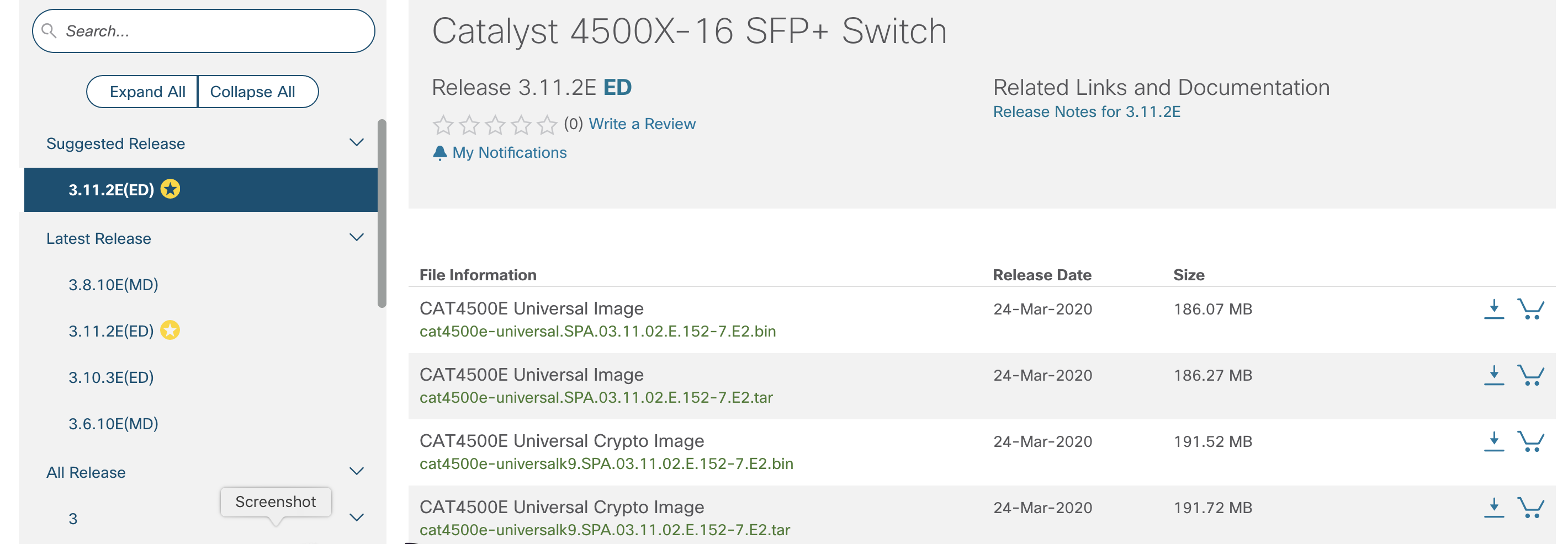
Can you please help me quick to understand the about the issue …My current Image is …cat4500e-universal.SPA.03.06.00.E.152-2.E.bin
Can I load the IOS version cat4500e-universal.SPA.03.11.02.E.152-7.E2.bin ?? What is the way to choose a IOS ?
BR//ZAMAN
---
### Author:  [@lagapidis](https://forum.networklessons.com/u/lagapidis)
#### Post date: [April 27, 2020, 6:08am UTC](https://forum.networklessons.com/t/how-to-upgrade-cisco-ios-image/1356/14 "2020-04-27T06:08:13Z")
Hello Zaman
On the left you will see a yellow star indicating which release Cisco suggests is the best for you to download. This is based on a balance between which one is currently the most stable, has the most bug fixes, and has the most new features and platform support. Choosing the “yellow starred” release is always best, unless you are looking for a particular IOS for some reason.
Now notice there there are MD and ED releases. [According to Cisco](https://www.ciscopress.com/articles/article.asp?p=2106547), this is the meaning of these release types:
- Early Deployment (ED): These releases provide both new features and new platform support in addition to bug fixes. These have an 18 month support window.
- Maintenance Deployment (MD): These releases are used to provide additional support for bug fixes and ongoing software maintenance. These have a 44 month support window.
Your original IOS version was an ED release, which you can see from the E in the name:
“cat4500e-universal.SPA.03.06.00. **E**.152-2.E.bin”
Now having chosen the specific release, you see several download options. You have universal images, and a crypto images. The crypto images are capable of enabling “strong cryptographic features” for use with SSH, HTTPs, IPSec etc… The universal images do not support these. Why? This is due to certain laws that prohibit the export from the United States of products with strong cryptographic features to certain countries, such as North Korea. Always choose the crypto images if you are in a country that allows them.
Finally, you have the choice of downloading a tar file or a bin file. [Cisco describes it](https://www.cisco.com/c/en/us/support/docs/switches/catalyst-2950-series-switches/41542-191.html#concept1) as follows:
> - The .bin file is the Cisco IOS Software image. If you want to use only the CLI to manage the switch, this is the only file you need to download.
>
> - The .tar file is an archive file from which both the IOS image and the CMS files are extracted during the upgrade process. If you want to manage switches or clusters of switches through a web interface (HTML), this is the only file you need to download.
For your purposes, only the bin file is required.
So you should download the Universal Crypto image bin file, or cat4500e-universalk9.SPA.03.11.02.E.152-7.E2.bin.
I hope this has been helpful!
Laz
---
### Author:  [@ajimalpm88](https://forum.networklessons.com/u/ajimalpm88)
#### Post date: [August 11, 2020, 1:39pm UTC](https://forum.networklessons.com/t/how-to-upgrade-cisco-ios-image/1356/15 "2020-08-11T13:39:35Z")
Hi,
How can we copy ios image from a PC to Cisco switch using SCP ?
Ajimal PM
---
### Author:  [@lagapidis](https://forum.networklessons.com/u/lagapidis)
#### Post date: [August 14, 2020, 7:23am UTC](https://forum.networklessons.com/t/how-to-upgrade-cisco-ios-image/1356/16 "2020-08-14T07:23:29Z")
Hello Ajimal
Take a look at this Cisco documentation that describes the whole process for you, whether you are using a Linux or Windows computer. In this scenario, no SCP server is necessary, you can transfer directly between the PC and the device.
> **[Transfer Cisco IOS Images to Routers and Switches Securely](https://www.cisco.com/c/en/us/support/docs/security-vpn/secure-shell-ssh/215450-copy-cisco-ios-images-from-pc-to-router.html)**
>
> This document describes how to copy the Cisco IOS® image file from the local Windows/Linux/macOS PC to Cisco routers and switches securely.
I hope this has been helpful!
Laz
---
### Author:  [@ajimalpm88](https://forum.networklessons.com/u/ajimalpm88)
#### Post date: [August 19, 2020, 6:45am UTC](https://forum.networklessons.com/t/how-to-upgrade-cisco-ios-image/1356/17 "2020-08-19T06:45:38Z")
Thanks for the link.
But I have already tried this command in my ios\_XE switches,it is not working.
Copy the Cisco IOS® images with the help of this command:
`scp ios_filename username@:ios_filename`
---
### Author:  [@lagapidis](https://forum.networklessons.com/u/lagapidis)
#### Post date: [August 20, 2020, 9:39am UTC](https://forum.networklessons.com/t/how-to-upgrade-cisco-ios-image/1356/18 "2020-08-20T09:39:16Z")
Hello Ajimal
Can you give us some more information about how the command fails? What output does it give? That would help in pinpointing the problem. Take a look at these two documents that may also be of help to you.
- Cisco [Command Reference for copy](https://www.cisco.com/c/en/us/td/docs/ios/fundamentals/command/reference/cf_book/cf_c1.html#wp1064741)
- Examples [in this document](https://www.cisco.com/c/en/us/td/docs/ios-xml/ios/security/d1/sec-d1-xe-3se-3850-cr-book/sec-d1-xe-3se-3850-cr-book_chapter_0101.html) show the command as it should function.
I hope this has been helpful!
Laz
---
### Author:  [@ajimalpm88](https://forum.networklessons.com/u/ajimalpm88)
#### Post date: [August 20, 2020, 2:25pm UTC](https://forum.networklessons.com/t/how-to-upgrade-cisco-ios-image/1356/19 "2020-08-20T14:25:32Z")
```
(config)#scp ?
% Unrecognized command
#scp ?
% Unrecognized command
```
---
### Author:  [@lagapidis](https://forum.networklessons.com/u/lagapidis)
#### Post date: [August 22, 2020, 9:06am UTC](https://forum.networklessons.com/t/how-to-upgrade-cisco-ios-image/1356/20 "2020-08-22T09:06:41Z")
Hello Ajimal
The command you need to use is `copy`. As shown in the documents that I linked above, an example of such a command using SCP is:
`copy flash:c4500-ik2s-mz.scp scp://user1@host1/`
Note that the main command is `copy` but SCP is used as a parameter to specify the protocol used to copy.
I hope this has been helpful!
Laz
[Next page](https://forum.networklessons.com/t/how-to-upgrade-cisco-ios-image/1356.md?page=2)