# Introduction to DNS
**URL:** https://forum.networklessons.com/t/introduction-to-dns/1266
**Category:** Lessons Discussion
**Created:** [December 29, 2016, 7:50pm UTC](https://forum.networklessons.com/t/introduction-to-dns/1266 "2016-12-29T19:50:43Z")
**Posts on this page:** 20
**Page:** 1
### Author:  [@ReneMolenaar](https://forum.networklessons.com/u/ReneMolenaar)
#### Post date: [December 29, 2016, 7:50pm UTC](https://forum.networklessons.com/t/introduction-to-dns/1266/1 "2016-12-29T19:50:43Z")
This topic is to discuss the following lesson:
> **[Introduction to DNS](https://networklessons.com/ip-services/introduction-to-dns)**
>
> Learn the essentials of the Domain Name System (DNS. Learn how DNS converts domain names to IP addresses, how we resolve hostnames, and more.
---
### Author:  [@mauroaldair](https://forum.networklessons.com/u/mauroaldair)
#### Post date: [July 14, 2015, 11:45am UTC](https://forum.networklessons.com/t/introduction-to-dns/1266/2 "2015-07-14T11:45:41Z")
Hello Rene,
Awesome even though i knew how DNS works, seeing on wireshark is just to awesome.
Well Done.
Mauro.
---
### Author:  [@renjithpatterilmathe](https://forum.networklessons.com/u/renjithpatterilmathe)
#### Post date: [August 19, 2015, 7:43am UTC](https://forum.networklessons.com/t/introduction-to-dns/1266/3 "2015-08-19T07:43:10Z")
Hi rene
the way of your teaching and explanation is awesome , and easy to understand everyone…
keep posted topics like this , looking for some security related stuffs as well…
Regards
Renjith P Mathew
---
### Author:  [@ReneMolenaar](https://forum.networklessons.com/u/ReneMolenaar)
#### Post date: [August 19, 2015, 10:37am UTC](https://forum.networklessons.com/t/introduction-to-dns/1266/4 "2015-08-19T10:37:02Z")
Hi Renjith,
Good to hear you like it! What security topics are you looking for?
Rene
---
### Author:  [@renjithpatterilmathe](https://forum.networklessons.com/u/renjithpatterilmathe)
#### Post date: [August 19, 2015, 5:15pm UTC](https://forum.networklessons.com/t/introduction-to-dns/1266/5 "2015-08-19T17:15:16Z")
Hi rene
Looking for CCNA security level…
---
### Author:  [@ReneMolenaar](https://forum.networklessons.com/u/ReneMolenaar)
#### Post date: [August 20, 2015, 9:11pm UTC](https://forum.networklessons.com/t/introduction-to-dns/1266/6 "2015-08-20T21:11:41Z")
Hi Renjith,
I have many tutorials that describe the CCNA security topics but right now I don’t have a specific page with everything in order. Once I’m done with all the MPLS, multicast and QoS tutorials then I’ll make a complete course for it.
Rene
---
### Author:  [@eduaraul\_15](https://forum.networklessons.com/u/eduaraul_15)
#### Post date: [March 28, 2016, 1:28am UTC](https://forum.networklessons.com/t/introduction-to-dns/1266/7 "2016-03-28T01:28:44Z")
Hi Rene, i would likr to know why in the example of openning the Web page… the DNS request use UDP instead TCP?
Thank you
---
### Author:  [@ReneMolenaar](https://forum.networklessons.com/u/ReneMolenaar)
#### Post date: [March 28, 2016, 11:44am UTC](https://forum.networklessons.com/t/introduction-to-dns/1266/8 "2016-03-28T11:44:28Z")
Hi Raul,
DNS supports both UDP and TCP but we typically only use TCP for zone transfers.
One of the advantages of UDP is that it’s faster since it’s connectionless. A DNS server doesn’t have to establish a TCP connection with each client that does a DNS request. With UDP, it just gets a DNS request, sends a response and it’s done.
Rene
---
### Author:  [@kunj.thacker](https://forum.networklessons.com/u/kunj.thacker)
#### Post date: [April 7, 2016, 2:23am UTC](https://forum.networklessons.com/t/introduction-to-dns/1266/9 "2016-04-07T02:23:04Z")
Hey Rene,
It’d be great if you can give some detailed insight on how a DNS query is resolved. Maybe an example would help.
Cheers !
Kunj
---
### Author:  [@ReneMolenaar](https://forum.networklessons.com/u/ReneMolenaar)
#### Post date: [April 7, 2016, 9:30pm UTC](https://forum.networklessons.com/t/introduction-to-dns/1266/10 "2016-04-07T21:30:35Z")
Hi Kunj,
Would you like to see a packet capture of a query/response or do you mean how the lookup is done from client to DNS server 1 \> DNS server 2, etc.?
Rene
---
### Author:  [@imakkar](https://forum.networklessons.com/u/imakkar)
#### Post date: [April 29, 2016, 1:43am UTC](https://forum.networklessons.com/t/introduction-to-dns/1266/11 "2016-04-29T01:43:03Z")
Hi Rene,
Can you explain different DNS record types and zones please.
---
### Author:  [@ReneMolenaar](https://forum.networklessons.com/u/ReneMolenaar)
#### Post date: [May 2, 2016, 4:37pm UTC](https://forum.networklessons.com/t/introduction-to-dns/1266/12 "2016-05-02T16:37:27Z")
Hi INderpreet,
DNS allows us to use zones. A zone stores information about the domain. When you register a domain name, you have to tell the register which DNS servers you want to use for your domain name.
On the DNS server that is responsible for your domain (zone) you can create different records.
Let me give you a short overview of the different records:
- A: the A record is used to store the IP address of a name. For example, 149.210.239.44 refers to "networklessons.com".
- AAAA: this is the same as the A record but it's used for IPv6 addresses.
- CNAME: the CNAME record is an alias for an A record. For example, I could use CNAME www.networklessons.com as an alias for networklessons.com.
- MX: the MX record is used to store the hostname for the mailserver. For example, I could use this to tell that mail.networklessons.com is the mail server for this domain name. You will need an A record for mail.networklessons.com.
Rene
---
### Author:  [@shreekumar001](https://forum.networklessons.com/u/shreekumar001)
#### Post date: [June 13, 2016, 5:28am UTC](https://forum.networklessons.com/t/introduction-to-dns/1266/13 "2016-06-13T05:28:46Z")
Hi Rene,
Can you explain why do we need /etc/hosts file. What happens if we do not have any entries in it?
---
### Author:  [@ReneMolenaar](https://forum.networklessons.com/u/ReneMolenaar)
#### Post date: [June 13, 2016, 3:30pm UTC](https://forum.networklessons.com/t/introduction-to-dns/1266/14 "2016-06-13T15:30:17Z")
Hi Shree Kumar,
The hosts file is used for static IP to HOSTNAME mappings. Normally it is used to configure the hostname of the local computer.
For all other IP-to-HOSTNAME lookups, we use a DNS server. Any application that requires the local hostname might fail if your hosts file is empty.
Rene
---
### Author:  [@olsonshawn](https://forum.networklessons.com/u/olsonshawn)
#### Post date: [September 15, 2016, 9:05pm UTC](https://forum.networklessons.com/t/introduction-to-dns/1266/15 "2016-09-15T21:05:41Z")
Rene,
Can you explain the steps a computer takes when it’s behind a switch, that’s behind a router, when it sends a request to reach [https://google.com](https://google.com)? I’m talking DNS, ARP, routing, and what order they happen? Just as much detail as possible. I am trying to figure out the order of operations.
Thank you!
---
### Author:  [@maher1](https://forum.networklessons.com/u/maher1)
#### Post date: [September 19, 2016, 2:35pm UTC](https://forum.networklessons.com/t/introduction-to-dns/1266/16 "2016-09-19T14:35:46Z")
Hi Shawn O,
In case your PC doesn’t have the MAC address of the gateway IP (which is the internal interface of the router) inside its ARP table, then It will issue an ARP request. With the ARP request, it will receive the MAC address from the router so it can start sending the packet. You can check this on the PC by going to the command line and typing the command “arp -a”
Then the packet will go to the router who in turn send it to the ISP DNS Server for the IP to domain name mapping. Once the IP of [google.com](http://google.com) is known, then the route of the packet happens to reach the web Server of google.
Hope I could answer your question.
---
### Author:  [@whijoon](https://forum.networklessons.com/u/whijoon)
#### Post date: [February 7, 2017, 1:12am UTC](https://forum.networklessons.com/t/introduction-to-dns/1266/17 "2017-02-07T01:12:13Z")
Hi Maher,
How does this PC know that the request to reach [http://google.com](http://google.com) needs to send to the ISP DNS server instead of the local DNS server?
How does this PC know the IP address of the ISP DNS server?
Thanks,
Whijoon Yim,
---
### Author:  [@ReneMolenaar](https://forum.networklessons.com/u/ReneMolenaar)
#### Post date: [February 8, 2017, 8:09am UTC](https://forum.networklessons.com/t/introduction-to-dns/1266/18 "2017-02-08T08:09:40Z")
Hi @whijoon
On your computer, you have to configure the DNS server manually or you receive it through the DHCP server:
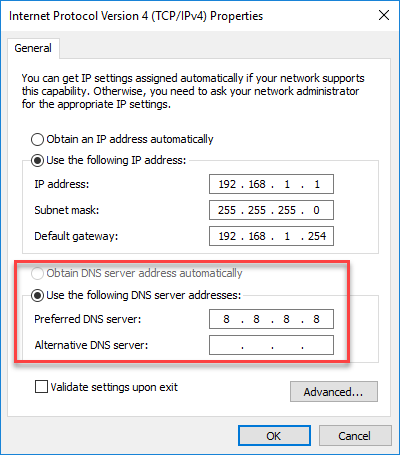
You could configure the DNS server of your ISP or anything else (8.8.8.8 is Google DNS).
It’s also possible that you see the IP address of your local router here. Most SOHO routers will act as a “proxy” / simple DNS server for your computers. When it receives a DNS request, it will forward it to the ISP DNS servers to figure out the IP address that belongs to the hostname. This is then returned to the computer.
---
### Author:  [@pratap.jantua](https://forum.networklessons.com/u/pratap.jantua)
#### Post date: [August 20, 2019, 12:10pm UTC](https://forum.networklessons.com/t/introduction-to-dns/1266/19 "2019-08-20T12:10:17Z")
[e.root-servers.net](http://e.root-servers.net).
[f.root-servers.net](http://f.root-servers.net).
[k.root-servers.net](http://k.root-servers.net).
[a.root-servers.net](http://a.root-servers.net).
[d.root-servers.net](http://d.root-servers.net).
[g.root-servers.net](http://g.root-servers.net).
[i.root-servers.net](http://i.root-servers.net).
[j.root-servers.net](http://j.root-servers.net).
[b.root-servers.net](http://b.root-servers.net).
[l.root-servers.net](http://l.root-servers.net).
[h.root-servers.net](http://h.root-servers.net).
[c.root-servers.net](http://c.root-servers.net).
[m.root-servers.net](http://m.root-servers.net).
Please help me to understand this !
---
### Author:  [@ReneMolenaar](https://forum.networklessons.com/u/ReneMolenaar)
#### Post date: [August 21, 2019, 1:33pm UTC](https://forum.networklessons.com/t/introduction-to-dns/1266/20 "2019-08-21T13:33:03Z")
Hi Pratap,
This is a list of the DNS root servers:
> **[Root Servers](https://www.iana.org/domains/root/servers)**
The root servers answer requests for the root zone which contains all top-level domains (TLD) like .com, .net, etc.
You can take a closer look at each of these here:
> **[Root Server Technical Operations Association](https://root-servers.org/)**
>
> The 13 root name servers are operated by 12 independent organisations. You can find more information about each of these organisations by visiting their homepage.
Here is an example (without caching):
- From your computer, you do a lookup for [networklessons.com](https://networklessons.com).
- Your computer forwards the request to the ISP DNS server.
- If the ISP DNS server doesn’t have an answer, it queries one of the root servers to ask which DNS servers are responsible for the .com TLD.
- The ISP DNS server sends a request to the .com TLD name server.
- The .com TLD name server answers which authoritative server is responsible for the [networklessons.com](https://networklessons.com) domain name.
- The ISP DNS server now asks the authoritative server for the IP address of [networklessons.com](https://networklessons.com) and gets the IP address.
- The ISP DNS answers your computer with the IP address.
As you can see, these root servers are important. Hope this helps!
Rene
[Next page](https://forum.networklessons.com/t/introduction-to-dns/1266.md?page=2)