# IPSec Static Virtual Tunnel Interface
**URL:** https://forum.networklessons.com/t/ipsec-static-virtual-tunnel-interface/2374
**Category:** Lessons Discussion
**Created:** [November 7, 2017, 10:35am UTC](https://forum.networklessons.com/t/ipsec-static-virtual-tunnel-interface/2374 "2017-11-07T10:35:21Z")
**Posts on this page:** 20
**Page:** 1
### Author:  [@ReneMolenaar](https://forum.networklessons.com/u/ReneMolenaar)
#### Post date: [November 7, 2017, 10:35am UTC](https://forum.networklessons.com/t/ipsec-static-virtual-tunnel-interface/2374/1 "2017-11-07T10:35:21Z")
This topic is to discuss the following lesson:
[https://networklessons.com/cisco/ccie-enterprise-infrastructureipsec-static-virtual-tunnel-interface/](https://networklessons.com/cisco/ccie-enterprise-infrastructureipsec-static-virtual-tunnel-interface/)
---
### Author:  [@michmoor](https://forum.networklessons.com/u/michmoor)
#### Post date: [November 17, 2017, 1:57am UTC](https://forum.networklessons.com/t/ipsec-static-virtual-tunnel-interface/2374/2 "2017-11-17T01:57:21Z")
In my lab , GNS3, running the command “tunnel mode ipsec ipv4” actually breaks VTI. I am unable to pass traffic . Once i remove that piece and keep the tunnel protection command then my VPN comes up. Do you know why?
I am running C7200-ADVENTERPRISEK9-M code.
Running a packet capture i see that traffic is indeed encrypted (ESP) over my “wan”.
---
### Author:  [@ReneMolenaar](https://forum.networklessons.com/u/ReneMolenaar)
#### Post date: [November 27, 2017, 1:32pm UTC](https://forum.networklessons.com/t/ipsec-static-virtual-tunnel-interface/2374/3 "2017-11-27T13:32:40Z")
Hi Michael,
I haven’t seen that before. If you enable a debug, does anything come up?
Rene
---
### Author:  [@hengsovandara1345](https://forum.networklessons.com/u/hengsovandara1345)
#### Post date: [December 17, 2017, 11:02am UTC](https://forum.networklessons.com/t/ipsec-static-virtual-tunnel-interface/2374/4 "2017-12-17T11:02:24Z")
Hi Rene
If i have 3 routers and like A B C and i want to create IPsec Virtual Tunnel Interface between A and C. As i see your configuration.
```
R2(config-if)# tunnel source 192.168.12.2
R2(config-if)# tunnel destination 192.168.12.1
```
In my case I have router B in the middle so tunnel source and tunnel destination will not be in the same network. Is it ok about that ?
Thank u.
Sovandara
---
### Author:  [@ReneMolenaar](https://forum.networklessons.com/u/ReneMolenaar)
#### Post date: [December 21, 2017, 12:20pm UTC](https://forum.networklessons.com/t/ipsec-static-virtual-tunnel-interface/2374/5 "2017-12-21T12:20:15Z")
Hi Sovandara,
If you want to establish a tunnel between R1 and R3, you would use 192.168.12.1 and 192.168.23.3 as the source and destination addresses.
---
### Author:  [@chrisnewnham17](https://forum.networklessons.com/u/chrisnewnham17)
#### Post date: [March 22, 2018, 11:09am UTC](https://forum.networklessons.com/t/ipsec-static-virtual-tunnel-interface/2374/6 "2018-03-22T11:09:51Z")
Hi Rene
Do you plan on doing a dynamic example also, using Virtual Access and Virtual Templates?
---
### Author:  [@ReneMolenaar](https://forum.networklessons.com/u/ReneMolenaar)
#### Post date: [March 23, 2018, 2:38pm UTC](https://forum.networklessons.com/t/ipsec-static-virtual-tunnel-interface/2374/7 "2018-03-23T14:38:05Z")
Hi Chris,
Do you mean something like this?
> **[Cisco IPsec Easy VPN Configuration](https://networklessons.com/miscellaneous/cisco-ipsec-easy-vpn-configuration)**
>
> This lesson shows you how to configure Cisco Easy IPsec VPN on a IOS router and the Cisco VPN client software.
Rene
---
### Author:  [@chrisnewnham17](https://forum.networklessons.com/u/chrisnewnham17)
#### Post date: [March 24, 2018, 8:12pm UTC](https://forum.networklessons.com/t/ipsec-static-virtual-tunnel-interface/2374/8 "2018-03-24T20:12:50Z")
Not quite, I meant like this:
https://www.youtube.com/embed/c1FyP71dVOE?feature=oembed&wmode=opaque
You have to create a virtual tunnel interface and use an unnumbered IP.
---
### Author:  [@ReneMolenaar](https://forum.networklessons.com/u/ReneMolenaar)
#### Post date: [April 4, 2018, 6:02pm UTC](https://forum.networklessons.com/t/ipsec-static-virtual-tunnel-interface/2374/9 "2018-04-04T18:02:22Z")
Hi Chris,
I just published a lesson where I use dynamic VTI on the hub and static VTIs on two spokes:
[https://networklessons.com/cisco/ccie-enterprise-infrastructureipsec-vti-virtual-tunnel-interface/](https://networklessons.com/cisco/ccie-enterprise-infrastructureipsec-vti-virtual-tunnel-interface/)
Rene
---
### Author:  [@yuta0523](https://forum.networklessons.com/u/yuta0523)
#### Post date: [July 8, 2018, 6:42am UTC](https://forum.networklessons.com/t/ipsec-static-virtual-tunnel-interface/2374/10 "2018-07-08T06:42:08Z")
Why do we need both “tunnel mode ipsec ipv4” and “tunnel protection ipsec profile” commands?
I removed the “tunnel mode ipsec ipv4” but the packets are still being encrypted.
---
### Author:  [@lagapidis](https://forum.networklessons.com/u/lagapidis)
#### Post date: [July 12, 2018, 5:00pm UTC](https://forum.networklessons.com/t/ipsec-static-virtual-tunnel-interface/2374/11 "2018-07-12T17:00:01Z")
Hello Yuta
Each of the commands you mentioned provide different features for the tunnel. The `tunnel mode ipsec ipv4` command is the one that defines the mode for the tunnel. More specifically, this command enables IPSec encapsulation.
The `tunnel protection ip sec profile` command is used to tie in the IPSec profile created earlier. This is where the encryption parameters are defined and applied.
It is for this reason that when you removed the `tunnel mode ipsec ipv4` command that the packets are still encrypted.
It is possible to have `tunnel mode gre` which is the default and apply the `tunnel protection ip sec profile` command and successfully have an encrypted tunnel.
I hope this has been helpful!
Laz
---
### Author:  [@yuta0523](https://forum.networklessons.com/u/yuta0523)
#### Post date: [July 13, 2018, 1:52am UTC](https://forum.networklessons.com/t/ipsec-static-virtual-tunnel-interface/2374/12 "2018-07-13T01:52:26Z")
Hi Laz,
Thank you for your reply.
Hmm, then what does “tunnel mode ipsec ipv4” do? If the packets are encrypted without this command why do we have this command?
Regards,
Yuta
---
### Author:  [@lagapidis](https://forum.networklessons.com/u/lagapidis)
#### Post date: [July 13, 2018, 1:53pm UTC](https://forum.networklessons.com/t/ipsec-static-virtual-tunnel-interface/2374/13 "2018-07-13T13:53:55Z")
Hello Yuta
So to reiterate, the tunnel mode ipsec ipv4 command configures the encapsulation. What does that mean? It may help to take a look at what we mean when we say encapsulation.
Now there is the option that I spoke about before, where you can use the following commands:
```
tunnel mode gre
tunnel protection ipsec profile profile_name
```
and the tunnel would be encrypted. This is because the first command deals with **encapsulation** while the second deals with the **encryption**.
Now if the commands are as follows:
```
tunnel mode ipsec ipv4
tunnel protection ipsec profile profile_name
```
then the encapsulation is ipsec as well. Now the IPSec encapsulation involves the entire original IP packet being encapsulated with a new packet header added. Protection is afforded to the whole inner IP packet (including the inner header) while the outer header (including any outer IPv4 options or IPv6 extension headers) remains unprotected.
I hope this has been helpful!
Laz
---
### Author:  [@yuta0523](https://forum.networklessons.com/u/yuta0523)
#### Post date: [July 14, 2018, 12:22pm UTC](https://forum.networklessons.com/t/ipsec-static-virtual-tunnel-interface/2374/14 "2018-07-14T12:22:09Z")
Hi Laz,
Thank you for the explanation.
Please correct me if I am misunderstanding here. If the encapsulation is ipsec, then it means encrypting the original packets twice one with “tunel mode ipsec ipv4” and then “tunnel protection” command for second encryption while if we choose to use gre as encapsulation encryption is done on the whole gre and original packets?
Also would you please teach me how to decide which encapsulation type we should be using?
Regards,
Yuta
---
### Author:  [@lagapidis](https://forum.networklessons.com/u/lagapidis)
#### Post date: [July 18, 2018, 4:01pm UTC](https://forum.networklessons.com/t/ipsec-static-virtual-tunnel-interface/2374/15 "2018-07-18T16:01:43Z")
Hello Yuta
IPSec functions in two modes. Tunnel mode and transport mode. Tunnel mode is when IPSec is the protocol that is used for tunneling and for encapsulation. This is the case when we configure the following:
```
tunnel mode ipsec ipv4
tunnel protection ipsec profile profile_name
```
where the profile as shown in the lesson chooses to use the tunnel mode for IPSec.
Whenever you choose` tunnel mode ipsec ipv4` it is necessary to include the type of encapsulation mechanisms that you will use by indicating the `tunnel protection` command as well. These two commands together will have the result of implementing an IPSec Tunnel Mode connection. The first indicating the tunnel mode and the second indicating the way in which that tunnel mode will be implemented.
Now, if you were to use these two commands:
tunnel mode gre
tunnel protection ipsec profile profile\_name
then you are configuring a GRE tunnel with IPSec protection. This essentially is configuring IPSec in transport mode. In this case, the correct configuration would be to change the profile to indicate `mode transport`.
IPSec transport mode is usually used when another tunneling protocol (like GRE) is used to first encapsulate the IP data packet, then IPSec is used to protect the GRE tunnel packets. IPSec protects the GRE tunnel traffic in transport mode.
The following image gives us an idea of the difference between the modes.
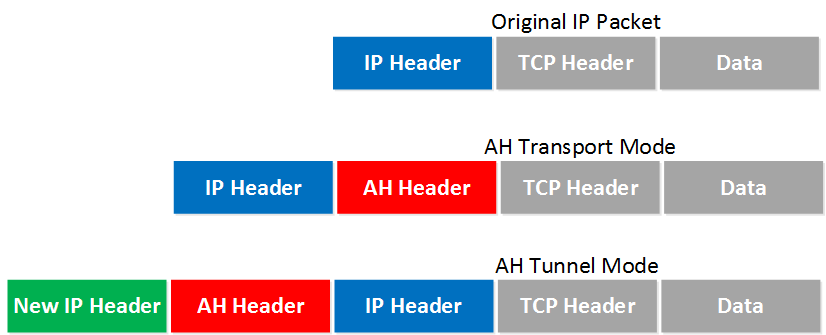
More information about these modes can be found at the following introductory lesson to IPSec:
[https://networklessons.com/cisco/ccie-enterprise-infrastructureipsec-internet-protocol-security/](https://networklessons.com/cisco/ccie-enterprise-infrastructureipsec-internet-protocol-security/)
Now how do you decide which case to use? Well, take a look at the characteristics of each:
- IPSec encapsulation does not support multicast
- GRE does support multicast
- IPSec is more complex to configure
- GRE is less complex
- IPSec includes security for the headers
- GRE does not include any security but payload only can be encrypted with IPSec transport mode
- GRE supports multiple Layer 3 protocols while IPSec only supports IP
These are just some of the characteristics of these two options, and based on those, you can choose what’s best for your application. Using IPSec in tunnel mode is by far the safest, but it does have drawbacks as seen above. GRE is most efficient, but it does have some security issues even when used with IPSec transport mode.
I hope this has been helpful!
Laz
---
### Author:  [@imel-design](https://forum.networklessons.com/u/imel-design)
#### Post date: [August 17, 2018, 2:37am UTC](https://forum.networklessons.com/t/ipsec-static-virtual-tunnel-interface/2374/17 "2018-08-17T02:37:06Z")
Hi there,
please, I need a clarification, is it true that we cannot use **IPSec with DVTI/VTI** and **IPSec with crypto-map and access-lists** in the same router? Let says we have one hub and two spokes topology, can we configure one spoke with IPSec using VTI and the other spoke with crypto-map and access-lists, then setting up the hub router to handle the two spokes, is it possible?
Within waiting for your insights, I will try to lab this on GNS3.
---
### Author:  [@ReneMolenaar](https://forum.networklessons.com/u/ReneMolenaar)
#### Post date: [August 20, 2018, 12:20pm UTC](https://forum.networklessons.com/t/ipsec-static-virtual-tunnel-interface/2374/18 "2018-08-20T12:20:12Z")
Hi Thierry,
I never tried this before so I’m not sure. Have you labbed it up yet?
Rene
---
### Author:  [@aungzawtun305](https://forum.networklessons.com/u/aungzawtun305)
#### Post date: [November 8, 2018, 11:14am UTC](https://forum.networklessons.com/t/ipsec-static-virtual-tunnel-interface/2374/19 "2018-11-08T11:14:36Z")
Hi ,
I try in virtaul lab same as you config but i don’t know why host 1 cannot ping host 2.Router to Router can ping.Host to host cannot reach
---
### Author:  [@lagapidis](https://forum.networklessons.com/u/lagapidis)
#### Post date: [November 11, 2018, 9:17am UTC](https://forum.networklessons.com/t/ipsec-static-virtual-tunnel-interface/2374/20 "2018-11-11T09:17:37Z")
Hello Ko
We’re sorry to hear that you’re having trouble. The only thing that I can say to help you is to verify that the configs are indeed correct. Can you share some of your configurations with us so we can take a look?
Laz
---
### Author:  [@imel-design](https://forum.networklessons.com/u/imel-design)
#### Post date: [March 13, 2019, 5:49pm UTC](https://forum.networklessons.com/t/ipsec-static-virtual-tunnel-interface/2374/21 "2019-03-13T17:49:33Z")
Hi, please can we have some usefull debug command for VPN troubleshooting ?
[Next page](https://forum.networklessons.com/t/ipsec-static-virtual-tunnel-interface/2374.md?page=2)