# IPv6 Multicast BSR and RP Example
**URL:** https://forum.networklessons.com/t/ipv6-multicast-bsr-and-rp-example/1014
**Category:** Lessons Discussion
**Created:** [December 26, 2016, 6:10pm UTC](https://forum.networklessons.com/t/ipv6-multicast-bsr-and-rp-example/1014 "2016-12-26T18:10:52Z")
**Posts on this page:** 15
**Page:** 1
### Author:  [@ReneMolenaar](https://forum.networklessons.com/u/ReneMolenaar)
#### Post date: [December 26, 2016, 6:10pm UTC](https://forum.networklessons.com/t/ipv6-multicast-bsr-and-rp-example/1014/1 "2016-12-26T18:10:52Z")
This topic is to discuss the following lesson:
> **[IPv6 Multicast BSR and RP Example](https://networklessons.com/multicast/ipv6-pim-mld-example)**
>
> This lesson covers the configuration and verification of IPv6 Multicast using BSR (Bootstrap) on Cisco IOS routers.
---
### Author:  [@ReneMolenaar](https://forum.networklessons.com/u/ReneMolenaar)
#### Post date: [May 31, 2014, 4:22pm UTC](https://forum.networklessons.com/t/ipv6-multicast-bsr-and-rp-example/1014/2 "2014-05-31T16:22:07Z")
ping only works if source interface lo0 supplied
---
### Author:  [@system](https://forum.networklessons.com/u/system)
#### Post date: [August 26, 2014, 1:23pm UTC](https://forum.networklessons.com/t/ipv6-multicast-bsr-and-rp-example/1014/3 "2014-08-26T13:23:51Z")
Hi
Is ipv6 multicast required on CCIE V5 lab ??
---
### Author:  [@ReneMolenaar](https://forum.networklessons.com/u/ReneMolenaar)
#### Post date: [August 28, 2014, 7:53am UTC](https://forum.networklessons.com/t/ipv6-multicast-bsr-and-rp-example/1014/4 "2014-08-28T07:53:31Z")
Yup it’s on the blueprint so you can encounter it.
---
### Author:  [@samer.rafid](https://forum.networklessons.com/u/samer.rafid)
#### Post date: [August 1, 2018, 12:34pm UTC](https://forum.networklessons.com/t/ipv6-multicast-bsr-and-rp-example/1014/5 "2018-08-01T12:34:14Z")
best CCIE R/S explanation …thanks
---
### Author:  [@murat](https://forum.networklessons.com/u/murat)
#### Post date: [October 14, 2019, 4:03pm UTC](https://forum.networklessons.com/t/ipv6-multicast-bsr-and-rp-example/1014/6 "2019-10-14T16:03:39Z")
Hi,
we did not use a command like `ipv6 pim sparse-mode` but the pim neighborship is established. How can ipv6 establish this?
regards.
---
### Author:  [@murat](https://forum.networklessons.com/u/murat)
#### Post date: [October 14, 2019, 4:10pm UTC](https://forum.networklessons.com/t/ipv6-multicast-bsr-and-rp-example/1014/7 "2019-10-14T16:10:31Z")
Hi,
Also what is FF07::7? is this a group member like 239.0.0.0/8?
regards
---
### Author:  [@lagapidis](https://forum.networklessons.com/u/lagapidis)
#### Post date: [October 15, 2019, 6:31am UTC](https://forum.networklessons.com/t/ipv6-multicast-bsr-and-rp-example/1014/8 "2019-10-15T06:31:47Z")
Hello Murat
In IPv6, there is no corresponding command to that used in IPv4. The `ipv6 multicast-routing` command enables multicast routing and enables multicast forwarding for PIM on all enabled IPv6 interfaces of the device.
Similarly, the `ipv6 pim bsr candidate rp` and `ipv6 pim bsr candidate bsr` commands enable the devices to function as rp and bsr for PIM.
Take a look at the following for more information:
> **[Cisco IOS XE 16 - Support](https://www.cisco.com/c/en/us/support/ios-nx-os-software/ios-xe-16/series.html)**
>
> Cisco IOS XE 16 - Technical support documentation, downloads, tools and resources
> [@murat](#):
>
> Also what is FF07::7? is this a group member like 239.0.0.0/8?
This is a prefix for reserved multicast addresses for IPv6, so yes, this is a group member similar to the IPv4 address you mention above.
I hope this has been helpful!
Laz
---
### Author:  [@syncope988](https://forum.networklessons.com/u/syncope988)
#### Post date: [February 20, 2020, 5:45am UTC](https://forum.networklessons.com/t/ipv6-multicast-bsr-and-rp-example/1014/9 "2020-02-20T05:45:10Z")
Hi Rene and staff,
i am trying to test multicast scope in a basic lab
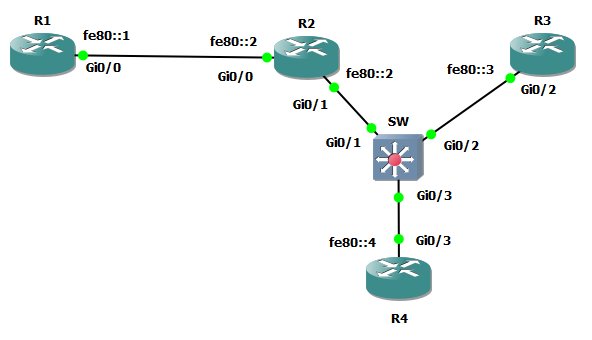
My goal is to build a site-local scope with all the routers and to test connectivity using multicast address FF05::2
So i want to ping FF05::2 from R4 and hope to receive replies from R1,R2,R3
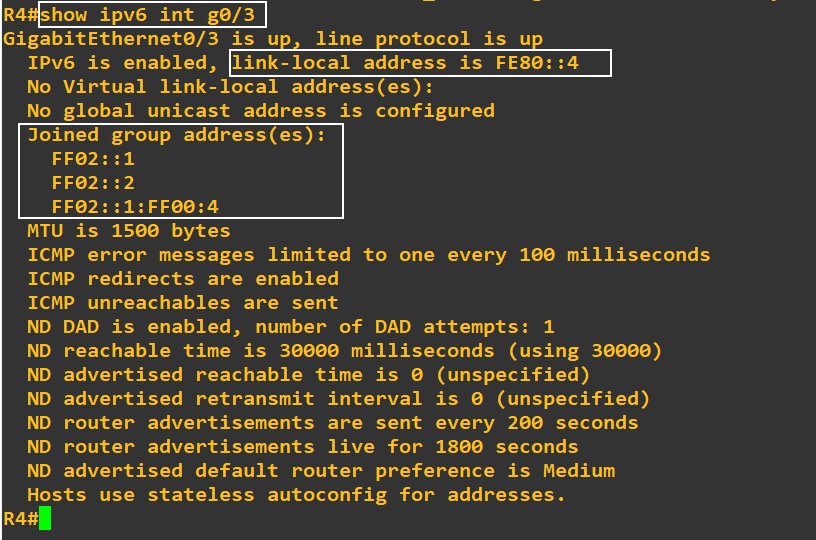
From the perspective of R4, at the beginning, join groups are
FF02::1 because R4 is a IPV6 node
FF02::2 because i set ipv6 unicast-routing
FF02::1:FF00:4 because of SNMA corresponding to link-local fe80::4
Next i set the interface g0/3 of R4 with a basic site-local address with ULA

Surprisingly fd00/8 appears like global unicast
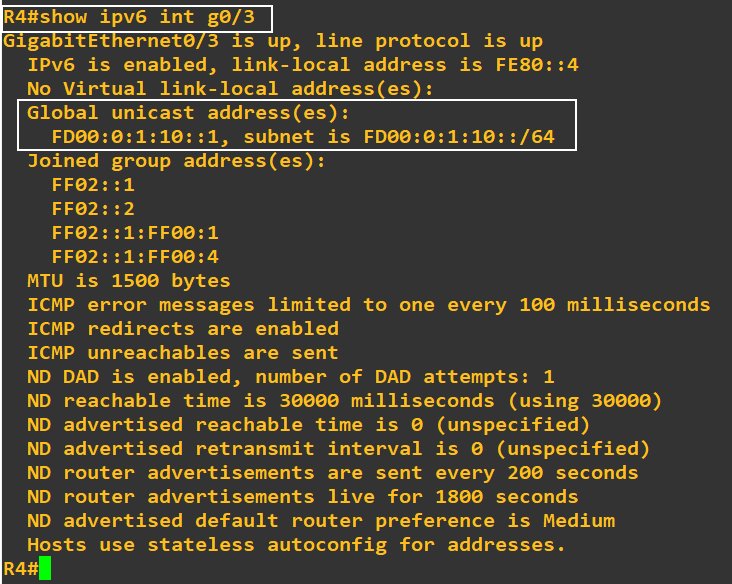
(I notice that SNMA FF02::1:FF00:1 group is join automaticaly and that is OK)
Q1: why fd00/8 appears like global unicast ?
Q2: can i set a site-local address on G0/3 of R4 and group multicast FF05::2 will be join automaticaly ? Is it the way it works?
Q3: can i acheive my goal (to ping FF05::2 and get replies) just setting ULA on the interfaces ?
Regards
---
### Author:  [@lagapidis](https://forum.networklessons.com/u/lagapidis)
#### Post date: [February 20, 2020, 7:33am UTC](https://forum.networklessons.com/t/ipv6-multicast-bsr-and-rp-example/1014/10 "2020-02-20T07:33:51Z")
Hello Dominique.
First of all, we will have to clarify the definitions of some types of IPv6 addresses. When looking at IPv6 multicast, we have various multicast scopes. These scopes are used to determine the limitations of the mutlicast traffic that will be enforced. It is the fourth hex digit that determines this scope.
Multicast addresses in IPv6 begin with: FF0 **X** where X is the number that corresponds to the scope. 2 corresponds to the link-local scope, in which the All Nodes, All Routers, and SNMA multicast addresses belong, and that’s why we see them starting with FF02 in the “Joined group addresses” shown above in your output. 5 corresponds to the site-local scope, so anything with FF05 belongs there. More about the various types of multicast scopes can be found at [the related IANA site](https://www.iana.org/assignments/ipv6-multicast-addresses/ipv6-multicast-addresses.xhtml).
Unicast addresses also have several categories, one of which is the Unique Local Address scope, that begins with FD00. Now the important thing to note here is that **routers don’t contain any intelligence that will let them know that this belongs to the ULA scope**. For routers, this is just another global unicast address. This is similar to the way routers don’t know that the 10.10.10.0/24 subnet is private for IPv4. So, in the output, you will see that the router sees this as a global unicast address. Conversely, link local addresses, **are** identified by routers, and are managed differently than global unicast.
In the same way, just because an interface is assigned a ULA address, doesn’t mean that it will automatically use site-local multicast scope addresses. The RFCs and IANA do define the all nodes and all routers site-local multicast addresses, but these are just definitions. Unlike the link local unicast and multicast addresses which are automatically assigned, site local unicast and multicast addresses must be manually configured.
I hope this has been helpful!
Laz
---
### Author:  [@syncope988](https://forum.networklessons.com/u/syncope988)
#### Post date: [February 20, 2020, 8:57am UTC](https://forum.networklessons.com/t/ipv6-multicast-bsr-and-rp-example/1014/11 "2020-02-20T08:57:18Z")
thanks Laz, understood,
but in my lab, how can i link ULA with multicast group ff05::2 ?
Regards
---
### Author:  [@lagapidis](https://forum.networklessons.com/u/lagapidis)
#### Post date: [February 21, 2020, 11:47am UTC](https://forum.networklessons.com/t/ipv6-multicast-bsr-and-rp-example/1014/12 "2020-02-21T11:47:08Z")
Hello Dominique
In order to make site-local multicast addressing function, you will have to create all of the multicast functionality manually. Link-local unicast and multicast addresses are a special case, which are created automatically in order to allow the functionality of particular features of IPv6 to function. Site-local unicast and multicast addresses on the other hand are simply defined in an RFC, they don’t actually automatically make the router do anything special.
This is clearly stated in the [RFC 7346 about IPv6 multicast address scopes](https://tools.ietf.org/html/rfc7346#section-2), where it says about the various scopes that exist in IPv6 multicast:
> Interface-Local, **Link-Local** , and Realm-Local scope boundaries **are automatically derived from physical connectivity or other non-multicast-related configurations.** Global scope has no boundary. **The boundaries of _all other non-reserved_ scopes of Admin-Local or larger are administratively configured.** For reserved scopes, the way of configuring their boundaries will be defined when the semantics of the scope are defined.
I hope this has been helpful!
Laz
---
### Author:  [@syncope988](https://forum.networklessons.com/u/syncope988)
#### Post date: [February 26, 2020, 5:37am UTC](https://forum.networklessons.com/t/ipv6-multicast-bsr-and-rp-example/1014/13 "2020-02-26T05:37:56Z")
Hi Laz,
thank for your replies,
i stay playing with my lab and test configs to see ff05::2 in action
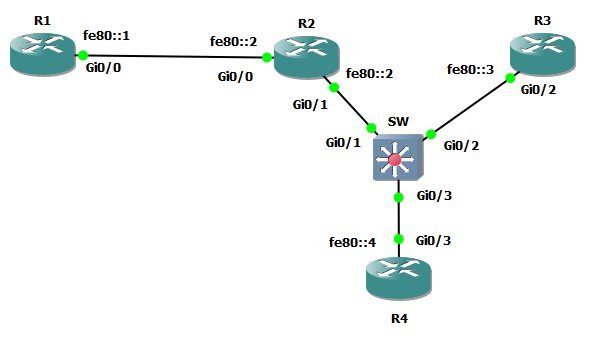
I do this config on R4 / Gi0/3
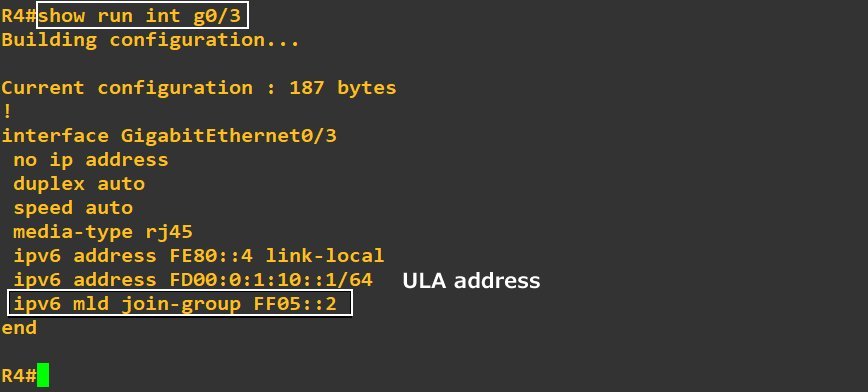
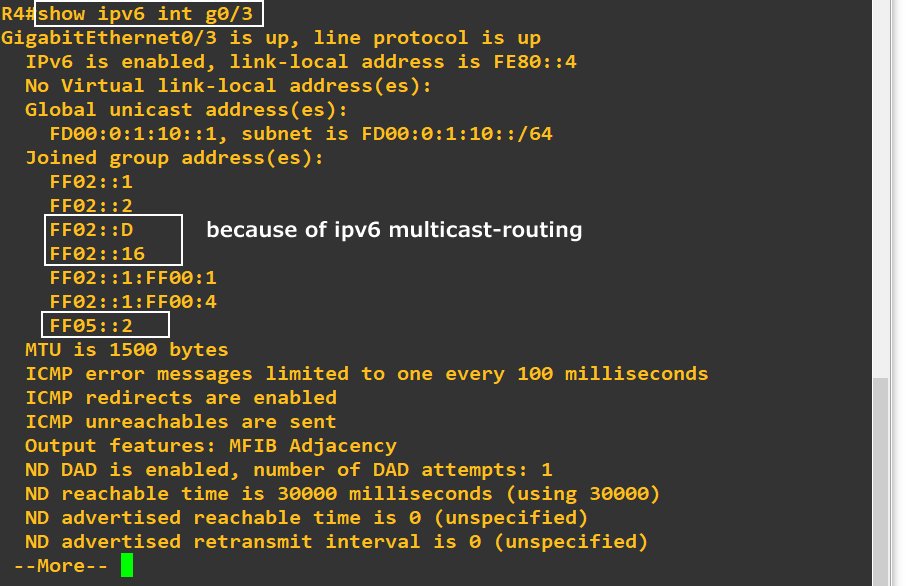
So now Gi0/3 is joining multicast group FF05::2
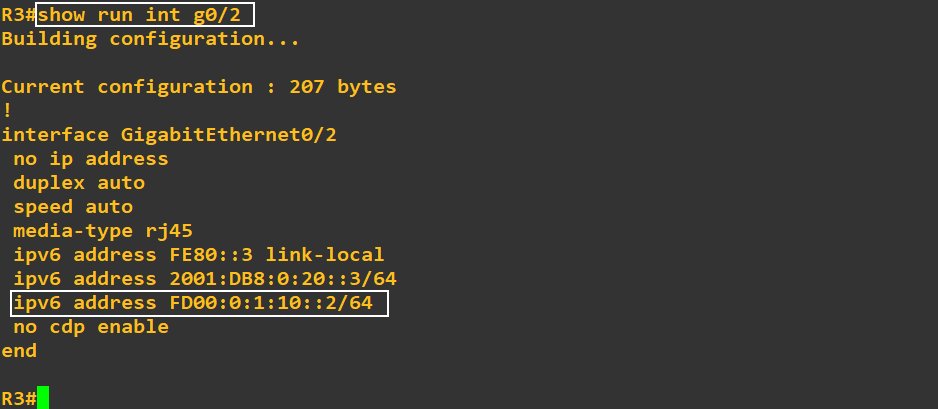
I give a ULA address on R3 / G0/2
Do ping ff05::2 from R3 get a reply from R4 ?
Here is the answer
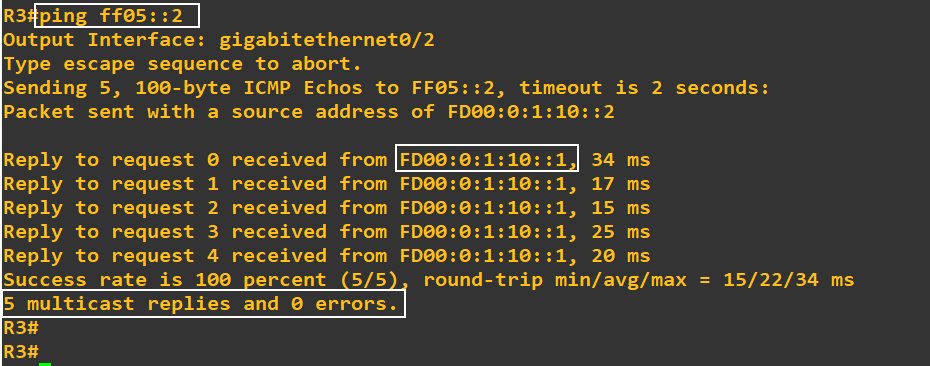
yes !!!
So is it the (only) way to use ff05::2 ? to join manually with MLD command
If not, could you describe schematically another way ?
How routing protocols (or other programs) could use ff05::2 if you had to configure it manually ?
Regards
---
### Author:  [@lagapidis](https://forum.networklessons.com/u/lagapidis)
#### Post date: [February 26, 2020, 6:19am UTC](https://forum.networklessons.com/t/ipv6-multicast-bsr-and-rp-example/1014/14 "2020-02-26T06:19:46Z")
Hello Dominique
That’s a great exercise, well done. Yes this is the only way that you can use ff05::2, you must configure it manually.
> [@syncope988](#):
>
> How routing protocols (or other programs) could use ff05::2 if you had to configure it manually ?
Routing protocols and other programs would not necessarily use this multicast address. To be honest I’ve never seen an implementation that uses site-scope addresses, and I think that this is just a definition of some ranges that until now, has limited or almost no usage. It’s similar to the IPv4 administratively scoped IP multicast ranges which are described in [RFC 2365](https://community.cisco.com/t5/vpn/ssh-failed-on-3750-switch/td-p/3043810). This RFC simply defines various scopes within the administratively scoped IP multicast address range but doesn’t actually imply the functionality. The functionality must be manually implemented, and used as each application sees fit.
I hope this has been helpful!
Laz
---
### Author:  [@j.degruijter](https://forum.networklessons.com/u/j.degruijter)
#### Post date: [September 16, 2022, 7:57am UTC](https://forum.networklessons.com/t/ipv6-multicast-bsr-and-rp-example/1014/15 "2022-09-16T07:57:49Z")
Hi Rene,
I have been working on IPv6 multicast labs the past few days and finally after a lot of frustration came to the conclusion that ping only seems to work using Loopback 0 as the output interface. Started to search for this on Google and came across this forum post. Go figure. I should have started at Networklessons 🙂
Still I do not understand why this is. I have tried to ping using the source mentioned in `show derived-config interface tunnel x` or `show ipv6 pim tunnel`. If I understand correctly the PIM register message is sent through this tunnel to the RP. However when debugging I get Pkt (2001:155:1:45::5,FF08::3) from GigabitEthernet0/1.45 (FS) Acceptance check failed - dropping.
Do you know why using Loopback 0 as the output interface works and other interfaces do not?