# Multicast IGMP Proxy
**URL:** https://forum.networklessons.com/t/multicast-igmp-proxy/2875
**Category:** Lessons Discussion
**Created:** [February 5, 2018, 2:43pm UTC](https://forum.networklessons.com/t/multicast-igmp-proxy/2875 "2018-02-05T14:43:22Z")
**Posts on this page:** 20
**Page:** 1
### Author:  [@ReneMolenaar](https://forum.networklessons.com/u/ReneMolenaar)
#### Post date: [February 5, 2018, 2:43pm UTC](https://forum.networklessons.com/t/multicast-igmp-proxy/2875/1 "2018-02-05T14:43:23Z")
This topic is to discuss the following lesson:
[https://networklessons.com/cisco/ccie-enterprise-infrastructuremulticast-igmp-proxy](https://networklessons.com/cisco/ccie-enterprise-infrastructuremulticast-igmp-proxy)
---
### Author:  [@ulrich](https://forum.networklessons.com/u/ulrich)
#### Post date: [April 8, 2018, 5:26am UTC](https://forum.networklessons.com/t/multicast-igmp-proxy/2875/2 "2018-04-08T05:26:08Z")
Hi René,
Under the loopback. what exact command? Is i pim proxy-server or service?
BR,
Ulrich
---
### Author:  [@adrifrigem](https://forum.networklessons.com/u/adrifrigem)
#### Post date: [April 9, 2018, 2:41am UTC](https://forum.networklessons.com/t/multicast-igmp-proxy/2875/3 "2018-04-09T02:41:09Z")
Hi Rene,
In the picture, R2 has two interfaces Gi0/2, and I think interface towards R3 should be Gi0/1
FYI
Regards
---
### Author:  [@ReneMolenaar](https://forum.networklessons.com/u/ReneMolenaar)
#### Post date: [April 13, 2018, 5:57pm UTC](https://forum.networklessons.com/t/multicast-igmp-proxy/2875/4 "2018-04-13T17:57:28Z")
Thanks Adrian, it has been fixed.
---
### Author:  [@ReneMolenaar](https://forum.networklessons.com/u/ReneMolenaar)
#### Post date: [April 13, 2018, 5:58pm UTC](https://forum.networklessons.com/t/multicast-igmp-proxy/2875/5 "2018-04-13T17:58:05Z")
Hi Ulrich,
Here’s the loopback of R2:
```
interface Loopback0
ip address 2.2.2.2 255.255.255.255
ip pim sparse-mode
ip igmp helper-address udl GigabitEthernet0/2
ip igmp proxy-service
```
You can find the complete configurations of all routers at the end of the lesson 😃
Rene
---
### Author:  [@markgimenez](https://forum.networklessons.com/u/markgimenez)
#### Post date: [May 5, 2018, 9:55pm UTC](https://forum.networklessons.com/t/multicast-igmp-proxy/2875/6 "2018-05-05T21:55:55Z")
`R2(config-if)#ip igmp helper-address udl GigabitEthernet 0/2`
ip igmp helper-address udl: this command tells the router to send IGMP membership reports to an upstream router that is connected on our UDL interface.
Why are we forwarding traffic to R2 Gig 0/2 towards R1 Gig 0/2 when R1 is blocking all income traffic?
`R2(config-if)#ip igmp unidirectional-link`
If it is unidirectional how would we know if traffic is inbound or outbound only?
Thanks
---
### Author:  [@lagapidis](https://forum.networklessons.com/u/lagapidis)
#### Post date: [May 7, 2018, 1:29pm UTC](https://forum.networklessons.com/t/multicast-igmp-proxy/2875/7 "2018-05-07T13:29:23Z")
Hello Mark.
The lesson here is simulating a situation where there is a unidirectional link such as is often the case when using satellite connections. All traffic on the satellite link goes from the internet towards the user, whereas all upload data goes via an alternate physical link. So, in order to simulate this situation, all incoming data on R2 G0/2 interface is blocked.
Having said that, let’s get to your questions:
> [@markgimenez](#):
>
> Why are we forwarding traffic to R2 Gig 0/2 towards R1 Gig 0/2 when R1 is blocking all income traffic?
What the `R2(config-if)#ip igmp helper-address udl GigabitEthernet 0/2` command is doing is providing a helper address (similar to a DHCP helper address) that according to Cisco
> “helpers [yes helpers] the report to the IGMP querier associated with the UDL interface identified in the ip igmp helper-address interface configuration command. This command should be used on every downstream router on every interface to a potential multicast receiver.”
You can find more info about this at this [Cisco Documentation link](https://www.cisco.com/c/en/us/td/docs/ios/12_2/ip/configuration/guide/fipr_c/1cfudlr.html#wp1000990).
So it is used as a destination address for responses from R1 to multicast queries from H1 that reached R1 via the back-channel. If this was not configured, then any IGMP packets destined for H1 would reach R2 and would be dropped as these did not originate from the Gi0/2 interface. Rene’s explanation of the command may be a little bit confusing, I will let him know to revise.
> [@markgimenez](#):
>
> If it is unidirectional how would we know if traffic is inbound or outbound only?
You do not need to specify whether the direction is sending or receiving. IGMP will learn which direction it is based on the nature of the connection. In other words, the direction is determined based on which direction the packets are actually flowing.
I hope this has been helpful!
Laz
---
### Author:  [@carloemmanuelvalle](https://forum.networklessons.com/u/carloemmanuelvalle)
#### Post date: [March 6, 2019, 3:25pm UTC](https://forum.networklessons.com/t/multicast-igmp-proxy/2875/8 "2019-03-06T15:25:32Z")
Hi
I don’t know if I’m wrong but I saw membership report on R1 received by G0/2, it’s suppose that that interface is an UDL and you can’t receive traffic from it. G0/2 just can send traffic but not receive is true?
---
### Author:  [@Amjad.Abdullah](https://forum.networklessons.com/u/Amjad.Abdullah)
#### Post date: [March 21, 2019, 1:08pm UTC](https://forum.networklessons.com/t/multicast-igmp-proxy/2875/9 "2019-03-21T13:08:20Z")
Hi,
I would highlight that, although Rene lessons are usually clear, this one isn’t (at least to me).
I didn’t know why we posted some commands and why there (under specific interfaces). I would say that there must be an explanation about how do we choose which is the main link and which is the back link (I didn’t know how to choose that after reading the lesson). I think it worth shedding some light on this part and how the main or back link are chosen (either manually or dynamically) because I couldn’t see any real piece of config on the internet link interfaces between R1 and R2. Moreover, I can see that the satellite link is used both ways in both directions! How is it a UDL then?! That is really confusing to me.
---
### Author:  [@ReneMolenaar](https://forum.networklessons.com/u/ReneMolenaar)
#### Post date: [March 26, 2019, 3:51pm UTC](https://forum.networklessons.com/t/multicast-igmp-proxy/2875/10 "2019-03-26T15:51:36Z")
@carloemmanuelvalle @Amjad.Abdullah
> [@carloemmanuelvalle](#):
>
> I don’t know if I’m wrong but I saw membership report on R1 received by G0/2, it’s suppose that that interface is an UDL and you can’t receive traffic from it. G0/2 just can send traffic but not receive is true?
> [@Amjad.Abdullah](#):
>
> Moreover, I can see that the satellite link is used both ways in both directions! How is it a UDL then?! That is really confusing to me.
Let me try to explain this a bit more. The debug output is very confusing…it shows the GigabitEthernet0/2 interface on R1 (satellite link) while in reality, R1 doesn’t receive the packet on this interface.
I started this topology and did another wireshark capture. Here are the MAC addresses of the GigabitEthernet0/2 and 0/3 interfaces of R1 and R2:
| Interface | Address |
| --- | --- |
| R1 Gi0/2 | fa16.3e9d.174c |
| R1 Gi0/3 | fa16.3ee5.573a |
| R2 Gi0/2 | fa16.3ed6.6294 |
| R2 Gi0/3 | fa16.3e26.cf96 |
Now look at the wireshark captures below:
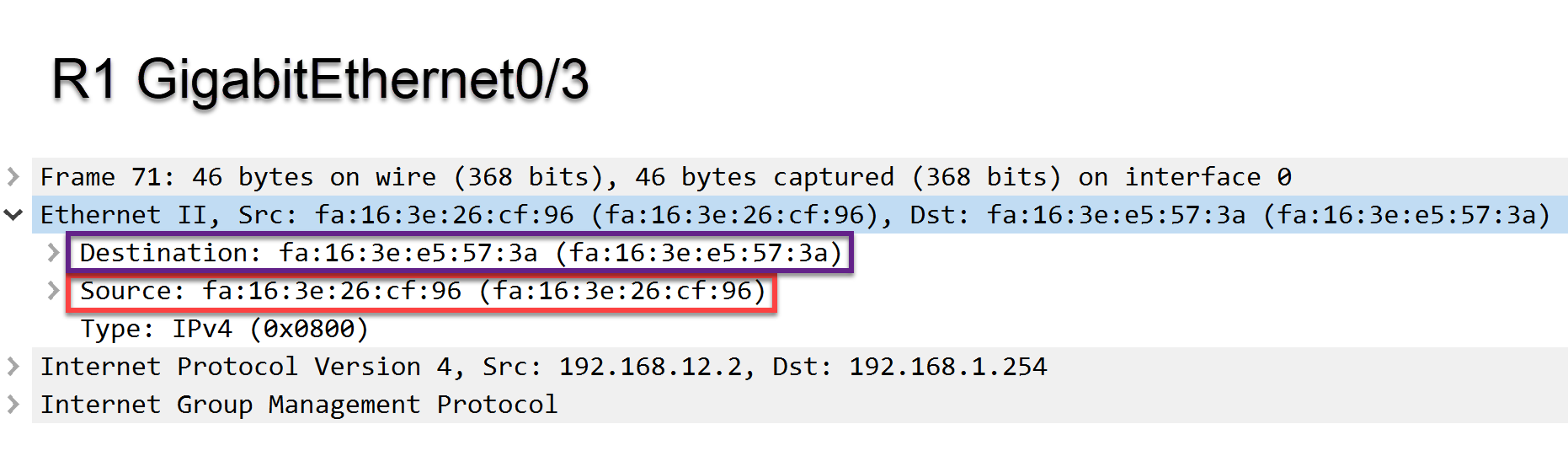
The output above is a capture on R1’s Gi0/3 interface. You can see the source MAC address is R2’s Gi0/3 interface. The destination is R1’s Gi0/3 interface.
Here’s a capture of R1’s Gi0/2 interface:
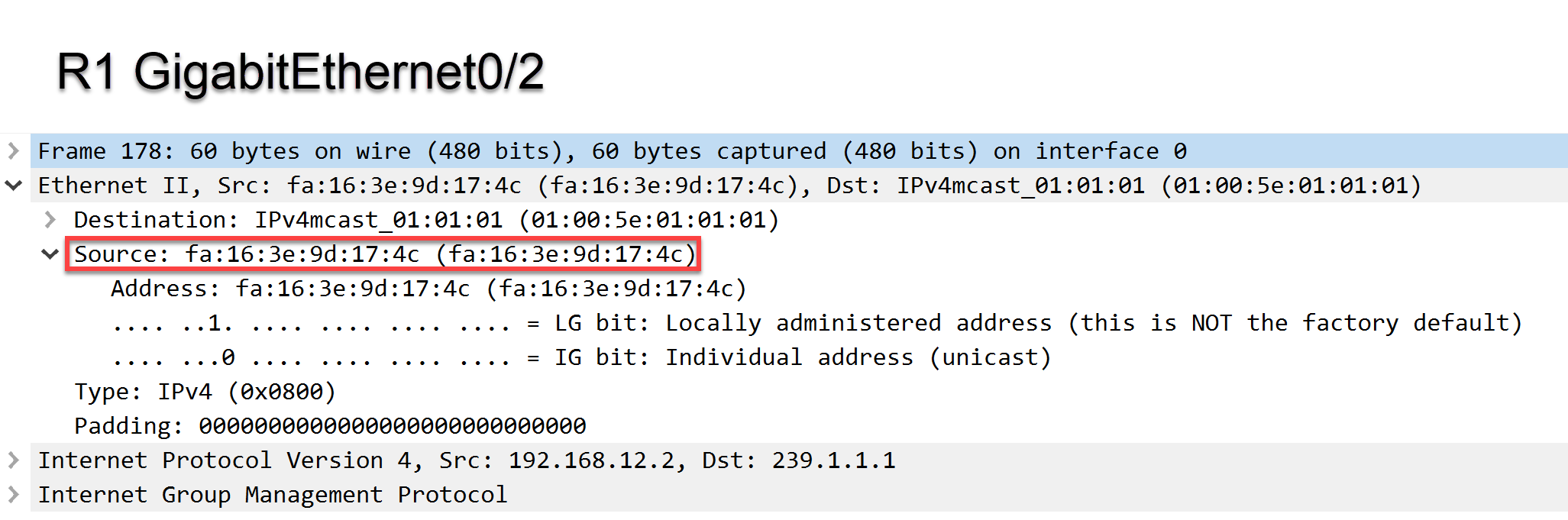
The output above shows the source is R1’s Gi0/2 interface. The debug output is confusing as it never shows the Gi0/3 interface while in reality, that’s where we receive the membership report on.
> [@Amjad.Abdullah](#):
>
> I would say that there must be an explanation about how do we choose which is the main link and which is the back link (I didn’t know how to choose that after reading the lesson). I think it worth shedding some light on this part and how the main or back link are chosen (either manually or dynamically) because I couldn’t see any real piece of config on the internet link interfaces between R1 and R2. Moreover
I’ll edit the lesson to explain what each interface is used for. The Gi0/3 interfaces are “regular” internet connections and the Gi0/2 interfaces is a unidirectional satellite connection.
Hope this helps! If not let me know 🙂
Rene
---
### Author:  [@carloemmanuelvalle](https://forum.networklessons.com/u/carloemmanuelvalle)
#### Post date: [March 28, 2019, 10:04pm UTC](https://forum.networklessons.com/t/multicast-igmp-proxy/2875/11 "2019-03-28T22:04:53Z")
Good explanation. This clear up my doubt.
Thank you!
---
### Author:  [@Zaman.rubd](https://forum.networklessons.com/u/Zaman.rubd)
#### Post date: [April 2, 2019, 4:47pm UTC](https://forum.networklessons.com/t/multicast-igmp-proxy/2875/12 "2019-04-02T16:47:57Z")
Hi Rene,
Very Good Lesson as always…
Currently where we use IGMP Proxy in production network ?? Thx
BR//ZAMAN
---
### Author:  [@lagapidis](https://forum.networklessons.com/u/lagapidis)
#### Post date: [April 4, 2019, 2:06pm UTC](https://forum.networklessons.com/t/multicast-igmp-proxy/2875/13 "2019-04-04T14:06:13Z")
Hello Mohammad
A typical usage of Multicast IGMP Proxy in a production network would be with any unidirectional network technology. Unidirectional links can be found in some types of satellite connections as well as some types of single strand fibre optic connections. In general, unidirectional links aren’t common, but they do exist, and this is why this feature has been implemented, so that devices that are served by these links can enjoy multicast services.
I hope this has been helpful!
Laz
---
### Author:  [@ronaldcheng14](https://forum.networklessons.com/u/ronaldcheng14)
#### Post date: [April 21, 2019, 11:32pm UTC](https://forum.networklessons.com/t/multicast-igmp-proxy/2875/14 "2019-04-21T23:32:41Z")
R3 in diagram has 2x Gi0/1 interfaces in the diagram.
> ip pim proxy-server: this command enables the actual proxying of IGMP membership reports.
Do we mean proxy-service?
---
### Author:  [@ReneMolenaar](https://forum.networklessons.com/u/ReneMolenaar)
#### Post date: [April 25, 2019, 6:51am UTC](https://forum.networklessons.com/t/multicast-igmp-proxy/2875/15 "2019-04-25T06:51:12Z")
Hi Ronald,
That’s right, it should be proxy-service. Just fixed it. Thanks!
Rene
---
### Author:  [@ch.sunon](https://forum.networklessons.com/u/ch.sunon)
#### Post date: [July 23, 2019, 9:13am UTC](https://forum.networklessons.com/t/multicast-igmp-proxy/2875/16 "2019-07-23T09:13:49Z")
I don’t know what is the wrong, I can’t ping 239.1.1.1 and R2 don’t recieve traffic
---
### Author:  [@lagapidis](https://forum.networklessons.com/u/lagapidis)
#### Post date: [July 24, 2019, 5:55am UTC](https://forum.networklessons.com/t/multicast-igmp-proxy/2875/17 "2019-07-24T05:55:48Z")
Hello ch.sunon
First of all, verify that your configurations are same as those configured in the lesson. Secondly, you can use the verification commands in the lesson to see where the problem exists. Take a look at those, and if you can give us some more information about the problem, we’ll be able to help you more.
I hope this has been helpful!
Laz
---
### Author:  [@ch.sunon](https://forum.networklessons.com/u/ch.sunon)
#### Post date: [July 24, 2019, 6:34am UTC](https://forum.networklessons.com/t/multicast-igmp-proxy/2875/18 "2019-07-24T06:34:51Z")
Please, see infomation show veiw and my config . I alreay check config same as this topic.
> **[Dropbox](https://www.dropbox.com/sh/e77xqv4pmenty4n/AADhyvHOWEDj1TbS77hhPemTa?dl=0)**
Thank you so much for your help
---
### Author:  [@lagapidis](https://forum.networklessons.com/u/lagapidis)
#### Post date: [July 26, 2019, 5:46am UTC](https://forum.networklessons.com/t/multicast-igmp-proxy/2875/19 "2019-07-26T05:46:30Z")
Hello ch.sunon
I believe that the best course of action is to take a look at the process that Rene follows in the verification section of the lesson. Take a look at the `show ip igmp interface` commands, the IGMP debugs, groups and ULDR output. Compare those and see where there is a discrepancy, and work your way backwards. It’s an excellent exercise in troubleshooting. If you find something specific let us know and we’ll continue helping with the t-shooting.
I hope this has been helpful!
Laz
---
### Author:  [@ch.sunon](https://forum.networklessons.com/u/ch.sunon)
#### Post date: [July 26, 2019, 8:08am UTC](https://forum.networklessons.com/t/multicast-igmp-proxy/2875/20 "2019-07-26T08:08:20Z")
Hello lagapides
I don’t know why is this appear
`224.0.1.40 Ethernet0/2 00:00:41 00:02:18 192.168.23.3`
but I see in the running-config is.
```
!
interface Ethernet0/2
ip address 192.168.23.2 255.255.255.0
ip pim sparse-mode
ip igmp mroute-proxy Loopback0
!
R2#sh ip igmp group
IGMP Connected Group Membership
Group Address Interface Uptime Expires Last Reporter Group Accounted
239.1.1.1 Loopback0 00:00:36 00:02:23 2.2.2.2
224.0.1.40 Ethernet0/2 00:00:41 00:02:18 192.168.23.3
224.0.1.40 Loopback0 00:00:42 00:02:19 2.2.2.2
```
for Verification.
> **[Dropbox](https://www.dropbox.com/sh/6mg7jkemaohz49f/AADGRgb9C1FEYY31MejgG7jUa?dl=0)**
Thank you for your help.
[Next page](https://forum.networklessons.com/t/multicast-igmp-proxy/2875.md?page=2)