# Python JSON
**URL:** https://forum.networklessons.com/t/python-json/10828
**Category:** Lessons Discussion
**Created:** [April 20, 2020, 2:59pm UTC](https://forum.networklessons.com/t/python-json/10828 "2020-04-20T14:59:09Z")
**Posts on this page:** 10
**Page:** 1
### Author:  [@ReneMolenaar](https://forum.networklessons.com/u/ReneMolenaar)
#### Post date: [April 20, 2020, 2:59pm UTC](https://forum.networklessons.com/t/python-json/10828/1 "2020-04-20T14:59:09Z")
This topic is to discuss the following lesson:
> **[Python JSON](https://networklessons.com/python/python-json)**
>
> This lesson explains how to work with the JSON data format in Python. We'll see how to convert JSON strings to dictionaries, vice versa, and more.
---
### Author:  [@Giovanni](https://forum.networklessons.com/u/Giovanni)
#### Post date: [June 27, 2020, 4:55pm UTC](https://forum.networklessons.com/t/python-json/10828/2 "2020-06-27T16:55:44Z")
Hi rene.
In a json like this..
```
{
"routers":
{
"name": "CSR1000V",
"vendor": "Cisco",
"type": "virtual"
},
{
"name": "1921",
"vendor": "Cisco",
"type": "hardware"
}
}
```
How can I select the “routers” label?
In this json I have not the “” after “routers” labels.
For example I have to select..if is there routers do something..if there a firewalls do something other…
Thanks you
---
### Author:  [@ReneMolenaar](https://forum.networklessons.com/u/ReneMolenaar)
#### Post date: [July 29, 2020, 12:06pm UTC](https://forum.networklessons.com/t/python-json/10828/3 "2020-07-29T12:06:03Z")
Hi Giovanni,
You probably already have an answer but just in case…
When you want to “select” a certain field in a JSON (or dictionary), it’s best to use an IDE like vscode and use the [debugger](https://networklessons.com/python/python-integrated-development-environment-ide#Debug) to select what you need. For example:
[https://vimeo.com/442680529](https://vimeo.com/442680529)
Rene
---
### Author:  [@syncope988](https://forum.networklessons.com/u/syncope988)
#### Post date: [November 25, 2020, 9:36pm UTC](https://forum.networklessons.com/t/python-json/10828/4 "2020-11-25T21:36:28Z")
Hi Rene and staff,
you don’t talk about CSV with python, so may i ask a question about python with CSV format in this section ?
Example 1: let’s python read a csv file
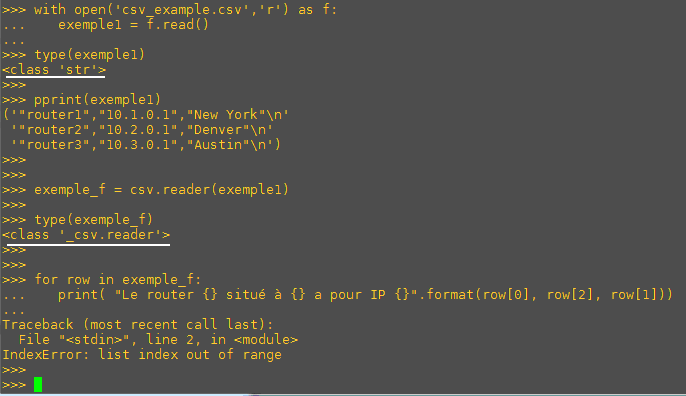
Exemple1 is a string, then apply csv.reader(): you get an object “\_csv.reader” but this is not a loop object
Example 2: just open the csv file

f is a \_io.TextIOWrapper object, then apply csv.reader(): you get an object “\_csv.reader” as well, but THIS IS a loop object
I don’t understand why in example 1, a “\_csv.reader” object is NOT a loop object, and in example 2, the same object (same class) is a loop object.
So the same object seems to be not consistent as it comes from a string or a \_io.TextIOWrapper object.
Could you help me ?
Best regards
---
### Author:  [@ReneMolenaar](https://forum.networklessons.com/u/ReneMolenaar)
#### Post date: [November 30, 2020, 7:22pm UTC](https://forum.networklessons.com/t/python-json/10828/5 "2020-11-30T19:22:26Z")
Bonjour @syncope988,
Using `open` or `with open` is the same thing, except when you use “with”, it automatically closes.
**First Example**
- You use the read() function on “f” and assign the output to the “exemple1” variable. When you use the read() function, you get a **string**.
- You then run the reader() function from the CSV module, feed it the “exemple1” variable and assign the output to the “exemple\_f” variable.
- You then iterate over each item in the “exemple\_f” variable.
When you check what “row” is, you’ll see it’s a list with only a single character. That’s why you get an index out of range error. There is only one item in the list, that’s why [0] works but not [1] or [2].
**Second Example**
- You open the csv\_example.csv file and assign the output to variable “f”.
- You run the reader() function from the CSV module and assign the output to variable “exemple\_f”.
- You iterate over variable “exemple\_f”.
**This time, you didn’t use the read() function.**
By doing it like this, each line in your CSV file **becomes a list**. That’s why you can use [0], [1], [2], etc. to access the items in your list.
**In a nutshell:** data and data conversion can be a pain. You can’t always predict what kind of object you get in return…a string, tuple, list, or dictionary. For example, the read() function returns a string but the readlines() function returns a list.
To make your life a lot easier, try to run some Python scripts in visual studio code. When you add a breakpoint, you can visualize what your data looks like:
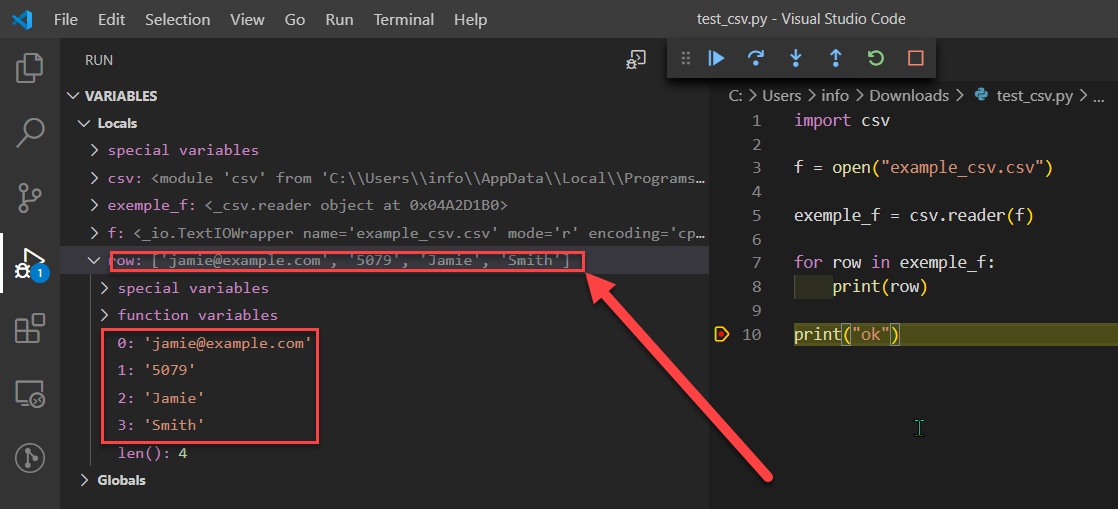
You can even right-click on what you want to use and choose “copy as expression”:
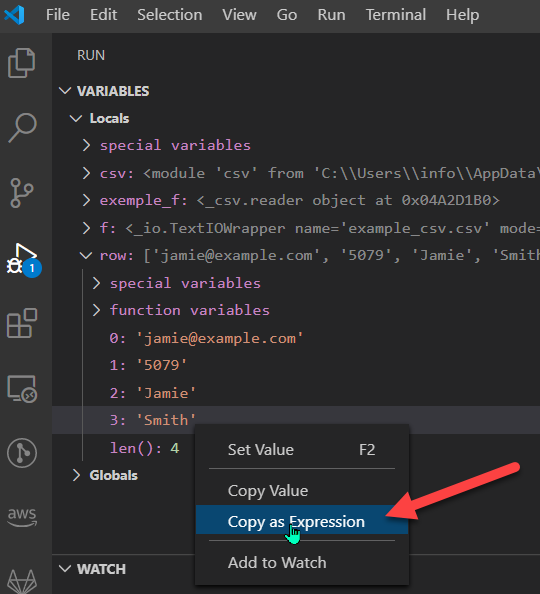
And use it in your code, or in the debug console:
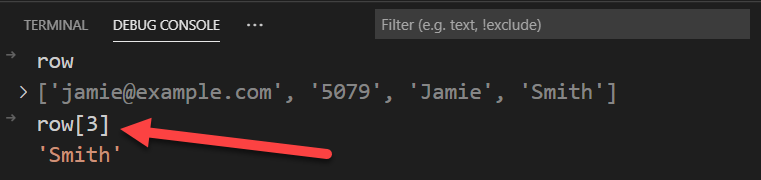
This makes it much easier compared to using the python interpreter or IDLE where you have to use the print or type function to see things. Give it a try, it will be very helpful 🙂
Doe this explanation help?
Rene
---
### Author:  [@syncope988](https://forum.networklessons.com/u/syncope988)
#### Post date: [December 1, 2020, 10:51am UTC](https://forum.networklessons.com/t/python-json/10828/6 "2020-12-01T10:51:12Z")
Hi Rene,
yes it helps a lot
Great thanks
Regards
---
### Author:  [@hetto.coss1](https://forum.networklessons.com/u/hetto.coss1)
#### Post date: [February 9, 2024, 7:58pm UTC](https://forum.networklessons.com/t/python-json/10828/7 "2024-02-09T19:58:58Z")
Hello everyone,
Would you recommend a particular tool to parse info from “`show`” commands using Python?
Thanks!
---
### Author:  [@lagapidis](https://forum.networklessons.com/u/lagapidis)
#### Post date: [February 13, 2024, 6:34am UTC](https://forum.networklessons.com/t/python-json/10828/8 "2024-02-13T06:34:09Z")
Hello Heberto
Take a look at this lesson which deals with some parsing using JSON:
> **[Python JSON](https://networklessons.com/python/python-json)**
>
> This lesson explains how to work with the JSON data format in Python. We'll see how to convert JSON strings to dictionaries, vice versa, and more.
Now having said that, if you want to use a purpose-designed tool for this, you can use any of the following specialized libraries and tools:
1. **TextFSM** : TextFSM is a Python module developed by Google which is widely used for parsing semi-structured text data like the output from “show” commands in Cisco IOS. It allows you to define a template that maps the output into a structured format, making it easier to process and analyze. TextFSM is particularly powerful for parsing complex and varied text outputs.
2. **Netmiko** : While primarily a library for handling SSH connections to network devices, Netmiko can be used in conjunction with TextFSM to send commands and parse the output. Netmiko simplifies the process of connecting to a device, executing commands, and retrieving the output.
3. **PyATS/Genie** : Developed by Cisco, PyATS is a Python automation framework designed specifically for network testing. Genie is part of the PyATS ecosystem and provides libraries for modeling and parsing network devices’ configurations and operational state. Genie can parse the output of “show” commands into structured JSON data, making it easier to work with programmatically.
4. **Nornir** : Nornir is a pluggable multi-threaded framework with inventory management to help operate collections of devices. It can use Netmiko and other plugins to connect to devices, send commands, and parse the output.
5. **Ansible with ios\_command module** : Although Ansible is not a Python library per se, it is a powerful automation tool that can be used for network automation tasks. The `ios_command` module in Ansible allows you to run commands on remote Cisco IOS devices and can be used in conjunction with parsing filters to structure the output.
Each of these tools has its strengths, and the best choice may depend on the specific requirements of your project, such as the complexity of the data you’re dealing with, the scale of your network, and your familiarity with these tools. TextFSM is a great starting point for simple parsing tasks, while PyATS/Genie offers a more comprehensive solution for Cisco-specific environments. Netmiko and Nornir are excellent for broader automation tasks that include but are not limited to parsing command outputs.
I hope this has been helpful!
Laz
---
### Author:  [@zahidsaeed27](https://forum.networklessons.com/u/zahidsaeed27)
#### Post date: [May 30, 2024, 8:10am UTC](https://forum.networklessons.com/t/python-json/10828/9 "2024-05-30T08:10:00Z")
Hi Team,
I have a question. In my python code, I want to take backup configurations for all my devices in the network. So what I did that I created a file and in this file I added IP address of all those devices and open in python code. Then I created for loop to run `show run` command for each item in that file.
My question is that this takes time. Is there any way that I can make my python code execute faster for this?
Thanks,
---
### Author:  [@lagapidis](https://forum.networklessons.com/u/lagapidis)
#### Post date: [June 3, 2024, 4:33am UTC](https://forum.networklessons.com/t/python-json/10828/10 "2024-06-03T04:33:15Z")
Hello Zahid
Indeed, if you have many network devices, executing this code will take quite a bit of time.
You can make your Python code execute faster by **performing tasks concurrently**. There are a few approaches you can take to achieve this:
- **Multithreading** : This approach allows you to run multiple threads in parallel. This is useful for I/O-bound tasks like network requests.
- **Multiprocessing** : This approach runs multiple processes in parallel, each with its own Python interpreter. It’s suitable for CPU-bound tasks.
- **Asyncio** : This approach is useful for writing single-threaded concurrent code using async/await syntax. It’s particularly useful for I/O-bound and high-level structured network code.
Since your scenario involves network I/O, using **multithreading** or **asyncio** would be appropriate. Rene doesn’t cover these in the Python course. Configuring either one of these is not trivial, so I can’t give specific solutions in a single post. But, you can explore these features to see syntax and methodologies to use. Here are some links to get you started:
> **[threading — Thread-based parallelism](https://docs.python.org/3/library/threading.html)**
>
> Source code: Lib/threading.py This module constructs higher-level threading interfaces on top of the lower level\_thread module. CPython implementation detail: In CPython, due to the Global Interpre...
> **[asyncio — Asynchronous I/O](https://docs.python.org/3/library/asyncio.html)**
>
> Hello World!: asyncio is a library to write concurrent code using the async/await syntax. asyncio is used as a foundation for multiple Python asynchronous frameworks that provide high-performance n...
If you try them out, let us know how you get along!
I hope this has been helpful!
Laz