# Python String Split() Method
**URL:** https://forum.networklessons.com/t/python-string-split-method/10567
**Category:** Lessons Discussion
**Created:** [April 5, 2020, 10:40am UTC](https://forum.networklessons.com/t/python-string-split-method/10567 "2020-04-05T10:40:12Z")
**Posts on this page:** 3
**Page:** 1
### Author:  [@ReneMolenaar](https://forum.networklessons.com/u/ReneMolenaar)
#### Post date: [April 5, 2020, 10:40am UTC](https://forum.networklessons.com/t/python-string-split-method/10567/1 "2020-04-05T10:40:12Z")
This topic is to discuss the following lesson:
> **[Python String Split() Method](https://networklessons.com/python/python-string-split-method)**
>
> The Python String Split() method lets you split a string into a list with multiple strings. This is useful when you want to read CSV files.
---
### Author:  [@pradyumnayadavgla](https://forum.networklessons.com/u/pradyumnayadavgla)
#### Post date: [May 31, 2020, 8:04pm UTC](https://forum.networklessons.com/t/python-string-split-method/10567/2 "2020-05-31T20:04:45Z")
Hi Rene,
as per this eg:
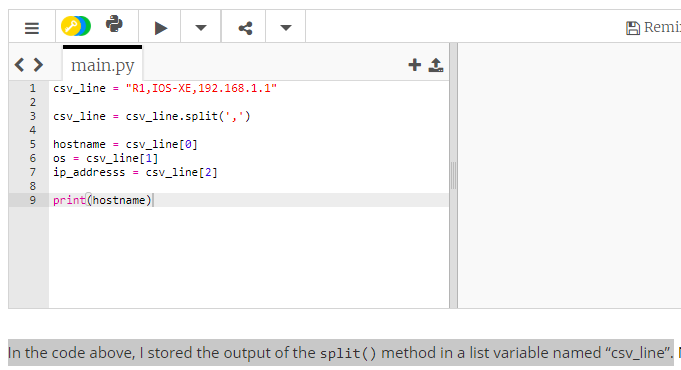
'The stored output of the split() method must be this **[‘R1’, ‘IOS-XE’, ‘192.168.1.1’]** not this one **csv\_line = “R1,IOS-XE,192.168.1.1”**.
please clarify
---
### Author:  [@lagapidis](https://forum.networklessons.com/u/lagapidis)
#### Post date: [June 4, 2020, 9:43am UTC](https://forum.networklessons.com/t/python-string-split-method/10567/3 "2020-06-04T09:43:00Z")
Hello Pradyumna
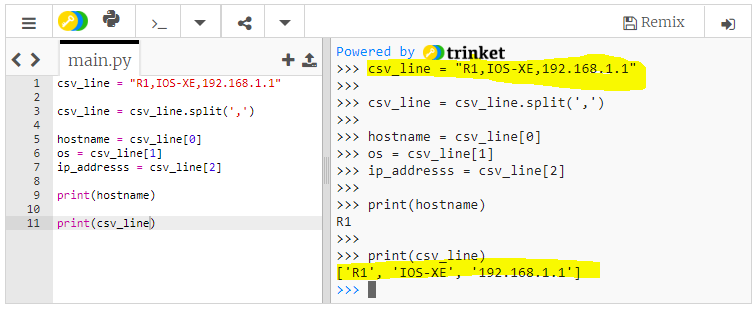
If the variable **csv\_line** is a string, then the output of that variable in the window on the right will be of the form “R1,IOS-XE,192.168.1.1”.
If the variable **csv\_line** is a list, then the output of that variable in the window on the right will be of the form [‘R1’, ‘IOS-XE’, ‘192.168.1.1’].
Notice in the following screenshot, initially, the output of csv\_line is with quotes, and separated by commas. After it is converted, it appears in square brackets, with each item of the list in single quotes, and separated by commas.
I hope this has been helpful!
Laz