# Troubleshooting OSPF Route Advertisement
**URL:** https://forum.networklessons.com/t/troubleshooting-ospf-route-advertisement/1191
**Category:** Lessons Discussion
**Created:** [December 27, 2016, 11:47pm UTC](https://forum.networklessons.com/t/troubleshooting-ospf-route-advertisement/1191 "2016-12-27T23:47:04Z")
**Posts on this page:** 20
**Page:** 1
### Author:  [@ReneMolenaar](https://forum.networklessons.com/u/ReneMolenaar)
#### Post date: [December 27, 2016, 11:47pm UTC](https://forum.networklessons.com/t/troubleshooting-ospf-route-advertisement/1191/1 "2016-12-27T23:47:05Z")
This topic is to discuss the following lesson:
> **[Troubleshooting OSPF Route Advertisement(s)](https://networklessons.com/ospf/troubleshooting-ospf-route-advertisement)**
>
> This lesson explains the most common issues why OSPF route advertisements are not showing up and how to fix this.
---
### Author:  [@gudhka.vishal](https://forum.networklessons.com/u/gudhka.vishal)
#### Post date: [October 30, 2015, 6:30pm UTC](https://forum.networklessons.com/t/troubleshooting-ospf-route-advertisement/1191/2 "2015-10-30T18:30:03Z")
Thank you for explaining OSPF troubleshooting in a simple language. This helps in understanding OSPF better.
---
### Author:  [@recinos2675](https://forum.networklessons.com/u/recinos2675)
#### Post date: [February 18, 2016, 2:14am UTC](https://forum.networklessons.com/t/troubleshooting-ospf-route-advertisement/1191/3 "2016-02-18T02:14:45Z")
The first scenario doesn’t match with the troubleshooting. For example, “We can see that R1 has learned about network 10.2.2.0 /24 from R2 but there’s nothing in the routing table of R2. What’s going on? Let’s check if OSPF is enabled:”. There is nowhere on the scenario that states, configure network address 10.2.2.0 /24, so I’m not expecting to see network 10.2.2.0 /24 in my routing table.
---
### Author:  [@ReneMolenaar](https://forum.networklessons.com/u/ReneMolenaar)
#### Post date: [February 18, 2016, 10:17am UTC](https://forum.networklessons.com/t/troubleshooting-ospf-route-advertisement/1191/4 "2016-02-18T10:17:03Z")
Hi Alex,
You are right, this should be the 2.2.2.0/24 network. I just fixed it in the article. Thanks for letting me know!
Rene
---
### Author:  [@rajmane408](https://forum.networklessons.com/u/rajmane408)
#### Post date: [August 8, 2016, 9:41am UTC](https://forum.networklessons.com/t/troubleshooting-ospf-route-advertisement/1191/5 "2016-08-08T09:41:28Z")
**Super Explanation 🙂**
---
### Author:  [@purohit.am](https://forum.networklessons.com/u/purohit.am)
#### Post date: [September 10, 2016, 4:44am UTC](https://forum.networklessons.com/t/troubleshooting-ospf-route-advertisement/1191/6 "2016-09-10T04:44:02Z")
Completely agree , Super Explanation !
Nice concept to include such a topic and very well explained !
---
### Author:  [@purohit.am](https://forum.networklessons.com/u/purohit.am)
#### Post date: [September 10, 2016, 4:52am UTC](https://forum.networklessons.com/t/troubleshooting-ospf-route-advertisement/1191/7 "2016-09-10T04:52:14Z")
After going through this article , I instantly checked if there is anything like this for BGP 🙂
Would really appreciate if you can add similar article for BGP i.e. the basic checkpoints of the protocol and most likely the only you might encounter ever.
thanks,Amit
---
### Author:  [@ReneMolenaar](https://forum.networklessons.com/u/ReneMolenaar)
#### Post date: [September 24, 2016, 11:30am UTC](https://forum.networklessons.com/t/troubleshooting-ospf-route-advertisement/1191/8 "2016-09-24T11:30:39Z")
Hi Amit,
We do have something similar for BGP:
[Troubleshooting BGP Neighbor Adjacency](https://networklessons.com/bgp/troubleshooting-bgp-neighbor-adjacency/)
[Troubleshooting BGP Route Advertisement](https://networklessons.com/bgp/troubleshooting-bgp-route-advertisement/)
Rene
---
### Author:  [@sutandrac1](https://forum.networklessons.com/u/sutandrac1)
#### Post date: [July 8, 2019, 12:32pm UTC](https://forum.networklessons.com/t/troubleshooting-ospf-route-advertisement/1191/9 "2019-07-08T12:32:53Z")
Hi Rene ,
It helped me revise very quickly for an interview.
There’s a little printing mistake under the section ‘OSPF summarization
commands’ :
“The network engineer that configured R1 and R2 expects to see network 172.16.0.0 /26 in the routing table of R1”, It is to be printed as 172.16.0.0/16.
Many Thanks .
---
### Author:  [@ReneMolenaar](https://forum.networklessons.com/u/ReneMolenaar)
#### Post date: [July 15, 2019, 3:39pm UTC](https://forum.networklessons.com/t/troubleshooting-ospf-route-advertisement/1191/10 "2019-07-15T15:39:45Z")
Thank you Sutandra, I just fixed this.
---
### Author:  [@bvesel](https://forum.networklessons.com/u/bvesel)
#### Post date: [January 9, 2020, 6:16pm UTC](https://forum.networklessons.com/t/troubleshooting-ospf-route-advertisement/1191/11 "2020-01-09T18:16:31Z")
Hi team,
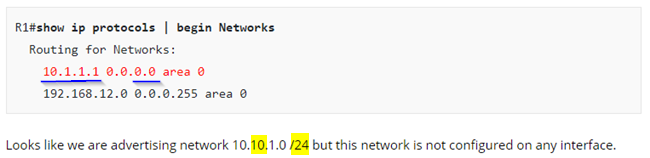
I suppose there is a little typo under a section “OSPF Network Command”. In the configuration below only host 10. **1**.1. **1** / **32** has been advertised into OSPF.
Thanks
---
### Author:  [@ReneMolenaar](https://forum.networklessons.com/u/ReneMolenaar)
#### Post date: [January 27, 2020, 1:45pm UTC](https://forum.networklessons.com/t/troubleshooting-ospf-route-advertisement/1191/12 "2020-01-27T13:45:44Z")
Thank you @bvesel, just fixed this one.
Rene
---
### Author:  [@ankushrai468](https://forum.networklessons.com/u/ankushrai468)
#### Post date: [April 5, 2021, 9:49pm UTC](https://forum.networklessons.com/t/troubleshooting-ospf-route-advertisement/1191/13 "2021-04-05T21:49:59Z")
Hi Team,
i was doing a LAB today about OSPF topology is given below
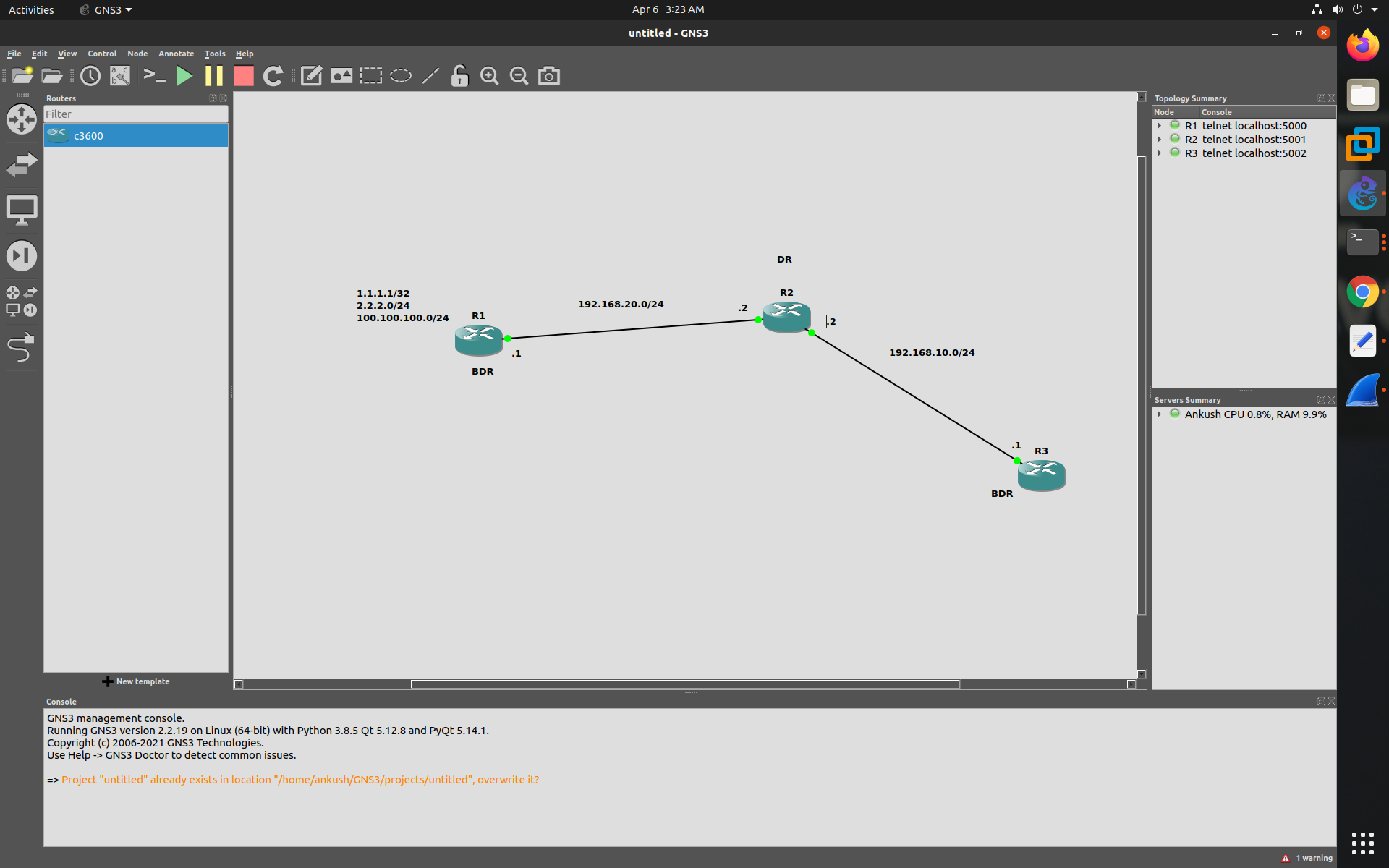
Here i have 3 routers on multi-access network so i created 3 loopback on R1 and advertised them under OSPF. so now the thing is i am able to see all loopbacks under routing table of each router but not seeing them in LSDB can you explain why,
R1
```
R1#show ip ospf interface
Loopback2 is up, line protocol is up
Internet Address 1.1.1.1/32, Area 0
Process ID 1, Router ID 192.168.20.1, Network Type LOOPBACK, Cost: 1
Loopback interface is treated as a stub Host
Loopback3 is up, line protocol is up
Internet Address 2.2.2.1/24, Area 0
Process ID 1, Router ID 192.168.20.1, Network Type LOOPBACK, Cost: 1
Loopback interface is treated as a stub Host
Loopback100 is up, line protocol is up
Internet Address 100.100.100.1/24, Area 0
Process ID 1, Router ID 192.168.20.1, Network Type LOOPBACK, Cost: 1
Loopback interface is treated as a stub Host
FastEthernet0/0 is up, line protocol is up
Internet Address 192.168.20.1/24, Area 0
Process ID 1, Router ID 192.168.20.1, Network Type BROADCAST, Cost: 1
Transmit Delay is 1 sec, State BDR, Priority 1
Designated Router (ID) 192.168.20.2, Interface address 192.168.20.2
Backup Designated router (ID) 192.168.20.1, Interface address 192.168.20.1
Timer intervals configured, Hello 10, Dead 40, Wait 40, Retransmit 5
oob-resync timeout 40
Hello due in 00:00:01
Supports Link-local Signaling (LLS)
Index 1/1, flood queue length 0
Next 0x0(0)/0x0(0)
Last flood scan length is 1, maximum is 1
Last flood scan time is 0 msec, maximum is 0 msec
Neighbor Count is 1, Adjacent neighbor count is 1
Adjacent with neighbor 192.168.20.2 (Designated Router)
Suppress hello for 0 neighbor(s)
R1#sh ip ospf database
OSPF Router with ID (192.168.20.1) (Process ID 1)
Router Link States (Area 0)
Link ID ADV Router Age Seq# Checksum Link count
192.168.10.1 192.168.10.1 932 0x80000002 0x00213E 1
192.168.20.1 192.168.20.1 1450 0x80000011 0x00704B 4
192.168.20.2 192.168.20.2 931 0x8000000B 0x0063CC 2
Net Link States (Area 0)
Link ID ADV Router Age Seq# Checksum
192.168.10.2 192.168.20.2 931 0x80000001 0x00DA76
192.168.20.2 192.168.20.2 1251 0x80000002 0x00EC4F
```
not seeing any loopback in LSDB
but on R3 i am seeing them under routing table.
R3
```
R3#show ip ospf database
OSPF Router with ID (192.168.10.1) (Process ID 1)
Router Link States (Area 0)
Link ID ADV Router Age Seq# Checksum Link count
192.168.10.1 192.168.10.1 211 0x80000002 0x00213E 1
192.168.20.1 192.168.20.1 733 0x80000011 0x00704B 4
192.168.20.2 192.168.20.2 212 0x8000000B 0x0063CC 2
Net Link States (Area 0)
Link ID ADV Router Age Seq# Checksum
192.168.10.2 192.168.20.2 212 0x80000001 0x00DA76
192.168.20.2 192.168.20.2 532 0x80000002 0x00EC4F
```
route
```
1.0.0.0/32 is subnetted, 1 subnets
O 1.1.1.1 [110/3] via 192.168.10.2, 00:16:23, FastEthernet0/1
2.0.0.0/32 is subnetted, 1 subnets
O 2.2.2.1 [110/3] via 192.168.10.2, 00:16:23, FastEthernet0/1
100.0.0.0/32 is subnetted, 1 subnets
O 100.100.100.1 [110/3] via 192.168.10.2, 00:16:23, FastEthernet0/1
C 192.168.10.0/24 is directly connected, FastEthernet0/1
O 192.168.20.0/24 [110/2] via 192.168.10.2, 00:16:23, FastEthernet0/1
```
---
### Author:  [@lagapidis](https://forum.networklessons.com/u/lagapidis)
#### Post date: [April 7, 2021, 5:49am UTC](https://forum.networklessons.com/t/troubleshooting-ospf-route-advertisement/1191/14 "2021-04-07T05:49:00Z")
Hello Ankush
This issue has to do with the way we read the OSPF database. Specifically, each LSA has a **Link ID** and an **Adv Router** that are shown in the table. These fields **do not show the actual destinations** being advertised but identify the LSAs exchanged between the OSPF routers.
The **ADV router** is the router ID of the router that advertised that particular LSA. In your case, looking at the OSPF database of R3, your loopbacks are contained within the LSAs that have the **ADV Router** of **192.168.20.1**. This IP address is the **router ID** of R1. This can be confirmed by the fact that you have a link count of 4 (three loopbacks and one physical link) for that router.
As an aside, in your case, the router used the highest IP address on an interface to define the router ID. You have loopbacks as well, but those must have been added after the router ID was established. (if you reset the OSPF process, your router ID will change on R1 based on the [OSPF router ID selection process](https://networklessons.com/ospf/ospf-router-id)).
For LSA type 1, the **Link ID** is the same as the ADV Router column. However, for type 2 LSAs, the Link ID refers to the router ID of the DR on the segment.
The point here is that you won’t actually see the destination networks within the OSPF database on the router with this command. In order to see the actual contents of the Type 1 LSA, you must use the `show ip ospf database router` command, which will show you details of the Type 1 LSAs that the router has received.
For more info no how to read the OSPF database, take a look at the following lesson:
> **[How to read the OSPF Database](https://networklessons.com/ospf/how-to-read-the-ospf-database)**
>
> This expert-level tutorial teaches you how to read and draw the OSPF Database on a Cisco IOS router.
I hope this has been helpful!
Laz
---
### Author:  [@jwang357](https://forum.networklessons.com/u/jwang357)
#### Post date: [July 4, 2022, 2:57am UTC](https://forum.networklessons.com/t/troubleshooting-ospf-route-advertisement/1191/15 "2022-07-04T02:57:19Z")
Hi all,
I had tried shoot from every angle:
Can somebody kindly shed light , why the Summary Null route is currently missing from the ABR’s routing table ?
I understood the theory that said : [when you use the Area Range command, a Summary route to null0 was supposed to be installed into the ABR’s routing table].
I had labbed it up using Packet Tracer , with the following configurations, and this Summary Null route is currently missing from Router B’s table :
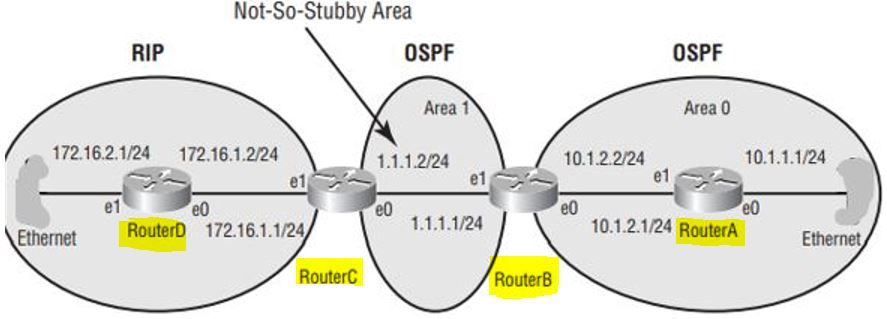
Please see my simple topology diagram :
Router B is the NSSA ABR , and is connecting to two areas : the backbone internal Router A, as well as connecting to Area 1 NSSA 's Router C (NSSA ASBR) .
\*\*\*\* Below is the configuration for NSSA ABR (Router B ):
```auto
hostname Router
no ip cef
no ipv6 cef
spanning-tree mode pvst
interface FastEthernet0/0
ip address 10.1.2.2 255.255.255.0
interface FastEthernet0/1
ip address 1.1.1.1 255.255.255.0
router ospf 24
log-adjacency-changes
area 0 range 10.0.0.0 255.0.0.0
area 1 nssa
network 10.0.0.0 0.255.255.255 area 0
network 1.0.0.0 0.255.255.255 area 1
!
ip classless
!
ip flow-export version 9
!
no cdp run
!
end
```
\*\*\*\* Below is the configuration for the Backbone internal Router A:
```auto
hostname Router
no ip cef
no ipv6 cef
spanning-tree mode pvst
!
interface FastEthernet0/0
ip address 10.1.1.1 255.255.255.0
!
interface FastEthernet0/1
ip address 10.1.2.1 255.255.255.0
!
router ospf 24
log-adjacency-changes
network 10.0.0.0 0.255.255.255 area 0
!
ip classless
ip flow-export version 9
end
```
\*\*\*\* Below is the configuration for NSSA ASBR (Router C ):
```auto
hostname Router
no ip cef
no ipv6 cef
spanning-tree mode pvst
!
interface FastEthernet0/0
ip address 1.1.1.2 255.255.255.0
!
interface FastEthernet0/1
ip address 172.16.1.1 255.255.255.0
!
router ospf 24
log-adjacency-changes
area 1 nssa
redistribute rip subnets
network 1.0.0.0 0.255.255.255 area 1
!
router rip
redistribute ospf 24
network 172.16.0.0
ip classless
ip flow-export version 9
end
!
```
\*\*\*\* Below is the configuration for the RIP Router D:
```auto
hostname Router
no ip cef
no ipv6 cef
spanning-tree mode pvst
!
interface FastEthernet0/0
ip address 172.16.1.2 255.255.255.0
!
interface FastEthernet0/1
ip address 172.16.2.1 255.255.255.0
!
router rip
network 172.16.0.0
!
ip classless
ip flow-export version 9
end
```
\*\*\*\* Here is the output “show ip route” for Router D: \*\*\*\*\*\*\*\*\*\*\*
```auto
Gateway of last resort is not set
172.16.0.0/16 is variably subnetted, 2 subnets, 2 masks
C 172.16.1.0/24 is directly connected, FastEthernet0/0
L 172.16.1.2/32 is directly connected, FastEthernet0/0
```
\*\*\*\*\* Here is the output “show ip route” for Router C: \*\*\*\*\*\*\*\*\*\*\*
```auto
Gateway of last resort is not set
1.0.0.0/8 is variably subnetted, 2 subnets, 2 masks
C 1.1.1.0/24 is directly connected, FastEthernet0/0
L 1.1.1.2/32 is directly connected, FastEthernet0/0
O IA 10.0.0.0/8 [110/2] via 1.1.1.1, 02:13:08, FastEthernet0/0
172.16.0.0/16 is variably subnetted, 2 subnets, 2 masks
C 172.16.1.0/24 is directly connected, FastEthernet0/1
L 172.16.1.1/32 is directly connected, FastEthernet0/1
```
\*\*\*\*\*\* Here is the output “show ip route” for Router B: \*\*\*\*\*\*\*\*\*\*\*
```auto
Gateway of last resort is not set
1.0.0.0/8 is variably subnetted, 2 subnets, 2 masks
C 1.1.1.0/24 is directly connected, FastEthernet0/1
L 1.1.1.1/32 is directly connected, FastEthernet0/1
10.0.0.0/8 is variably subnetted, 2 subnets, 2 masks
C 10.1.2.0/24 is directly connected, FastEthernet0/0
L 10.1.2.2/32 is directly connected, FastEthernet0/0
172.16.0.0/24 is subnetted, 1 subnets
O N2 172.16.1.0/24 [110/20] via 1.1.1.2, 01:56:15, FastEthernet0/1
```
\*\*\*\* Here is the output “show ip route” for Router A: \*\*\*\*\*\*\*\*\*\*\*
```auto
Gateway of last resort is not set
1.0.0.0/24 is subnetted, 1 subnets
O IA 1.1.1.0/24 [110/2] via 10.1.2.2, 02:11:36, FastEthernet0/1
10.0.0.0/8 is variably subnetted, 2 subnets, 2 masks
C 10.1.2.0/24 is directly connected, FastEthernet0/1
L 10.1.2.1/32 is directly connected, FastEthernet0/1
172.16.0.0/24 is subnetted, 1 subnets
O E2 172.16.1.0/24 [110/20] via 10.1.2.2, 02:11:36, FastEthernet0/1
```
Much Appreciated for your good trouble shooting knowledge 😄 !!!
---
### Author:  [@lagapidis](https://forum.networklessons.com/u/lagapidis)
#### Post date: [July 6, 2022, 6:08am UTC](https://forum.networklessons.com/t/troubleshooting-ospf-route-advertisement/1191/16 "2022-07-06T06:08:51Z")
Hello Jenny
> [@jwang357](#):
>
> I understood the theory that said : [when you use the Area Range command, a Summary route to null0 was supposed to be installed into the ABR’s routing table].
Hmm, I don’t believe that the area range command creates a summary route to null0. It creates a summary route for inter-area routes (LSA type 3 routes), but not to Null0. Take a look at this Cisco command reference for more info:
> **[Cisco IOS IP Routing: OSPF Command Reference - OSPF Commands: A through ip...](https://www.cisco.com/c/en/us/td/docs/ios-xml/ios/iproute_ospf/command/iro-cr-book/ospf-a1.html#wp1778175609)**
>
> Cisco IOS IP Routing: OSPF Command Reference
> -OSPF Commands: A through ip ospf demand-circuit
Now, what this command does introduce, as configured in your topology, is summarization of the 10.0.0.0/8 network. This summarization occurs as far as the advertisements from Router B into Area 1 go. So you won’t see the summarization in the routing table of Router B, but in the routing table of Router A as an IA route. The same occurs in the lesson as well.
Does that make sense?
I hope this has been helpful!
Laz
---
### Author:  [@jwang357](https://forum.networklessons.com/u/jwang357)
#### Post date: [July 17, 2022, 10:42pm UTC](https://forum.networklessons.com/t/troubleshooting-ospf-route-advertisement/1191/17 "2022-07-17T22:42:28Z")
Thank you Laz ! I hope you don’t mind, if I could clarify a few common area of understandings :
Most people had thought, the Area Range command would usually create a summary route to null0.
Now, according to your kind attachment of the above Cisco Reference article, I now believe that the Area Range command DOES NOT HAVE TO create a summary route to null0.
Hence, am I right to arrive at the interpretation that, although the Area Range command could create a summary route to null0, but it does not have to create it.
I Just don’t understand it 100%, exactly which command , had created a summary route to null0 in the RIB ? Many thanks Laz 😄
---
### Author:  [@lagapidis](https://forum.networklessons.com/u/lagapidis)
#### Post date: [July 20, 2022, 7:51am UTC](https://forum.networklessons.com/t/troubleshooting-ospf-route-advertisement/1191/18 "2022-07-20T07:51:22Z")
Hello Jenny
I understand more clearly now what you were referring to and I think that I will be revising my [previous answer](https://forum.networklessons.com/t/troubleshooting-ospf-route-advertisement/1191/16). Although it is true that the summary route appears in the neighboring router, you are correct that when you create the summary route using the `area range` command, the Null0 summary route should appear **in the router on which the area range was configured**.
This is done to protect routers from routing loops. When you use summaries it’s possible that other routers will send traffic to you for networks that you have no clue about where they are. You may forward them to a default route, and that traffic may return to you, causing a loop. For this reason, the Null0 summary route is installed locally so that the traffic will be forwarded to the null0 interface and dropped.
Now having said that, to be honest, I don’t know why the Null0 summary route does not appear in Router B as shown in [your post](https://forum.networklessons.com/t/troubleshooting-ospf-route-advertisement/1191/15). It should indeed appear as you originally suspected.
At first I thought it may have to do with the NSSA area 1 or the fact that you are summarizing a network that includes some directly connected networks on router B. For this reason, I labbed this up in CML and attempted to recreate your issue, and found in all cases that the Null0 summary route appears in the router that has been configured with the summary route. So to answer your original question, I don’t know why your network does not show a Null0 route in Router B.
My suggestion would be to attempt to apply the [summary-address command](https://networklessons.com/ospf/how-to-configure-ospf-summarization) instead and see if there is any change. Can you let us know the following:
1. how are you emulating this, in GNS3?
2. What are your results with the summary-address command?
Let us know so that we can help you further.
I hope this has been helpful!
Laz
---
### Author:  [@jwang357](https://forum.networklessons.com/u/jwang357)
#### Post date: [July 24, 2022, 2:56am UTC](https://forum.networklessons.com/t/troubleshooting-ospf-route-advertisement/1191/19 "2022-07-24T02:56:55Z")
Awesome good information ! Thank you Laz !!
---
### Author:  [@camerone7276](https://forum.networklessons.com/u/camerone7276)
#### Post date: [April 21, 2024, 2:00am UTC](https://forum.networklessons.com/t/troubleshooting-ospf-route-advertisement/1191/20 "2024-04-21T02:00:43Z")
So what does adding the always command to default-information originate do? Does that just automatically a default route that matches all traffic?
[Next page](https://forum.networklessons.com/t/troubleshooting-ospf-route-advertisement/1191.md?page=2)