# Update Firmware: Unable to access 2nd ASDM \[HA Setup\]
**URL:** https://forum.networklessons.com/t/update-firmware-unable-to-access-2nd-asdm-ha-setup/24700
**Category:** ASA
**Created:** [March 5, 2022, 3:43pm UTC](https://forum.networklessons.com/t/update-firmware-unable-to-access-2nd-asdm-ha-setup/24700 "2022-03-05T15:43:51Z")
**Posts on this page:** 4
**Page:** 1
### Author:  [@iammainefernandez](https://forum.networklessons.com/u/iammainefernandez)
#### Post date: [March 5, 2022, 3:43pm UTC](https://forum.networklessons.com/t/update-firmware-unable-to-access-2nd-asdm-ha-setup/24700/1 "2022-03-05T15:43:51Z")
Hi Network Lessons,
I am new using ASA and planning update 2 Firewall via ASDM next week, I have checked that I need to update the two firewall firmware as per CISCO.
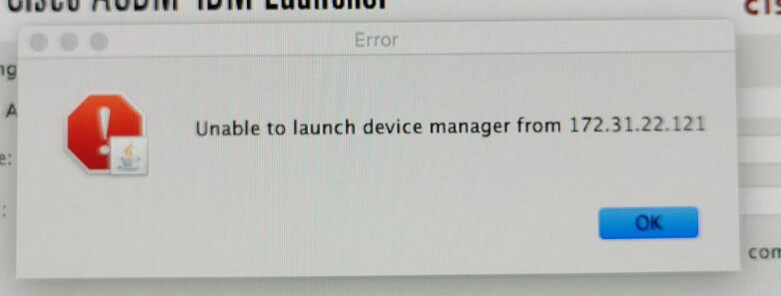
As the setup has been here before I came in the operation, I’m struggling to access the second FW ASDM to do backup first, I have checked that both **firewall mode : Router**
Here is the config for Active and Standby (Active would be 172.31.22.122 [Accessible ASDM] and supposed Standby [172.31.22.121 Unable to launch]
When I search the whole config and 172.31.22.121 only appears one and when I try to access it via browser, it is unreachable and only 172.31.22.122 reachable via browser[Prompt install ASDM]
```auto
crypto ca trustpoint ASDM_Launcher_Access_TrustPoint_0
enrollment self
fqdn none
subject-name CN=172.31.22.121,CN= _____ ASA01P
keypair ASDM_LAUNCHER
crl configure
```
```auto
http server enable
http 172.31.22.64 x.x.x.x management
```
**Active**
```auto
> _____ ASA01P# show interface ip brief
Interface IP-Address OK? Method Status Protocol
GigabitEthernet1/1 unassigned YES unset up up
GigabitEthernet1/2 unassigned YES unset up up
GigabitEthernet1/3 unassigned YES unset up up
GigabitEthernet1/4 unassigned YES unset up up
GigabitEthernet1/5 unassigned YES unset administratively down down
GigabitEthernet1/6 unassigned YES unset administratively down down
GigabitEthernet1/7 unassigned YES unset administratively down down
GigabitEthernet1/8 192.168.1.1 YES unset up up
Internal-Control1/1 127.0.1.1 YES unset up up
Internal-Data1/1 unassigned YES unset up up
Internal-Data1/2 unassigned YES unset up up
Internal-Data1/3 unassigned YES unset up up
Internal-Data1/4 1xx.2xx.1.1 YES unset up up
Management1/1 172.31.22.122 YES CONFIG up up
Port-channel1 xxx.x5.9x.116 YES CONFIG up up
Port-channel2 17x.3x.2x.x96 YES CONFIG up up
```
```auto
_____ ASA01P# show failover interface
interface LAN_FO GigabitEthernet1/8
System IP Address: 192.168.1.2 255.255.255.0
My IP Address : 192.168.1.1
Other IP Address : 192.168.1.2
```
```auto
_____ ASA01P# Show Failover
Serial Number: Ours XXX5AV, Mate XXX57K
Last Failover at: 22:21:05 SGT Oct 4 2021
This host: Primary - Active
Active time: 13033389 (sec)
slot 1: ASA5516 hw/sw rev (3.0/9.12(1)) status (Up Sys)
Interface management (172.31.22.122): Normal (Waiting)
Interface Outside (xxx.x5.9x.116): Normal (Waiting)
Interface Inside (17x.3x.2x.x96): Normal (Waiting)
slot 2: SFR5516 hw/sw rev (N/A/6.2.0-362) status (Up/Up)
ASA FirePOWER, 6.2.0-362, Up, (Monitored)
slot 2: SFR5516 hw/sw rev (N/A/6.2.0-362) status (Up/Up)
ASA FirePOWER, 6.2.0-362, Up, (Monitored)
Other host: Secondary - Standby Ready
Active time: 0 (sec)
slot 1: ASA5516 hw/sw rev (3.0/9.12(1)) status (Up Sys)
Interface management (0.0.0.0): Normal (Waiting)
Interface Outside (0.0.0.0): Normal (Waiting)
Interface Inside (0.0.0.0): Normal (Waiting)
slot 2: SFR5516 hw/sw rev (N/A/6.2.0-362) status (Up/Up)
ASA FirePOWER, 6.2.0-362, Up, (Monitored)
slot 2: SFR5516 hw/sw rev (N/A/6.2.0-362) status (Up/Up)
ASA FirePOWER, 6.2.0-362, Up, (Monitored)
```
**Standby**
```auto
> _____ ASA01P# show interface ip brief
Interface IP-Address OK? Method Status Protocol
GigabitEthernet1/1 unassigned YES unset up up
GigabitEthernet1/2 unassigned YES unset up up
GigabitEthernet1/3 unassigned YES unset up up
GigabitEthernet1/4 unassigned YES unset up up
GigabitEthernet1/5 unassigned YES unset administratively down down
GigabitEthernet1/6 unassigned YES unset administratively down down
GigabitEthernet1/7 unassigned YES unset administratively down down
GigabitEthernet1/8 192.168.1.2 YES unset up up
Internal-Control1/1 127.0.1.1 YES unset up up
Internal-Data1/1 unassigned YES unset up up
Internal-Data1/2 unassigned YES unset up up
Internal-Data1/3 unassigned YES unset up up
Internal-Data1/4 1xx.2xx.1.1 YES unset up up
Management1/1 unassigned YES CONFIG up up
Port-channel1 unassigned YES CONFIG up up
Port-channel2 unassigned YES CONFIG up up
```
```auto
_____ ASA01P# show failover interface
interface LAN_FO GigabitEthernet1/8
System IP Address: 192.168.1.1 255.255.255.0
My IP Address : 192.168.1.2
Other IP Address : 192.168.1.1
```
```auto
_____ ASA01P# Show Failover
Serial Number: Ours XXX57K, MateXXX5AV
Last Failover at: 22:20:52 SGT Oct 4 2021
This host: Secondary - Standby Ready
Active time: 0 (sec)
slot 1: ASA5516 hw/sw rev (3.0/9.12(1)) status (Up Sys)
Interface management (0.0.0.0): Normal (Waiting)
Interface Outside (0.0.0.0): Normal (Waiting)
Interface Inside (0.0.0.0): Normal (Waiting)
slot 2: SFR5516 hw/sw rev (N/A/6.2.0-362) status (Up/Up)
ASA FirePOWER, 6.2.0-362, Up, (Monitored)
slot 2: SFR5516 hw/sw rev (N/A/6.2.0-362) status (Up/Up)
ASA FirePOWER, 6.2.0-362, Up, (Monitored)
Other host: Primary - Active
Active time: 13033471 (sec)
slot 1: ASA5516 hw/sw rev (3.0/9.12(1)) status (Up Sys)
Interface management (172.31.22.122): Normal (Waiting)
Interface Outside (xxx.x5.9x.116): Normal (Waiting)
Interface Inside (17x.3x.2x.x96): Normal (Waiting)
slot 2: SFR5516 hw/sw rev (N/A/6.2.0-362) status (Up/Up)
ASA FirePOWER, 6.2.0-362, Up, (Monitored)
slot 2: SFR5516 hw/sw rev (N/A/6.2.0-362) status (Up/Up)
ASA FirePOWER, 6.2.0-362, Up, (Monitored)
```
Hoping you would able to help me, I don’t want to update the firewall without backing the second FW and accessible via ASDM.
---
### Author:  [@lagapidis](https://forum.networklessons.com/u/lagapidis)
#### Post date: [March 8, 2022, 9:03am UTC](https://forum.networklessons.com/t/update-firmware-unable-to-access-2nd-asdm-ha-setup/24700/2 "2022-03-08T09:03:40Z")
Hello Charmaine
The `crypto ca trustpoint` and related commands are used when using a certificate to access the ASA via ASDM. This particular configuration states that the subject name (which is the identity of the owner) is 172.31.22.121. If that entity does not exist, then the enrolment will fail. I suggest you do the following:
1. Take a look at the config of the first FW and see if it matches with the second. (My understanding is that you successfully connected to the first firewall using ASDM).
2. Take a look at the following Cisco community form discussion and verify that you have correctly configured the `aaa authentication HTTP console LOCAL` command and that the username and password being used are indeed in the ASA’s local database. (assuming you are doing local authentication).
3. Finally, take a look at the following lesson that describes how to access an ASA via ASDM. This of course considered that you are applying these configs from scratch, but it may be helpful in your troubleshooting procedures:
[https://networklessons.com/ciscoasa-firewall/cisco-asa-asdm-configuration](https://networklessons.com/ciscoasa-firewall/cisco-asa-asdm-configuration)
Let us know how you get along in your progress. If you need further clarifications or help, let us know!
I hope this has been helpful!
Laz
---
### Author:  [@iammainefernandez](https://forum.networklessons.com/u/iammainefernandez)
#### Post date: [March 10, 2022, 6:36am UTC](https://forum.networklessons.com/t/update-firmware-unable-to-access-2nd-asdm-ha-setup/24700/3 "2022-03-10T06:36:12Z")
Hi Laz,
Thanks for the response.
For me to be safe, I should not use 172.31.22.121 as the standby for my management interface.
May I check if I need to configure the standby config for my inside and outside interface?
---
### Author:  [@lagapidis](https://forum.networklessons.com/u/lagapidis)
#### Post date: [March 12, 2022, 6:02am UTC](https://forum.networklessons.com/t/update-firmware-unable-to-access-2nd-asdm-ha-setup/24700/4 "2022-03-12T06:02:16Z")
Hello Charmaine
I’m not sure I completely understand your question. Since the 172.31.22.121 address dosen’t seem to be assigned to any interface on the ASA (you searched the config and found it only within the `crypto ca trustpoint` config), you may need to investigate the topology and the addressing that has been configured. It’s always a challenge to decipher what’s going on in a system that you didn’t configure, but have inherited in this way…
As for the active/standby config, take a look at this lesson that will give you some more insight into how this particular feature is implemented.
> **[Cisco ASA Firewall Active / Standby Failover](https://networklessons.com/cisco/asa-firewall/cisco-asa-firewall-active-standby-failover)**
>
> This lesson shows how active/standby failover works on Cisco ASA Firewalls. This allows the standby ASA to take over when the primary fails.
I hope I’ve addressed your questions, but if not, feel free to clarify!
I hope this has been helpful!
Laz