BGP Neighbor Adjacency States

Hello Rene.

I appreciate your and Laz’s help here. We can leave it as it is, as it’s probably not that important, it’s just something I was curious about.

I’ve one more question that I want to ask.


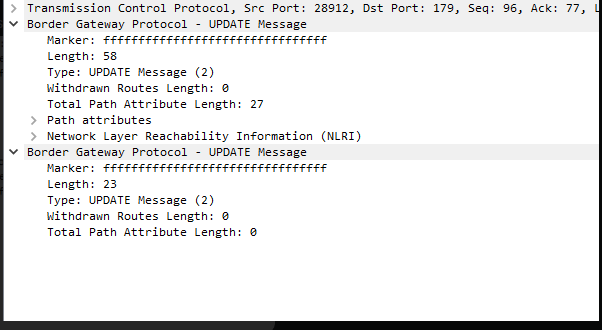
What’s up with these empty UPDATE messages? They are sent each time a neighborship is successfuly established.

The first one makes perfect sense since that is a network that I am advertising into BGP but what’s up with the second empty UPDATE message?

This occurs every time a neighbor adjacency is established, regardless of whether any networks are actually being advertised. Both routers send an empty UPDATE message. I’d assume that it’s some sort of KEEPALIVE, but KEEPALIVE messages are literally sent before it during the OpenConfirm state. Any ideas here?

Kind regards,
David

Hello David

It’s always worth investigating these things as they help us to dig deeper into the inner workings of BGP and the “why” concerning the way the protocol has been designed. Sometimes we encounter to such situations where it is difficult to interpret how they operate, and sometimes it just happens to be the way that a particular vendor implements the protocol on their devices.

Now concerning your other question, this is what is known as an End-of-RIB marker. In RFC 4724, which describes the Graceful Restart Mechanism for BGP, this is further explained like so:

An UPDATE message with no reachable Network Layer Reachability
Information (NLRI) and empty withdrawn NLRI is specified as the End-
of-RIB marker that can be used by a BGP speaker to indicate to its
peer the completion of the initial routing update after the session
is established…

Although the End-of-RIB marker is specified for the purpose of BGP
graceful restart, it is noted that the generation of such a marker
upon completion of the initial update would be useful for routing
convergence in general, and thus the practice is recommended.

Also, note that multiple BGP messages can be grouped together within a single TCP segment rather than being sent separately. In the Wireshark output that you shared, we see that the End-of-RIB marker is actually sent as a separate Update message. Whereas the first update message has a non-zero value for the path attribute length, the send update is indeed an End-of-RIB marker since both values are set to 0. Does that make sense?

I hope this has been helpful!

Laz

Hello, everyone!

The most confusing thing to me that I never wrapped my head around are the first 3 BGP neighbor states (well the first 2, the 3rd one is optional).

Idle
So when we configure BGP and specify a start event (a neighbor command, for example) the router sets the state for that neighbor to Idle. Here it will find a matching route, initialize all the necessary resources and timers, start listening for TCP port 179 connections and send a SYN message and then move on to the Connect state, is this correct?

Connect
In this state, the routers are trying to establish the TCP connection using the 3-way handshake. Once this process is successfull, an OPEN message is sent and the router (whoever is the first to do this) moves into the OpenSent state, and so does the other router.

What confuses is me is all the additional… hassle around it :smiley:. If an error occurs during the adjacency formation which causes it to move back to Idle, the ConnectRetryTimer is set to 60 seconds and doubles on subsequent failures?

Active
Then, if the TCP connection in the Connect state fails and the ConnectRetryTimer depletes, a new TCP connection is attempted, the timer is reset and the adjacency state is moved to Active?

And then when the ConnectRetryTimer depletes itself during the Active state… we move back to the Connect state and reset the ConnectRetryTimer? :smiley:

Isn’t this just redundant? It feels like the two states are just playing ping pong with eachother. If the ConnectRetryTimer depletes itself in Connect, the state is moved to Active and vice-versa. This is what confuses me. The ConnectRetryTimer and all this state moving/timing behind it.

Not to mention that I was never successful in labbing these (as indicated by the posts above) :smiley:

Can someone please shed some light onto this?

Thank you.
David

Hello David

Yes that is correct. The Idle state is essentially a preparation state, preparing all that’s necessary to start communication. As soon as the SYN message is sent or received, it moves to the Connect state.

The Connect state can be seen as the TCP three-way handshake itself. Once it is successful, it moves on to the OpenSent state. Now, what if there is a failure? In that case, the ConnectRetryTimer is indeed set to 60 seconds and it doubles on subsequent failures. Why? This is a mechanism to prevent constant, rapid attempts to establish a connection, which could consume significant resources. It is a kind of dampening method to avoid flapping.

BGP is not designed to converge quickly like IGPs. Its stability is much more important than its speed of convergence, because flapping BGP routes can have devastating effects on the network, and on the Internet as a whole.

If the TCP connection fails in the Connect state and the ConnectRetryTimer expires, the router attempts a new TCP connection, resets the timer, and transitions to the Active state.

When the ConnectRetryTimer expires in the Active state, the router transitions back to the Connect state and resets the timer. This is not redundant but rather a way to continuously attempt to establish a connection until successful, with a delay between attempts to conserve resources.

The confusion might arise from the fact that the Active state is optional and often skipped in modern implementations. In the past, the Active state was used to initiate a new connection when the initial attempt failed, but nowadays, routers often move directly from Connect to OpenSent state, skipping the Active state altogether.

In a lab environment, you might not see these states due to the speed of modern networks and devices. The transition between states usually happens too fast to be observed.

I hope this has been helpful!

Laz

Hello,

When does it move to open confirm? Does it just go to open sent then to established? Or would it move to open confirm after then to established?

Thanks

Hello Cameron

A BGP router will move from the OpenSent to the OpenConfirm state once it receives and validates the OPEN message from its peer.

Once it enters the OpenConfirm state, it begins to send KEEPALIVE messages, while simultaneously waiting to receive KEEPALIVE messages. Once it receives the first KEEPALIVE message, it will then move to the Established state. Does that make sense?

I hope this has been helpful!

Laz

That makes perfect sense, thank you so much Laz. Have a great night

1 Like

Hi Rene,

What is the difference between connect and active state, In both state the router is trying to initiate a TCP connection, right?

Thank You,
Ashwith

Hello Ashwith

Yes, you’re correct that in both the Connect and Active states, the router is trying to initiate a TCP connection. However, there is a key difference between the two:

In the Connect state, the router is waiting for an acknowledgment of the TCP connection request (SYN packet) it has sent to its neighbor. If the router gets an acknowledgment (SYN-ACK packet), it moves to the OpenSent state. If it does not receive an acknowledgment, it will keep trying until the ConnectRetry timer expires, and then it will move to the Active state.

In the Active state, the router is still trying to establish a TCP connection with its neighbor, but this time it is more aggressive. It starts sending hello packets to its neighbor. If it gets a reply, it moves to the OpenSent state. If it does not get a reply after a certain period, it declares the neighbor as down.

So, the main difference is the method and aggressiveness with which the router tries to establish the TCP connection in each state.

I hope this has been helpful!

Laz

Hi Team, May I know what kind of resources BGP will initialize?

Hello Sathish

In the description of the IDLE state in the BGP FSM, when it says “initialize some resources,” it refers to the preparatory tasks and system-level allocations that BGP performs to get ready for establishing a connection with a remote neighbor. Specifically, this includes:

  1. Memory Allocation: Allocating memory to store session-specific data, such as BGP messages, route tables, and neighbor state information.
  2. Data Structures Setup: Initializing internal data structures to manage the BGP session. This might include creating entries for the neighbor in tables that track BGP sessions and routes.
  3. Timers Configuration: Setting up or resetting necessary timers.
  4. Event Handling Setup: Preparing mechanisms to handle specific BGP events and transitions, ensuring that the FSM is ready to respond to changes or triggers like successful TCP connections or session resets.
  5. Socket Setup for Listening: Opening a TCP socket and listening for incoming connection attempts from the remote neighbor.
  6. Log Initialization: Starting or resetting logging mechanisms to track session establishment and debug information.

These are all internal mechanisms performed at a system level by BGP and are not generally configurable. But they ensure that BGP is ready to handle the next stages in the FSM, such as transitioning to the Connect state if the TCP connection succeeds.

I hope this has been helpful!

Laz

1 Like

Thank you for the detailed information

1 Like

Hello, everyone.

I’ve been over the RFC and I wanted to provide clarity regarding Idle, Connect, and Active, considering that these three states confuse the most people. All of this information is from the BGP RFC.

Idle

This is the initial state that the router will enter the moment we define a neighbor. The RFC says that it happens when:

 In response to a ManualStart event (Event 1) or an AutomaticStart event (Event 2).

In other words, the moment we hit a start event such as manually configuring a neighbor (which is a start event) or have this happen automatically (the IOS can do it too), we will hit Idle very fast and the following things will start to happen:

the local system:

        - initializes all BGP resources for the peer connection,

        - sets ConnectRetryCounter to zero,

        - starts the ConnectRetryTimer with the initial value,

        - initiates a TCP connection to the other BGP peer,

        - listens for a connection that may be initiated by the remote
          BGP peer, and

        - changes its state to Connect

In other words, the local router will open a socket (TCP/179), allocate resources, find a matching route for the destination and then move to Connect. Idle is basically the preparation phase. You will either be here at the beginning of the peering or in case something goes wrong.

Connect

Idle and Connect are tied together and usually transition fast. In this state, the BGP router is listening for TCP connections (TCP/179) and also trying to establish them towards the destination.

To simplify this, if the connection succeeds, the routers will eventually move to OpenSent and hopefully finish the peering.

Active

BGP’s FSM is good for one thing - causing a migraine. I believe a lot of people are confused about the difference between Connect and Active.

Remember that a router will start in Idle and Reach Connect if the following happens:

 In response to a ManualStart event (Event 1) or an AutomaticStart event (Event 2).

Active is a bit different. RFC defines it as:

In this state, BGP FSM is trying to acquire a peer by listening for, and accepting, a TCP connection.

In other words, the Active state is very similar to Connect. However, in the active state, we do not try to establish a TCP connection with the peer, we only listen for them on TCP port 179. This is what the PassiveTcpEstablishment event is.

A passive TCP establishment event, often referred to as a passive open, is the process where a server-side application prepares to accept an incoming network connection. Instead of initiating a connection

When does which one occur?

There are multiple examples of this but I will only include the simple ones.

There are times when the TCP connection fails and the state moves to Connect. There are also times when it moves to Active.

The difference between Connect and Active, in simple terms, is that in the Connect state, we wait for the neighbor by listening on port 179 and at the same time try to establish a connection with it.

In the Active state, we only wait for the neighbor, but do not establish a connection with it.

You will only move from Connect to Active if TCP reports an error (maybe the neighbor closes the connection via an RST or a FIN message) on the connection after it has been successfully established (but before the OPEN messages are exchanged).

      If a TcpConnectionFails event (Event 18) is received, the local
      system:

         - changes its state to Active.

  Event 18: TcpConnectionFails

         Definition: Event indicating that the local system has received
                     a TCP connection failure notice.

                     The remote BGP peer's TCP machine could have sent a
                     FIN. 

Otherwise, you remain in the Connect state or return to the Idle state, it depends on the problem.

The worst part is, as confusing as the FSM is, vendors can decide to implement it differently so what the RFC says does not even always have to be true…

If I had to guess a topic that most people do not understand about BGP, it would probably be this.

The bottom line is, being in the Idle, Connect, or Active states for a long period of time always indicates a problem either with IP reachability or with TCP session establishment.

Just wanted to share this here

David
Hello David

Thank you for that excellent description. I’d just like to add some info that will further help in understanding the Connect and Active states.

The Active and Connect states are both part of a retry/acquisition cycle there to continually attempt a connection:

  • Connect state: Router initiates active TCP open (sends SYN) AND listens on TCP/179 (bidirectional)
  • Transition to Active: TCP connection attempt fails (timeout, RST, ICMP unreachable) or ConnectRetryTimer expires.
  • Active state: Router is listening for inbound connections AND the ConnectRetryTimer is running
    • Key point: When ConnectRetryTimer expires while in Active state, the FSM transitions back to Connect
  • Back to Connect: Router re-attempts active TCP open (sends new SYN)

This creates the classic Connect → Active → Connect loop seen when troubleshooting stuck neighbors.

So the Active state is not just a “never initiate TCP” state, because if it were, two routers both in Active would never establish a session. Timers ensure that you never stay in the Active state, thus the retry loop ensures persistent connection attempts with backoff.

The term “Stuck in Active” actually means repeated failed TCP attempts cycling through the timer, not passive waiting.

Yes, it is true that vendors may stray from the strict definition in the RFC, however, they are still obligated to ensure that any modifications they make will not affect interoperability between BGP peers of different vendors. So although they may stray, this is quite limited.

Thanks again for the insight, it’s always helpful!

Laz