Hello Dinesh
I tried labbing this up in packet tracer. The truth is that the Etherchannel does appear to be misbehaving as I too get amber lights on the etherchannel.
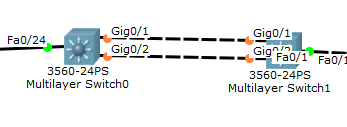
However, doing a
show etherchannel summary shows that the etherchannel is working correctly:
Switch#show etherchannel summary
Flags:  D - down        P - in port-channel
        I - stand-alone s - suspended
        H - Hot-standby (LACP only)
        R - Layer3      S - Layer2
        U - in use      f - failed to allocate aggregator
        u - unsuitable for bundling
        w - waiting to be aggregated
        d - default port


Number of channel-groups in use: 1
Number of aggregators:           1

Group  Port-channel  Protocol    Ports
------+-------------+-----------+----------------------------------------------

2      Po2(RU)           LACP   Gig0/1(P) Gig0/2(P)
Switch#
So I wouldn’t be too worried about how it is displayed there.
Remember that you have made the portchannel a Layer 3 interface, so the VLAN indication here doesn’t mean anything. If you can ping, you’re fine. I see the same in my configuration as well.
What is missing in your topology is what you stated above about routing on R1 and R2. You have to make sure that all routers can reach all networks. Your SW3 and SW4 routing are fine, but you need to add to both R1 and R2. I suggest you do the following:
- Configure the PC with a static IP address.
- Progressively ping each of the routers from the PC along the path like so:
ping 192.168.10.193 (SW4 VLAN 10 interface)
ping 192.168.100.17 (SW3 Portchannel interface)
ping 192.168.100.13 (R2 Fa0/1 interface)
ping 192.168.100.5 (R1 Se0/0/1 interface)
Wherever you find that the ping fails, you can troubleshoot connectivity and routing - Once you get end to end connectivity, configure the DHCP server on R1 and the helper address on VLAN 10 interface of SW4, and then configure the PC to function with DHCP
This is the procedure I followed, and I troubleshot all my errors. It took a while for the DHCP helper address to kick in, so the host didn’t get an IP address immediately. I had to disconnect and connect it again.
I could send you my topology, but I think it would be more useful for you to work this out on your own. If you still have trouble however, I’ll save it and send it to you.
I hope this has been helpful!
Laz