L2TPv3 (Layer 2 Tunnel Protocol Version 3)

Hello Sean

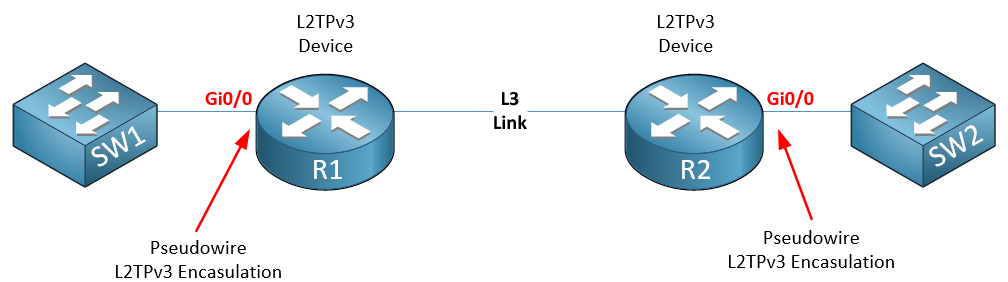
To achieve what you’re trying to do, you need something like this:


R1 and R2 are the devices that support L2TPv3. By configuring pseudowire on the Gi0/0 interfaces of R1 and R2, you are creating a Layer 2 tunnel between the two Gi0/0 interfaces on the routers, that is being tunneled through the Layer 3 underlay. The result is as if you are connecting two layer 2 ports of SW1 and SW2 directly.

The reason why you have to configure it on physical ports is that the pseudowire feature and the xconnect command can only be applied to physical Layer 3 interfaces. The mechanism of encapsulation actually takes place at the physical Gi0/0 interfaces of the routers.

You can configure the connecting ports of SW1 and SW2 as access ports or trunk ports. You can then span as many VLANs as you want across the Layer 3 infrastructure. They’ll function as if you have connected the switches directly to one another. Does that make sense?

I hope this has been helpful!

Laz

Hello Sean

Yes, BPDUs will also traverse the tunnel. Once again, using anTPv3 tunnel is just like connecting two switches using a Layer 2 link.

The connected switches will participate in STP, and will be affectθed by any loops that are detected. But keep in mind that unless the devices on either end of the L2TPv3 tunnel are connected by some other Layer 2 connection, you will never have a loop, and the L2TPv3 tunnel will never be blocked by STP. Only if you have two or more Layer 2 connections between the devices connected over that L2TPv3 link could you have such a scenario. Does that make sense?

I hope this has been helpful!

Laz

Hello everyone
I would like to use vrf with L2TPv3 configuration. Is it possible to configure L2TPv3 with vrf (on L2 interface and tunnel)

Hello Mateusz

Virtual Routing and Forwarding instances (VRFs) are Layer 3 constructs that allow multiple independent routing tables to coexist on the same router. Layer 3 interfaces can be assigned to a specific VRF, and all the networks reachable via those interfaces are included in the corresponding VRF’s routing table.

When you configure L2TPv3 on an interface using the xconnect command, you effectively transform that interface into a Layer 2 interface, which operates without Layer 3 routing. As a result, VRFs cannot be directly applied to L2TPv3-enabled interfaces, or to any Layer 2 interfaces in general.

However, you can still associate the subnet that is served through the L2TPv3 tunnel and the network segment it serves with a specific VRF. To achieve this, you assign the default gateway for that subnet to the desired VRF. While the lesson does not include a default gateway configuration, this approach would be the method to ensure VRF association for the subnet in question. Does that make sense?

I hope this has been helpful!

Laz

I have two ESR6300 routers running the latest MD release 17.12.05. The routers have two router ports and 4 switch ports. I have the two routers connected via the g0/0/1 router interfaces and have a pseudowire-class configured identical to the example in this lesson but instead of putting the xconnect on a physical interface I am doing it on an interface vlan 30 on both devices. All switchports are access ports in vlan 30. The l2tp tunnel is up but I am unable to ping across to the laptops on either side, even though the laptops have IP addresses configured in the same network. I unfortunately don’t have a copy of the configs at the moment, I can provide them later. Any ideas what might be preventing communication accross the l2tp tunnel? For clarification, there are no other configurations on the device besides the router ports connecting the two devices and the l2tp configuratons. IP CEF is enabled

Hello Curtis

Thanks for the detailed post. Since you say that you see that the tunnel is up, I assume you’ve used the show xconnect all, the show l2tp and the show l2tun tun commands and have confirmed that all is well.

Next you should check that the switchports on which the laptops are connected are on VLAN 30, that the SVI is configured WITHOUT an IP address, and that you can successfully ping from one router to the other on the routed interfaces, ensuring L3 connectivity.

If everything checks out, the only other thing I can think of is the MTU size, Because the L2TP adds overhead, your pings may be dropped if they exceed the MTU and the DF bit is set. But this is somewhat unlikely because default ping sizes are typically very small for Windows devices or any PC or laptop for that matter, and the DF is usually not set unless you exlicitly set it.

Everything seems to be configured correctly based on your descriptoin It would be helpful to take a look at the configs to see specifics, only then can we definitavely respond. If you get the configs, I’d look forward to taking a look.

The other thing you should keep in mind is that this type of setup using xconnect is becoming less common, and is expected to be deprecated soon. For IOS-XE devices (which includes the ESR6300) the use of a bridge domain interface (BDI) is the preferred method to create layer 2 tunnels. You can find out how to do it here:

In any case, I’d be interested to hear how you get along. Whether you resolve it with the xconnect command or using a BDI, I look forward to hearing from you.

I hope this has been helpful!

Laz

Thank you very much for the response! I am not sure what was happening before. I went in today and powered up the devices and just decided to try a ping again and it worked. I made absolutely no changes. I was also able to successfully replicate the configurations on a pair of ISR 4451X routers that have an embedded 48 port switch. Thank you guys for the great lesson and simple instructions. Next week I am going to test the BVI and BDI as I did not know about that method. I am also noticing that not all of our devices are going to be able to support the l2tpv3 due to licensing for the required package, which I was concerned about as I am going to need several stand-alone instances of layer 2 tunnels. Thanks again for everything and I will post an update once I test the BVI/BDI methods.

Hello Curtis

Ha, sometimes that happens. It’s some weird setting or glitch that just needs a reboot, and all is well. Great to hear that it did work out after all. I’d be interested to hear how your experiment with the BVI/BDI works out. Keep us posted!

It’s our pleasure to help out, keep networking, and the experience is always valuable!

I hope this has been helpful!

Laz

I have not tried the BVI/BVD yet as I don’t think it is designed for what I am doing. I will have two routers going across a point-2-point long-range wireless link and I will need to use IPSec to secure the data going across. I tested it today with my ip local interface set to my tunnel and it works great. Previously I mentioned that BVI/BVD might be better since I was concerned about licensing. However, I discovered that all of the devices will be using have the license, just some need to be activated. Additionally, after reading though the documentation about BVI/BVD, it seems to be more for a single router with a LAN on either side. I am I correct in my understanding?

Yes, everything has been very helpful, and I really appreciate that I am able to get this kind of support. It really makes paying for the subscription more valuable.

Hello Curtis

Thanks for the update. For your specific application of securing a single wireless link with IPSec, your implementation is just fine. Whether you use BVI/BVD or the method you describe, both are sufficient for what you need.

As far as your more general question, you are correct that a BVI can be used on a single router to bridge two local LAN interfaces, effectively turning that router into a switch for those two ports. For example, bridging GigabitEthernet0/1 and GigabitEthernet0/2.

However, that is only its most basic application. The feature is used within ISPs and service provider networks, as well as in extremely large enterprise networks. Its primary power is to bridge a physical interface (like your LAN port) to a logical interface (like a Pseudowire).

Think of a Bridge Domain as a virtual Layer 2 switch inside the router. You can connect different types of interfaces to this virtual switch:

  • Physical Ethernet ports (via a Service Instance)
  • Pseudowires (like L2TPv3 or MPLS VPLS)
  • Ether-over-GRE tunnels

When you do this, you create what is known as an “L2VPN” or a “Transparent LAN Service” (TLS). You are essentially “plugging” your local LAN into one port of this virtual switch, and “plugging” the long-haul L2TPv3 tunnel into another port. The router then simply switches frames between them.

So, to directly answer your question: No, the BVI/BDI model is not just for a single router. It is the foundational technology for building Layer 2 VPNs between two or more routers across a Layer 3 WAN, and is much more scalable.

So, both methods are valid for your point-to-point scenario, but they operate differently, and the BVI/BDI method is far more scalable and aligned with modern networking practices. It’s often called “Carrier Ethernet” or “E-LAN/E-LINE” services.

For your specific case however, it doesn’t sound like scalability is an issue, so either one is siutable for what you need.

I’m glad you interaction with the lessons and the forum has been beneficial for you! It’s beneficial for me as well, as lookin into these technologies helps me to learn as well!! I’m glad you feel you’re getting your money’s worth, that is very satisfying for us. Keep networking!

I hope this has been helpful!

Laz