Thanks, indeed it’s clear to me now.
1 Like
Hello, everyone!
I have three short questions when it comes to LDP. Why does LDP specifically prefer a loopback interface IP over a physical interface? This isn’t like BGP where we can form a remote adjacency, wouldn’t most LDP routers be directly connected?
When it comes to these LDP packets, why are apart from the prefixes and the labels the local router associated with them also included the IP addresses of the interfaces?
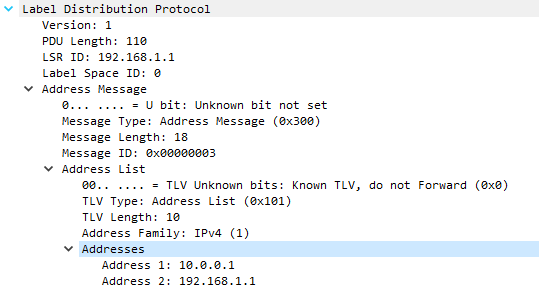
Where in the LDP packet does a PE router indicate that the P router should perform PHP? I didn’t find that anywhere.
That’s all, thank you 
David
Hello David
LDP prefers a loopback interface IP over a physical interface IP for stability reasons. In a typical network, physical interfaces can go down due to various reasons (cable issues, hardware failure, etc.), but a loopback interface is a virtual interface that is always up unless it is manually shut down. Since LDP sessions are tied to the router ID, using a loopback interface ensures that the LDP session remains stable even if a physical interface goes down. However, it is possible to change the source of LDP sessions if you have a specific requirement or reason for that.
You can explicitly configure the interface that LDP should use as its source for establishing sessions. On a Cisco IOS device, you’d use the following command in global configuration mode:
mpls ldp discovery transport-address GigabitEthernet0/0
The above commandwould make the Gi0/0 interface the source and destination for its the exchange of LDP messages with neighbors.
If I’m not mistaken, you’re asking why the IP addresses of the local router are included in the LDP message as shown in your wireshark capture. Well, the IP addresses of the interfaces are included in the LDP packets to identify the source of the LDP labels. This is important in MPLS networks where multiple LDP sessions may exist between routers. The receiving router needs to know which interface the LDP label came from to correctly forward traffic.
The PHP is not directly indicated in the LDP packets. PHP is a function performed by the P router just before the egress PE router in an MPLS network. The P router removes the MPLS label before forwarding the packet to the PE router. This is done to reduce the load on the PE router. The decision to perform PHP is typically based on the configuration of the P and PE routers and not indicated in the LDP packets.
I hope this has been helpful!
Laz
There is a local label and an outgoing label for example in R1 it says the local is 100 and the outgoing ot pop. since we configured R1 with label range 100-199 doesnt that means only R1 will add labels from range 100-199? then what does local label mean? i thought it meant if u received a packet with label 100 then pop it and send it but if R1 is the only router who will add the label 100. how can it receive a packet with label 100?
Hello Muayad.
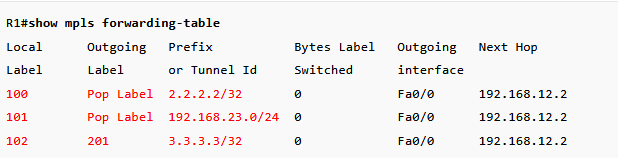
The local label field basically says “I, the local router R1, has generated this label for this network and sent it to my neighbors. If anyone sends me an MPLS-encapsulated packet that has a label of, say 100, I will know that this is for the 2.2.2.2/32 network.”
since we configured R1 with label range 100-199 doesnt that means only R1 will add labels from range 100-199?
That’s right, since only R1 was configured with such label values. And that’s exactly what’s happening. None of the other routers apart from R1 use 100-199.
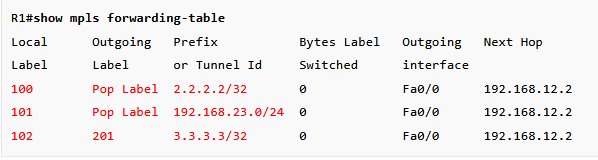
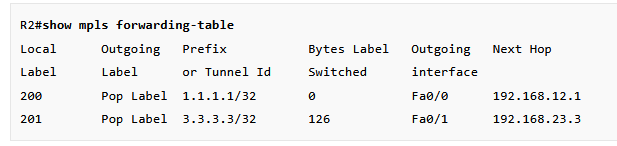
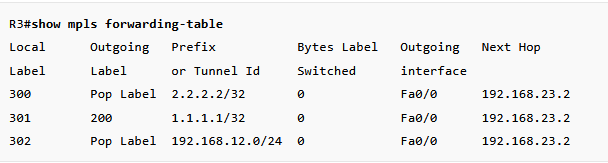
The local label field is the label that the router locally generated for the networks and advertised to its neighbors. As you can see, only R1 generates labels that range from 100 to 199. R2 and R3 don’t do that since they were configured with a different label range.
If we focus only on this entry:

This entry means the following
Local Label: 100 (this means that R1 generated a label of 100 for the 2.2.2.2/32 network). If any other routers send an MPLS packet to this router that has a label of 100, R1 will know that this is destined for the 2.2.2.2/32 network.
Outgoing label: Pop Label (this means that when this router receives a packet for the 2.2.2.2/32 network (so with the label of 100), it will remove the label before forwarding it to the next hop - 192.168.12.2). This is basically PHP (Penultimate Hop Popping) in action where a router pops the label before it arrives at the destination router.
If we take a look at Rene’s topology again:
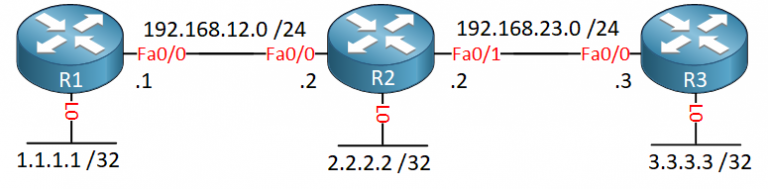
R1 is connected to 1.1.1.1/32. Since it’s connected to the destination network, it will tell R2 to pop the label if it wants to send something to 1.1.1.1/32.

R2 now knows that if it wants to send something to 1.1.1.1, it has to pop the label. In addition, R2 also generates a label for the network and tells R3 that if it wants to send something to 1.1.1.1/32, it should use a label of 200.

Now imagine that R3 wants to send a packet to 1.1.1.1/32. It checks the MPLS forwarding table and since R2 told it to use a label value of 200, it will send the packet labeled as 200.
R2 receives the packet, reads the label value (200), checks the forwarding table, and realizes that this is for the 1.1.1.1/32 network. Since R1 told R2 to pop the label if it wants to send something to 1.1.1.1/32, R2 will pop the label and send it unlabelled to R1.
Let me know if you have any further questions.
David
1 Like
how does ldp neighbor forms? is it a broadcast? do they have to be directly connected to be formed? and why do we always form it on the direct physical interfaces? why we never formed it using the loopbacks
Hello Muayad
These are all very good questions, and they’re ideal to help us understand how LDP operates and forms neighbors.
LDP neighbor formation is a two-phase process combining discovery and session establishment. In the first phase, the discovery phase, when you enable LDP on an interface using mpls ip the router begins sending LDP Hello messages using UDP port 646 to the predefined multicast address 224.0.0.2. This is a multicast communication that is limited to the specific network segment. It doesn’t get routed beyond the local L2 segment.
These “Link Hellos” are sent periodically (every 5 seconds by default) and contain:
- The router’s LDP Identifier (LDP Router-ID)
- The transport address (typically a loopback IP) to be used for the TCP session
When two LDP-enabled routers on the same link receive each other’s Hellos, they discover each other as potential LDP peers, and they move on to the session establishment phase.
In this second phase, the routers establish a TCP session on port 646 for actual label exchange. The router with the higher LDP identifier (transport address) takes the active role and initiates the TCP connection. The router with the lower LDP identifier takes the passive role and listens.
Now the TCP session is established between the transport addresses which are typically configured on the loopback IPs, not the physical interface IPs. LDP initialization messages are exchanged to negotiate session parameters.
Once operational, routers exchange label bindings, keepalives (every 60 seconds by default on Cisco IOS), and other LDP protocol messages.
Now, for standard LDP, neighbors must be directly connected. This is because the multicast group (224.0.0.2) is not routable and only works on a single Layer 2 segment. However, you can create LDP neighbors between non-directly connected neighbors using targeted LDP.
Targeted LDP sends unicast Hello messages to a specific remote IP address (typically a loopback), allowing LDP sessions across multiple hops. This is used for various special case scenarios, one of which is OSPF Remote Loop-Free Alternate (LFA) Fast Reroute (FRR).
So the initial discovery takes place over the physical interfaces using the local multicast group, while the final session takes place between the transport addresses of the routers, which are typically the loopbacks.
I hope this has been helpful!
Laz
1 Like
Is having to reload the router when changing the label range, subjective to the Cisco device model?
Hello Leo
The requirement to reload the router when changing the MPLS label range varies by vendor, platform, and operating system. It depends upon the system and platform architecture.
For example, classic IOS and IOS-XE typically require a reload when this command is issued. This is because the label space and LFIB memory structures are initialized at boot time. The platform cannot dynamically resize or reallocate this memory while MPLS processes are running. This is something that you typically configure when you deploy a device, and is not changed throughout the lifetime of the device deployment.
Some platforms will display a warning similar to the following when you enter this command:
% Changes to the MPLS label range will not take effect until the router is reloaded.
The following Cisco command reference for this command on the IOS-XR platform states that a reload is necessary after applying the command.
Note, however, that some newer platforms and software versions may support more dynamic changes, but this varies by hardware family and software train. Unless your platform documentation specifically states otherwise, expect a reload requirement.
I hope this has been helpful!
Laz
1 Like
Ok make sense. Thanks Laz
1 Like