Yes, VXLAN can be deployed in both ISR and Nexus devices in the same spine-leaf architecture. VXLAN is an open standard developed by the IETF so interoperability between different platforms and even different vendors is possible.
VXLANs are used in scenarios where network designers need to overcome the scalability and other limitations of VLANs. The most common usage is within data centers, however, it’s not limited to just data centers. It can also be used in cloud computing environments or any other scenario where you need to create a Layer 2 network over a Layer 3 network.
The most common use cases for VXLAN are:
Data Center Network Overlays: It allows for the creation of large-scale virtual networks over a physical infrastructure, providing isolation between different tenants in a multi-tenant data center.
Cloud Computing Environments: It provides network segmentation and isolation at a large scale for multi-tenant cloud environments.
Network Virtualization: It enables the creation of virtual networks that are decoupled and independent from the underlying network hardware.
In the Cisco ACI architecture, the BG concept is equivalent to a traditional VLAN in a networking context. A Bridge Group is essentially a Layer 2 domain where you can group together a set of related endpoints.
BDIs and BVIs are both concepts related to Bridge Groups.
A BDI is a logical interface that allows bidirectional flow of traffic between a routed interface and a bridge group within the same network. It’s a routed interface that represents a set of interfaces that are bridged.
A BVI, on the other hand, is used in bridging environments where you want to enable IP connectivity to the bridge group. The BVI provides a means to route traffic between different VLANs.
In terms of their relationship, a Bridge Group can contain one or more BDIs or BVIs. The BDI or BVI allows the Bridge Group to communicate with other Bridge Groups or with routed interfaces. In essence, the BDI or BVI provides the “gateway” for the Bridge Group’s Layer 2 traffic to be routed.
Hello Rene,
I have a question about VXLAN. If I wanted to extend this over a geographic distance would I just take the spine switches and connect them across a tunnel. For instance if switch 1 is in one part of the city and switch 2 is on the other side of town. Is this the technology I would use. Can you give me some idea as to how this is done. Thanks
Yes, you’re on the right track. VXLAN is indeed a technology that can be used to extend Layer 2 networks across geographically dispersed locations.
To extend your VXLAN over a geographic distance, you would still need some underlying network to interconnect your locations. This is the “underlay” network. This could be a dedicated line, MPLS, or even a VPN over the internet. What you use will affect the overall functionality of your network.
The spine switches in your VXLAN fabric would then form a tunnel over this underlay network, encapsulating the Layer 2 frames in a VXLAN packet with an IP header, creating the “overlay” network.
The switches at each site would need to be configured with the same VNI to ensure they are part of the same Layer 2 domain. They would also need to be configured with the IP address of the other switch’s VTEP to establish the tunnel.
Keep in mind, that the performance of your VXLAN will be dependent on the performance of your underlay network. So you’ll want to ensure you have enough bandwidth and low latency between the two sites.
Hi Laz,
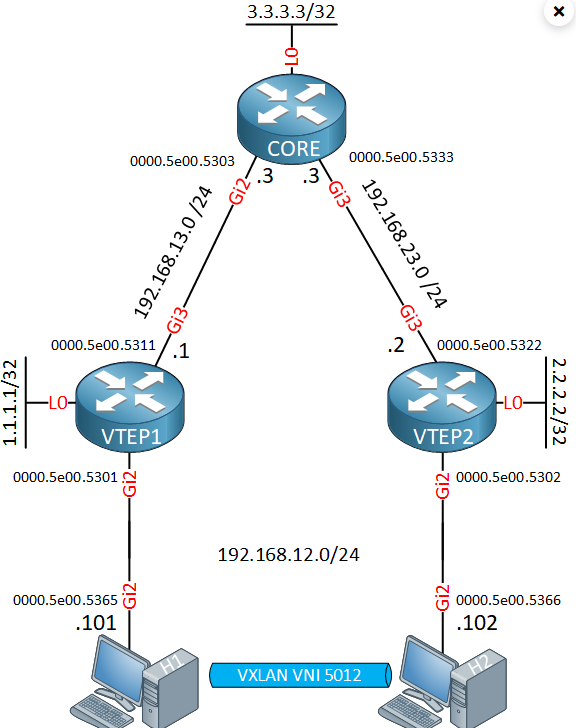
For the same topology. If I change the H2 IP address to different subnet ex: 192.168.13.2/24 keeping everything else same. Can we ping from H1 to H2 ? Because, Overlay routing happening with overlay IPs and when packet gets decapsulated at VTEP2 switch is routing through MAC address. So, does the underlay host IP matter as long as the vlan to VNI mapping is same ? Please let me know.
The short answer is no, it won’t work. The reason is because the whole purpose of this setup here creates an extension of the Layer 2 domain of the hosts, i.e., the H1 and H2 devices. So any communication from H1 to H2 must take place on the same subnet. The reason is because there is no provisioning for routing anywhere. There is no device acting as the default gateway.
If you did assign 192.168.13.2/24 to H2, H1 will send the packet to its default gateway. This all operates on the overlay. There is no configured default gateway, and no configured routing on the VXLAN fabric.
To make this work, one solution is to use EVPN L3 VNIs, as described in this lesson: